
VC-02
AI-Thinker VC-02 Kit Offline Voice Recognition Board User Manual
Model: VC-02
1. Introduction
The VC-02 Kit is a development board designed for the AI-Thinker VC-02 module, providing an offline voice recognition solution. This kit integrates essential components for easy debugging and development, including a CH340C serial port to USB chip for communication and firmware upgrades. It features wake-up and status indicator lights for clear operational feedback. The core of the module is the Unisound US516P6 voice chip, which offers advanced speech recognition algorithms for ultra-low-cost offline voice control applications.
This manual provides detailed instructions for setting up, operating, and maintaining your VC-02 Kit, along with troubleshooting tips and technical specifications.
2. Key Features
- Offline Voice Recognition: Enables voice-controlled applications without an internet connection.
- Compact Design: Small form factor suitable for integration into various projects.
- Easy Setup: User-friendly interface and comprehensive documentation for straightforward configuration.
- Wide Compatibility: Compatible with a range of microcontrollers and development boards.
- Customizable Voice Commands: Supports customization of up to 150 local voice commands.
- Integrated CH340C: Provides serial port to USB functionality for debugging and upgrades.
- US516P6 Chip: Features a 32-bit RISC architecture core with DSP instruction set and FPU for efficient speech processing.
- Rich Peripheral Interfaces: Includes UART, I2C, DAC, PWM, and GPIO.
- Built-in Memory: 242KB high-speed SRAM and 2MB FLASH.
3. Kit Components
The AI-Thinker VC-02 Kit typically includes the following components:
- VC-02 Development Board
- Microphone Module
- Speaker Module
- Connecting Cables

This image displays the complete VC-02 kit, featuring the central processing board, a small external microphone for voice input, and a compact speaker for audio output. The components are interconnected with red and black wires, indicating power and signal lines.

A close-up view of the VC-02 development board highlights the central AI-Thinker VC-02 module. The module is labeled with "Support: Offline Voice Command Entry: 150" and "Flash: 2MB", indicating its core capabilities. Surrounding the module are various pins and connectors, including a micro-USB port for power and data, and headers for connecting peripherals like the microphone and speaker.
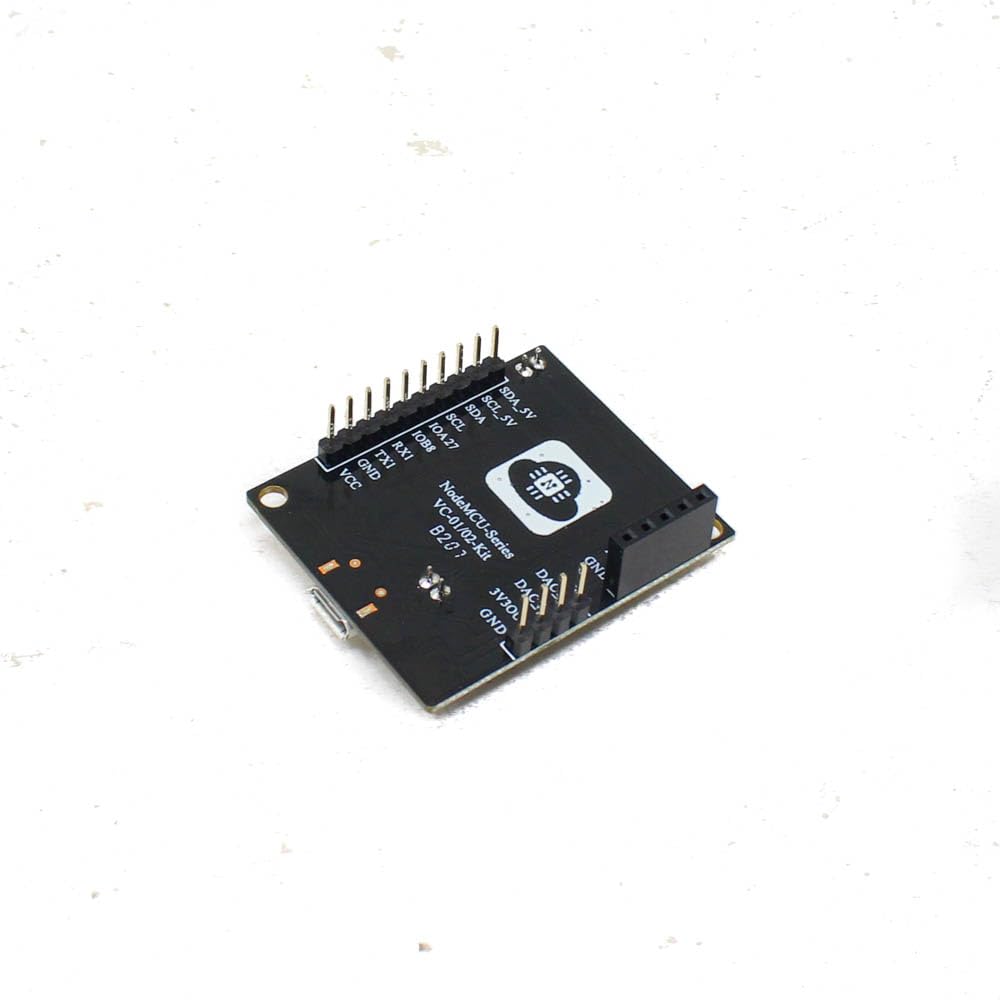
This image shows the underside of the VC-02 development board, revealing the pinout labels for various interfaces such as SDA, SCL, TX1, RX1, GND, VCC, DAC, and PWM. These labels are crucial for connecting the board to other microcontrollers or external components, facilitating integration into larger projects.
4. Setup Instructions
Follow these steps to set up your AI-Thinker VC-02 Kit:
- Connect Microphone and Speaker: Connect the provided microphone module to the designated MIC+ and MIC- pins on the VC-02 board. Similarly, connect the speaker module to the SPK+ and SPK- pins. Ensure correct polarity.
- Power Connection: Connect the VC-02 development board to your computer using a micro-USB cable. The board integrates a CH340C serial port chip, which will provide power and enable communication.
- Driver Installation: If your operating system does not automatically recognize the CH340C chip, you may need to install the appropriate USB-to-serial drivers. These drivers are typically available from the CH340C manufacturer's website or common microcontroller development resources.
- Development Environment Setup: For custom voice command programming or firmware updates, set up your preferred development environment (e.g., Arduino IDE with appropriate board support, or a dedicated SDK from AI-Thinker/Unisound).
- Initial Firmware Upload (if necessary): If the board does not come pre-loaded with your desired voice commands, use the development environment to upload the necessary firmware. The integrated CH340C facilitates this process.
- Observe Status Indicators: After power-up, observe the wake-up light and cold/cooling lamp indicators on the board. These lights provide visual feedback on the board's status and operational state.
5. Operation Guide
The VC-02 Kit is designed for offline voice recognition. Here’s a general guide to its operation:
- Power On: Ensure the board is powered via the USB connection. The status indicator lights should illuminate.
- Wake-up Phrase: The module typically requires a specific wake-up phrase to activate its listening mode. Refer to your firmware documentation for the exact phrase. Once the wake-up phrase is detected, the board's status light may change, indicating it is ready to receive commands.
- Issue Voice Commands: After the wake-up phrase, speak your pre-programmed voice commands clearly. The VC-02 supports up to 150 local instructions.
- Observe Feedback: The board's status lights and any connected output devices (e.g., relays, LEDs) will respond according to the recognized command. The speaker may also provide audio feedback if programmed.
- Customizing Commands: To change or add voice commands, you will need to use the provided development tools and re-upload the firmware to the VC-02 module.
For detailed information on specific voice commands and their functionalities, consult the firmware documentation or the AI-Thinker official resources.
6. Maintenance
To ensure the longevity and optimal performance of your VC-02 Kit, follow these maintenance guidelines:
- Handle with Care: The board contains sensitive electronic components. Avoid dropping it or subjecting it to physical shock.
- Keep Dry: Protect the board from moisture and liquids, as these can cause short circuits and damage.
- Clean Gently: If cleaning is necessary, use a soft, dry cloth. Avoid using harsh chemicals or abrasive materials.
- Static Electricity: Take precautions against electrostatic discharge (ESD) when handling the board, especially in dry environments.
- Storage: Store the kit in a cool, dry place, away from direct sunlight and extreme temperatures.
7. Troubleshooting
If you encounter issues with your VC-02 Kit, consider the following troubleshooting steps:
- No Power/Indicator Lights Off:
- Ensure the USB cable is securely connected to both the board and the power source (computer/USB adapter).
- Try a different USB cable or USB port.
- Computer Not Recognizing Board (CH340C):
- Verify that the CH340C drivers are correctly installed on your computer.
- Check Device Manager (Windows) or
ls /dev/tty*(Linux/macOS) for the serial port.
- Voice Commands Not Recognized:
- Ensure the microphone is correctly connected and positioned.
- Speak clearly and at a normal volume.
- Verify that the correct wake-up phrase is being used.
- Confirm that the desired voice commands are programmed into the firmware.
- Check for background noise that might interfere with recognition.
- No Audio Output from Speaker:
- Check the speaker connections for correct polarity and secure fit.
- Ensure the firmware is configured to provide audio feedback.
- Firmware Upload Issues:
- Confirm that the correct board and port are selected in your development environment.
- Ensure no other applications are using the serial port.
- Check for any error messages from the development environment.
8. Technical Specifications
| Model Name | VC-02 |
| Processor Core | 32-bit RISC architecture |
| Processor Speed | 240 MHz |
| SRAM | 242 KB |
| FLASH Memory | 2 MB |
| Operating System | RTOS (Real-Time Operating System) |
| Offline Commands | Supports up to 150 local instructions |
| Interfaces | UART (full-duplex, up to 3Mbps), I2C, DAC, PWM, GPIO, USB |
| Compatible Devices | Microcontrollers, Development Boards, Smart Home Devices, Household Appliances, Toys, Lamps |
| Product Dimensions | 3 x 2 x 10000.01 cm |
| Item Weight | 100 g |
Note: The product dimensions provided in the source data (3 x 2 x 10000.01 cm) may contain a typographical error for the height. Please refer to the manufacturer's official documentation for precise measurements.
9. Warranty Information
This product typically comes with a 1 Month Warranty from the date of purchase. Please retain your proof of purchase for any warranty claims. The warranty covers manufacturing defects but generally excludes damage caused by misuse, accidents, unauthorized modifications, or improper installation.
For specific warranty terms and conditions, please refer to the documentation provided by your retailer or contact the manufacturer.
10. Customer Support
For technical assistance, further documentation, or inquiries regarding your AI-Thinker VC-02 Kit, please contact your point of purchase or the manufacturer, Shenzhen Anxinke Technology Co., Ltd. You may also find additional resources and community support forums online for AI-Thinker products.
Manufacturer: Shenzhen Anxinke Technology Co., Ltd
Related documentsVC-02


Ask a question about this manual
Ask about setup, troubleshooting, compatibility, parts, safety, or missing instructions. Manuals+ will review the question and use this page’s manual context to help answer it.