
EMOS H4064
EMOS GoSmart Outdoor Surveillance Camera
Model: H4064
Brand: EMOS
Product Overview
The EMOS GoSmart Outdoor Surveillance Camera with WiFi and App provides an advanced solution for monitoring your outdoor area. This device combines high-resolution video surveillance with integrated lighting, offering comprehensive security features for your property.

Image: The EMOS GoSmart Outdoor Surveillance Camera H4064, shown alongside a smartphone displaying its live feed and control interface.
Key features include a 3 MP high-resolution camera, an integrated LED light adjustable between 200 and 1200 lumens, and a rotating camera function for extended coverage. It supports night vision, motion detection, two-way audio communication, and can be controlled via the EMOS GoSmart app, compatible with Google Assistant and Alexa.
Setup and Installation
Package Contents
Before beginning installation, please verify that all components are present in the package:
- EMOS GoSmart Outdoor Camera with LED Light
- Installation material for wall mounting
- User Manual (this document)
Physical Installation
The camera is designed for wall mounting. Choose a suitable outdoor location that provides the desired surveillance coverage and has access to a wired power source. Ensure the mounting surface is stable and can support the camera's weight.
- Mark the drilling points on the wall using the mounting bracket as a template.
- Drill holes at the marked points.
- Insert the provided wall plugs into the drilled holes.
- Secure the mounting bracket to the wall using the screws.
- Attach the camera unit to the mounted bracket.
Power Connection
Connect the camera to a 12-volt wired power supply. Ensure the connection is secure and protected from outdoor elements, as the camera is waterproof (IP65 rated).
App Installation and Wi-Fi Setup
To control and monitor your camera, download the EMOS GoSmart App on your smartphone or tablet. The app is available for both Android and iOS devices.
- Search for "EMOS GoSmart" in the Google Play Store (for Android) or Apple App Store (for iOS).
- Download and install the app.
- Open the app and follow the on-screen instructions to create an account or log in.
- Add your new camera device by selecting the appropriate model and following the pairing process. The camera connects via 2.4 GHz Wi-Fi.

Image: A user interacting with the EMOS GoSmart application on a mobile phone, demonstrating remote monitoring capabilities.
Operating the Camera
Camera Functions
The EMOS GoSmart camera offers a range of functions accessible through the mobile application:
- High-Resolution Video: Captures video at 3 Megapixel resolution with a 130° wide-angle view.
- Rotatable Lens: The camera lens can be rotated 120° horizontally via the app to adjust the viewing area.
- Night Vision: Provides clear surveillance up to 10 meters in low-light conditions.
- Integrated LED Light: The powerful LED light can be adjusted between 200 and 1200 lumens directly from the app, providing illumination for your monitored area.
- Motion Detection & Person Recognition: The camera detects movement and can specifically identify human figures, reducing false alarms.
- Two-Way Communication: Use the built-in microphone and speaker for real-time two-way audio communication.
- Siren: Activate a 120 dB siren remotely via the app to deter intruders.
- Adjustable Surveillance Areas: Define specific zones within the camera's view for motion detection, ensuring you only receive alerts for relevant activities.

Image: An illustration highlighting the key features of the EMOS GoSmart camera, including motion detection, two-way audio, night vision, and adjustable LED light.

Image: This graphic details advanced functionalities such as defining adjustable surveillance zones, the integrated 120 dB siren, person detection, 2.4 GHz Wi-Fi operation, and smart scenario integration.

Image: Visual representation of the EMOS GoSmart camera's adjustable light intensity, demonstrating illumination levels at 200, 600, 1000, and 1200 lumens.
Recording and Storage
The camera supports video recording to a local SD card (not included) or to cloud storage. Your data is stored securely on AWS-Cloud servers located in Germany.
Smart Home Integration
The EMOS GoSmart camera is compatible with popular smart home platforms, including Amazon Alexa and Google Assistant. It also supports Tuya and Smart Life ecosystems, allowing for seamless integration into your existing smart home setup.
Maintenance
To ensure optimal performance and longevity of your EMOS GoSmart camera, regular maintenance is recommended:
- Cleaning: Periodically wipe the camera lens and housing with a soft, damp cloth to remove dust and dirt. Avoid using harsh chemicals or abrasive materials.
- Firmware Updates: Keep the camera's firmware updated through the EMOS GoSmart App to benefit from the latest features and security enhancements.
- Power Supply: Ensure the power connection remains secure and free from damage.
Troubleshooting
If you encounter issues with your EMOS GoSmart camera, refer to the following common troubleshooting steps:
| Problem | Possible Cause | Solution |
|---|---|---|
| Camera not connecting to Wi-Fi | Incorrect Wi-Fi password, 5 GHz network, weak signal. | Ensure correct 2.4 GHz Wi-Fi password. Move camera closer to router or use a Wi-Fi extender. |
| No image or black screen in app | Power issue, app glitch, network problem. | Check power connection. Restart the app. Verify internet connectivity. |
| Motion detection too sensitive/not sensitive enough | Sensitivity settings, detection zone configuration. | Adjust motion detection sensitivity and define specific surveillance zones within the app. |
| Two-way audio not working | Microphone/speaker blocked, app permissions. | Ensure nothing is obstructing the microphone or speaker. Check app permissions for audio access. |
For further assistance, please refer to the support section of the EMOS GoSmart App or visit the EMOS official website.
Specifications
| Feature | Detail |
|---|---|
| Model Number | H4064 |
| Usage Environment | Outdoor |
| Compatible Devices | iPhone, Smartphone |
| Power Source | Wired (12 Volts) |
| Connectivity Protocol | Wi-Fi (2.4 GHz) |
| Controller Type | Google Assistant, SmartThings, Tuya, Android, Amazon Alexa |
| Mounting Type | Wall Mount |
| Video Resolution | 1296p (3 MP Effective Still Resolution) |
| Color | White |
| Included Components | Camera, Installation Accessories |
| Viewing Angle | 130 Degrees |
| Night Vision Range | 10 Meters |
| Material | Metal |
| Water Resistance | Waterproof (IP65) |
| Item Dimensions (L x W x H) | 7.4 x 13.1 x 26 cm |
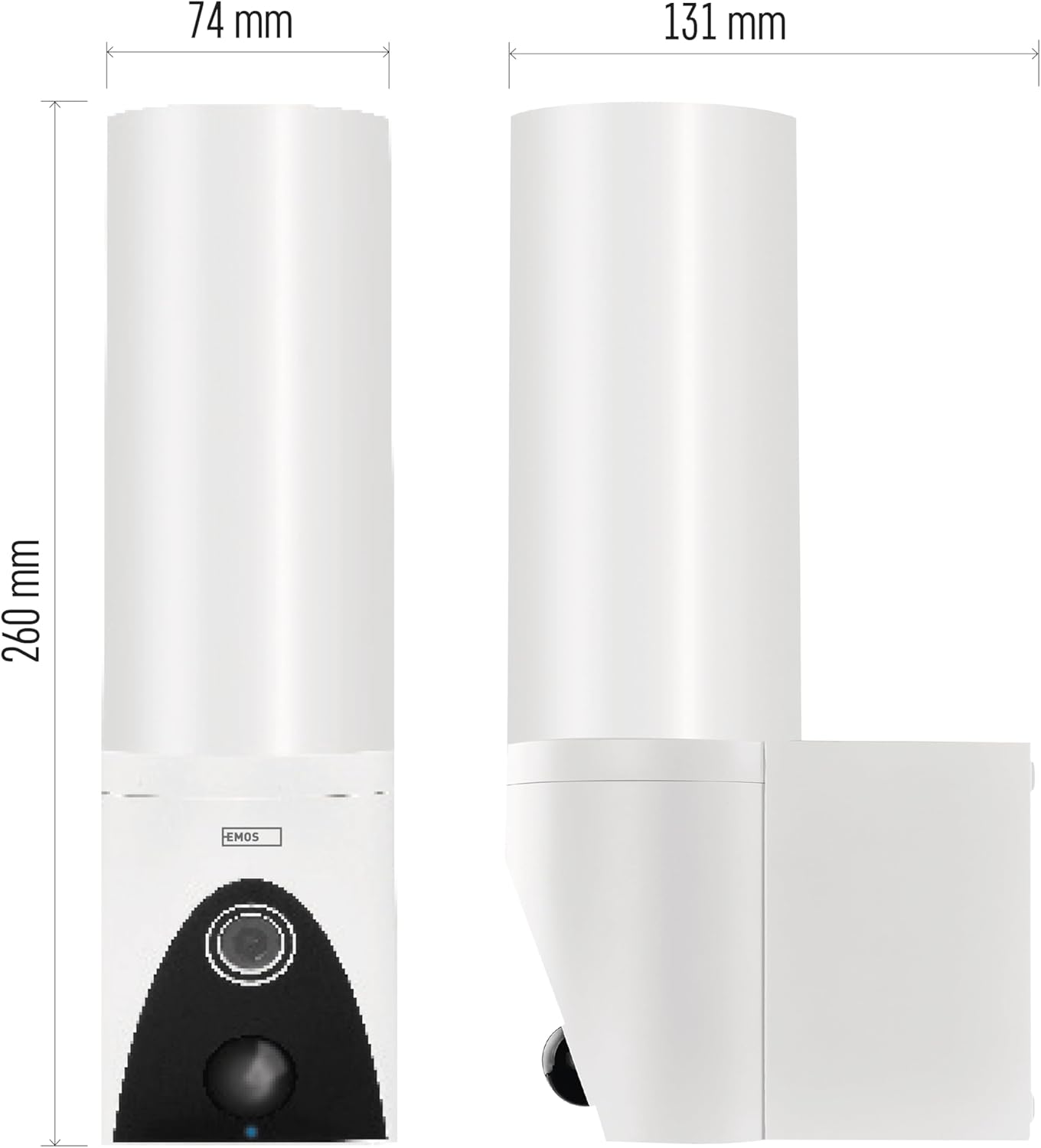
Image: Technical drawing illustrating the dimensions of the EMOS GoSmart Outdoor Surveillance Camera, with measurements for height, width, and depth.
Warranty and Support
EMOS products are designed for reliability and performance. For any questions, technical support, or warranty claims, please contact EMOS customer service or visit the official EMOS website for detailed support information.
Software updates are guaranteed, though the specific end date is not specified. It is recommended to regularly check the EMOS GoSmart App for available updates to ensure your device operates with the latest features and security patches.
For information regarding recycling of lamps or disposal of broken/damaged lamps, please refer to local regulations and guidelines.
Related documentsH4064


Ask a question about this manual
Ask about setup, troubleshooting, compatibility, parts, safety, or missing instructions. Manuals+ will review the question and use this page’s manual context to help answer it.