
Important Safety Information
Please read all instructions carefully before assembly and use. Retain this manual for future reference.
- Always follow the assembly instructions carefully to avoid injury.
- This chair has a maximum weight capacity of 250 pounds. Exceeding this limit may cause the chair to break or tip over, leading to injury.
- Ensure all screws and bolts are securely tightened before use. Periodically check and re-tighten as necessary.
- Do not stand on the chair.
- Use the chair on a level surface.
- Keep children away from the chair during assembly. Small parts may pose a choking hazard.
Product Overview
The GlasFlength Ergonomic Office Chair is designed to provide comfort and support for extended periods of sitting. It features a mesh high back, adjustable headrest, flip-up arms, and smooth-rolling casters for enhanced mobility.

Image: The GlasFlength Ergonomic Office Chair, black with mesh back and headrest, positioned in a modern home office environment next to a white desk.
Key Features:
- Ergonomic Design: Provides comprehensive back support for prolonged comfort.
- Adjustable Headrest: Customize height and angle for personalized neck support.
- Flip-Up Arms: Offers versatility, allowing the chair to be pushed closer to desks or used without armrests.
- Breathable Mesh Back: Promotes air circulation to keep you cool.
- High-Density Foam Seat: Ensures plush seating comfort and maintains shape over time.
- 360° Swivel & Rolling Casters: Allows for easy movement and flexibility in your workspace.

Image: A close-up view of the chair's backrest highlighting the ergonomic lumbar support area, shown in blue, with a storage basket feature behind the mesh.
The chair incorporates ergonomic lumbar support designed to conform to the natural curve of your spine, enhancing comfort and promoting good posture. The mesh back also features a convenient storage basket.

Image: A detailed view of the seat cushion, illustrating its construction with high-density foam for durability and a breathable mesh fabric for comfort and air circulation.
The seat is constructed with high-density foam that maintains its shape over time, covered with a cooling, breathable mesh fabric to ensure comfort during prolonged use.
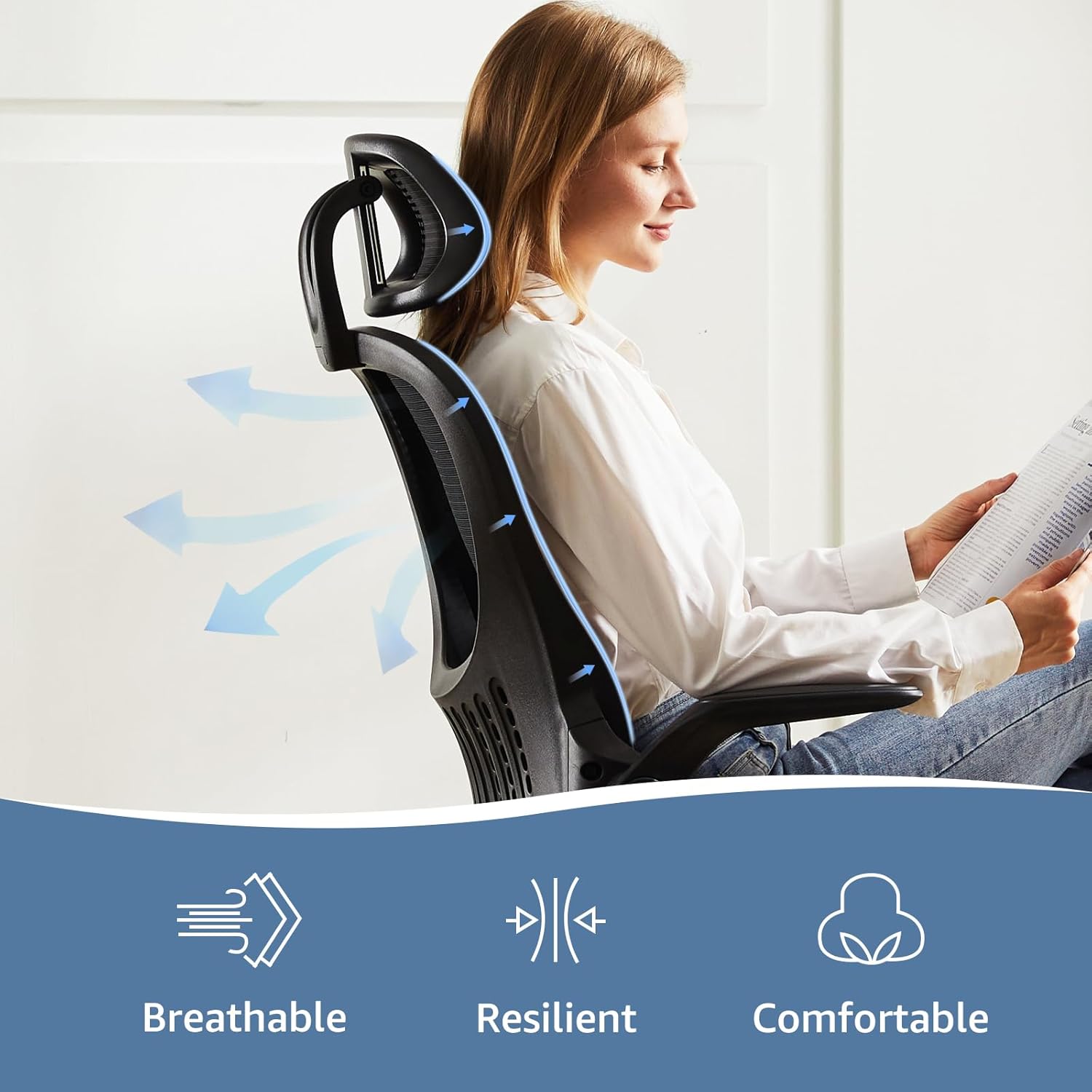
Image: A side profile of the office chair, emphasizing the breathable and resilient mesh backrest, designed to provide comfort and support while allowing airflow.
The mesh backrest is designed to be breathable, resilient, and comfortable, adapting to your body while allowing air to circulate.
Parts List
Before assembly, please ensure all components are present and undamaged. Refer to the included installation manual for a detailed visual parts list.
- Chair Backrest with Mesh and Lumbar Support
- Seat Cushion
- Headrest
- Armrests (Left and Right, Flip-Up)
- Gas Lift Cylinder
- Base (5-star)
- Casters (5 pieces)
- Mechanism Plate (under seat)
- Hardware Pack (screws, washers, Allen wrench)
Setup and Assembly
Assembly of the GlasFlength Ergonomic Office Chair is designed to be straightforward. An installation manual with detailed instructions and necessary tools is included with your purchase.
- Attach Casters to Base: Insert each of the five casters into the holes at the end of each leg of the 5-star base until they click securely into place.
- Insert Gas Lift: Place the gas lift cylinder into the center hole of the assembled 5-star base.
- Attach Mechanism Plate to Seat: Align the mechanism plate with the pre-drilled holes on the underside of the seat cushion. Secure it using the provided screws and Allen wrench. Ensure the front of the mechanism faces the front of the seat.
- Attach Armrests to Seat: Secure the left and right armrests to the sides of the seat cushion using the designated screws.
- Attach Backrest to Seat: Connect the backrest to the mechanism plate or directly to the seat/armrest assembly, depending on the design. Secure with screws.
- Attach Headrest: Slide the headrest into the designated slots at the top of the backrest.
- Connect Seat to Gas Lift: Carefully place the assembled seat onto the gas lift cylinder, ensuring it is centered and fully seated.
- Final Check: Verify that all screws are tightened and the chair is stable before use.
For visual guidance, refer to the detailed diagrams in your included installation manual.
Operating Instructions
Your GlasFlength Ergonomic Office Chair offers several adjustment options to customize your seating experience.

Image: A diagram illustrating the three primary adjustment points of the chair: (1) Tension Control, (2) Seat Height, and (3) Rocking Mode. It also shows the recline angles from 107° to 144° and the seat tilt from 0° to 37°.
1. Seat Height Adjustment:
- Locate the lever on the right side, beneath the seat (labeled as '2' in the diagram).
- To raise the seat: Lift the lever while taking your weight off the seat. The seat will rise automatically.
- To lower the seat: Lift the lever while remaining seated. The seat will lower.
- Release the lever to lock the seat at the desired height.
2. Rocking Mode and Tilt Lock:
- The same lever used for seat height (labeled as '3' in the diagram) also controls the rocking function.
- To enable rocking: Pull the lever outwards. The chair back will now recline and rock.
- To lock the chair in an upright position: Push the lever inwards.
- The chair offers a recline range from approximately 107° to 144°.
3. Tilt Tension Control:
- The round knob located under the front-center of the seat (labeled as '1' in the diagram) adjusts the tension of the rocking mechanism.
- Turn clockwise to increase tension, making it harder to recline.
- Turn counter-clockwise to decrease tension, making it easier to recline.
4. Adjustable Headrest:
- The headrest can be adjusted vertically (up and down) and for angle.
- To adjust height: Gently pull or push the headrest to the desired position. It will click into place.
- To adjust angle: Tilt the headrest forward or backward to find your preferred angle.
5. Flip-Up Armrests:
- The armrests can be flipped up to allow the chair to slide further under a desk or for users who prefer to sit without armrests.
- To flip up: Gently lift the armrests upwards until they lock into a vertical position.
- To lower: Pull the armrests slightly upwards again and then push them down.
Maintenance
Regular maintenance will help prolong the life and appearance of your office chair.
- Cleaning:
- For mesh and fabric parts: Use a soft cloth dampened with mild soap and water. Blot gently and allow to air dry. Do not use harsh chemicals or abrasive cleaners.
- For plastic and metal parts: Wipe with a soft, damp cloth.
- Hardware Check: Periodically (every 3-6 months) check all screws and bolts to ensure they are tight. Re-tighten as needed to maintain stability and safety.
- Caster Care: Keep casters free of hair, dust, and debris to ensure smooth rolling. You can use a small brush or vacuum cleaner to clean them.
- Avoid Direct Sunlight: Prolonged exposure to direct sunlight can fade fabric and mesh materials.
Troubleshooting
If you encounter any issues with your chair, refer to the following common problems and solutions.
| Problem | Possible Cause | Solution |
|---|---|---|
| Chair is wobbly or unstable. | Loose screws or bolts. | Check and tighten all assembly screws and bolts, especially those connecting the backrest, armrests, and mechanism plate to the seat. |
| Seat height adjustment not working. | Gas lift cylinder malfunction or lever not engaged. | Ensure the lever is fully engaged. If the issue persists, the gas lift cylinder may need replacement. Contact customer support. |
| Chair does not rock or rocks too easily/stiffly. | Tilt tension knob incorrectly adjusted or rocking mechanism locked. | Adjust the tilt tension knob (turn clockwise to stiffen, counter-clockwise to loosen). Ensure the rocking lever is pulled outwards to enable rocking. |
| Casters not rolling smoothly. | Debris (hair, dust) caught in casters. | Turn the chair over and carefully remove any debris from the caster wheels. |
| Squeaking noises. | Loose connections or friction between parts. | Tighten all screws. Apply a small amount of silicone lubricant to moving parts or connection points if necessary, avoiding contact with fabric. |
Specifications

Image: A technical diagram showing the various dimensions of the GlasFlength Ergonomic Office Chair, including height, width, depth, seat depth, and headrest dimensions. It also indicates a weight capacity of 250 lbs.
| Feature | Detail |
|---|---|
| Brand | GlasFlength |
| Model Name | Ergonomic Office Chair w/ Flip-up Arms |
| Item Model Number | DDP-HX-C-3619-1B-BK |
| Color | Black |
| Product Dimensions | 20"D x 20"W x 46"H (Overall) |
| Weight Capacity | 250 pounds |
| Item Weight | 28 pounds |
| Back Style | Mesh Back |
| Arm Style | Flip-Up |
| Special Features | Adjustable Height, Arm Rest, Ergonomic, Rolling, Adjustable Headrest |
| Fill Material | Foam |
| Assembly Required | Yes |
| UPC | 757106493525 |
Warranty and Support
GlasFlength is committed to providing high-quality products. For any warranty inquiries, technical support, or assistance with parts, please contact GlasFlength customer service.
Please have your model number (DDP-HX-C-3619-1B-BK) and proof of purchase ready when contacting support.
You can visit the official GlasFlength store for more information: GlasFlength Store