
radtel RT-470X Plus
Radtel RT-470X Plus Tri Band Ham Radio User Manual
Model: RT-470X Plus | Brand: Radtel
Introduction
The Radtel RT-470X Plus is a versatile tri-band ham radio designed for extensive frequency coverage and flexible programming. It supports 8 receiving bands, including FM/AM, and 3 transmitting bands. Key features include mobile app Bluetooth programming, Windows CPS compatibility, keyboard programming, wireless frequency copy, dual PTT buttons, and NOAA weather alerts. This manual provides comprehensive instructions for setting up, operating, and maintaining your RT-470X Plus radio.
Package Contents
Upon opening your Radtel RT-470X Plus package, please verify that all the following items are included:
- 1x Radtel RT-470X Plus Radio
- 1x 2800mAh Type-C Battery
- 1x 7.87-inch Dual Band 145/435 Antenna
- 1x 39-inch USB-C Charger Cable
- 1x Belt Clip with Metal Piece
- 1x English User Manual
- 1x AC Power Adapter with USB Port (FCC ID: 2AZSA-RT470X)
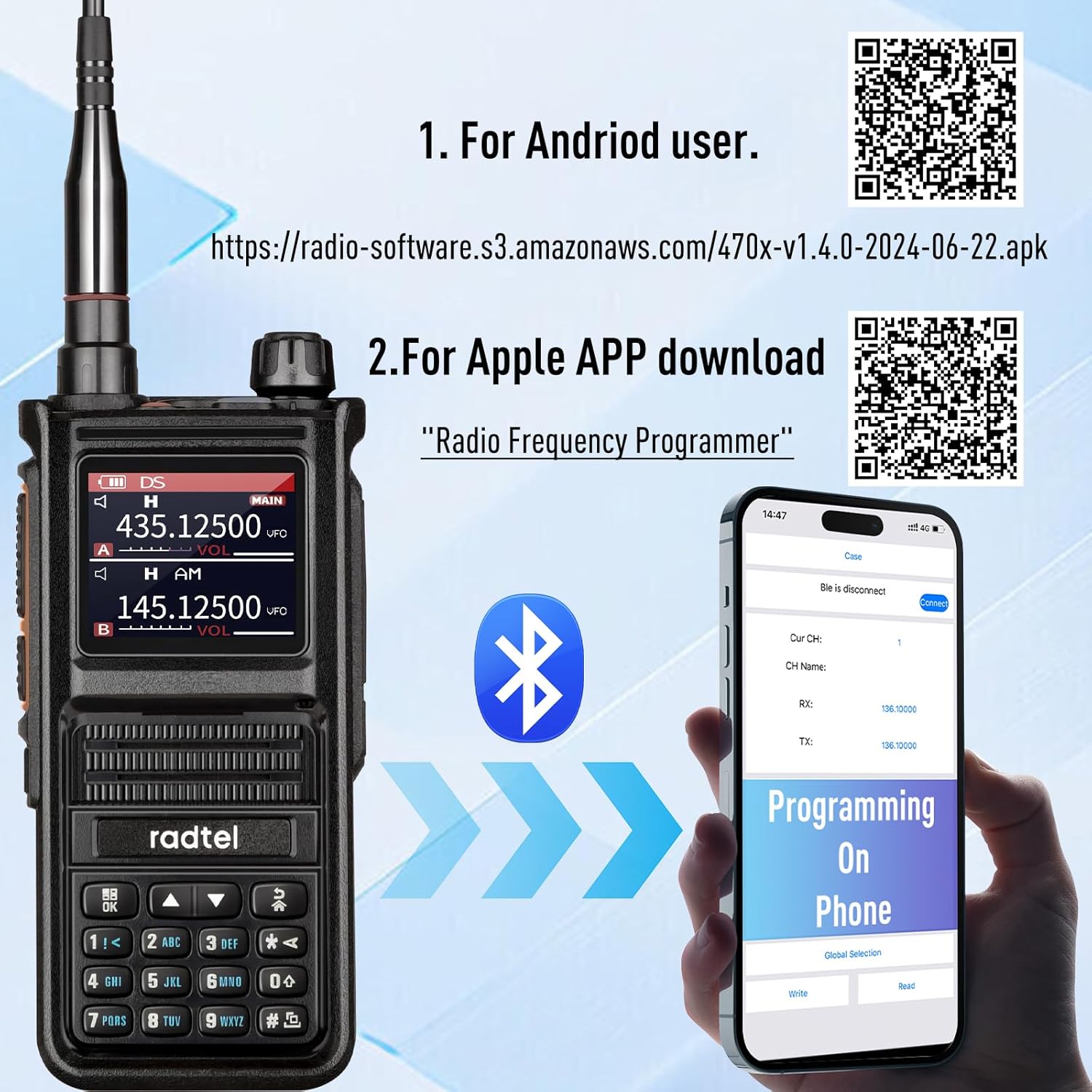
Image: All components included in the Radtel RT-470X Plus package, including the radio, battery, antenna, charging cable, belt clip, user manual, and power adapter.
Product Overview
The RT-470X Plus features a robust design with a clear 1.77-inch TFT color screen for easy readability. It includes a full keypad for direct frequency input and menu navigation, along with dedicated buttons for various functions. The radio is equipped with a dual PTT button for convenient transmission on different bands without switching the main band.

Image: Front view of the Radtel RT-470X Plus radio, highlighting its 1.77-inch color display, full keypad, and speaker/microphone grilles.
Key Features at a Glance
- Broad Frequency Coverage: Supports 8 receiving bands (including FM/AM) and 3 transmitting bands.
- Easy Programming: Mobile app (iOS/Android), Windows CPS, and keyboard programming.
- Wireless Frequency Copy: Quickly replicate frequencies and CTCSS/DCS tones from other radios.
- Dual PTT Button: Programmed for independent UHF and VHF transmission.
- NOAA Weather Alert: Receive severe weather forecasts.
- Built-in Flashlight: For illumination in dark conditions.
- USB-C Rechargeable: Convenient charging via USB-C cable.
Video: An overview of the Radtel RT-470X Plus, showcasing its design and various features.
Setup
1. Battery Installation
Insert the 2800mAh Type-C battery into the battery compartment on the back of the radio. Ensure it clicks securely into place. The battery can be charged directly via its USB-C port or when installed in the radio.
2. Antenna Attachment
Screw the provided 7.87-inch Dual Band 145/435 Antenna onto the antenna connector at the top of the radio. Turn clockwise until it is finger-tight. Do not overtighten.
3. Initial Power On
Rotate the power/volume knob clockwise to turn on the radio. Adjust the knob to set the desired volume level.
Operating Instructions
Frequency Coverage
The RT-470X Plus offers extensive frequency coverage for both receiving and transmitting:
- Receiving Bands:
- AM: 108-136 MHz (Aviation Air Band)
- FM: 66-108 MHz
- VHF: 18-107 MHz, 136-174 MHz, 220-260 MHz, 174-350 MHz, 350-400 MHz
- UHF: 470-629 MHz, 840-999 MHz
- Transmitting Bands:
- VHF: 144-146 MHz
- UHF: 400-520 MHz

Image: Detailed breakdown of the multi-band transmitting and receiving capabilities of the RT-470X Plus radio.
Programming Options
The RT-470X Plus offers multiple convenient ways to program frequencies and settings:
1. Mobile App Bluetooth Programming
Program your radio wirelessly using a mobile app compatible with both iOS and Android devices. This method allows for easy management of channels and settings directly from your smartphone.

Image: The RT-470X Plus radio connected via Bluetooth to a mobile phone displaying the programming interface. QR codes are provided for Android and iOS app downloads.
Download the Android app here: Android App Download
Download the iOS app (Radio Frequency Programmer) here: iOS App Download
2. Windows CPS and CHIRP Software Programming
For advanced users, the radio supports programming via Windows CPS (Customer Programming Software) and CHIRP software. This provides comprehensive control over all radio parameters.

Image: The RT-470X Plus radio displayed alongside a laptop, illustrating the three programming modes: CPS programming, CHIRP programming, and Keypad programming.
3. Keyboard Programming
The RT-470X Plus allows for direct frequency and setting input using its integrated keypad, offering immediate control without external software.
Wireless Frequency Copy
This innovative feature allows the RT-470X Plus to quickly copy frequencies and CTCSS/DCS tones from other radios. This is particularly useful for establishing immediate communication with non-LCD models, provided they are within a 1-meter distance.
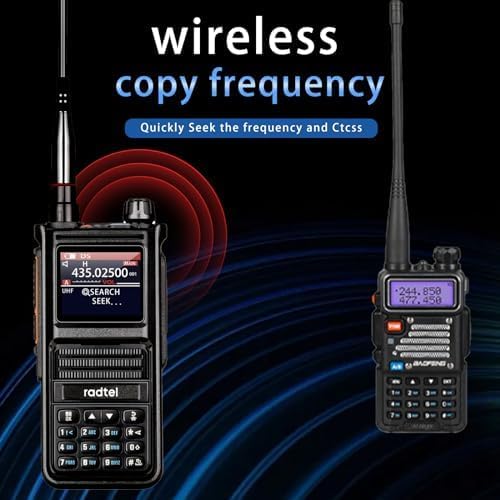
Image: The RT-470X Plus radio actively scanning and copying frequencies from another walkie-talkie wirelessly.
Video: A demonstration on how to store frequencies as channels on the Radtel RT-470X Plus radio.
Dual PTT Button
The RT-470X Plus features a dual PTT (Push-To-Talk) button setup. PTT1 can be programmed to transmit on the UHF frequency in band 1, while PTT2 transmits on the VHF frequency in band 2. This allows for convenient operation and quick switching between bands without needing to change the main display band.
NOAA Weather Alert
Stay informed about severe weather conditions with the integrated NOAA weather alert function. The radio can receive real-time weather forecasts, ensuring your safety during outdoor activities.

Image: The RT-470X Plus radio showing a NOAA weather alert on its display, set against a backdrop of an outdoor camping scene.
Aviation Air Band Reception
The RT-470X Plus is capable of receiving signals on the aviation air band (108-136 MHz AM). This allows users to listen to air traffic communications, enhancing situational awareness. Please note that transmission on this band is not supported.

Image: The RT-470X Plus radio displaying an aviation frequency (125.02500 MHz) with silhouettes of airplanes in the background, indicating its air band reception capability.
Built-in Flashlight
The radio includes a strong built-in flashlight, providing convenient illumination in dark environments such as camping or basements.
Setting Repeater and CTCSS
Learn how to configure repeater settings and CTCSS (Continuous Tone-Coded Squelch System) tones on your RT-470X Plus for enhanced communication privacy and access to repeaters.
Video: A step-by-step guide on setting up repeater frequencies and CTCSS tones on the Radtel RT-470X radio.
Maintenance
Charging the Battery
The 2800mAh Type-C battery can be charged using the included USB-C charger cable and AC power adapter. The battery features a direct USB-C charging port, allowing it to be charged independently or while installed in the radio. A small LED on the battery indicates charging status (red for charging, green for fully charged).

Image: The RT-470X Plus battery connected to a USB-C charging cable, illustrating its compatibility with various charging sources like car chargers, power banks, and wall chargers.
Cleaning and Care
To maintain your radio's performance and appearance, wipe it with a soft, damp cloth. Avoid using harsh chemicals or abrasive cleaners. Keep the radio dry and away from extreme temperatures.
Troubleshooting
If you encounter issues with your Radtel RT-470X Plus, consider the following common solutions:
- Programming Issues: Ensure you are using the correct software version (mobile app, Windows CPS, or CHIRP) and that the radio is properly connected. Some users have reported issues with Bluetooth connectivity or specific software versions; try updating firmware or using an alternative programming method if one fails.
- No Power: Check battery charge level. Ensure the battery is correctly installed.
- Poor Reception/Transmission: Verify the antenna is securely attached. Check frequency settings and ensure you are within range of other radios or repeaters.
- Screen Damage: While the screen is durable, prolonged exposure to harsh conditions or impacts can cause damage. Consider a screen protector for outdoor use.
Firmware Upgrade
Firmware upgrades can resolve bugs, improve performance, and add new features. Follow the instructions carefully when performing a firmware upgrade.
Video: A guide on how to upgrade the firmware of the Radtel RT-470X radio using the Bootloader Pro software.
Specifications
| Feature | Detail |
|---|---|
| Item Weight | 15.8 ounces |
| Product Dimensions | 1.57 x 2.28 x 4.6 inches |
| Item Model Number | RT-470X Plus |
| Batteries | 1 Lithium Ion battery required (included) |
| Manufacturer | Xiamen Radtel Electronics Co.,Ltd |
| Brand | radtel |
| Color | Standard |
| Number of Channels | 256 |
| Frequency Range | UHF VHF (18-620/840-999Mhz Scanning Receiver, Multi-band TX/RX, Air band RX) |
| Talking Range Maximum | 5 Kilometer |
| Tuner Technology | FM/AM |
| Voltage | 7.4 Volts |
| Water Resistance Level | Not Water Resistant |
Warranty and Support
The Radtel RT-470X Plus comes with a 1 Year Warranty from the manufacturer, Xiamen Radtel Electronics Co.,Ltd. For technical support, warranty claims, or any product-related inquiries, please contact Radtel Direct through their official channels or refer to the contact information provided in your product packaging.
For additional resources and updates, visit the Radtel Store on Amazon.
Related documentsRT-470X Plus


Ask a question about this manual
Ask about setup, troubleshooting, compatibility, parts, safety, or missing instructions. Manuals+ will review the question and use this page’s manual context to help answer it.