
Introduction
Thank you for choosing the Auxmir Foldable Lighted Makeup Mirror. This device is designed to provide optimal lighting and convenience for your makeup application, whether at home or while traveling. Its compact, foldable design, adjustable lighting, and smart features ensure a superior user experience. Please read this manual thoroughly before use to ensure proper operation and maintenance.
Package Contents
- Auxmir Foldable Lighted Makeup Mirror (Model BM-2219)
- USB-C Charging Cable
- User Manual
Product Features
- Rechargeable Battery: Built-in 1500mAh lithium battery for cordless use.
- Portable & Foldable Design: Compact and lightweight (381g) for easy storage and travel.
- 3 Dimmable Color Lights: Features 72 LED lights with White (6000K-6500K), Natural (4500K-5000K), and Warm (3000K-3500K) light modes.
- Stepless Brightness Adjustment: Long press touch sensor to customize brightness from 1% to 100%.
- Memory Function: Retains the last used light setting for convenience.
- 180° Adjustable Angle & Height: Allows for personalized viewing angles.
- Smart Sensor: Automatically turns the light on when opened beyond 30 degrees and off when closed or folded below 30 degrees.
- High-Definition Mirror: Provides a clear and accurate reflection.
Setup
- Unfolding the Mirror: Gently open the mirror from its folded position. The stand will automatically extend.
- Adjusting the Stand: Adjust the mirror to your desired height and angle. The stand allows for 180-degree rotation and height adjustment. Ensure the mirror is stable on a flat surface.
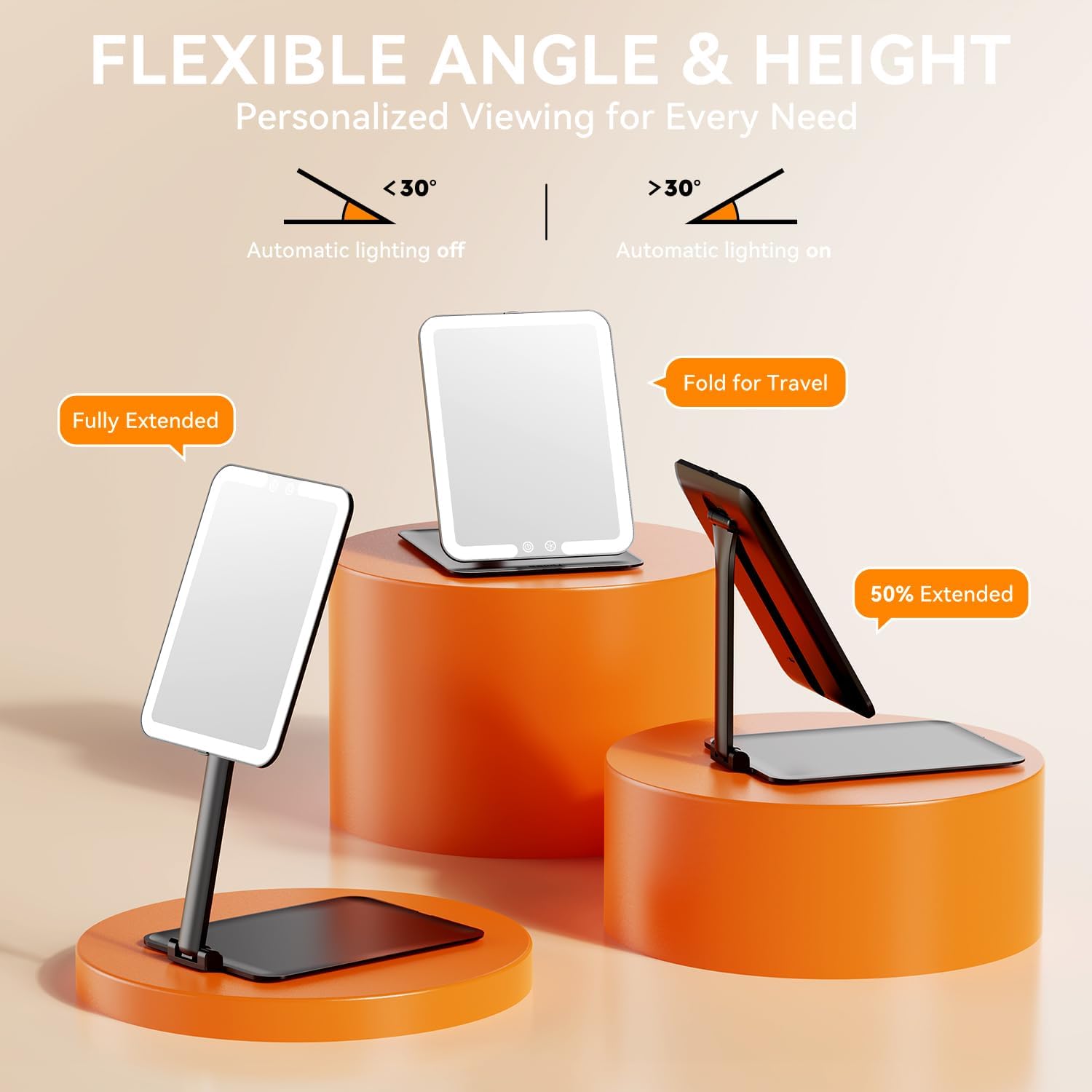
Image: The Auxmir mirror demonstrating its flexible angle and height adjustments, including fully extended, partially extended, and folded positions.
Operating Instructions
- Power On/Off: Touch the power icon (O) on the mirror surface to turn the lights on or off.
- Changing Light Modes: With the lights on, touch the light mode icon (⚙) to cycle through the three color modes: White, Natural, and Warm.
- Adjusting Brightness: To adjust the brightness, long press the power icon (O). The brightness will gradually increase or decrease. Release your finger when the desired brightness is reached.
- Smart Sensor Function: The mirror is equipped with a smart sensor. When the mirror is opened to an angle greater than 30 degrees, the lights will automatically turn on. When folded to an angle less than 30 degrees, the lights will automatically turn off.

Image: The Auxmir mirror showcasing its three color lighting modes: Warm, Natural, and Cool, suitable for various makeup demands.

Image: A visual guide demonstrating the stepless dimming feature of the Auxmir mirror, allowing brightness customization from 1% to 100%.
Charging
The Auxmir mirror features a built-in rechargeable battery. To charge the device:
- Locate the USB-C charging port on the side or back of the mirror stand.
- Connect the provided USB-C cable to the mirror and plug the other end into a compatible USB power source (e.g., wall adapter, power bank, laptop).
- A charging indicator light will typically illuminate during charging and turn off or change color when fully charged.
Charging Time: Approximately 120 minutes for a full charge.
Working Time: Up to 720 minutes (12 hours) on the weakest light setting.

Image: The Auxmir mirror highlighting its rechargeable feature, with a 120-minute charging time and 720-minute working time (on weak light), compatible with USB Type-C, wall chargers, car chargers, power banks, and laptops.
Maintenance
- Cleaning: Use a soft, dry, or slightly damp cloth to clean the mirror surface and body. Avoid abrasive cleaners or harsh chemicals.
- Storage: When not in use, fold the mirror to protect the mirror surface and LEDs. Store in a cool, dry place away from direct sunlight.
- Handling: Handle with care to prevent breakage. Avoid placing in areas where it could fall and cause injury.
Troubleshooting
| Problem | Possible Cause | Solution |
|---|---|---|
| Lights do not turn on. | Low battery or mirror not fully opened. | Charge the mirror. Ensure the mirror is opened beyond 30 degrees for the smart sensor to activate. |
| Lights are dim or flickering. | Low battery. | Recharge the mirror fully. |
| Mirror stand is unstable. | Improper adjustment or uneven surface. | Ensure the stand is fully extended and locked into position. Place the mirror on a flat, stable surface. |
Specifications
- Brand: Auxmir
- Model Number: BM-2219
- Dimensions (Folded): Approximately 21L x 15.5W Centimetres (8.3"L x 6.1"W)
- Item Weight: 381 g
- Battery Capacity: 1500mAh Lithium
- LED Lights: 72 pieces
- Color Modes: White, Natural, Warm
- Special Features: Compact, Foldable, Adjustable Angle/Height, Touch Screen Control, Memory Function, Smart Sensor
- Material: Plastic frame

Image: The Auxmir mirror illustrating its compact dimensions, including length, width, and thickness, emphasizing its portability.

Image: The Auxmir mirror being placed into a handbag, demonstrating its compact and portable design for easy on-the-go use, with its lightweight feature (381g) highlighted.
Warranty & Support
Auxmir provides a 3-Year Warranty for this product, covering manufacturing defects and ensuring reliable coverage. Additionally, Lifetime Support is available through 24/7 customer service to assist with any inquiries or issues you may encounter.
For further assistance or warranty claims, please refer to the contact information provided on the Auxmir official website or your purchase platform.
Safety Information
- Handle the mirror with care to prevent breakage.
- Avoid placing the mirror in areas where it could fall and cause injury.
- Keep out of reach of children.
- Do not expose the mirror to extreme temperatures or direct sunlight for prolonged periods.
- Do not attempt to disassemble or repair the mirror yourself. Contact customer support for assistance.