
Introduction
The Spider Farmer SmartG12 Hydroponic Growing System is designed for indoor cultivation of herbs, vegetables, and flowers without soil. This manual provides instructions for setup, operation, maintenance, and troubleshooting to ensure optimal plant growth and a successful indoor gardening experience.
Product Overview & Components
The SmartG12 system allows you to grow up to twelve plants simultaneously. Key features include a 36W full-spectrum LED grow light, a 6-liter water reservoir, and smart control via a dedicated mobile application.
Included Components:
- Main Hydroponic Unit
- LED Grow Light with adjustable height pole
- Water Reservoir (6L capacity)
- 12 Grow Baskets
- 12 Grow Sponges
- 12 Pod Covers
- Power Adapter
- Plant Food (A+B)
- T-Sprinkler
- Water Injection Cover

This image details the contents of the packaging, including the main hydroponic unit, power adapter, plant food (A+B), T-Sprinkler, water injection cover, pod covers, grow baskets, and grow sponges.
Setup
- Unpack Components: Carefully remove all items from the packaging. Refer to the 'Included Components' section to ensure all parts are present.
- Assemble the Unit:
- Insert the LED grow light pole into the base of the main unit.
- Attach the LED grow light panel to the top of the pole.
- Place the growing deck onto the water reservoir.
- Prepare Grow Baskets and Sponges:
- Place one grow sponge into each grow basket.
- Insert seeds into the center of each grow sponge.
- Place the grow baskets into the openings on the growing deck.
- Cover each grow basket with a pod cover to create a humid environment for germination.
- Fill Water Reservoir:
- Open the water injection cover.
- Fill the 6-liter water reservoir with clean water up to the 'MAX' fill line.
- Add the recommended amount of Plant Food A and B according to the instructions on the nutrient bottles. Mix thoroughly.
- Close the water injection cover.
- Connect Power: Plug the power adapter into the unit and then into a standard electrical outlet.
Operating Instructions
Once assembled and filled, the SmartG12 system is ready for operation. The unit features a control panel with touch buttons for basic functions, and advanced control is available via the Spider Farmer app.
Control Panel Functions:
- Power Button: Turns the system on/off.
- Light Button: Manually adjusts light intensity or cycles through preset modes.
- Pump Button: Manually activates or deactivates the water pump.
- WiFi Button: Initiates WiFi pairing mode for app connection.
Adjusting Light Height:
As your plants grow, adjust the height of the LED grow light by sliding the pole upwards. Ensure the light is positioned approximately 2-4 inches (5-10 cm) above the tallest plants to provide optimal light exposure.

The system features an adjustable light pole, allowing the LED grow light to be raised up to 70 cm (27.6 inches) as plants grow. It also highlights the 6-liter water reservoir capacity.
Water Pump Operation:
The silent water pump circulates water and nutrients, providing oxygen to the plant roots. The pump operates quietly at approximately 20dB.
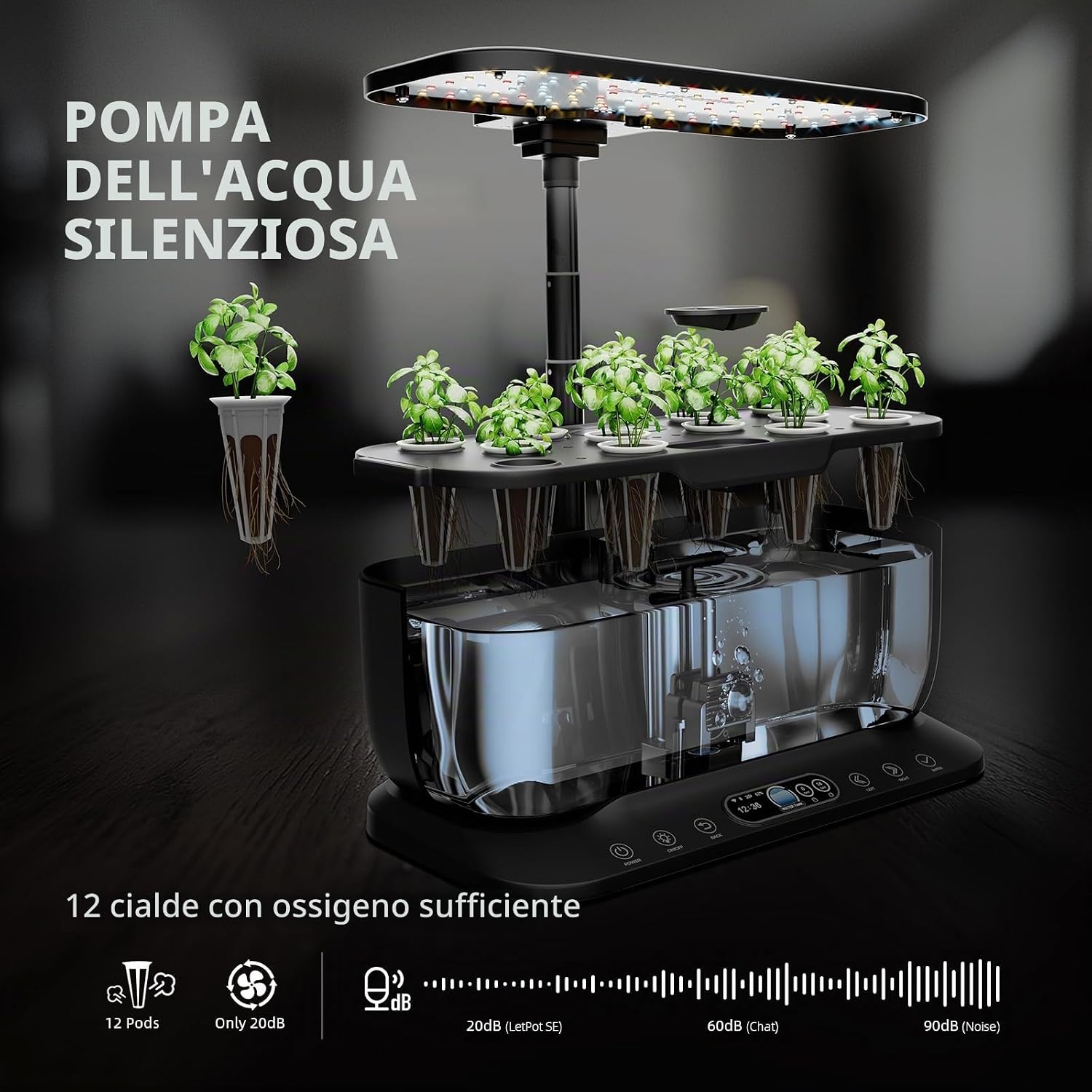
The system includes a silent water pump, operating at only 20dB, ensuring quiet operation. It supports 12 plant pods, providing sufficient oxygenation for roots.
App Control
The Spider Farmer app provides comprehensive control and monitoring features for your SmartG12 system.
Downloading and Connecting the App:
- Download the 'Spider Farmer' app from your device's app store.
- Create an account or log in.
- Follow the in-app instructions to pair your SmartG12 system via WiFi. Ensure your device is connected to a 2.4GHz WiFi network during setup.
Key App Features:
- Lighting Schedule: Customize a 0-24 hour lighting schedule to match your plants' needs. The 36W full-spectrum LED light provides red, blue, and white light for all growth stages.

Users can set a customized 0-24 hour lighting schedule via the app, automating plant care and ensuring optimal light exposure for growth.
- Plant Modes: Select from 6 pre-set vegetable modes or create 5 custom growing programs.
- Vacation Mode: Activate vacation mode to maintain plant health while you are away.
- Water Level Monitoring: The app displays the current water level and provides reminders when the water level is low (e.g., below 2.5L).

This image illustrates the Spider Farmer app's capabilities, including 6 vegetable modes, 5 custom modes, vacation mode, water level indicator, temperature and humidity display, and nutrient solution cycle reminder.
- Temperature and Humidity Display: Monitor environmental conditions within your growing system.
- Nutrient Solution Reminder: Receive reminders for when to change or replenish the nutrient solution.
- Remote Control: Monitor your garden and control the lights from anywhere using the app.

The app allows users to monitor their indoor garden and control the grow lights remotely, providing convenience and flexibility for plant care.
Customizable Pump Timing:
The app also allows for customizable pump timing to improve water circulation and oxygenation for your plants. You can set specific on/off times and durations.

This image shows the app interface for customizing pump operation, allowing users to set specific on/off times and durations to enhance water circulation and oxygenation for healthier plants. It also notes a low water level warning at 2.5L.
Maintenance
Regular maintenance is crucial for the health of your plants and the longevity of your system.
Water and Nutrient Replenishment:
- Check the water level daily. Refill with fresh water as needed.
- Replenish nutrient solution every 1-2 weeks, or as indicated by the app's reminder system. Follow the nutrient manufacturer's instructions for dosage.
- For best results, perform a full water change every 2-4 weeks to prevent nutrient imbalance and algae growth.
Cleaning:
- Periodically clean the water reservoir and growing deck to remove any algae or mineral buildup. Use a soft cloth and mild soap, then rinse thoroughly.
- Ensure the pump intake is clear of debris.
Troubleshooting
This section addresses common issues you might encounter with your SmartG12 system.
Issue: LED Light is not turning on.
- Solution: Check if the power adapter is securely connected to both the unit and the electrical outlet. Ensure the system is powered on via the control panel or app.
Issue: Water pump is not circulating water.
- Solution: Verify the power connection. Check if the pump is activated in the app or via the control panel. Ensure the water level is sufficient and the pump intake is not blocked.
Issue: App cannot connect to the device.
- Solution: Ensure your mobile device is connected to a 2.4GHz WiFi network. Restart the SmartG12 unit and try pairing again. If issues persist, reset the WiFi on the device (refer to app instructions) and re-attempt pairing.
Issue: High-pitched noise (coil whine) from the LED light.
- Solution: Some users have reported a high-pitched sound from the LED panel. While often temporary or minor, if persistent and disruptive, contact customer support.
Issue: Water level indicator is inaccurate or shows low when full.
- Solution: Ensure the water level is indeed at the 'MAX' line. If the issue persists, it might indicate a sensor malfunction. Contact customer support.
Issue: Plants are not growing well.
- Solution: Check nutrient levels and ensure proper dosage. Verify the light schedule and intensity are appropriate for your plant type. Ensure the light height is adjusted correctly. Monitor temperature and humidity via the app.
Specifications
| Feature | Specification |
|---|---|
| Product Dimensions | 29 x 22.8 x 45 cm (11.4 x 9 x 17.7 inches) |
| Weight | 3.31 kg (7.3 lbs) |
| Model Number | SF-smartG12-New-DE |
| Power Source Type | AC DC |
| LED Grow Light Power | 36W Full Spectrum |
| Water Reservoir Capacity | 6 Liters |
| Plant Pods | 12 |
| Adjustable Growth Height | Up to 70 cm (27.6 inches) |
| Connectivity | App Control, WiFi |
Warranty and Support
For warranty information and technical support, please refer to the official SPIDER FARMER website or contact their customer service directly. Keep your purchase receipt for warranty claims.