
Product Overview
The LEOBOG AU75 is a versatile 75-key mechanical keyboard designed for gaming and productivity. It features tri-mode connectivity (Bluetooth 5.0, 2.4GHz wireless, and USB-C wired), all-key hot-swappable switches, vibrant RGB backlighting, and a multi-functional knob for enhanced control. Its unique 5-layer sound-deadening material ensures a creamy and satisfying typing experience.

Figure 1: LEOBOG AU75 Mechanical Keyboard in Retro Roket colorway.
Setup Guide
What's in the Box
- LEOBOG AU75 Mechanical Keyboard
- USB-C to USB-A Coiled Cable
- Keycap Puller
- LEOBOG Star Vector Switches (pre-installed)
- Keyboard Cleaner
- 2.4GHz USB Dongle (stored in keyboard)
Connection Methods
The AU75 keyboard supports three versatile connection modes: Bluetooth, 2.4GHz wireless, and USB-C wired. This allows seamless switching between up to 5 devices.

Figure 2: The keyboard supports Bluetooth, 2.4GHz, and USB-C connections for multiple devices.
- USB-C Wired Connection:
Connect the provided USB-C cable to the keyboard's Type-C port and the USB-A end to your computer. The keyboard will automatically switch to wired mode. This mode is ideal for stable, low-latency performance, especially during gaming.
- 2.4GHz Wireless Connection:
Locate the 2.4GHz USB dongle stored in the keyboard's receiver storage compartment (usually on the underside). Plug the dongle into an available USB port on your computer. Switch the mode selector on the keyboard to the 2.4G position. The keyboard should connect automatically.
- Bluetooth 5.0 Connection:
Switch the mode selector on the keyboard to the Bluetooth (BT) position. The keyboard will enter pairing mode. On your device (PC, Mac, tablet, smartphone), go to Bluetooth settings and search for "AU75". Select it to pair. The keyboard can store up to 5 Bluetooth devices, allowing quick switching using FN + Q/W/E/R/T keys.
Physical Setup
The keyboard features adjustable feet on its underside. Flip these feet out to raise the keyboard to a more ergonomic typing angle. The rubberized pads on the feet ensure stability and prevent slipping during use.
Operating Instructions
Functional Knob
The multi-functional knob located on the top right of the keyboard provides quick access to various settings:

Figure 3: The functional knob allows quick adjustments for volume and lighting.
- Short Press: Mute/unmute audio (in Office Mode) or switch lighting effects (in Gaming Mode).
- Long Press (3 seconds): Switch between Office Mode and Gaming Mode.
- Rotate: Adjust volume (in Office Mode) or adjust backlight brightness (in Gaming Mode).
RGB Backlighting
The keyboard features 16.8 million RGB light colors with 16 pre-set lighting effects. You can customize lighting brightness, speed, and patterns.

Figure 4: The keyboard features dynamic RGB lighting with various effects.
- FN + |: Switch between 17 pre-set backlight effects.
- FN + Tab: Switch light colors within certain effects.
- FN + Left Arrow: Slow down light speed.
- FN + Right Arrow: Accelerate light speed.
- FN + Up Arrow: Increase backlight brightness.
- FN + Down Arrow: Decrease backlight brightness.
All-Key Hot Swappable Switches
The AU75 keyboard is equipped with LEOBOG Star Vector Switches and supports 3/5-pin hot-swappable switches. This allows you to easily change keycaps and switches to customize your typing feel and sound without soldering.
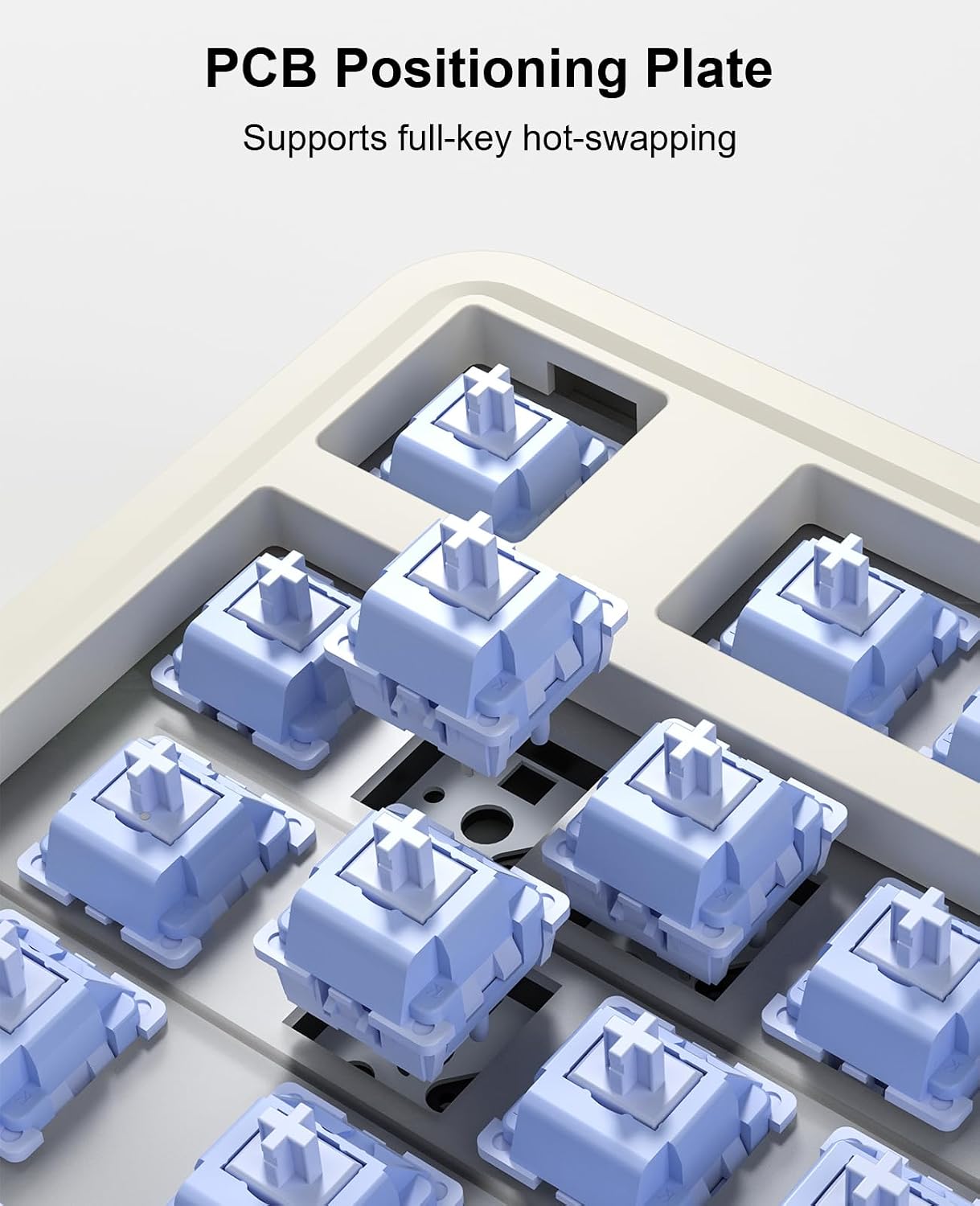
Figure 5: The PCB positioning plate supports full-key hot-swapping for easy customization.
Video 1: Official LEOBOG video demonstrating different mechanical keyboard switches, including linear and tactile options. This highlights the hot-swappable feature of the keyboard.
Battery Life
The keyboard is equipped with a high-endurance 4000mAh battery. With RGB lighting off, it can last over 200 hours. With RGB lighting on, it provides over 20 hours of continuous use.

Figure 6: The 4000mAh battery provides extended usage time.
Software Customization
You can customize your keyboard further using the AULA drivers. This software allows for key remapping, advanced RGB backlight adjustment, and macro creation to personalize your work or gaming environment.
Maintenance
Cleaning
Regular cleaning helps maintain the keyboard's performance and appearance. Use the provided keyboard cleaner brush and cloth to remove dust and debris from between the keycaps and on the surface.
Keycap and Switch Replacement
Utilize the included keycap puller to safely remove keycaps. For switch replacement, gently pull the switch straight up using a switch puller (not explicitly listed as included, but implied by hot-swappable feature and extra switches). Ensure proper alignment when inserting new switches to avoid bending pins.
Troubleshooting
- Keyboard not connecting: Ensure the mode selector is set correctly (BT, 2.4G, or Wired). For wireless modes, check battery level. For Bluetooth, ensure your device's Bluetooth is on and the keyboard is in pairing mode. For 2.4GHz, ensure the dongle is securely plugged in.
- Keys not responding: Check if the keyboard is properly connected. If hot-swappable, ensure the switch is fully seated. Try replacing the switch with one of the spares if available.
- RGB lights not working: Check brightness settings using the functional knob or FN key combinations. Ensure the keyboard is charged.
- Lag or input delay: For wireless connections, try moving closer to the receiver or switching to wired mode for optimal performance.
Specifications
| Feature | Detail |
|---|---|
| Product Dimensions | 14.17 x 7.48 x 1.96 inches |
| Item Weight | 2.72 pounds |
| Connectivity Technology | Bluetooth, 2.4GHz Wireless, USB-C Wired |
| Keyboard Description | Mechanical |
| Number of Keys | 75 |
| Backlighting | RGB (16.8 million colors, 16 effects) |
| Battery | 4000mAh Lithium Ion (included) |
| Special Features | Volume Roller, Backlit, Hotkeys, Programmable Keys, Hot-Swappable |
| Compatible Devices | Laptop, PC, Gaming Console, Tablet, Smartphone |
Warranty and Support
LEOBOG provides 48 months of after-sales service for the AU75 keyboard. For any inquiries, technical support, or warranty claims, please refer to the contact information provided in your product packaging or visit the official LEOBOG website.


