
1. Introduction
Thank you for choosing the AIBBQLIFE A5 Wireless Meat Thermometer. This device is designed to provide precise temperature monitoring for various cooking methods, including oven, grill, BBQ, and smoker. With Bluetooth 5.2 connectivity and a dedicated app, you can monitor your food's temperature remotely, ensuring perfectly cooked results every time. This manual provides detailed instructions for setup, operation, maintenance, and troubleshooting.

Figure 1.1: AIBBQLIFE A5 Wireless Meat Thermometer components and app interface.
2. Package Contents
Please verify that all items are present in your package:
- 1 x Wireless Meat Thermometer Probe
- 1 x Charging Base
- 1 x USB Type-C Charging Cable
- 1 x User Manual (this document)

Figure 2.1: The wireless meat thermometer probe and its charging base.
3. Product Overview
Key Features:
- Real-Time Monitoring: Obtain precise temperature readings directly on your smartphone.
- Extended Bluetooth Range: Bluetooth 5.2 provides up to 656ft (200m) range for remote monitoring.
- Preset Cooking Menus: Includes 10 food menus and 5 taste presets for various dishes.
- Fast Connection: Advanced Bluetooth 5.2 technology ensures quick and stable device pairing.
- Accurate Temperature: Temperature deviation of only ±1°C (or ±1.8°F).
- IP68 Waterproof: Stainless steel probe is fully waterproof for easy cleaning and use in various environments.
- Long Battery Life: Base charges in 3 hours for 24 hours of continuous use; probe operates for up to 48 hours on a full charge.
- Magnetic Design: Charging base features a strong magnetic back for convenient attachment to metallic surfaces.
Probe Dimensions:

Figure 3.1: Probe dimensions and key specifications.
4. Setup Guide
4.1. Charging the Device
Before first use, ensure both the probe and the charging base are fully charged.
- Insert the probe into the charging base.
- Connect the provided USB Type-C charging cable to the charging base and a suitable USB power adapter (not included).
- The indicator light on the base will illuminate during charging. The base typically charges in 3 hours, providing 24 hours of continuous use. The probe charges while in the base and can operate for up to 48 hours on a full charge.

Figure 4.1: Charging the thermometer probe within its base.
4.2. App Installation
The AIBBQLIFE A5 thermometer requires a companion app for full functionality.
- Search for the "AiBBQ Life" app on the Apple App Store (for iOS devices) or Google Play Store (for Android devices).
- Download and install the app on your smartphone or tablet.
- Ensure your device's Bluetooth is enabled.
4.3. Device Pairing
Follow these steps to connect your thermometer to the app:
- Remove the probe from the charging base. This automatically activates the probe.
- Open the "AiBBQ Life" app on your smartphone.
- The app should automatically detect and connect to the thermometer via Bluetooth 5.2. If not, follow the in-app instructions to manually add a device.
- Once connected, the app will display the current temperature readings.
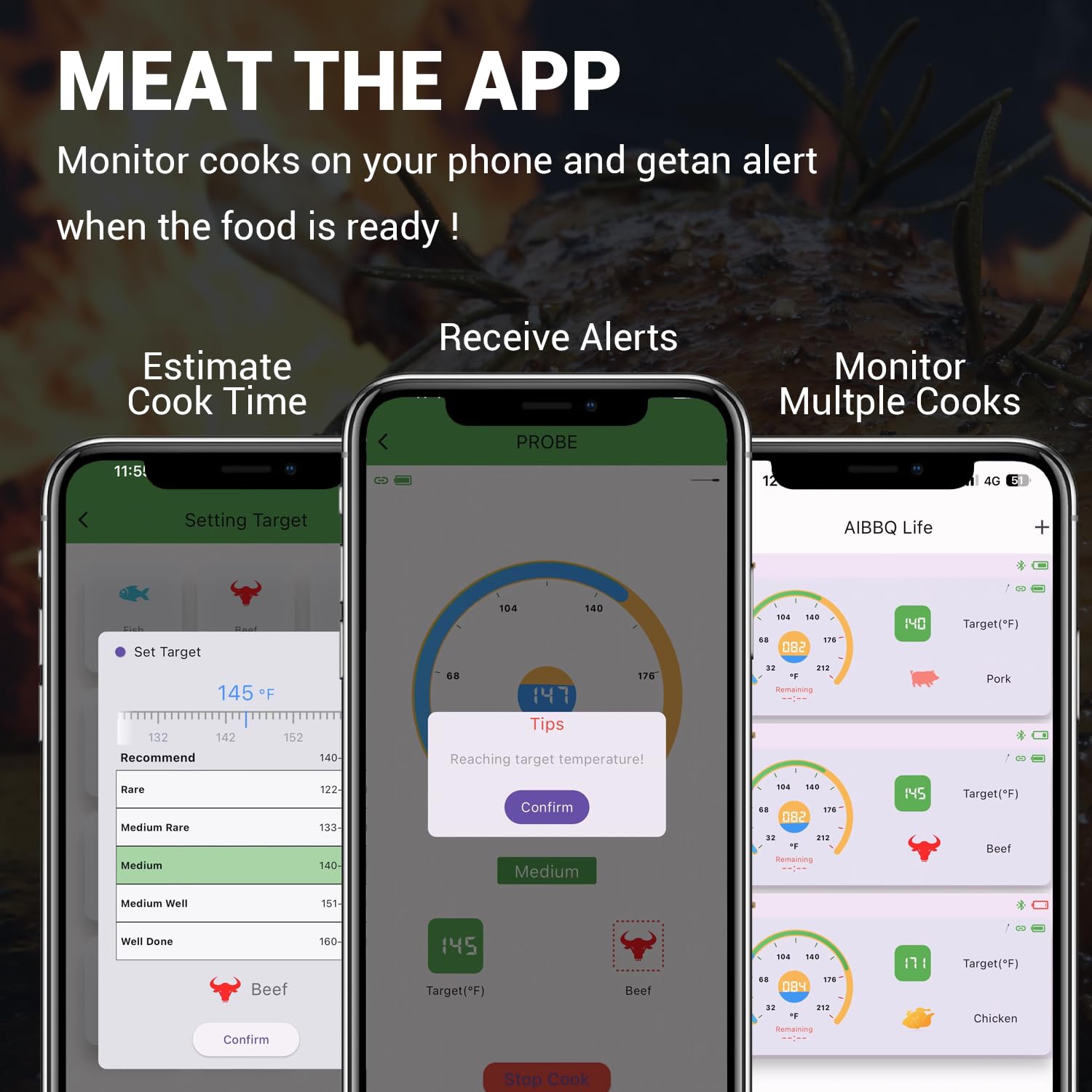
Figure 4.2: The AiBBQ Life app interface for monitoring and setting alerts.
5. Operating Instructions
5.1. Using the Probe
Proper probe insertion is crucial for accurate readings.
- Insert the probe into the thickest part of the meat, avoiding bones or gristle.
- Ensure the probe is inserted deep enough so that the internal temperature sensor (located near the tip) is fully within the meat.
- The black handle of the probe should remain outside the food and cooking vessel to prevent damage.

Figure 5.1: Correct probe insertion into meat.
5.2. App Functions
The "AiBBQ Life" app offers comprehensive control and monitoring features:
- Preset Menus: Select from 10 different food types (e.g., beef, chicken, pork) and 5 taste preferences (e.g., rare, medium, well-done). The app will automatically set the target temperature.
- Custom Temperature: For specific recipes, you can manually set your desired target temperature.
- Real-Time Monitoring: View the current internal temperature of your food and the ambient temperature (if applicable) on your smartphone.
- Alerts: The app will notify you when your food reaches the target temperature, preventing overcooking or undercooking.
- Timer: Utilize the built-in timer function for precise cooking duration management.
- Temperature Units: Switch between Celsius (°C) and Fahrenheit (°F) within the app settings.

Figure 5.2: App interface showing preset cooking menus.
6. Maintenance and Care
To ensure the longevity and accuracy of your AIBBQLIFE A5 thermometer, follow these care instructions:
- Cleaning the Probe: The stainless steel probe is IP68 waterproof. After each use, clean the probe thoroughly with warm, soapy water. It can also be placed in a dishwasher. Ensure all food residues are removed.
- Cleaning the Base: Wipe the charging base with a damp cloth. Do not submerge the charging base in water.
- Storage: Store the probe in its charging base when not in use. Keep the device in a cool, dry place away from direct sunlight and extreme temperatures.
- Battery Care: Recharge the device regularly, even if not used frequently, to maintain battery health.

Figure 6.1: The waterproof probe can be easily cleaned under running water.
7. Troubleshooting
| Problem | Possible Cause | Solution |
|---|---|---|
| Device not connecting to app | Bluetooth is off; Probe not activated; App not open; Out of range; Low battery. | Ensure Bluetooth is on. Remove probe from base to activate. Open the app. Move closer to the device. Charge the device. |
| Inaccurate temperature readings | Improper probe insertion; Probe damaged. | Re-insert the probe into the thickest part of the meat, avoiding bones. If issues persist, contact customer support. |
| Probe not charging | Cable issue; Base issue; Probe not seated correctly. | Check USB-C cable and power adapter. Ensure probe is fully seated in the base. Try a different charging cable/adapter. |
| App crashes or freezes | Software glitch; Outdated app version. | Close and restart the app. Check for app updates in your device's app store. Restart your smartphone. |
8. Specifications
- Model Number: A5
- Brand: AIBBQLIFE
- Connectivity: Bluetooth 5.2
- Bluetooth Range: Up to 656 ft (200m)
- Internal Temperature Range: 0°C-100°C / 32°F-212°F
- Handle Withstand Temperature: Max. 320°C / 608°F
- Accuracy: ±1°C / ±1.8°F
- Waterproof Rating: IP68 (Probe)
- Charging Port: USB Type-C
- Base Charging Time: Approximately 3 hours
- Base Battery Life: Up to 24 hours (continuous use)
- Probe Battery Life: Up to 48 hours (continuous use)
- Outer Material: Plastic (Base), Stainless Steel (Probe)
- Included Components: Meat Thermometer with Charging Cable
- Certifications: FCC
9. Warranty and Support
AIBBQLIFE products are designed for quality and reliability. For warranty information, technical support, or any questions regarding your A5 Wireless Meat Thermometer, please refer to the contact information provided on the product packaging or visit the official AIBBQLIFE website. Please retain your proof of purchase for warranty claims.
