
Jazmm 088V
Jazmm Digital AM FM Radio with Bluetooth 5.3 (Model 088V) User Manual
Model: 088V | Brand: Jazmm
Introduction
This manual provides detailed instructions for the operation and maintenance of your Jazmm Digital AM FM Radio with Bluetooth 5.3, Model 088V. Please read this manual thoroughly before using the device to ensure proper function and longevity.

Image: Front view of the Jazmm Digital AM FM Radio, Model 088V, showing the speaker grille and control panel.
What's in the Box
Verify that all items are present upon unboxing:
- Jazmm Digital AM FM Bluetooth Radio (Model 088V)
- Owner's Manual
- Type-C Charging Cable
- Wrist Strap
Product Overview
Familiarize yourself with the radio's controls and ports:
Front Panel:
- Speaker Grille: Main audio output.
- Digital Display: Shows frequency, mode, and track information.
- Numeric Keypad (0-9): For direct frequency input or track selection.
- SCAN Button: Initiates automatic station scanning.
- REC Button: Activates voice recording (requires TF card).
- LED Button: Toggles the flashlight on/off.
- Play/Pause Button: Controls playback in MP3 mode.
- Previous/Next Track Buttons: Navigates tracks or stations.
- M (Mode) Button: Switches between AM, FM, Bluetooth, TF Card, and USB modes.
Side Panel:
- ON/OFF Switch: Powers the device on or off.
- Volume Dial: Adjusts audio volume.
- Type-C Charging Port: For charging the internal battery.
- USB Port: For USB flash drive playback.
- TF Card Slot: For TF card playback and recording.
- 3.5mm Earphone Jack: For private listening.
- Flashlight LED: Integrated light source.
- Wrist Strap Attachment Point: For securing the included wrist strap.

Image: Side view of the radio highlighting the flashlight and wrist strap attachment.
Setup
1. Charging the Battery
The radio is equipped with a 2000mAh rechargeable battery. Before first use, fully charge the device.
- Connect the provided Type-C charging cable to the radio's charging port.
- Connect the other end of the cable to a USB power adapter (not included) or a computer's USB port.
- The charging indicator on the display will show charging status. A full charge takes approximately 2.5 hours.
- Once fully charged, the radio can operate for up to 12 hours.

Image: The radio connected to a Type-C charging cable, illustrating the charging process.
2. Inserting TF Card (Optional)
To use the MP3 playback or recording functions, insert a TF (Micro SD) card into the designated slot.
- Locate the TF card slot on the side of the radio.
- Gently insert the TF card with the metal contacts facing down until it clicks into place.
- To remove, push the card inward until it springs out.
Operating Instructions
1. Power On/Off
Slide the ON/OFF switch on the side of the radio to power it on or off.
2. AM/FM Radio Operation
Upon powering on, the radio typically defaults to FM mode. Press the 'M' (Mode) button to switch between AM and FM bands.
- Automatic Scan: Press the 'SCAN' button to automatically search for and save available stations.
- Manual Tuning: Use the numeric keypad to directly input the desired frequency. For example, to tune to 98.5 FM, press '9', '8', '5'.
- Adjusting Volume: Rotate the volume dial on the side of the radio.
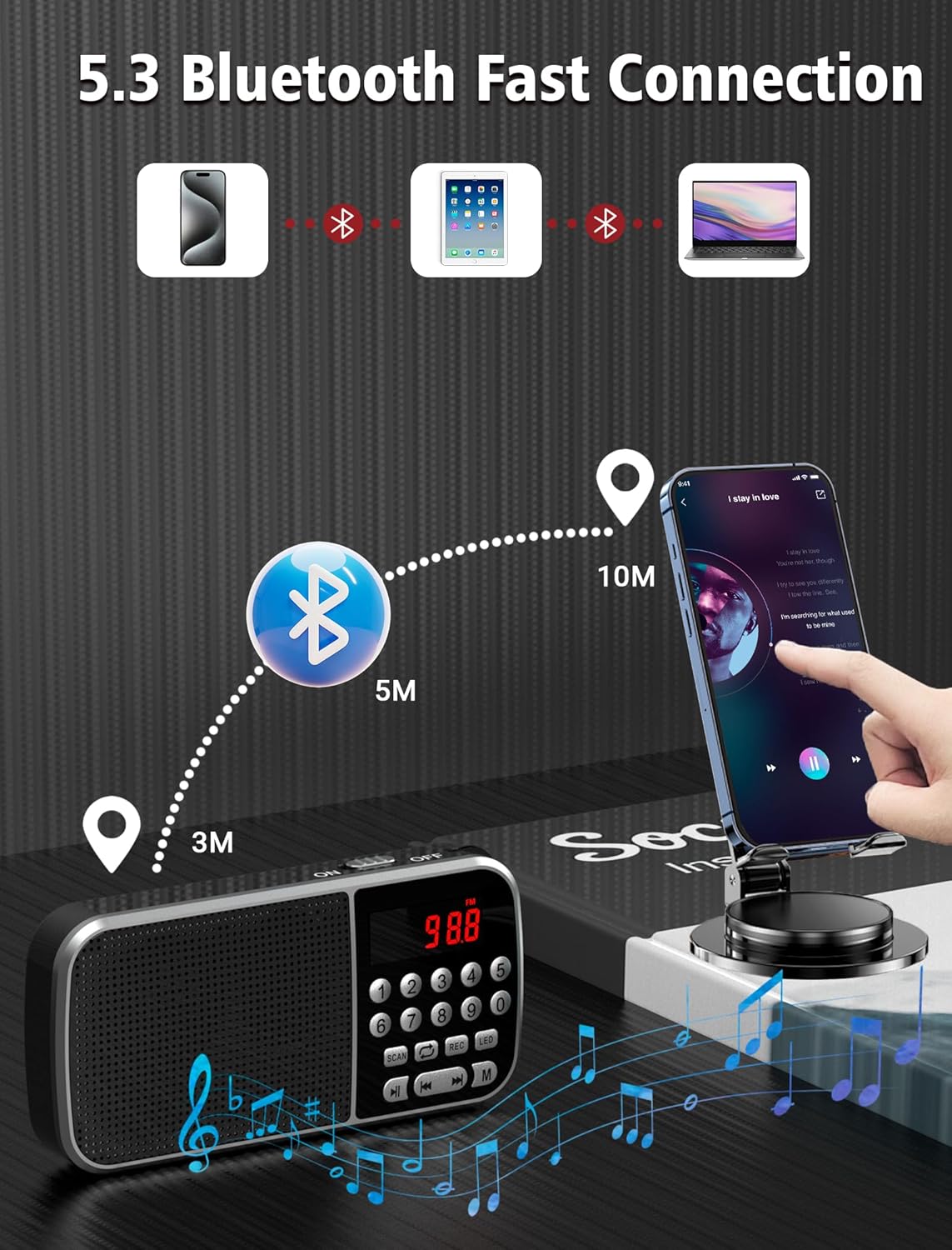
Image: The radio displaying various AM and FM frequencies, illustrating its reception capabilities.
3. Bluetooth 5.3 Mode
Connect your smartphone or other Bluetooth-enabled devices to the radio for wireless audio playback.
- Press the 'M' (Mode) button until "Bluetooth" or a Bluetooth icon appears on the display. The radio will enter pairing mode.
- On your device, enable Bluetooth and search for available devices.
- Select "Jazmm 088V" (or similar) from the list to pair.
- Once connected, you can play audio from your device through the radio's speaker.
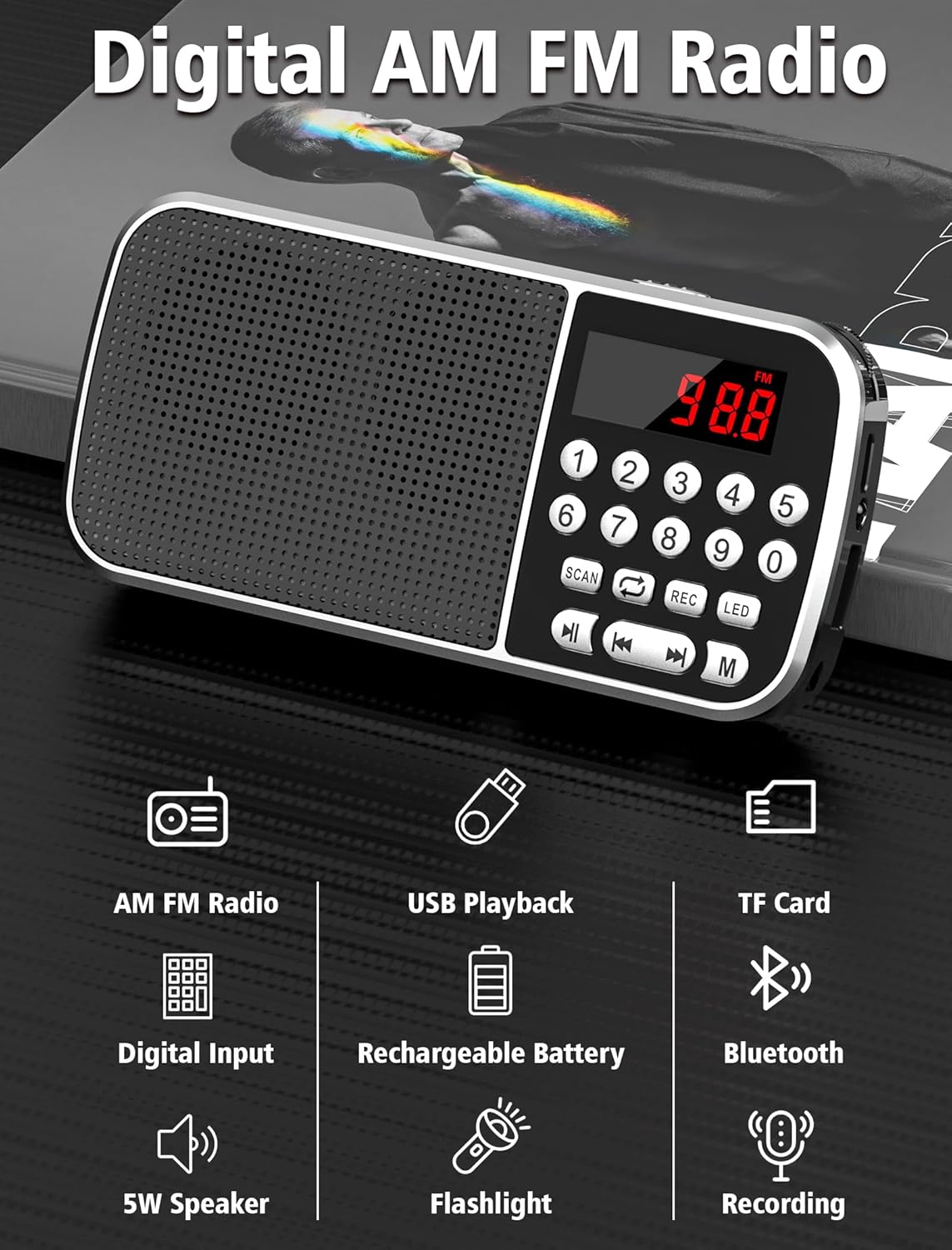
Image: Diagram showing the radio wirelessly connected to various devices via Bluetooth 5.3.
4. MP3 Playback (TF Card / USB)
The radio supports MP3 playback from both TF cards and USB flash drives.
- TF Card Playback: Insert a TF card with MP3 files. Press the 'M' button to select TF card mode.
- USB Playback: Insert a USB flash drive with MP3 files. Press the 'M' button to select USB mode.
- Use the Play/Pause and Previous/Next Track buttons to control playback.
- You can also use the numeric keypad to jump to specific track numbers.

Image: A person listening to music through headphones connected to the radio, demonstrating MP3 playback.
5. Voice Recorder
Record audio directly to an inserted TF card.
- Ensure a TF card is inserted.
- Press the 'REC' button to start recording. The display will indicate recording status.
- Press 'REC' again to stop and save the recording.
- Recordings are saved as MP3 files on the TF card.

Image: The radio with a microphone icon, illustrating its sound recording capability to a TF card.
6. Flashlight Function
The radio includes a built-in LED flashlight for convenience.
- Press the 'LED' button to turn the flashlight on.
- Press the 'LED' button again to turn the flashlight off.
7. Headphone Use
For private listening, plug 3.5mm headphones (not included) into the earphone jack on the side of the radio.
Maintenance
- Keep the radio dry. Avoid exposure to moisture or liquids.
- Clean the device with a soft, dry cloth. Do not use abrasive cleaners or solvents.
- Store the radio in a cool, dry place when not in use.
- Avoid dropping or subjecting the radio to strong impacts.
Troubleshooting
| Problem | Possible Cause | Solution |
|---|---|---|
| No power/Won't turn on | Battery is depleted. | Charge the battery fully using the provided Type-C cable. |
| Poor radio reception | Weak signal; environmental interference. | Adjust the radio's position. Try scanning again. |
| Bluetooth not connecting | Radio not in pairing mode; device too far. | Ensure radio is in Bluetooth mode. Keep devices within 10 meters. Re-pair if necessary. |
| MP3 files not playing | Incorrect file format; TF card/USB not inserted correctly. | Ensure files are in MP3 format. Reinsert TF card/USB drive. Check if the radio is in the correct mode. |
| Recording not working | No TF card inserted; TF card full. | Insert a TF card. Check available space on the TF card. |
Specifications
- Model: 088V
- Brand: Jazmm
- Product Dimensions: 1.14 x 2.68 x 5.39 inches
- Item Weight: 6.2 ounces
- Battery: 2000mAh Lithium Polymer (included)
- Charging Time: Approximately 2.5 hours
- Usage Time: Up to 12 hours
- Connectivity: Bluetooth 5.3
- Radio Bands: AM (520-1710 KHZ) / FM (87.5-108 MHZ)
- Speaker Output: 5W
- Media Playback: TF Card, USB (MP3 format)
- Additional Features: Voice Recorder, Flashlight, 3.5mm Earphone Jack
Warranty and Support
For warranty information and technical support, please refer to the contact details provided on the product packaging or visit the official Jazmm website. Keep your purchase receipt as proof of purchase for warranty claims.
Related documents088V


Ask a question about this manual
Ask about setup, troubleshooting, compatibility, parts, safety, or missing instructions. Manuals+ will review the question and use this page’s manual context to help answer it.