
1. Product Overview
The SYNCO Xtalk Link Signal Booster is designed to enhance and extend the capabilities of the SYNCO Xtalk wireless intercom system. It functions as both a signal booster and a master unit, allowing for expanded communication ranges, increased user capacity, and flexible group management. This device is crucial for large-scale productions, events, and environments requiring robust and reliable team communication.
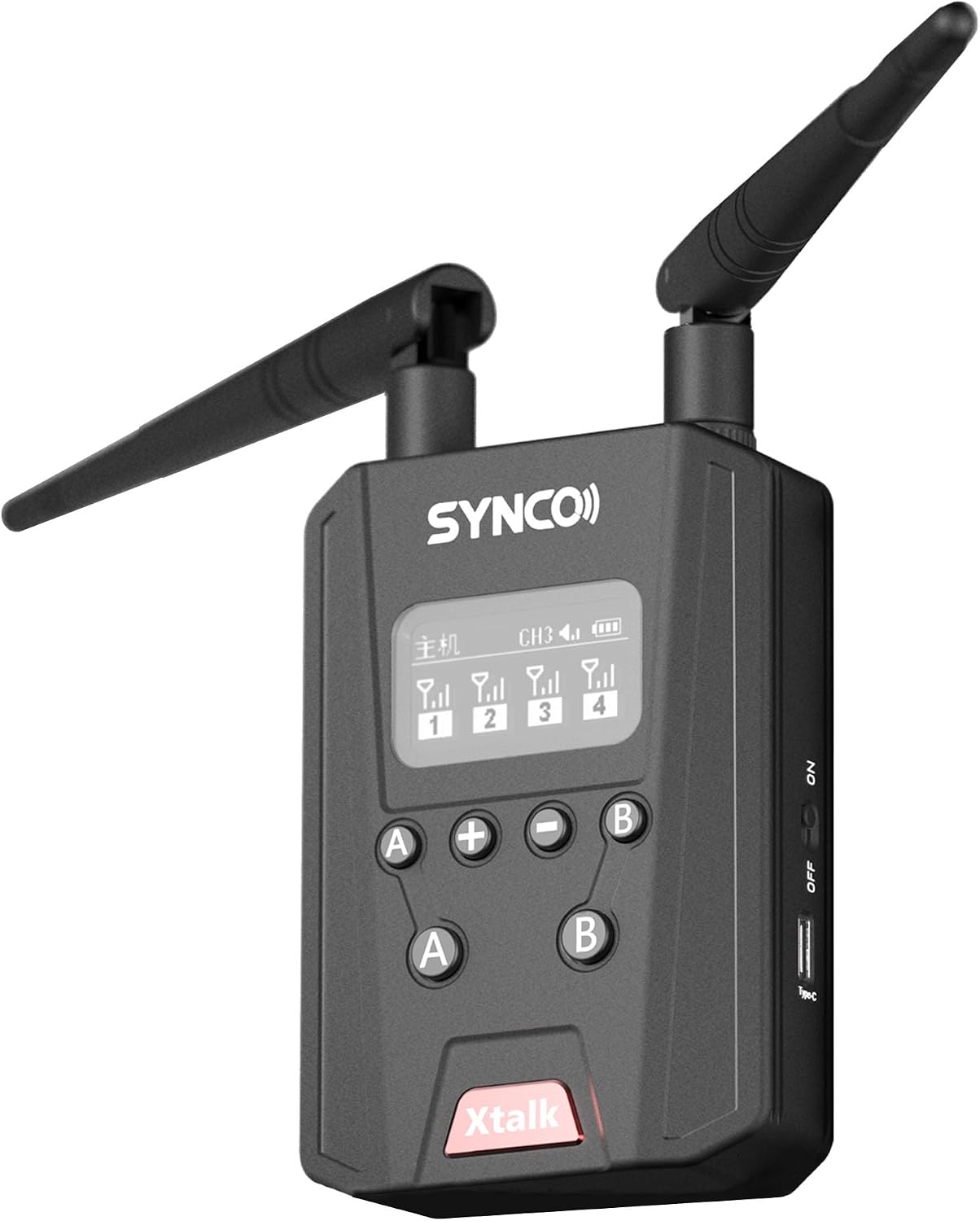
Image: Front view of the SYNCO Xtalk Link Signal Booster, showcasing its compact design with two antennas, a display screen, and control buttons.
2. What's in the Box
Verify that all components are present upon unboxing:
- Xtalk Link Signal Booster *1
3. Setup Guide
3.1 Powering On/Off
- To power on the device, locate the power switch on the side and slide it to the 'ON' position.
- To power off, slide the switch to the 'OFF' position.
3.2 Connecting to Xtalk System
The Xtalk Link Signal Booster integrates seamlessly with existing Xtalk communication systems. It can function as a Master unit or a Level 1 unit depending on the desired configuration.
- As a Master Unit: The booster can connect up to 4 Level 1 units, acting as the central hub for communication.
- As a Level 1 Unit: It can connect to two existing groups, each consisting of 3 Level 1 units and 1 host, to form a larger communication network of up to 9 persons.
3.3 Optimal Placement
For best performance, place the Xtalk Link Signal Booster in a central location within the desired communication area. Avoid obstructions like thick walls or large metal objects that could interfere with the signal. The device is designed for true wall-penetrating capabilities, but optimal placement will maximize range and stability.
4. Operating Instructions
4.1 Master & Level 1 Mode Operation
The Xtalk Link offers dual functionality:
- Master Mode: Functions as a host, connecting up to 4 Level 1 units. It can also be used as a talking headset.
- Level 1 Mode: Connects two existing groups (e.g., two groups of 3 Level 1 units with 1 host each) to form a larger 9-person communication group. This mode extends the communication distance between the two groups and allows for signal blocking if needed.
4.2 Extending Communication Range (Infinite Connection)
The Signal Booster significantly expands the number of users and the communication range of the Xtalk system.
- Without the Xtalk Link, the system supports up to 13 users.
- With one Signal Boost, a 9-person group can be divided into a 4-person and a 5-person group. Two X10 systems can combine for up to 21 users.
- With two Signal Boosts, up to 29 headsets can work simultaneously (e.g., two X10s and one X10 combined). This allows for virtually infinite connection, overcoming traditional communication system limitations.
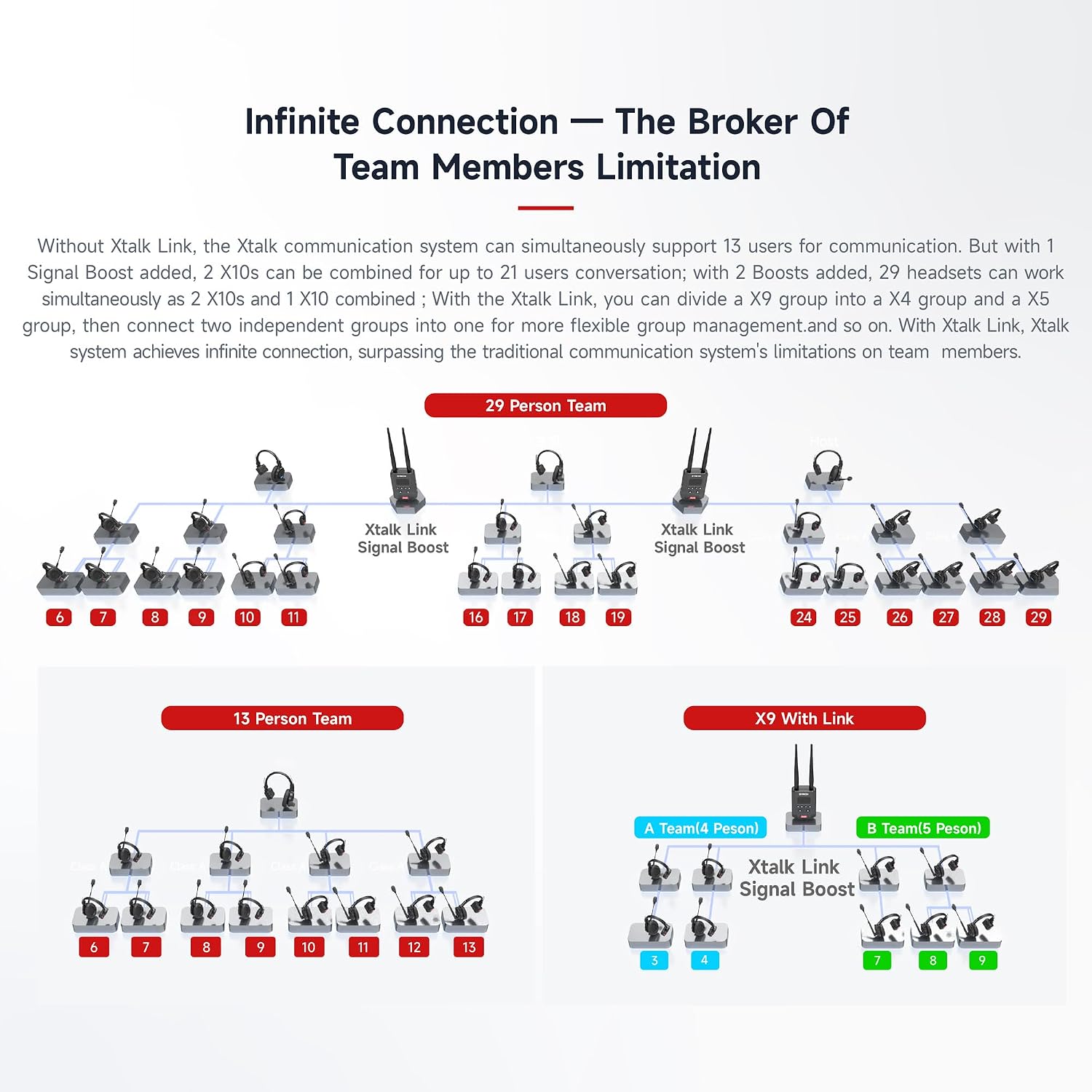
Image: Diagram illustrating how the SYNCO Xtalk Link Signal Booster enables infinite connection, showing configurations for 13-person, X9 with Link, and 29-person teams.
4.3 Farther & Steady Communication
When used with two sets of X10, the Signal Boost enables reliable communication within a 1 km range. This makes it suitable for large-scale events such as film productions, concerts, and outdoor adventures.

Image: Visual representation of the 1000m communication range achieved with the SYNCO Xtalk Link Signal Booster, showing two units communicating across a landscape.
4.4 True Wall-Penetrating Capabilities
The Xtalk Link acts as a Signal Boost and a Master, adapting to various environments. In unobstructed conditions, it provides a stable communication distance of up to 700 meters (2297 feet). In obstructed conditions, it can penetrate up to 3 concrete walls, ensuring solid and reliable communication support within buildings.

Image: Diagram illustrating the wall-penetrating capability of the SYNCO Xtalk Link, showing a signal passing through multiple walls from a headset to the booster.
4.5 A/B Group Communication
The Signal Boost allows for the division of the communication system into two distinct groups, A and B, creating a dual-channel communication setup. The A/B buttons on the device provide total control, enabling various modes such as communicating with both groups, communicating with only one group, or muting all microphones as required.

Image: Diagram showing the A/B group communication feature, with two distinct teams (A and B) communicating via the Signal Booster, indicating control over which group can transmit.
5. Maintenance
- Cleaning: Use a soft, dry cloth to clean the exterior of the device. Do not use liquid cleaners or aerosols.
- Storage: Store the device in a cool, dry place away from direct sunlight and extreme temperatures.
- Battery Care: If the device contains an internal rechargeable battery, ensure it is charged regularly, even when not in use, to maintain battery health. Avoid fully discharging the battery for extended periods.
6. Troubleshooting
6.1 No Signal or Limited Range
- Check Power: Ensure the Signal Booster is powered on and has sufficient battery charge or is connected to a power source.
- Obstructions: Reposition the booster to minimize physical obstructions (e.g., thick walls, large metal structures) between the booster and the Xtalk headsets.
- Interference: Move the booster away from other electronic devices that might cause signal interference (e.g., Wi-Fi routers, microwaves).
- Antenna Position: Ensure antennas are properly attached and oriented for optimal signal reception.
6.2 Connection Issues
- Re-pair Devices: If headsets are not connecting, try re-pairing them with the Xtalk system and the booster according to the Xtalk system's pairing instructions.
- Firmware Update: Check the SYNCO official website for any available firmware updates for the Xtalk Link Signal Booster, which may resolve connectivity issues.
6.3 A/B Group Communication Not Functioning
- Button Check: Ensure the A/B buttons are pressed correctly to switch between groups or mute microphones.
- Configuration: Verify that the Xtalk system and booster are configured for A/B group communication as intended.
7. Specifications
| Feature | Specification |
|---|---|
| Item Weight | 1.98 pounds |
| Product Dimensions | 2 x 4 x 3 inches |
| Item Model Number | SNC2408201748L |
| ASIN | B0DD7BQY8C |
| Date First Available | August 16, 2024 |
| Manufacturer | SYNCO |
| Brand | SYNCO |
| Color | Black |
| Number of Channels | 2 |
| Special Feature | Lightweight |
| Talking Range Maximum | 1000 Meter |
| Water Resistance Level | Not Water Resistant |
| Included Components | Xtalk Link Signal Booster *1 |
| Compatible Devices | Xtalk system devices |
8. Warranty and Support
For detailed warranty information and technical support, please refer to the official SYNCO website or contact SYNCO customer service directly. Keep your purchase receipt as proof of purchase for warranty claims.
Visit the SYNCO Store: SYNCO Official Store