
1. Introduction
This manual provides detailed instructions for the installation, operation, and maintenance of your DaToo Aquarium LED Clip Light 10W with Timer & Dimmer. Please read this manual thoroughly before use to ensure proper function and longevity of the product.

Image 1: DaToo Aquarium LED Clip Light in use on a fish tank.
The DaToo Aquarium LED Clip Light is designed to provide optimal lighting for your fish tank, featuring adjustable light modes, brightness levels, and a built-in timer. Its design aims to enhance the visual appeal of your aquarium and support the well-being of aquatic life.
2. Product Features
- 3 Light Modes: Offers White light only, Blue light only, and a combination of White & Blue light.
- 10 Brightness Levels: Adjustable brightness from 10% to 100% for each light mode.
- Built-in Timer: Provides 6, 10, or 12-hour lighting duration options, with automatic daily on/off cycles.
- High Color Rendering: Utilizes LED light beads designed to accurately display the natural colors of fish and plants.
- Durable Construction: Features an Aluminum Alloy Shell for efficient heat dissipation and extended product life.
- Flexible Gooseneck: A 360° flexible gooseneck allows for easy adjustment of lighting angle and height.
- Secure Mounting: Equipped with a high-strength ABS mount clip, suitable for fish tank walls up to 0.98 inches thick.

Image 2: High Color Rendering and Durable Aluminum Alloy Shell.

Image 3: Flexible Gooseneck and Mount Clip.
3. Package Contents
The DaToo Aquarium LED Clip Light package includes:
- 1 x DaToo Aquarium LED Clip Light (10W with Timer & Dimmer)
4. Setup and Installation
- Check Compatibility: Ensure your fish tank wall thickness is no more than 0.98 inches (2.5 cm) for proper clip fit. Refer to the dimensions image below.
- Attach the Clip: Gently slide the mount clip onto the edge of your aquarium. Apply slight pressure if necessary to secure it firmly. The clip is designed to fit snugly.
- Position the Light: Adjust the 360° flexible gooseneck to position the LED light bar over your aquarium at the desired angle and height.
- Connect Power: Plug the power adapter into a standard electrical outlet.

Image 4: Product Dimensions and Clip Compatibility.
5. Operating Instructions
The DaToo Aquarium LED Clip Light features an inline controller for easy operation.
5.1. Power On/Off
- Press the Power button (usually the top button on the controller) to turn the light on or off.
5.2. Light Modes and Brightness Adjustment
The light offers three modes and ten brightness levels.
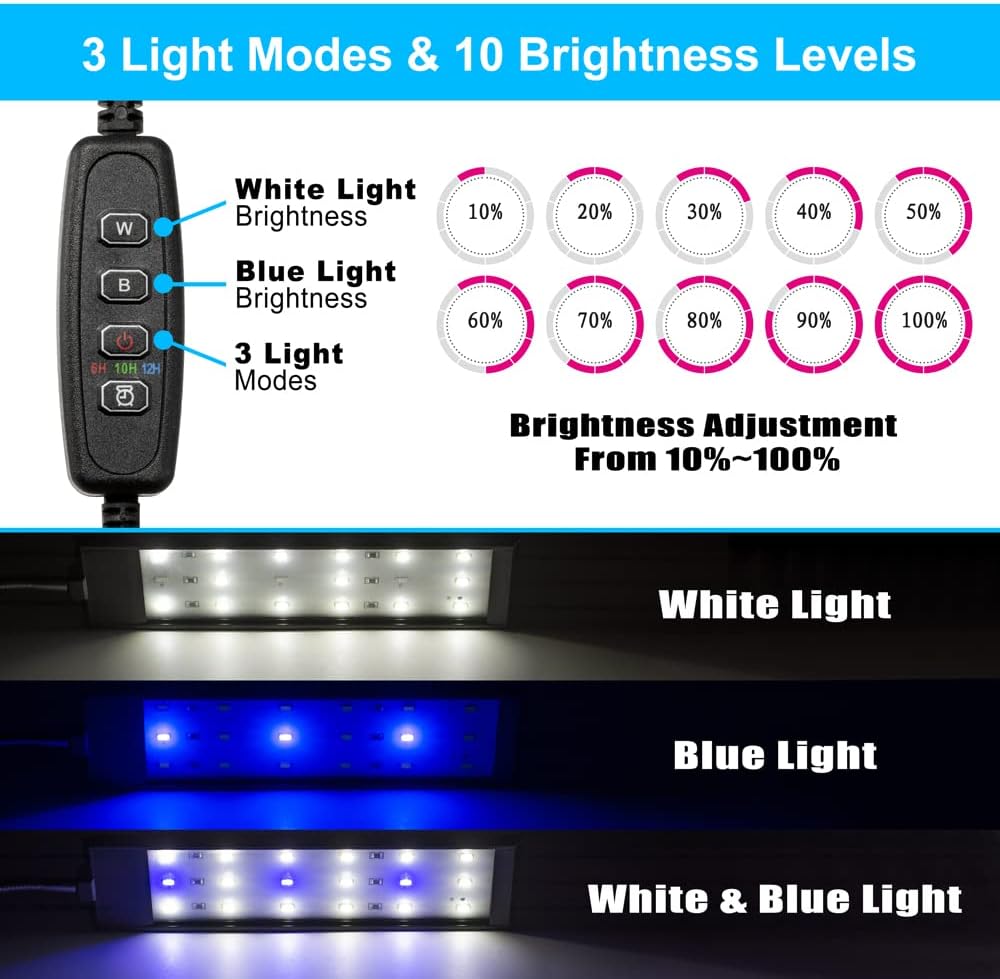
Image 5: Light Modes and Brightness Control.
- Press the Mode button (often labeled with a light bulb icon or 'M') to cycle through the three light modes: White, Blue, and White & Blue.
- Use the White light button (W) to adjust the brightness of the white LEDs. Each press increases brightness by 10%, from 10% to 100%.
- Use the Blue light button (B) to adjust the brightness of the blue LEDs. Each press increases brightness by 10%, from 10% to 100%.
5.3. Timer Function
Set the light to automatically turn on and off daily.

Image 6: Timer Setting Options.
- Press the Timer button (labeled with a clock icon and '6H', '10H', '12H') to select the desired lighting duration: 6 hours, 10 hours, or 12 hours.
- Once a timer is set, the light will automatically turn on and off at the same time each day.
6. Maintenance
Regular maintenance ensures optimal performance and extends the lifespan of your aquarium light.
- Cleaning: Disconnect the power before cleaning. Use a soft, damp cloth to wipe the LED light bar and the clip. Avoid using abrasive cleaners or solvents. Ensure the light is completely dry before reconnecting power.
- Inspection: Periodically check the power cord and connections for any signs of damage. Do not use the light if any part is damaged.
- Water Contact: While the light is designed for aquarium use, avoid submerging the light bar or controller in water.
7. Troubleshooting
If you encounter issues with your DaToo Aquarium LED Clip Light, refer to the following common solutions:
- Light Not Turning On:
- Check if the power adapter is securely plugged into the electrical outlet and the light.
- Ensure the power button on the inline controller has been pressed.
- Verify that the electrical outlet is functional by plugging in another device.
- Timer Not Functioning:
- Ensure a timer duration (6H, 10H, or 12H) has been selected.
- The timer starts from the moment it is set. If you set it at 9 AM for 6 hours, it will turn off at 3 PM and turn on again at 9 AM the next day.
- Inconsistent Brightness/Flickering:
- Check for loose connections in the power cable or adapter.
- Ensure the light bar is clean and free from water spots or debris.
If these steps do not resolve the issue, please contact customer support.
8. Specifications
| Feature | Specification |
|---|---|
| Brand | DaToo |
| Model Name | 11-DTAL |
| Wattage | 10 watts |
| Number of Light Sources | 27 (21 White, 6 Blue) |
| Material | Metal, Plastic (Aluminum Alloy Shell, ABS Mount Clip) |
| Product Dimensions | 13.7 x 1.96 x 5.9 inches (Light bar: 18.1 x 2 x 1.7 inches, Soft Arm: 5.4 inches) |
| Item Weight | 11.3 ounces |
| Fit Fish Tank Thickness | ≤0.98 inches |
| Light Modes | White, Blue, White & Blue |
| Brightness Range | 10%~100% (10 levels) |
| Timer Options | 6 hours, 10 hours, 12 hours |
9. Warranty and Support
The DaToo Aquarium LED Clip Light comes with a One Year Warranty from the date of purchase. This warranty covers manufacturing defects and ensures product reliability.
For warranty claims, technical support, or any inquiries regarding your product, please contact DaToo customer service through your original point of purchase or visit the official DaToo website for contact information.