
Introduction
This manual provides comprehensive instructions for the SHZSR CarPlay and Android Auto interface. This kit integrates wireless CarPlay, wireless Android Auto, and Mirror Link functionalities into your existing Porsche PCM 3.1 / CDR+ system, while fully retaining all original PCM features. Please read these instructions carefully before installation and operation to ensure proper functionality and safety.
Compatibility
The SHZSR CarPlay and Android Auto interface is designed for Porsche vehicles equipped with the PCM 3.1 infotainment system. Compatible models include:
- Porsche 911 (991.1)
- Porsche Boxster
- Porsche Cayman
- Porsche Macan (2014-2016)
- Porsche Cayenne (2010-2017)
- Porsche Panamera (2010-2016)
It is crucial to verify your vehicle's PCM version before installation. The following image illustrates how to identify the PCM 3.1 system by its button differences and silver chrome trim, distinguishing it from PCM 3.0 and PCM 4.0.

Figure 1: Identification of PCM 3.1 system based on interface and trim details.

Figure 2: Visual guide for distinguishing PCM versions (3.0, 3.1, 4.0).
Key Features
Upon installation, this interface adds the following functionalities to your vehicle:
- Wireless CarPlay: Seamless integration for iPhone users, allowing access to navigation, music, calls, and messages.
- Wireless Android Auto: Seamless integration for Android phone users, providing access to navigation, music, calls, and messages.
- Mirror Link: Screen mirroring functionality for both iOS and Android devices.
- Media Playback: Supports various media formats via USB.
- Camera Support: Compatible with original and aftermarket reverse, front, and 360-degree cameras.
- AHD Video Decoding: Advanced video decoding for high-definition camera inputs.
- DSP Digital Audio Decoding: Enhanced audio processing for superior sound quality.
- Fast Charging: Provides fast charging capabilities for connected devices.
- Non-destructive Connection: Designed for plug-and-play installation without modifying original vehicle wiring.
- Original Car Controls: Retains full functionality of original car controls, including the center rocker and knob.
- Original Car Bluetooth: Works in conjunction with the original car's Bluetooth system.

Figure 3: Overview of key features provided by the interface.

Figure 4: Visual representation of Wireless CarPlay and Android Auto interfaces.

Figure 5: CarPlay interface displaying navigation and music.
Setup: What's in the Box
Please ensure all components are present before beginning installation:
- CarPlay Box
- LVDS Harness
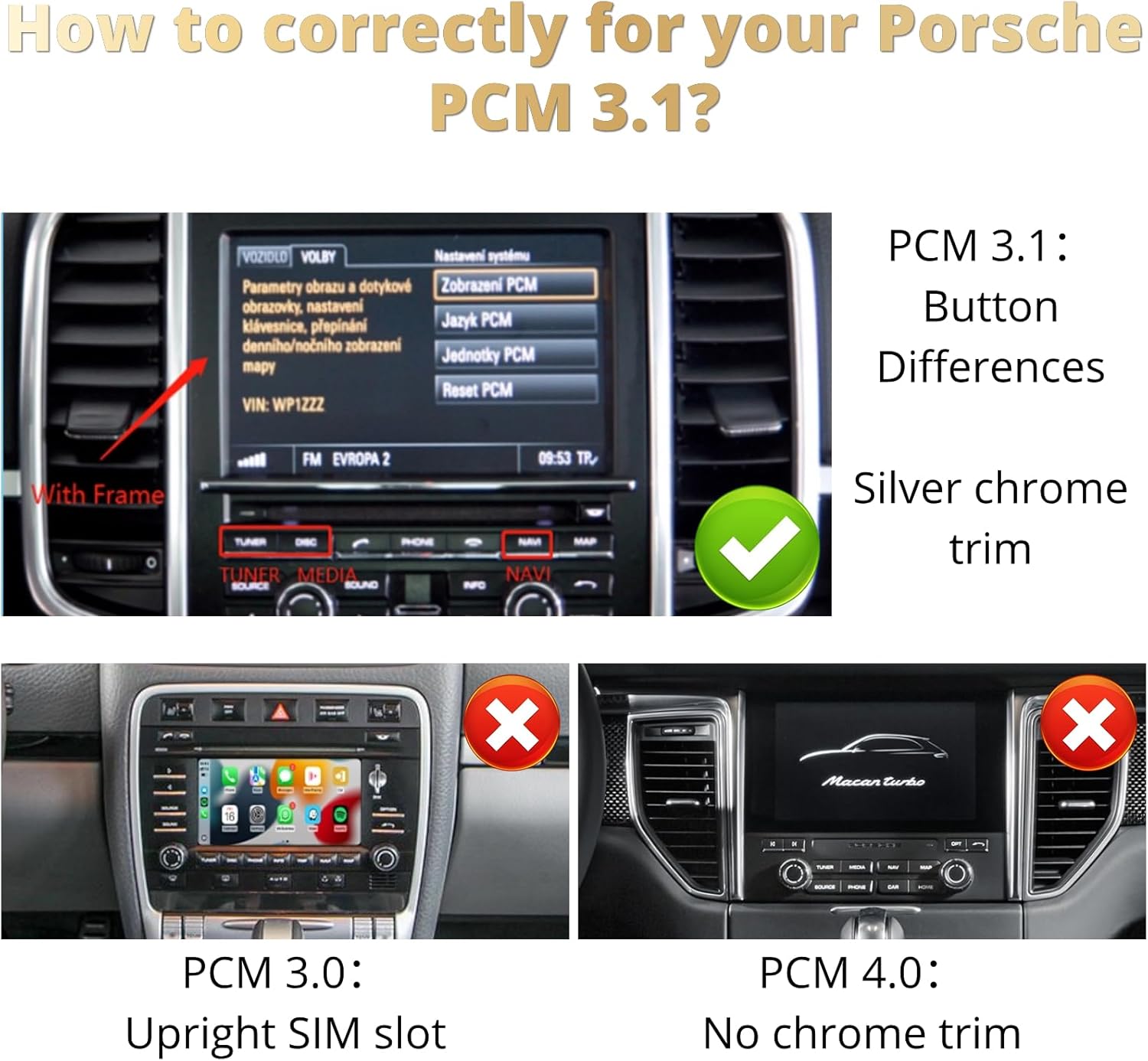
Figure 6: The CarPlay interface box, showing connection ports.
Installation
The SHZSR CarPlay and Android Auto interface is designed for a non-destructive, plug-and-play installation. This means no cutting or splicing of original vehicle wires is required. The LVDS harness connects directly to existing ports within your vehicle's infotainment system.
- Preparation: Ensure the vehicle's ignition is off and the battery is disconnected before starting the installation.
- Access PCM Unit: Carefully remove the necessary trim panels to access the rear of your Porsche PCM 3.1 unit. Refer to your vehicle's service manual for specific panel removal instructions.
- Connect LVDS Harness: Disconnect the original LVDS cable from the PCM unit and connect it to the provided LVDS harness. Then, connect the other end of the LVDS harness to the PCM unit.
- Connect CarPlay Box: Connect the CarPlay box to the LVDS harness and other necessary power/signal cables as indicated in the detailed wiring diagram (not included in this general manual, refer to product-specific installation guide).
- Route Cables: Securely route all cables to prevent interference and ensure a tidy installation.
- Reassemble: Reconnect the battery and reassemble all trim panels.
Note: Professional installation is recommended if you are not familiar with automotive electronics.
Operation
The interface is designed to integrate seamlessly with your vehicle's existing controls.
- Switching Modes: To switch between the original PCM system and the CarPlay/Android Auto interface, use the designated button or sequence as described in the product-specific guide.
- Control: The system supports original car knob control and the center rocker for navigation within the CarPlay or Android Auto interface.
- Voice Control: Utilize voice assistants like Siri (for CarPlay) or Google Assistant (for Android Auto) for hands-free operation of maps, music, phone calls, and messages.
- Applications: Access your favorite applications such as Maps, iTunes, Apple Music, Spotify, and other compatible apps directly from your car's display.

Figure 7: CarPlay interface in a Porsche vehicle.

Figure 8: Android Auto interface in a Porsche vehicle.
Maintenance
The SHZSR interface requires minimal maintenance. Keep the unit and connections free from dust and moisture. Avoid using harsh chemicals for cleaning. Ensure all cables remain securely connected.
Troubleshooting
If you encounter issues, consider the following basic troubleshooting steps:
- No Display: Check all cable connections, especially the LVDS harness. Ensure the power supply to the CarPlay box is secure.
- No Audio: Verify that the audio output settings on your phone and the car's PCM system are correctly configured. Ensure the original car Bluetooth is active and paired.
- Intermittent Connection: Ensure your phone's Wi-Fi and Bluetooth are enabled and stable. Try restarting both your phone and the car's infotainment system.
- Controls Not Responding: Confirm that the interface is fully initialized. If using original car controls, ensure they are functioning correctly with the original PCM system.
For persistent issues, please contact customer support.
Specifications
| Feature | Detail |
|---|---|
| Brand | SHZSR |
| Model Number | PCM 3.1 |
| Connectivity Technology | Mirror Link, Wireless Android Auto, Wireless CarPlay |
| Controller Type | Push Button, Original Car Knob Control |
| Special Features | Non-destructive connection, Plug and Play, Support original / aftermarket Reverse/Front/360 camera, Supports CarPlay & Android Auto, Works with original car Bluetooth, Works with original car controls |
| Compatible Devices | Porsche Boxster, Cayman & 911 (981 & 991.1) - 2012 to 2016, Cayenne - 2010 to 2017, Macan - 2014 to 2016, Panamera - 2010 to 2016 |
| Connector Type | LVDS |
| Audio Output Mode | Stereo |
| Item Weight | 2 Pounds |
| Supported Internet Services | Maps, iTunes |
| Audio Output Type | Speakers |
| Built-In Media | CarPlay box, LVDS Harness |
Warranty Information
This product comes with a 1-year warranty from the date of purchase. The warranty covers manufacturing defects and malfunctions under normal use. It does not cover damage caused by improper installation, misuse, accidents, or unauthorized modifications. Please retain your proof of purchase for warranty claims.
Customer Support
For technical assistance, installation queries, or troubleshooting beyond the scope of this manual, please contact SHZSR customer support. Refer to your product packaging or the seller's website for contact details.
