
INKEE GCA20U
INKEE GCA20U Inflatable LED Tube Light
Instruction Manual
1. Introduction
Thank you for choosing the INKEE GCA20U Inflatable LED Tube Light. This manual provides essential information for the safe and effective use of your new lighting equipment. Please read this manual thoroughly before operation and retain it for future reference.
The INKEE GCA20U is a versatile 20W bi-color LED tube light designed for photography and videography. Its inflatable design allows for compact storage and a large luminous surface when in use. It features adjustable color temperature and is powered via USB Type-C.
2. Product Features
- 90cm Large Luminous Surface: Equipped with 320 full-spectrum lamp beads and a Color Rendering Index (CRI) of 95+, providing a wide and even light spread. The inflation port's design ensures a complete luminous surface.
- Adjustable Bi-Color Temperature: Quickly switch between four color temperature levels: 2700K, 4000K, 5600K, and 6500K to match various lighting environments.
- Type-C Power Compatibility: Fully compatible with PD protocol for 20W full power output, and also supports universal 5V (10W) power supplies.
- Soft Light Effect: The white TPU material on the back enhances overall brightness by 10% and ensures durability for various weather conditions.
- Convenient Inflation/Deflation: Features a multifunctional air nozzle supporting both electric and manual inflation. Easily deflated and folded for storage.
- N52 Magnets: Three integrated N52 magnets allow for flexible mounting options on metallic surfaces.
- 2-Meter Power Control Cable: Provides extended reach and includes a four-button remote for easy operation.
3. Package Contents
Please check the package for the following items:
- INKEE GCA20U LED Tube Light x 1
- Instruction Manual x 1
- Storage Bag x 1
4. Setup
4.1 Inflation
The INKEE GCA20U is designed to be inflated before use to achieve its full luminous surface. It supports both manual and electric inflation.
- Locate the air nozzle on the tube light.
- For Manual Inflation: Pinch the base of the air nozzle to open the valve and blow air into the tube until it is firm. Release the pinch to seal the valve.
- For Electric Inflation: Attach a compatible air pump (not included) to the air nozzle. Inflate until the tube is firm. Remove the pump and ensure the valve is sealed.

Image: Inflation methods for the INKEE GCA20U LED Tube Light, demonstrating both manual mouth blowing and the use of an electric air pump.
4.2 Power Connection
Connect the tube light to a power source using the provided Type-C cable.
- Insert the Type-C connector into the port on the tube light's control unit.
- Connect the other end of the cable to a compatible USB power source (e.g., power bank, wall adapter). For full 20W output, a power source supporting PD protocol is recommended. A universal 5V (10W) power supply can also be used.

Image: The INKEE GCA20U LED Tube Light's Type-C interface connected to different power supply devices, including a power bank and a 20W wall charger.
4.3 Mounting
The GCA20U can be mounted in various ways:
- Stand Mounting: The tube light can be attached to a light stand using appropriate clamps (not included) or its integrated mounting points.
- Magnetic Attachment: Utilize the three built-in N52 magnets to firmly attach the light to metallic surfaces.

Image: The INKEE GCA20U LED Tube Light demonstrating its N52 magnets for secure attachment to metallic surfaces.
5. Operating Instructions
The INKEE GCA20U is controlled via its wired remote control.

Image: The wired remote control for the INKEE GCA20U LED Tube Light, featuring buttons for power, brightness adjustment, and mode selection.
- Power On/Off: Press and hold the power button (usually marked with a circle and a vertical line) on the remote control to turn the light on or off.
- Adjusting Brightness: Use the '+' and '-' buttons to increase or decrease the light's intensity. The light typically offers multiple brightness levels.
- Adjusting Color Temperature: Press the 'M' (Mode) button to cycle through the available color temperature settings: 2700K, 4000K, 5600K, and 6500K.

Image: Visual representation of the four adjustable color temperatures (2700K, 4000K, 5600K, 6500K) available on the INKEE GCA20U LED Tube Light.
6. Maintenance
6.1 Cleaning
- Ensure the device is powered off and disconnected from any power source before cleaning.
- Wipe the exterior of the tube light with a soft, dry cloth. For stubborn dirt, a slightly damp cloth can be used, followed by immediate drying.
- Do not use harsh chemicals, abrasive cleaners, or solvents, as these can damage the TPU material and electronic components.
6.2 Deflation and Storage
- To deflate, locate the air nozzle and press the valve to release air. Gently roll or press the tube light to expel all air.
- Once deflated, fold the tube light neatly and place it in the provided storage bag.
- Store the device in a cool, dry place, away from direct sunlight and extreme temperatures.
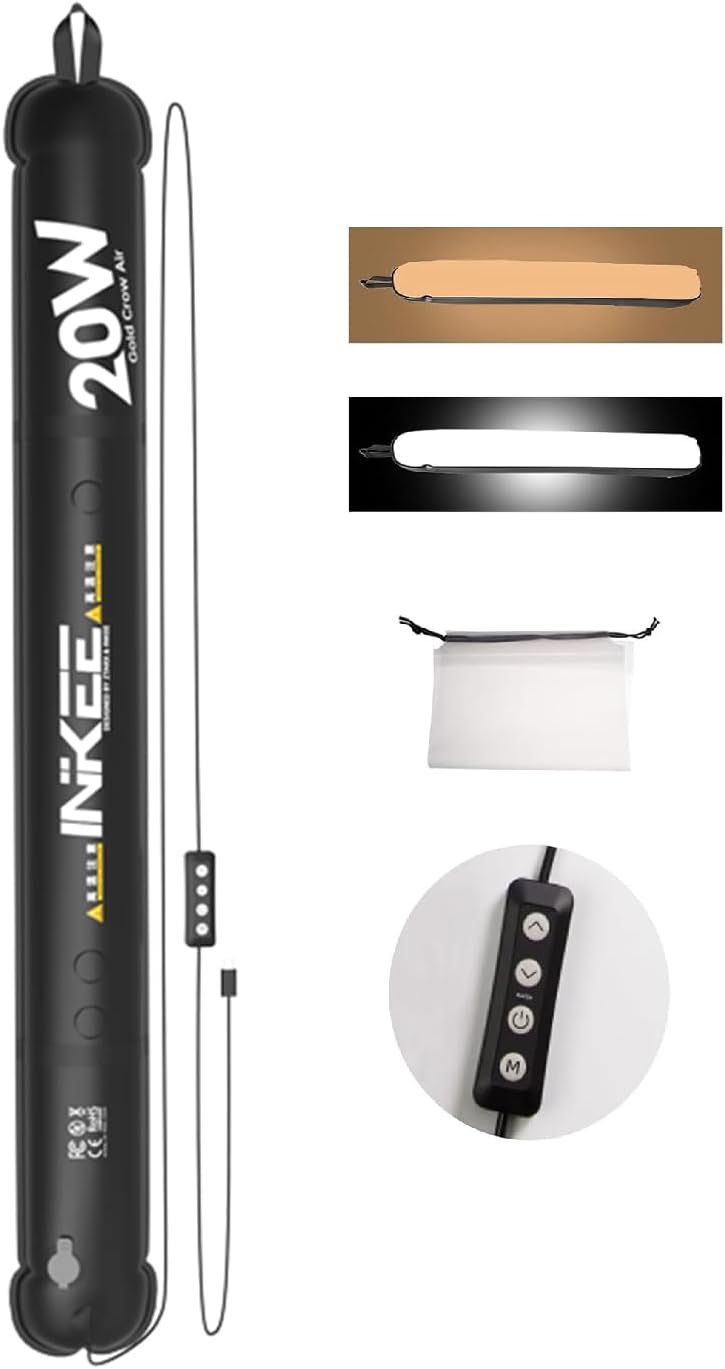
Image: The INKEE GCA20U LED Tube Light shown deflated and folded, ready for compact storage in its bag.
7. Troubleshooting
| Problem | Possible Cause | Solution |
|---|---|---|
| Light does not turn on. | No power or insufficient power supply. | Ensure the Type-C cable is securely connected. Use a power source that can deliver at least 10W (5V/2A) or 20W (PD compatible) for full functionality. Check if the power source is working. |
| Light turns off unexpectedly during use. | Overheating or unstable power supply. | Ensure adequate ventilation around the control unit. Verify the power source is stable and can continuously supply the required wattage. If using a power bank, ensure it is sufficiently charged. |
| Difficulty inflating/deflating. | Air nozzle valve not properly opened/closed. | For inflation, ensure the valve is fully open by pinching its base. For deflation, press the valve firmly to release air. |
| Light appears dim or flickers. | Insufficient power or faulty cable/unit. | Try a different Type-C cable and power source. Ensure the power source meets the wattage requirements. If the issue persists, contact customer support. |
8. Specifications
| Feature | Detail |
|---|---|
| Brand | INKEE |
| Model Number | GCA20U |
| Light Type | LED |
| Wattage | 20 Watts |
| Color Temperature | 2700K, 4000K, 5600K, 6500K (Adjustable) |
| CRI | 95+ |
| Luminous Surface Length | 90 cm |
| Power Source | USB Type-C (External Power Bank/Adapter Required) |
| Control Method | Wired Remote Control (Button) |
| Item Weight | 12 ounces (approx. 340g) |
| Package Dimensions | 9.09 x 5.47 x 1.93 inches (approx. 23.1 x 13.9 x 4.9 cm) |
| Special Features | Inflatable Design, N52 Magnets, Instant Start |
9. Warranty and Support
This product comes with a standard manufacturer's warranty. Please refer to the warranty card included in your package or visit the official INKEE website for detailed warranty terms and conditions.
For technical support, troubleshooting assistance, or inquiries about replacement parts, please contact INKEE customer service through their official channels. Keep your purchase receipt as proof of purchase for warranty claims.
Related documentsGCA20U


Ask a question about this manual
Ask about setup, troubleshooting, compatibility, parts, safety, or missing instructions. Manuals+ will review the question and use this page’s manual context to help answer it.