
PetSafe PWW00-17957
PetSafe Outlast Pumpless Cat & Dog Water Fountain
Model: PWW00-17957 (60 oz/1.7L Size)
Introduction
Welcome to the user manual for your new PetSafe Outlast Pumpless Cat & Dog Water Fountain. This innovative pet fountain is designed to provide fresh, circulating water for your pets without the need for a traditional submerged pump. Featuring patented HydroSpin technology, it ensures a continuous flow of water, promoting better hydration and a healthier drinking experience for your cat or dog. Its unique design simplifies maintenance and enhances reliability.

Image: A cat drinking from the PetSafe Outlast Pumpless Water Fountain, highlighting its innovative design.
Setup
The PetSafe Outlast Fountain is designed for quick and easy assembly. Follow these steps to set up your fountain:
- Unpack Components: Carefully remove all parts from the packaging. Ensure you have the Outlast 60 oz Fountain unit, 1 PetSafe® Ion-X™ Filter (PAC00-17260), Quick start guide, USB Power Cable, and Wall adaptor.
- Rinse Components: Before first use, rinse all parts of the fountain (excluding the motor unit and power cable) with warm, soapy water. Rinse thoroughly to remove any residue.
- Assemble the Fountain:
- Place the main basin on a flat, stable surface.
- Insert the HydroSpin technology unit into its designated slot in the basin.
- Install the Ion-X filter into the filter housing. Ensure it is seated correctly.
- Place the top cover onto the basin, aligning it properly.
- Fill with Water: Fill the fountain with fresh water up to the maximum fill line. Do not overfill.
- Connect Power: Connect the USB Power Cable to the fountain and then to the Wall adaptor. Plug the adaptor into a standard electrical outlet.
- Initiate Operation: The fountain will begin circulating water automatically once plugged in.

Image: A dog using the fountain, illustrating the ease of setup and cleaning.
Operating Instructions
The PetSafe Outlast Fountain is designed for continuous operation to ensure your pet always has access to fresh, circulating water.
- Continuous Flow: The fountain's HydroSpin technology will continuously circulate water when plugged in, providing a constant stream for your pet to drink from.
- Smart & Quiet Motor: The intelligent sensors in the fountain are designed to slow water flow at night, reducing noise for a quieter environment. They also automatically shut off the motor when water levels are low to protect the motor and extend its life.
- LED Indicator: The integrated LED indicator will alert you when the water level is low, signaling that it's time for a refill. It also indicates when the filter needs to be changed.
- Refilling: When the LED indicator shows low water, unplug the fountain, remove the top cover, and refill with fresh water up to the maximum fill line. Reassemble and plug back in.
Maintenance
Regular cleaning and filter replacement are crucial for maintaining the hygiene and performance of your PetSafe Outlast Fountain.
Cleaning the Fountain
The PetSafe Outlast Fountain is designed for easy cleaning, with many components being dishwasher-safe.
- Unplug and Disassemble: Always unplug the fountain from the power outlet before cleaning. Disassemble all removable parts, including the top cover, HydroSpin unit, and filter.
- Dishwasher Safe Parts: The basin, top cover, and HydroSpin unit (if removable from the motor housing) are dishwasher safe (top rack only).
- Hand Wash Non-Dishwasher Safe Parts: The motor housing and power cable should never be submerged in water. Wipe them clean with a damp cloth.
- Clean Thoroughly: Use warm, soapy water and a soft brush or sponge to clean any parts not placed in the dishwasher, paying attention to any areas where mineral deposits or debris might accumulate. Rinse all parts thoroughly.
- Dry and Reassemble: Ensure all parts are completely dry before reassembling the fountain.
Filter Replacement
The Ion-X Filter is essential for keeping the water clean and fresh. It uses carbon to remove bad tastes and odors, and ion-exchange resin to soften the water and prevent mineral buildup.
- Frequency: The suggested lifespan for each filter is 2 to 4 weeks, depending on usage and water quality. The LED indicator will also signal when a filter change is needed.
- Steps:
- Unplug the fountain and remove the top cover.
- Remove the old filter and discard it.
- Rinse the new PetSafe® Ion-X™ Filter (PAC00-17260) under cold water for 30 seconds to remove any loose carbon dust.
- Insert the new filter into the filter housing, ensuring it fits securely.
- Reassemble the fountain, refill with water, and plug it back in.

Image: Demonstrating filter replacement for the fountain.
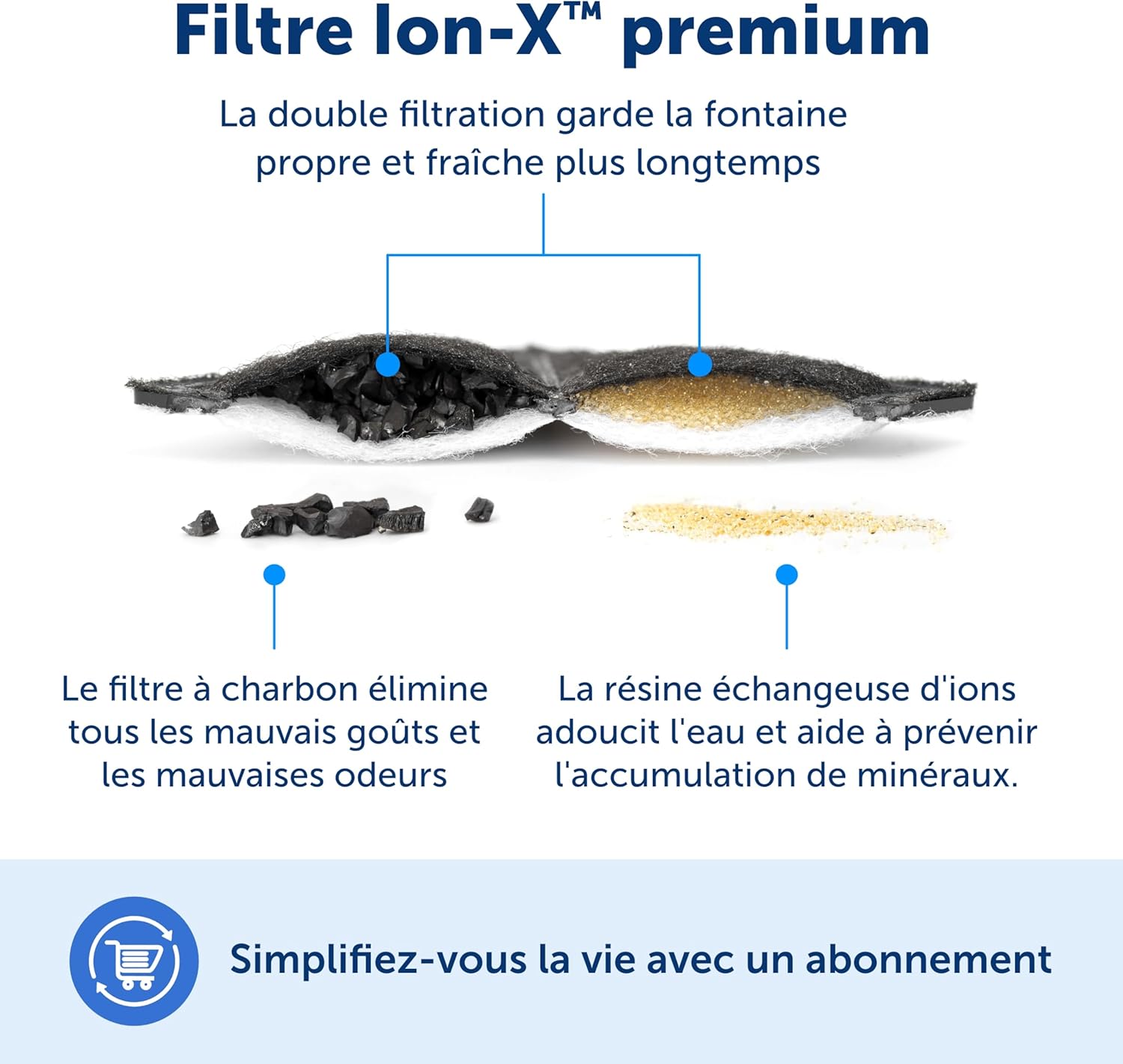
Image: Diagram of the Ion-X filter's internal structure and function.
Troubleshooting
If you encounter any issues with your PetSafe Outlast Fountain, refer to the following common problems and solutions:
| Problem | Possible Cause | Solution |
|---|---|---|
| Fountain is not circulating water. |
|
|
| Fountain is noisy. |
|
|
| Water tastes or smells bad. |
|
|
| LED indicator is red/flashing. |
|
|
Specifications
| Feature | Detail |
|---|---|
| Model Name | PetSafe Outlast 60 oz Pumpless Pet Fountain |
| Model Number | PWW00-17957 |
| Capacity | 60 oz (1.7 L) |
| Dimensions (LxWxH) | 10.15"L x 8.5"W x 6.8"H |
| Weight | 2.95 pounds (1.34 Kilograms) |
| Material | Plastic |
| Color | White |
| Filter Type | PetSafe® Ion-X™ Filter (PAC00-17260) |
| Power | USB Power Cable with Wall Adaptor |
| Target Audience | Cats, Dogs |
| Specific Uses | Indoor |
| Manufacturer | Radio Systems Corporation |
Warranty and Support
Your PetSafe Outlast Pumpless Cat & Dog Water Fountain comes with a 1 Year Limited Warranty from the date of purchase. This warranty covers defects in materials and workmanship under normal use.
For warranty claims, technical support, or additional assistance, please contact PetSafe Customer Service.
- Online Resources: You can often find FAQs, troubleshooting guides, and product registration on the official PetSafe website.
- Contact Information: Refer to the Quick Start Guide included with your product or visit the PetSafe website for the most current contact details (phone, email, or chat support).
- User Manual (PDF): A comprehensive user manual in PDF format is available for download here.
Related documentsPWW00-17957


Ask a question about this manual
Ask about setup, troubleshooting, compatibility, parts, safety, or missing instructions. Manuals+ will review the question and use this page’s manual context to help answer it.