
Introduction
The Amaran Ace 25x is a compact and powerful bi-color LED light designed for mobile creators. It offers versatile lighting solutions with adjustable color temperature, intensity, and a boost mode for extra brightness. This manual provides essential information for setting up, operating, and maintaining your Amaran Ace 25x.
What's in the Box
Upon unboxing your Amaran Ace 25x, verify that all the following components are included:
- 1x Amaran Ace 25x LED Light
- 1x Amaran Ace Dome Diffuser
- 1x Amaran Ace Lock to Cold Shoe Adapter
- 1x Amaran USB-C Charging Cable (50cm)

Image: The Amaran Ace 25x light, Ace Dome Diffuser, Ace Lock to Cold Shoe Adapter, and USB-C Charging Cable.
Product Features
- Compact and Powerful: Delivers up to 32W output in a mini form factor.
- Bi-Color Lighting: Adjustable color temperature from 2,700K to 6,500K.
- High Brightness: Up to 6,320 lux at 0.5m in Boost Mode.
- Quick Setup: Amaran Ace Lock quick-release mount for fast attachment.
- Long Battery Life: Up to 4 hours and 40 minutes in Silent Mode.
- Fast Charging: Recharges from 0-90% in approximately 40 minutes via PD fast charging.
- Simplified Control: User-friendly color screen, custom shortcuts, and wireless control via the Amaran app.
- Magnetic Back: Allows for easy attachment to metal surfaces.
- Quiet Cooling System: Operates with minimal noise, max 28dB within 1m.
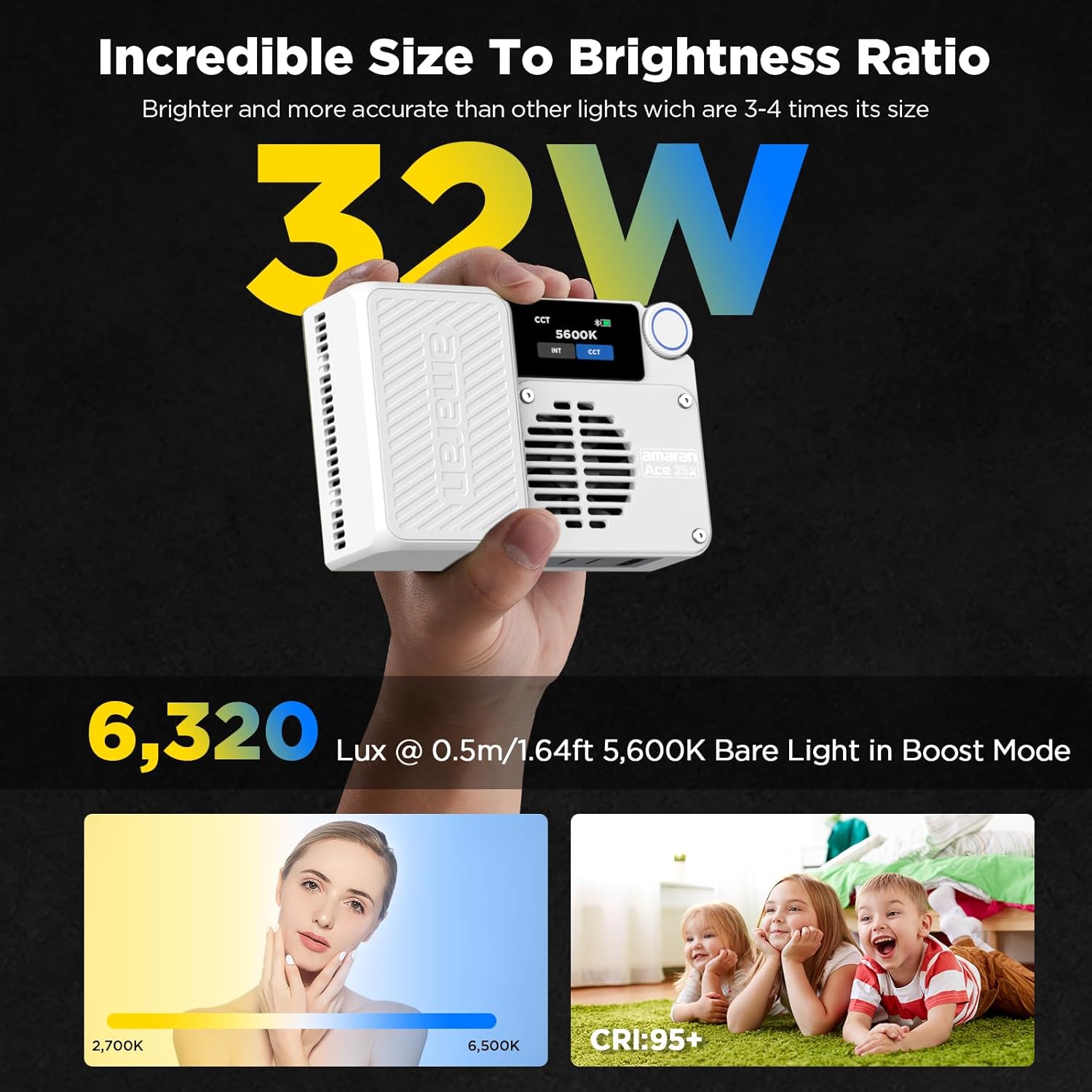
Image: The Amaran Ace 25x in hand, demonstrating its compact size and powerful output.

Image: The Amaran Ace 25x with its magnetic dome diffuser and magnetic fixation feature.

Image: Portability of the Amaran Ace 25x, fitting into a pocket.
Setup
Attaching the Diffuser
The Amaran Ace Dome Diffuser attaches magnetically to the front of the LED light. Simply align the diffuser with the light panel and it will snap into place. This helps to soften the light output for a more natural look.
Mounting the Light
The Amaran Ace 25x features an Amaran Ace Lock quick-release mount. This allows for fast and secure attachment to cameras or tripods using the included Cold Shoe Adapter. The light also has a 1/4-20 screw mount for direct attachment to compatible accessories.

Image: Attaching the Amaran Ace Lock cold shoe adapter.
Operating Instructions
Power On/Off
Locate the power switch on the side of the unit. Slide the switch to the 'On' position to power on the device. Slide it to 'Off' to power down.
Adjusting Settings (On-Device)
The Amaran Ace 25x features a user-friendly color screen and a settings wheel for intuitive control. The settings wheel allows you to switch between intensity (INT) and Kelvin temperature (CCT). A click of the wheel confirms your selection. The MODE button allows access to other settings like Bluetooth and button customization.
Boost Mode
Activate Boost Mode for maximum brightness, increasing output up to 32W. This is ideal for situations requiring extra illumination.

Image: The Amaran Ace 25x display showing Boost Mode.
App Control
For greater flexibility, control your Amaran Ace 25x wirelessly using the Amaran app (Sidus Link). The app allows for comprehensive adjustments of brightness, color temperature, effects, and fan speed.

Image: Controlling the Amaran Ace 25x with the Amaran app.
Video: Official commercial demonstrating quick setup, brightness adjustment, app control, boost mode, and magnetic mounting of the Amaran Ace 25x.
Mounting Options
The Amaran Ace 25x offers multiple mounting solutions for diverse shooting scenarios:
- Magnetic Fixation: The integrated magnetic back allows the light to be securely attached to any metal surface.
- Cold Shoe Mount: Use the included Amaran Ace Lock to Cold Shoe Adapter to mount the light onto cameras or other cold shoe compatible accessories.
- 1/4-20 Screw Mount: The light itself and the cold shoe adapter both feature 1/4-20 screw mounts for compatibility with various light stands and tripods.

Image: Amaran Ace 25x magnetically attached to a metal surface.
Charging and Battery Life
The Amaran Ace 25x is equipped with a 4,500mAh battery, providing extended operation time. It supports PD fast charging via its USB-C port.
- Runtime: Up to 4 hours and 40 minutes in Silent Mode.
- Recharge Time: Approximately 40 minutes to reach 90% charge from empty.

Image: Amaran Ace 25x charging via USB-C.
Maintenance
- Cleaning: Use a soft, dry cloth to clean the exterior of the light. Avoid using harsh chemicals or abrasive materials.
- Storage: Store the light in a cool, dry place away from direct sunlight and extreme temperatures.
- Battery Care: For optimal battery longevity, avoid fully discharging the battery frequently. Charge the device regularly, even when not in use for extended periods.
Troubleshooting
| Problem | Possible Cause | Solution |
|---|---|---|
| Light does not turn on. | Low battery or power switch is off. | Charge the battery using the USB-C cable. Ensure the power switch is in the 'On' position. |
| Cannot connect to Amaran app. | Bluetooth is off or app needs reset. | Ensure Bluetooth is enabled on your device. Restart the Amaran app and the light. |
| Light output is dim. | Intensity setting is low or battery is low. | Increase the intensity setting via the control wheel or app. Charge the battery. |
Specifications
| Feature | Detail |
|---|---|
| Brand | Amaran |
| Model Name | ACE 25x |
| Output Power | Up to 32W (Boost Mode) |
| Color Temperature | 2,700K - 6,500K |
| Brightness | 6,320 lux @ 0.5m (Boost Mode) |
| Battery Capacity | 4,500mAh |
| Battery Life (Silent Mode) | Up to 4 hours 40 minutes |
| Charging Time (0-90%) | Approx. 40 minutes (PD Fast Charging) |
| Dimensions (L x W x H) | 4.65" x 3.03" x 1.3" |
| Weight | 416g (0.92lb) |
| Cooling System Noise | Max 28dB @ 1m |
| Connectivity | Bluetooth (Amaran App / Sidus Link) |
| Mounting Options | Magnetic, Cold Shoe, 1/4-20 Screw Mount |
| Water Resistance Level | Not Water Resistant |
Warranty and Support
The Amaran Ace 25x comes with a 12-Month Warranty from the date of purchase. For technical support, troubleshooting assistance, or warranty claims, please contact Amaran customer service through their official website or the retailer where the product was purchased.


