
1. Product Overview
The GEYA GPS8-01-U-40A is an AC220V Din Rail mounted overvoltage and undervoltage protective device designed for household equipment. It provides essential protection against voltage fluctuations, ensuring the safety and longevity of connected appliances. This device features real-time voltage monitoring, self-reset capabilities after a fault, and clear LED indicators for fault status.

Image 1.1: Front view of the GEYA GPS8-01 Overvoltage Undervoltage Protective Device.
2. Safety Information
Please read this manual carefully before installation and operation. Incorrect installation or use may result in electric shock, fire, or damage to the device and connected equipment. Always adhere to local electrical codes and standards.
- Installation should only be performed by qualified personnel.
- Ensure the main power supply is disconnected before any wiring or maintenance.
- Do not operate the device if it is damaged or malfunctioning.
- Verify correct wiring connections to prevent short circuits or improper operation.
- Keep the device away from moisture, dust, and corrosive environments.
3. Product Features
- Voltage (True RMS) monitoring and protection.
- Adjustable overvoltage and undervoltage values.
- Double bus wiring design for enhanced capability.
- Automatic reset after fault conditions.
- Digital display for voltage values and LED indicators for fault status.
- Compact 1-MODULE design for DIN rail mounting.
4. Setup and Installation
4.1 Wiring Diagram
The GPS8-01 device supports both upper and down wiring configurations. Ensure the neutral (N) and incoming line (IN) connections are correctly made as per the diagram below.

Image 4.1: Comparison of upper and down wiring for GPS8-01 and GPS8-02 models. For GPS8-01, connect N to N and IN to 1 for upper incoming line, and N to N and IN to 1 for down incoming line.
4.2 Installation Steps
- Mount the device onto a standard DIN rail.
- Connect the incoming neutral (N) and live (IN) wires to the corresponding terminals on the device.
- Connect the load wires (neutral and live) from the device's output terminals to the equipment requiring protection.
- Ensure all connections are secure and tightened appropriately.
- Once wiring is complete, restore power to the circuit.
Video 4.2: Demonstration of connecting the GEYA protective device to a load and power supply. The video illustrates accessing the load, connecting to the power supply, and turning on electricity to show the device's operation.
5. Operating Instructions
5.1 Panel Diagram and Indicators
The device features a digital display and LED indicators to show operating status and fault conditions.
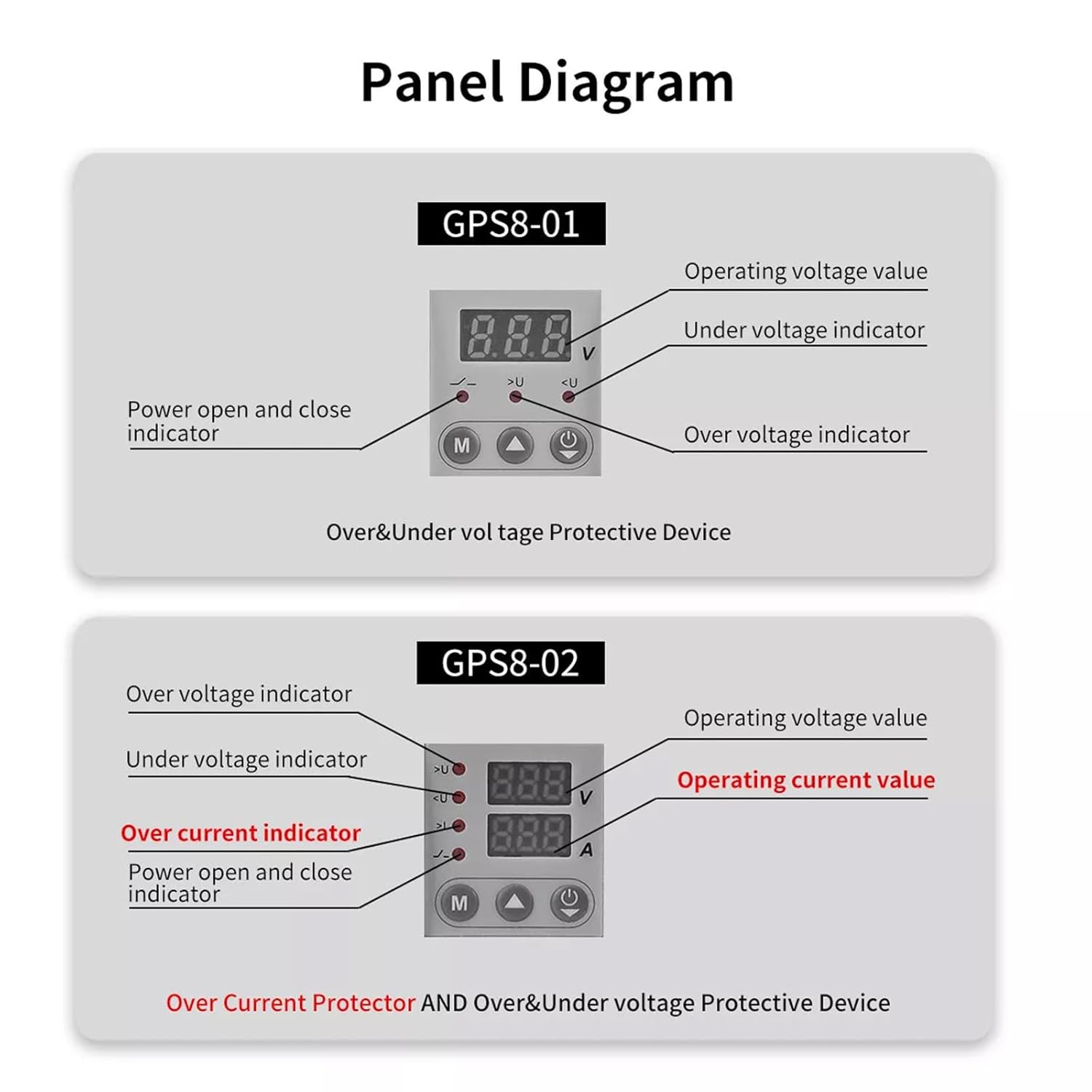
Image 5.1: Panel layout for GPS8-01 and GPS8-02. GPS8-01 displays operating voltage, under voltage indicator, over voltage indicator, and power open/close indicator. GPS8-02 adds over current indicator and operating current value.
- Operating Voltage Value: Displays the current voltage.
- Over Voltage Indicator (>U): Lights up when overvoltage condition is detected.
- Under Voltage Indicator (
- Power Open and Close Indicator: Indicates the power status of the device.
5.2 Parameter Setting
To adjust the protection parameters, press and hold the 'M' button for 3 seconds to enter the parameter setting interface. Use the up and down arrow buttons to navigate and adjust values. Short presses of the arrow buttons can quickly add and drop parameters. If no key is operated for 60 seconds, the device will automatically exit the setting mode.

Image 5.2: Parameter setting flow for GPS8-01 and GPS8-02. For GPS8-01, settings include Overvoltage (230V-300V), Undervoltage (145V-210V), and Reset Time (2s-900s).
GPS8-01 Adjustable Parameters:
- Overvoltage Setting: Range 230V-300V (Factory default: 275V).
- Undervoltage Setting: Range 145V-210V (Factory default: 175V).
- Reset Time Setting: Range 2s-900s (Time before the device automatically resets after a fault).
6. Dimensions
The compact design of the GPS8-01 allows for easy integration into electrical panels.
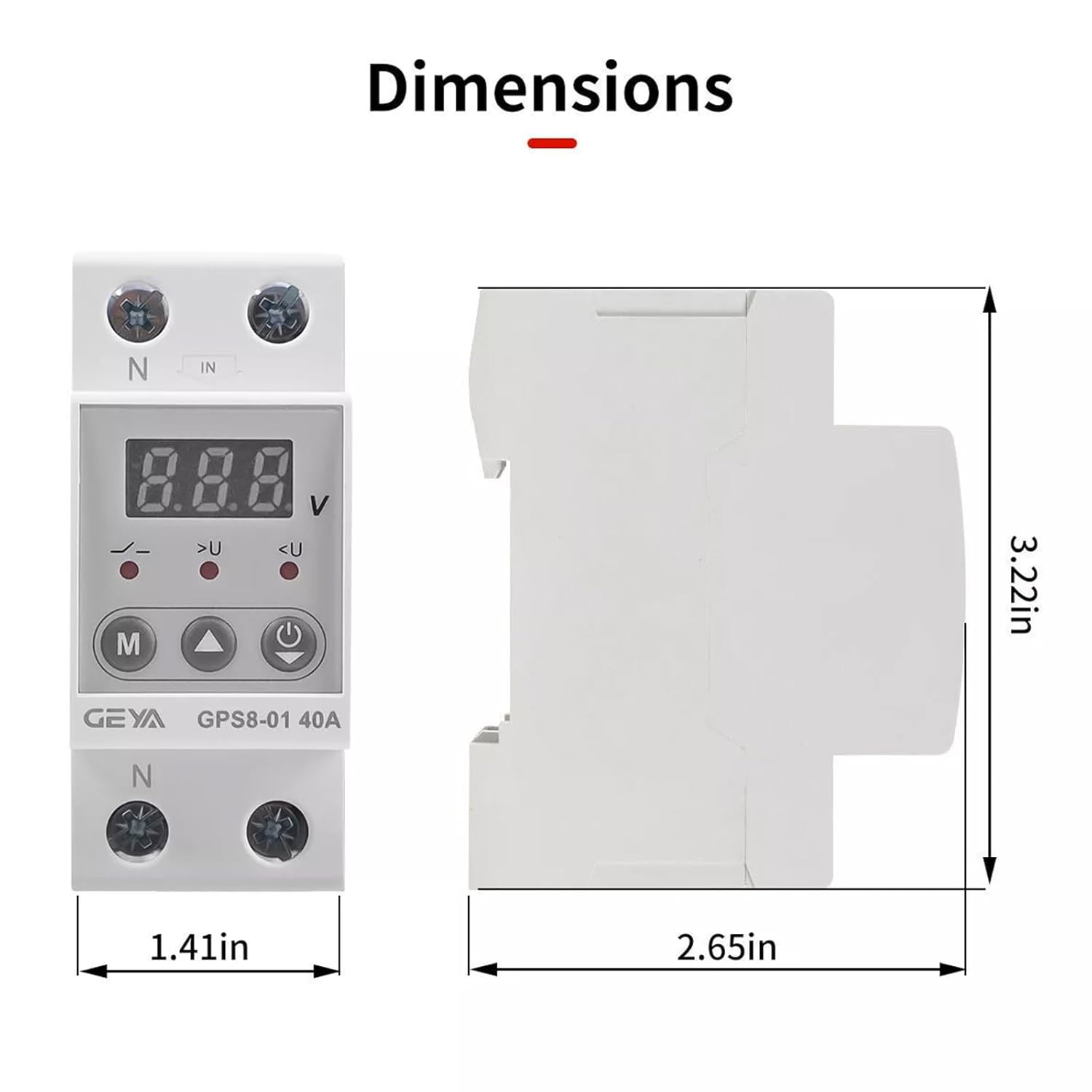
Image 6.1: Dimensions of the GEYA GPS8-01 device. Width: 1.41in (36mm), Height: 3.22in (82mm), Depth: 2.65in (68mm).
7. Technical Specifications
Detailed technical parameters for the GEYA GPS8-01 protective device.
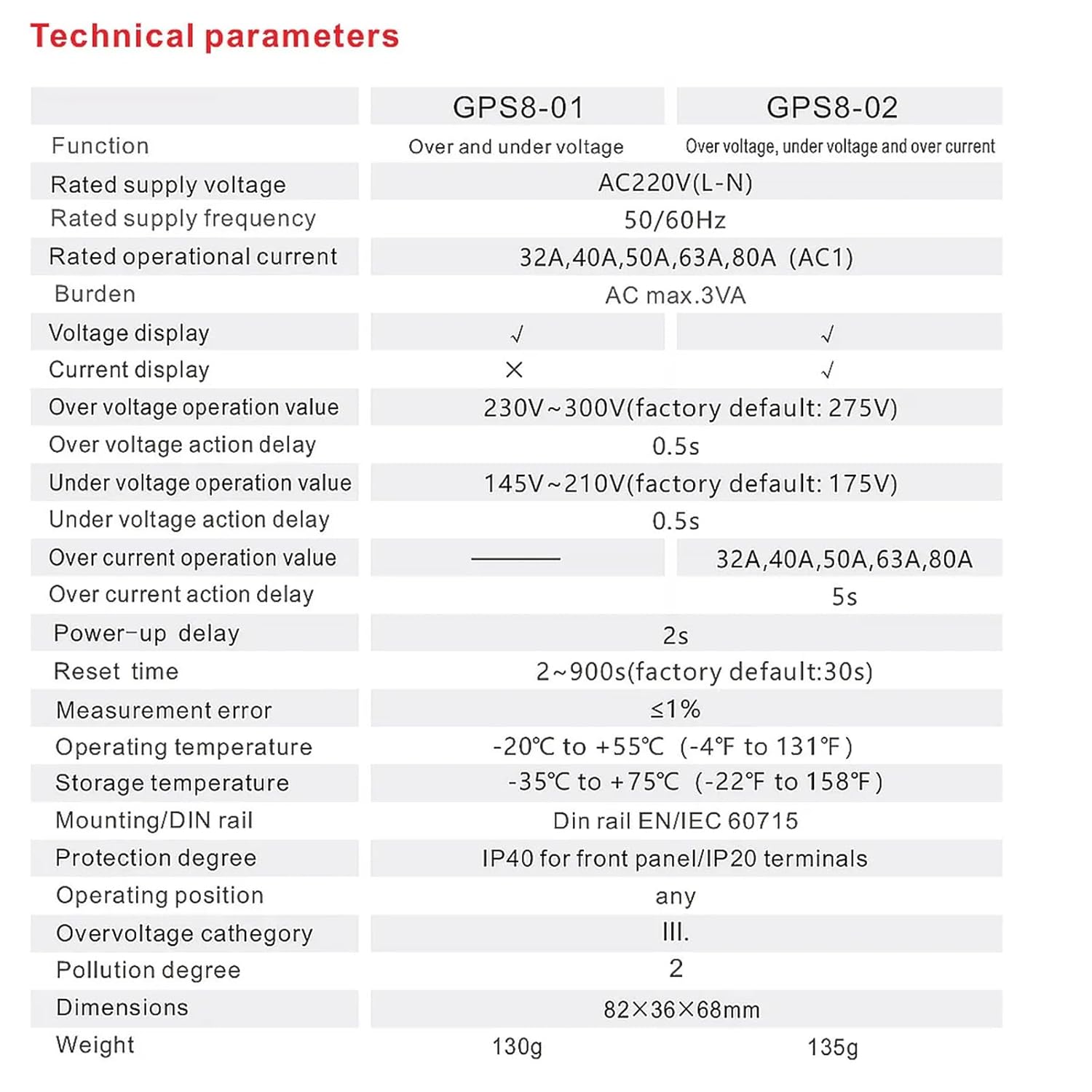
Image 7.1: Technical specifications table comparing GPS8-01 and GPS8-02 models.
| Parameter | GPS8-01 (Over and Under Voltage) |
|---|---|
| Rated supply voltage | AC220V (L-N) |
| Rated supply frequency | 50/60Hz |
| Rated operational current | 32A, 40A, 50A, 63A, 80A (AC1) |
| Burden | AC max. 3VA |
| Voltage display | ✓ |
| Current display | ✗ |
| Over voltage operation value | 230V~300V (factory default: 275V) |
| Over voltage action delay | 0.5s |
| Under voltage operation value | 145V~210V (factory default: 175V) |
| Under voltage action delay | 0.5s |
| Over current operation value | — |
| Over current action delay | — |
| Power-up delay | 2s |
| Reset time | 2~900s (factory default: 30s) |
| Measurement error | ≤1% |
| Operating temperature | -20°C to +55°C (-4°F to 131°F) |
| Storage temperature | -35°C to +75°C (-22°F to 158°F) |
| Mounting/DIN rail | Din rail EN/IEC 60715 |
| Protection degree | IP40 for front panel/IP20 terminals |
| Operating position | any |
| Overvoltage category | III. |
| Pollution degree | 2 |
| Dimensions | 82×36×68mm |
| Weight | 130g |
8. Troubleshooting
If the device is not functioning as expected, consider the following:
- No Display/Power: Check the main power supply and ensure all wiring connections are secure.
- Frequent Tripping: Verify that the set overvoltage/undervoltage thresholds are appropriate for your electrical system. Excessive voltage fluctuations in your area might require consultation with an electrician.
- Device Not Resetting: Check the 'Reset Time Setting' parameter. If the fault condition persists, the device will not reset until the condition is cleared.
- Incorrect Voltage Reading: Ensure proper wiring and that the device is correctly rated for your supply voltage.
For issues not resolved by these steps, contact qualified technical support.
9. Maintenance
The GEYA GPS8-01 device requires minimal maintenance. Regular checks can help ensure optimal performance:
- Periodically inspect the device for any visible damage or loose connections.
- Keep the device clean and free from dust and debris. Use a dry, soft cloth for cleaning.
- Do not use abrasive cleaners or solvents.
10. Warranty and Support
GEYA products are manufactured to high-quality standards. For warranty information and technical support, please refer to the official GEYA website or contact your local distributor. Keep your purchase receipt as proof of purchase.
