
1Mii E35-Black
1Mii Open Ear Headphones E35 User Manual
Model: E35-Black | Brand: 1Mii
Product Overview
The 1Mii Open Ear Headphones E35 are designed for comfort and awareness, featuring an open-ear design that allows you to stay connected to your surroundings while enjoying high-quality audio. These wireless sports earbuds come with rotatable ear hooks for a secure and comfortable fit, making them ideal for various activities.

Image: The 1Mii Open Ear Headphones E35 in blue, shown with their compact charging case.
Key Features:
- Snug Fit & All Day Comfort: Ultra-light design with 120-degree rotatable ear hooks made of skin-friendly material, ensuring no ear canal pain and a secure fit for sports.
- Open Listening, Maximum Awareness: Air conduction technology allows constant awareness of surroundings, enhancing safety during outdoor activities.
- Extended 60 Hours Playtime: Up to 15 hours of playtime on a single charge, with a total of 60 hours using the charging case.
- Clear Call and Premium Sound: Dual ENC noise reduction microphones for clear calls and dual large 16.5mm bio-diaphragm dynamic drivers for robust bass and balanced stereo audio.
- IPX4 Waterproof: Critically sealed areas provide water resistance, making them suitable for sweaty high-intensity sports.

Image: Illustration demonstrating the 180-degree biaxial rotation design of the ear hooks for a perfect fit.
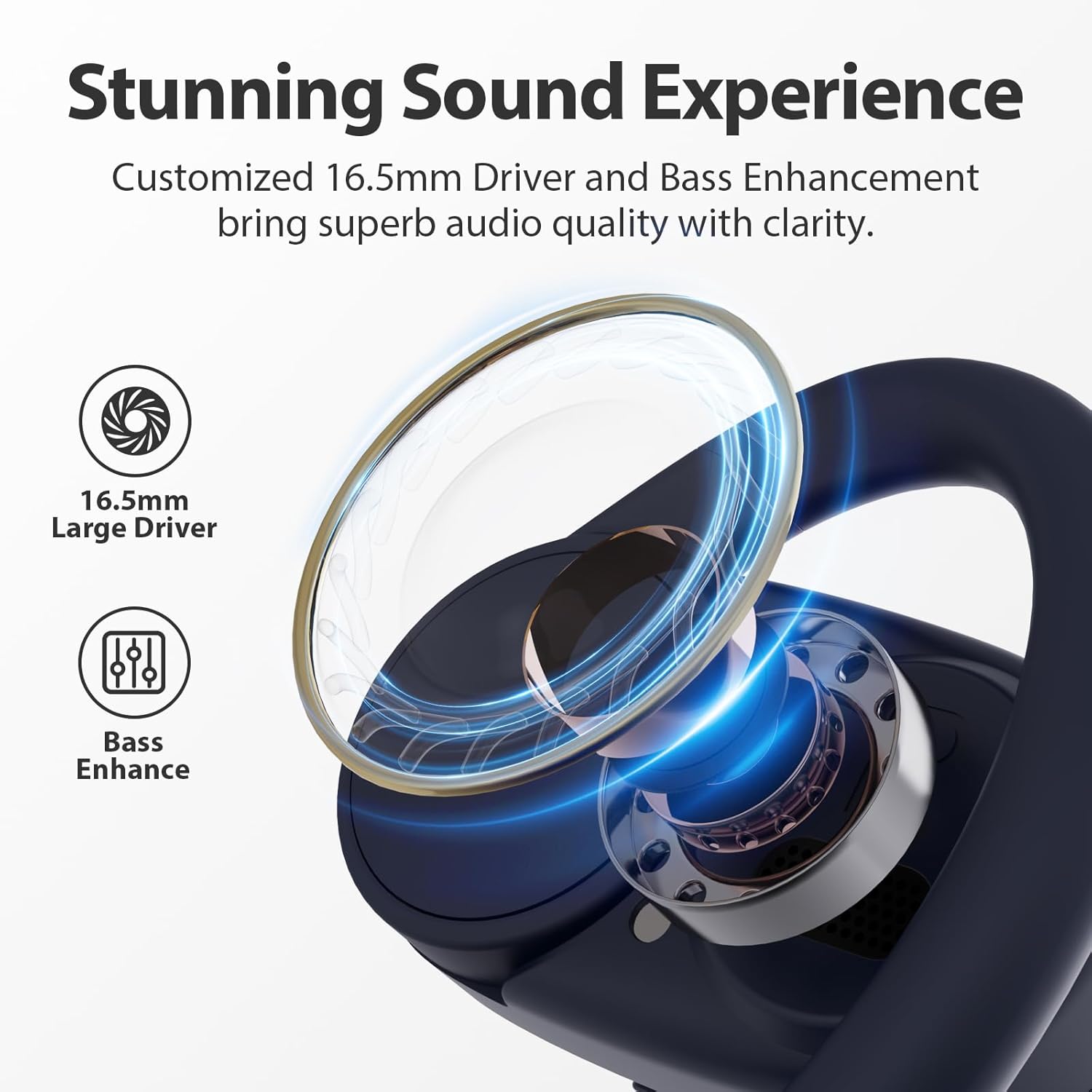
Image: Close-up showing the 16.5mm large driver and bass enhancement technology for stunning sound.

Image: Visual representation of the IPX5 waterproof rating, showing earbuds with water droplets.
Setup Guide
Wearing the Headphones:
Follow these steps for a comfortable and secure fit:
- Take out the headphones from the charging case and unfold the ear hooks to their maximum angle.
- Slide the ear hook behind your ear.
- Finally, turn the earphones to adjust them firmly to the most comfortable angle.

Image: Step-by-step guide illustrating the correct way to wear the open-ear headphones.
Initial Pairing:
1. Open the charging case. The headphones will automatically enter pairing mode.
2. On your device (smartphone, tablet, etc.), enable Bluetooth and search for available devices.
3. Select "1Mii E35" from the list of devices to connect.
4. Once connected, you will hear an audio prompt, and the indicator light on the headphones will change.
Operating Instructions
The 1Mii E35 headphones feature intuitive button controls on each earbud. Refer to the diagram below for specific functions:

Image: Detailed control layout for the left and right earphones, including functions for music playback, calls, and voice assistant.
Left Earphone Controls:
- 1x Press: Pause/Play
- 2x Press: Previous Track
- 2s Hold: Voice Assistant
- 1x Press (during call): Pick up/Hang up a call
- 1s Hold (incoming call): Reject incoming calls
- 5s Hold: Turn off
- 10s Hold: Clear the pairing
Right Earphone Controls:
- 1x Press: Pause/Play
- 2x Press: Next Track
- 2s Hold: Game mode / Music mode toggle
- 1x Press (during call): Pick up/Hang up a call
- 1s Hold (incoming call): Reject incoming calls
- 5s Hold: Turn off
- 10s Hold: Clear the pairing
Charging:
Place the earbuds back into the charging case. The indicator light on the case will show the charging status. Ensure the charging case itself is charged using the provided USB Type-C cable.
Video: An official product video showcasing the features and design of the 1Mii E35 Open Ear Headphones, including comfort, sound, and water resistance.
Maintenance
To ensure the longevity and optimal performance of your 1Mii Open Ear Headphones E35, follow these maintenance guidelines:
- Cleaning: Regularly wipe the earbuds and charging case with a soft, dry, lint-free cloth. Do not use abrasive cleaners, alcohol, or chemical sprays.
- Water Exposure: While IPX4 water-resistant, avoid submerging the headphones in water. Dry them thoroughly if they get wet from sweat or light rain before placing them back in the charging case.
- Storage: Store the headphones in their charging case when not in use to protect them from dust and damage. Avoid extreme temperatures.
- Charging: Use only the provided USB Type-C cable for charging. Do not use damaged cables or chargers.
- Battery Care: For optimal battery life, avoid fully discharging the battery frequently. Charge them regularly, even if not used for extended periods.
Troubleshooting
If you encounter issues with your 1Mii Open Ear Headphones E35, try the following solutions:
| Problem | Possible Solution |
|---|---|
| Headphones not turning on | Ensure the charging case and earbuds are fully charged. Place earbuds in case, close, then open again. |
| Cannot pair with device | Make sure Bluetooth is enabled on your device. Clear previous pairing records on both the headphones (10s hold on either earphone) and your device. Restart both devices and try pairing again. Ensure headphones are in pairing mode. |
| No sound or low volume | Check the volume levels on both your device and the headphones. Ensure headphones are properly connected. Try playing different audio sources. |
| Intermittent connection | Ensure no obstacles are between the headphones and your device. Move closer to your device. Avoid strong electromagnetic interference. |
| Microphone not working | Ensure the headphones are selected as the audio input device on your phone/computer. Check for any obstructions on the microphone ports. |
Specifications
| Feature | Detail |
|---|---|
| Model Name | E35-Black |
| Brand | 1Mii |
| Connectivity Technology | Bluetooth, Wireless |
| Bluetooth Version | 5.0 |
| Ear Placement | Open Ear |
| Earpiece Shape | Ear Hook |
| Audio Driver Size | 16.5 Millimeters |
| Water Resistance Level | IPX4 Water Resistant |
| Playtime (Single Charge) | Up to 15 hours |
| Total Playtime (with Case) | Up to 60 hours |
| Control Method | Remote (Button Controls) |
| Included Components | User Manual, USB Type-C Cable |
| Item Weight | 7 ounces |
What's in the Box
Upon opening your 1Mii Open Ear Headphones E35 package, you should find the following items:
- Wireless Stereo Headset (Left and Right Earbuds)
- Charging Case
- USB Type-C Charging Cable
- User Manual (Instructions)

Image: All items included in the 1Mii E35 Open Ear Headphones package: earbuds, charging case, USB-C cable, and user manual.
Warranty and Support
1Mii products are designed and manufactured to the highest quality standards. For detailed warranty information, please refer to the warranty card included in your product packaging or visit the official 1Mii website. Keep your purchase receipt as proof of purchase for any warranty claims.
For technical support, troubleshooting assistance, or any inquiries regarding your 1Mii Open Ear Headphones E35, please contact 1Mii customer service through their official support channels. Contact information can typically be found on the product packaging or their website.
Related documentsE35-Black

Ask a question about this manual
Ask about setup, troubleshooting, compatibility, parts, safety, or missing instructions. Manuals+ will review the question and use this page’s manual context to help answer it.