
Introduction
Thank you for choosing the Circrane AZ-001 Solar Wireless Pool Thermometer. This device is designed to provide accurate and convenient water temperature readings for various applications, including swimming pools, hot tubs, ice baths, and aquariums. Featuring solar power, a clear digital display, and IPX8 waterproofing, this thermometer ensures reliable performance and ease of use. Please read this manual thoroughly before operation to ensure proper setup and optimal functionality.
Package Contents
- 1 x Circrane Solar Wireless Pool Thermometer (Transmitter)
- 1 x Thermometer Monitor (Receiver)
- 1 x USB-C Charging Cable
- 1 x User Manual
Product Overview
The Circrane AZ-001 system consists of two main components: the floating pool thermometer (transmitter) and the indoor monitor (receiver). The transmitter measures water temperature and transmits it wirelessly to the receiver, which displays both water and indoor temperatures.

Image 1: The Circrane Solar Wireless Pool Thermometer (left) and its indoor receiver (right).
Transmitter (Pool Thermometer)
- Solar Panel: Charges the internal lithium-ion battery.
- Digital Display: Shows current water temperature.
- Function Button: Used for power on/off and switching temperature units.
- USB-C Port: For alternative charging.
- IPX8 Waterproof: Designed for continuous submersion in water.
Receiver (Indoor Monitor)
- LCD Display: Shows water temperature (OUT) and indoor temperature (IN).
- Buttons: For setting temperature units, viewing MAX/MIN records, and channel selection.
- Battery Compartment: For AAA batteries (included).

Image 2: Detailed view of the transmitter and receiver displays, indicating various indicators and temperature readings.
Setup
1. Transmitter (Pool Thermometer) Setup
- Power On: The transmitter is solar-powered and typically powers on automatically when exposed to light. If it does not turn on, ensure it has sufficient solar charge or connect it to a USB-C charger.
- Change Temperature Unit: After powering on, press the function button on the transmitter to switch between Celsius (°C) and Fahrenheit (°F).
- Placement: Place the transmitter in the water (pool, hot tub, etc.). Ensure the solar panel is exposed to sunlight for continuous charging.

Image 3: The pool thermometer features a larger solar panel for efficient charging, ensuring extended battery life.
2. Receiver (Indoor Monitor) Setup
- Install Batteries: Open the battery compartment on the back of the receiver and insert 2 AAA batteries (included), observing the correct polarity.
- Power On: The receiver will power on automatically once batteries are installed.
- Placement: Place the receiver in a convenient indoor location, ensuring it is within the wireless transmission range of the transmitter.
3. Device Pairing
The transmitter and receiver are typically pre-paired at the factory. If pairing is required or connection is lost:
- Ensure both the transmitter and receiver are powered on.
- Bring the transmitter and receiver within 1 meter (3 feet) of each other.
- Press the function button on the transmitter once. The receiver should display the water temperature, indicating successful pairing.
Operating Instructions
Temperature Monitoring
- The receiver displays the water temperature (OUT) from the transmitter and the ambient indoor temperature (IN).
- The temperature refreshes every 10 seconds for quick readings.
- Press the 'MAX/MIN' button on the receiver to view the highest and lowest recorded temperatures. Press again to cycle through.
- Press the '°F/°C' button on the receiver to switch the display unit between Fahrenheit and Celsius.

Image 4: Key features of the Circrane wireless thermometer, highlighting quick temperature reads, maximum/minimum temperature records, and Celsius/Fahrenheit switching.
Maintenance
Charging
- The transmitter is primarily solar-powered. Ensure the solar panel is clean and exposed to direct sunlight for optimal charging.
- For faster charging or during periods of low sunlight, use the provided USB-C cable to charge the transmitter.
- The receiver is powered by 2 AAA batteries. Replace them when the low battery indicator appears on the display.
Waterproofing
The transmitter is IPX8 waterproof, meaning it can withstand continuous immersion in water. Ensure the USB-C port cover is securely closed to maintain its waterproof integrity.
Cleaning
Wipe both the transmitter and receiver with a soft, damp cloth. Do not use abrasive cleaners or solvents.
Troubleshooting
- No Temperature Reading on Receiver:
- Ensure both units are powered on.
- Check battery levels in both units.
- Bring units closer together to ensure they are within the 300ft wireless transmission range.
- Re-pair the devices if necessary (refer to Device Pairing section). - Inaccurate Temperature:
- Ensure the transmitter is fully submerged in the water.
- Allow sufficient time for the thermometer to stabilize in the water (typically a few minutes). - Transmitter Not Charging:
- Ensure the solar panel is clean and exposed to direct sunlight.
- Try charging via the USB-C cable.
Specifications
| Feature | Detail |
|---|---|
| Model Number | AZ-001 |
| Power Source (Transmitter) | Solar Powered, 1 Lithium Ion battery (included) |
| Power Source (Receiver) | 2 AAA batteries (included) |
| Measurement Accuracy | +/-1.8 Fahrenheit |
| Display Style | Digital |
| Waterproof Rating | IPX8 |
| Wireless Transmission Distance | Up to 300ft (in open field) |
| Material | Acrylonitrile Butadiene Styrene |
| Item Weight | 372 g |
| Parcel Dimensions | 21.01 x 12.5 x 11.99 cm |

Image 5: Detailed dimensions of the transmitter and receiver units.
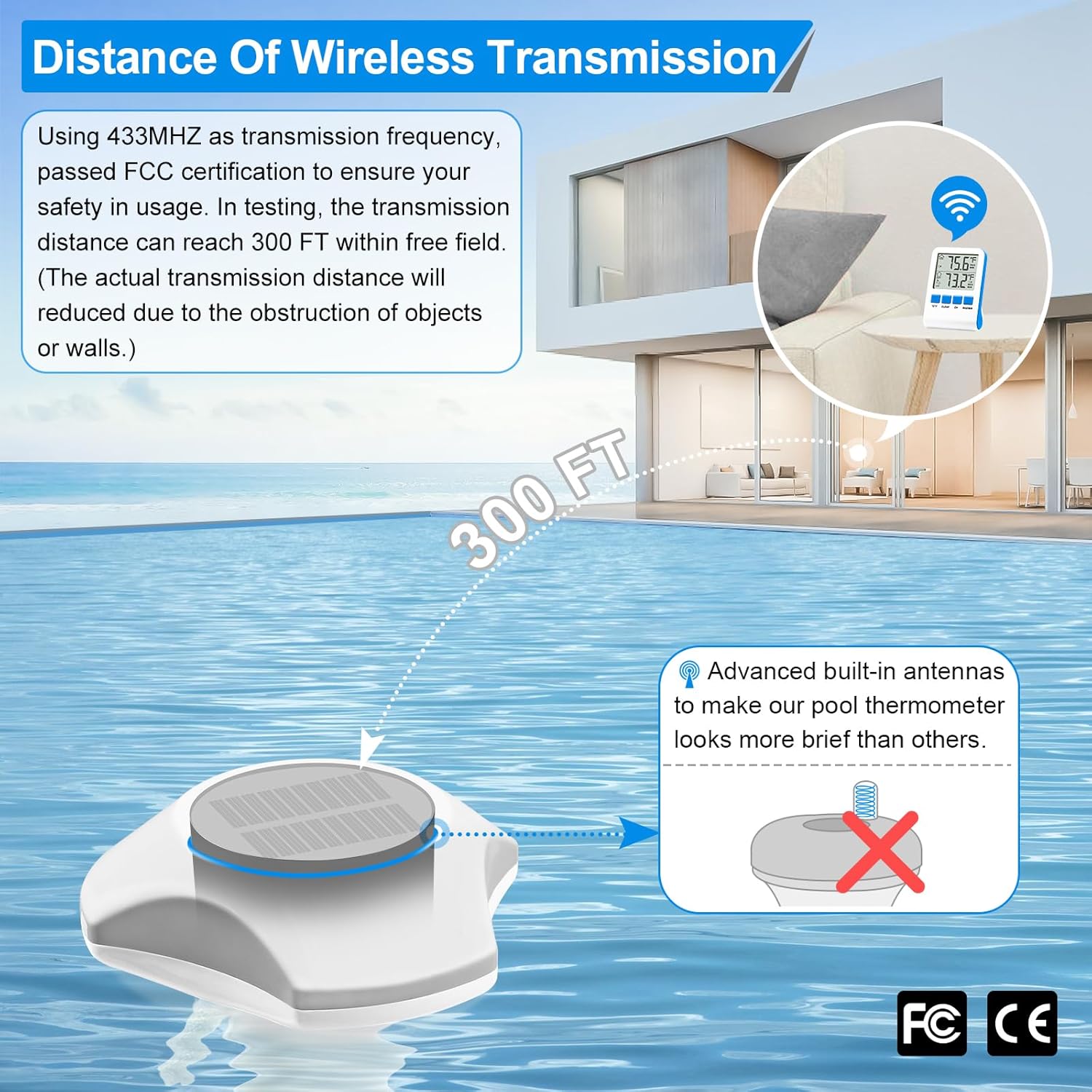
Image 6: Illustration of the wireless transmission range, indicating up to 300 feet in an open field.
Warranty and Support
For warranty information and customer support, please refer to the documentation included with your purchase or contact Circrane customer service directly. Keep your purchase receipt as proof of purchase.


