
1. Introduction
This manual provides detailed instructions for the proper setup, operation, and maintenance of your Aquos T-Scale ZTP-30 Price Computing Scale. Please read this manual thoroughly before using the device to ensure correct functionality and to prevent damage. Retain this manual for future reference.
2. Safety Information
- Do not expose the scale to extreme temperatures, humidity, or direct sunlight.
- Avoid placing the scale near strong electromagnetic fields.
- Ensure the scale is placed on a stable, level surface to guarantee accurate measurements.
- Do not overload the scale beyond its maximum capacity of 30 lbs (13.6 kg).
- Disconnect the power cable before cleaning or performing any maintenance.
- Use only the provided power adapter.
3. Package Contents
Verify that all items are present in the package:
- Aquos T-Scale ZTP-30 Scale Unit
- Stainless Steel Platter
- Pole Display Assembly
- Power Cable
- User Manual (this document)
4. Product Overview
The Aquos T-Scale ZTP-30 is an NTEP-approved, legal-for-trade price computing scale designed for accurate weighing and pricing. It features a durable stainless steel platter and clear LCD displays for both operator and customer.
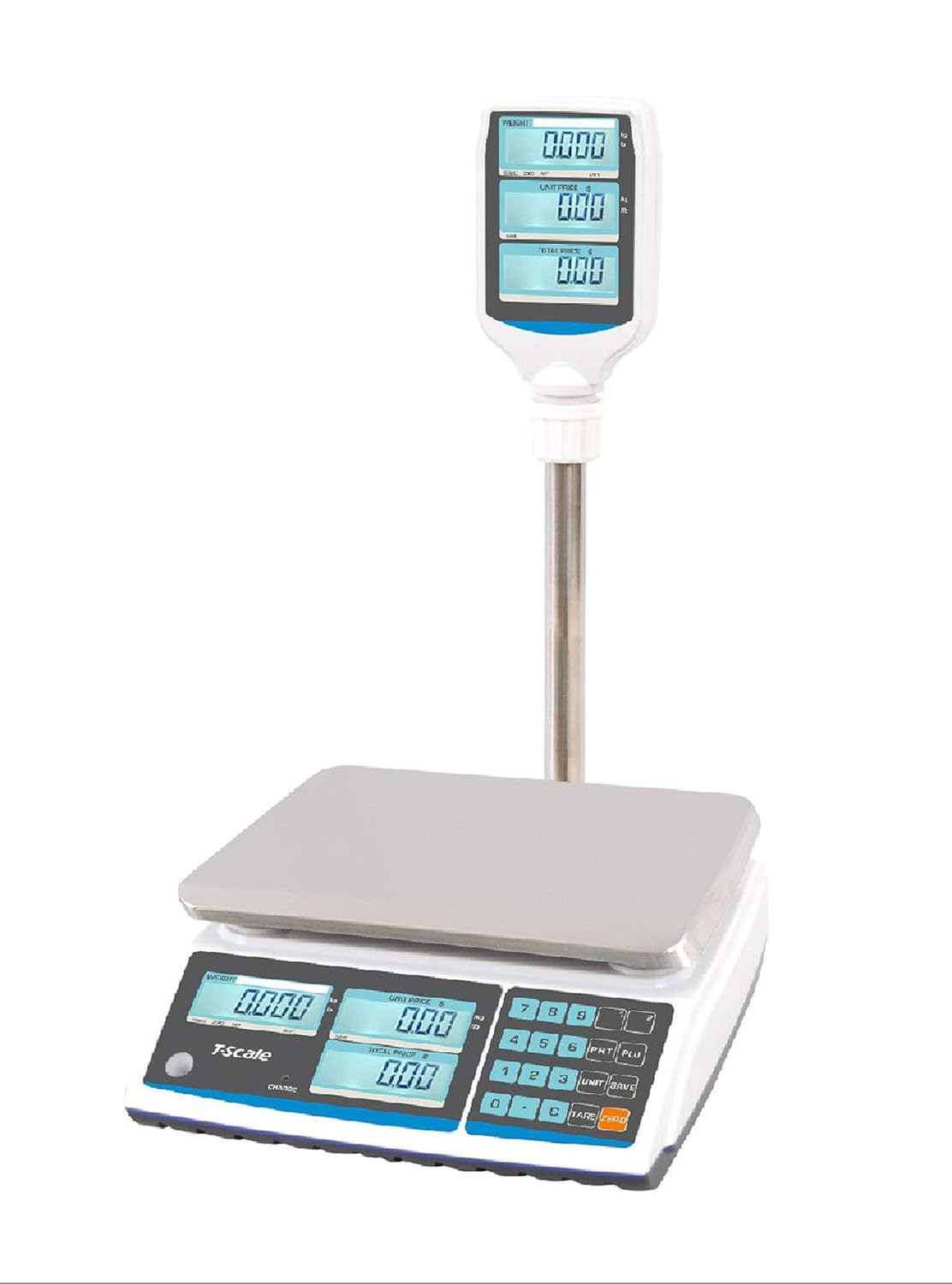
Figure 4.1: Front view of the Aquos T-Scale ZTP-30 Price Computing Scale, showing the main unit, stainless steel platter, and pole-mounted customer display.

Figure 4.2: The Aquos T-Scale ZTP-30 scale unit displaying the NTEP (National Conference on Weights and Measures) certification logo, indicating its legal-for-trade status.
5. Setup
- Unpacking: Carefully remove all components from the packaging.
- Platter Installation: Place the stainless steel platter securely onto the scale base. Ensure it sits flat and does not wobble.
- Pole Display Assembly: Insert the pole display into the designated slot on the rear of the scale base. Secure it firmly. The cable connecting the pole display to the main unit is typically pre-attached.
- Power Connection: Connect the power cable to the scale's power input port and then plug it into a standard electrical outlet.
- Initial Charge: If operating on battery, ensure the internal rechargeable battery is fully charged before first use. The battery is shipped disconnected; flip the unit over and connect the battery connector.
- Leveling: Adjust the four adjustable feet at the bottom of the scale until the bubble in the level indicator (usually located near the display) is centered. This ensures accurate weighing.
6. Operating Instructions
6.1. Power On/Off
- Press the [ON/OFF] button to turn the scale on or off.
- Allow a few seconds for the scale to stabilize and perform a self-check upon powering on.
6.2. Basic Weighing
- Ensure the scale displays '0.000' before placing an item. If not, press the [ZERO] button.
- Place the item to be weighed gently on the center of the stainless steel platter.
- Read the weight displayed on the main LCD.

Figure 6.1: The scale displaying a weight of 1.000 lbs on both the operator and pole displays, with the unit price and total price fields showing zeros.
6.3. Unit Switching (Lb/Kg)
- Press the [UNIT] button to toggle between pounds (Lb) and kilograms (Kg). The active unit will be indicated on the display.
6.4. Tare Function
The tare function allows you to subtract the weight of a container, so only the net weight of the contents is measured.
- Place the empty container on the platter.
- Press the [TARE] button. The display will reset to '0.000', indicating the container's weight has been tared.
- Add the items to be weighed into the container. The display will show only the weight of the items.
- To clear the tare, remove the container and press [TARE] again.
6.5. Price Computing
This function calculates the total price based on the item's weight and a set unit price.
- Place the item on the platter. The weight will be displayed.
- Using the numeric keypad, enter the price per unit (e.g., price per pound or kilogram).
- The scale will automatically calculate and display the total price in the 'TOTAL PRICE' field.
- To clear the unit price, press the [CLEAR] button.
7. Maintenance
7.1. Cleaning
- Always disconnect the power cable before cleaning.
- Remove the stainless steel platter for easy cleaning. Wash it with mild soap and water, then dry thoroughly.
- Wipe the scale base and display with a soft, damp cloth. Do not use abrasive cleaners, solvents, or immerse the unit in water.
- Ensure no liquid enters the internal components of the scale.
7.2. Battery Charging
- The scale features a built-in rechargeable battery. When the battery indicator shows low power, connect the scale to an AC power source using the provided power cable.
- The scale can be operated while charging.
- Regular charging helps maintain battery life. Avoid completely draining the battery frequently.
8. Troubleshooting
| Problem | Possible Cause | Solution |
|---|---|---|
| Scale does not power on. | No power, loose power cable, discharged battery, battery not connected. | Check power cable connection. Ensure outlet is functional. Charge the battery. Verify internal battery connection. |
| Inaccurate readings. | Scale not level, unstable surface, air currents, foreign objects under platter, calibration required. | Level the scale. Place on a stable surface. Avoid drafts. Clean under the platter. Contact support for calibration instructions if needed. |
| "OVERLOAD" or similar error message. | Weight exceeds maximum capacity (30 lbs). | Remove excess weight immediately. Do not exceed 30 lbs. |
| Display is dim or flickering. | Low battery. | Connect the scale to AC power to charge the battery. |
9. Specifications
The following specifications are for the Aquos T-Scale ZTP-30 model:

Figure 9.1: Manufacturer's specifications sheet for the T-Scale ZTP_ZSP series, including the ZTP-30 model.
| Feature | Detail |
|---|---|
| Model Number | ZTP-30 |
| Capacity | 0.002 lbs up to 30 lbs (13.6 kg) |
| Readability | 0.005 lbs (2g) |
| Display Type | LCD with Backlight (15mm digit) |
| Platter Size | 10.5 x 8 inches (W x D) |
| Material | Stainless Steel (platter), ABS Plastic (housing) |
| Power Source | AC adapter (12V/500mA), Built-in rechargeable battery (6V/3.2Ah) |
| Operating Temperature | -10°C ~ 40°C (14°F ~ 104°F) |
| Approval | NTEP Approved, Legal for Trade (Class III) |
| Package Dimensions | 20.2 x 13.3 x 7.9 inches |
| Item Weight | 10 Pounds |
10. Warranty and Support
For warranty information, technical support, or service inquiries, please refer to the contact information provided with your purchase documentation or visit the official Aquos website. Keep your purchase receipt as proof of purchase for warranty claims.