
1. Introduction
The Universal Audio ANTI 1992 High Gain Amp Pedal is a stereo amp and cab emulation pedal designed to deliver high-gain guitar tones. It features six famous mic/speaker pairs, built-in boosts, and offers both live and preset modes. Customization is available through the UAFX mobile app. This pedal emulates the sound of a 120-watt tube amplifier, providing aggressive, 'scooped' guitar tones suitable for modern metal, bone-crushing riffs, searing leads, and crystalline cleans.
2. Key Features
- Authentic emulation of early '90s 120-watt high-gain amp tones.
- Powerful UAFX dual-engine for realistic sound.
- Integrated noise gate, TS-style overdrive, and boost for album-ready sounds.
- Dynamic Room Modeling technology derived from UA’s OX Amp Top Box.
- Six classic mic/speaker pairings for diverse tonal options.
3. What's in the Box
Upon unboxing your Universal Audio ANTI 1992 High Gain Amp Pedal, you should find the following components:
- Universal Audio ANTI 1992 High Gain Amp Pedal
- Power supply (may be sold separately, check product packaging)
- USB Cable
- User Manual
4. Setup
- Power Connection: Connect a compatible 9V DC power supply (20 Milliamps, center-negative) to the 9VDC input on the rear of the pedal.
- Instrument Connection: Connect your guitar to the IN 1/MONO input using a standard 1/4-inch instrument cable. For stereo input, use both IN 1/MONO and IN 2/STEREO.
- Output Connection: Connect the OUT 1/MONO output to your amplifier or audio interface. For stereo output, use both OUT 1/MONO and OUT 2/STEREO.
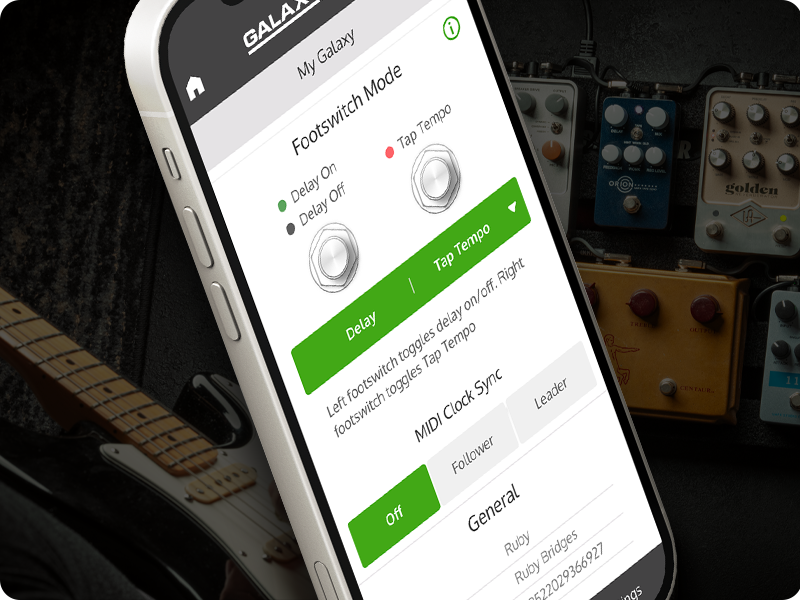
- USB Connection: For app control or firmware updates, connect a USB-C cable from the pedal's USB port to your computer or mobile device.
- Bluetooth Pairing: To use the UAFX mobile app wirelessly, ensure Bluetooth is enabled on your device and follow the app's instructions to pair with the pedal.
5. Operating Controls
The ANTI 1992 pedal features a range of knobs and switches for precise tone shaping:
- PRE GAIN: Adjusts the input gain level.
- PRESENCE: Controls the high-frequency response.
- OUTPUT: Sets the overall output volume.
- LOW [OVERDRIVE]: Adjusts low frequencies and can engage overdrive.
- MID [OD TONE]: Controls mid-range frequencies and overdrive tone.
- HIGH [OD LEVEL]: Adjusts high frequencies and overdrive level.
- CAB Switch: Selects between different cabinet emulations (e.g., UK V30, CA V30, WHITE 75).
- CHANNEL Switch: Toggles between different amp channels (e.g., RTHM, CRNCH, LEAD).
- ON Footswitch: Activates or bypasses the pedal effect.
- PRESET Footswitch: Cycles through saved presets.
For advanced control and additional parameters, utilize the UAFX mobile app via Bluetooth or USB-C connection.
6. Connectivity
The ANTI 1992 pedal offers versatile connectivity options:
- 1/4-inch Audio Inputs/Outputs: Supports both mono and stereo configurations for instrument and amplifier connections.
- USB Type C: Used for connecting to a computer or mobile device for firmware updates and app control.
- Bluetooth: Enables wireless control and customization via the UAFX mobile app.
- 9V DC Power Input: Standard power input for the pedal.
7. Product Media




Product Videos
8. Specifications
| Feature | Detail |
|---|---|
| Brand | Universal Audio |
| Model Name | ANTI 1992 |
| Model Number | GPM-ANTI |
| Product Dimensions | 5.55"L x 3.62"W x 2.52"H |
| Item Weight | 567 Grams |
| Voltage | 9 Volts (DC) |
| Amperage | 20 Milliamps |
| Audio Output Effects | Distortion, Overdrive |
| Controls Type | Knob |
| Power Source | Corded Electric |
| Hardware Interface | 1/4-inch Audio, Bluetooth, USB Type C |
| Signal Format | Analog |
| Color | Red |
| UPC | 819937004629 |
9. Maintenance
To ensure the longevity and optimal performance of your Universal Audio ANTI 1992 High Gain Amp Pedal, follow these maintenance guidelines:
- Cleaning: Use a soft, dry cloth to clean the pedal's exterior. Avoid abrasive cleaners or solvents, which can damage the finish and internal components.
- Storage: Store the pedal in a cool, dry place away from direct sunlight, extreme temperatures, and high humidity.
- Connections: Periodically check all cable connections for wear and tear. Ensure jacks are free of dust and debris.
- Firmware Updates: Regularly check the Universal Audio website or UAFX app for available firmware updates to ensure your pedal has the latest features and bug fixes.
10. Troubleshooting
If you encounter issues with your ANTI 1992 pedal, consider the following common troubleshooting steps:
- No Sound:
- Ensure the power supply is correctly connected and providing the specified 9V DC.
- Check all instrument cables for proper connection and functionality.
- Verify that the pedal is engaged (ON footswitch LED is lit).
- Confirm your amplifier or audio interface is powered on and correctly configured.
- Poor Sound Quality:
- Adjust the PRE GAIN, OUTPUT, and EQ knobs to find a balanced tone.
- Experiment with different CAB and CHANNEL settings.
- Ensure your instrument's pickups and wiring are functioning correctly.
- App Connectivity Issues:
- Make sure Bluetooth is enabled on your mobile device and the pedal.
- Try connecting via USB-C cable to establish a connection.
- Restart both the pedal and your mobile device.
- Ensure the UAFX app is updated to the latest version.
- Unwanted Noise/Hum:
- Use a high-quality, isolated power supply.
- Check for faulty cables or ground loops.
- Engage the built-in noise gate feature and adjust its settings via the app.
If these steps do not resolve the issue, please contact Universal Audio customer support.
11. Warranty and Support
The Universal Audio ANTI 1992 High Gain Amp Pedal comes with a Limited Lifetime Warranty. For detailed terms and conditions, please refer to the warranty information provided with your product or visit the official Universal Audio website.
For technical support, service, or further inquiries, please visit the Universal Audio support page or contact their customer service directly. Keep your purchase receipt and product serial number handy when seeking support.


