
Introduction
Thank you for choosing the Revell Ghost Driver Remote Control Toy Car. This manual provides essential information for the safe and optimal use of your new RC car. Please read all instructions carefully before operation and retain this manual for future reference.
Safety Information
WARNING: CHOKING HAZARD – Small parts. Not for children under 3 years.
- Always operate the RC car in a safe environment, away from people, pets, and obstacles.
- Do not operate near water or in wet conditions to prevent electrical damage.
- Ensure adult supervision for children operating the toy.
- Do not mix old and new batteries, or different types of batteries.
- Remove batteries from the car and remote when not in use for extended periods.
- Dispose of used batteries responsibly according to local regulations.
Package Contents
Verify that all items are present in the package:
- Revell Ghost Driver Remote Control Car
- 2.4 GHz Remote Control
- 5x AA Alkaline Batteries (for car)
- Instruction Manual
Setup
1. Battery Installation
The Revell Ghost Driver RC car requires 5 AA alkaline batteries, which are included. The remote control typically requires 2 AA batteries (not explicitly listed as included, please check your remote's battery compartment for details).
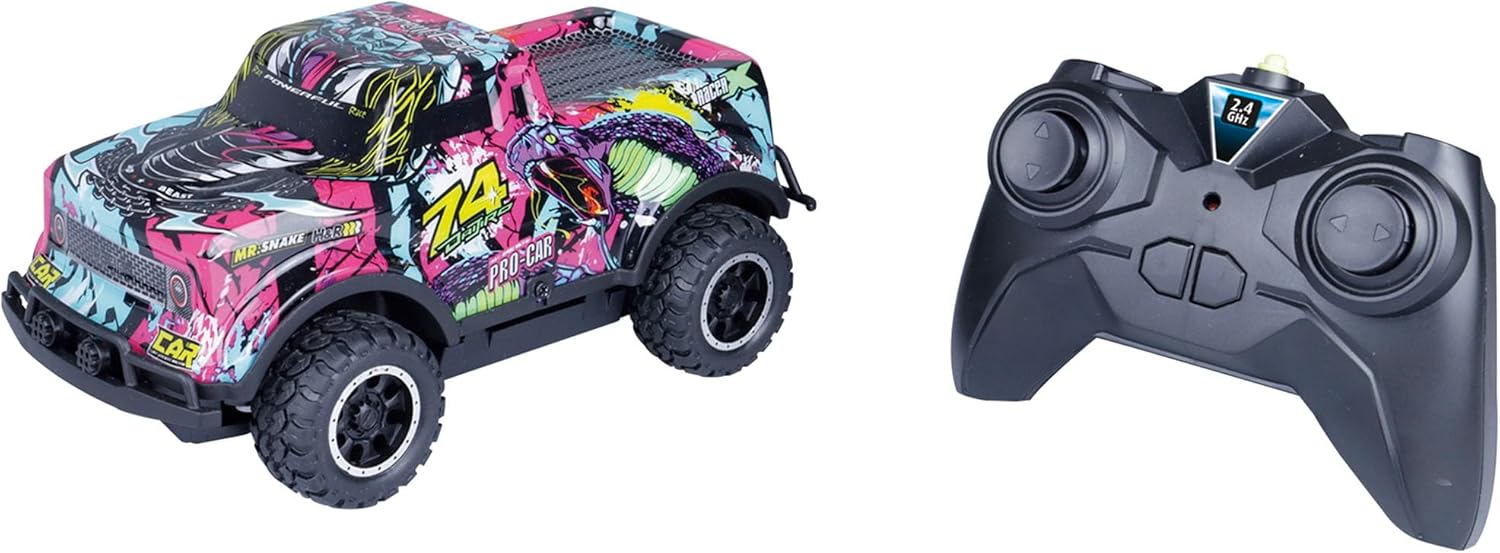
Image: The Revell Ghost Driver RC car and its accompanying 2.4 GHz remote control. The car features a vibrant, multi-colored graphic design, while the remote is black with two joysticks and a 2.4 GHz indicator.
- For the RC Car: Locate the battery compartment on the underside of the car. Use a small screwdriver to open the battery cover. Insert 5 AA alkaline batteries, ensuring correct polarity (+/-). Replace the cover and secure it with the screw.
- For the Remote Control: Locate the battery compartment on the back of the remote control. Open the cover and insert 2 AA batteries (if required), observing correct polarity. Replace the cover.
2. Pairing the Remote Control
The 2.4 GHz remote control automatically pairs with the car when both are turned on. Ensure both the car and the remote have fresh batteries installed.
- Turn on the RC car using the power switch located on its chassis.
- Turn on the remote control. The indicator light on the remote should blink and then become solid, indicating a successful connection.
- If pairing fails, turn both devices off and repeat the steps. Ensure no other 2.4 GHz devices are causing interference nearby.
Operating Instructions
Once the car and remote are paired, you can begin operating your Revell Ghost Driver.

Image: A close-up view of the black 2.4 GHz remote control for the Revell Ghost Driver. It features two joysticks for directional control and a central indicator light.
- Forward/Backward: Use the left joystick (or designated control) to move the car forward or backward.
- Steering (Left/Right): Use the right joystick (or designated control) to steer the car left or right.
- LED Lighting: The car features integrated LED lighting that illuminates during operation, enhancing visibility and visual appeal, especially in low-light conditions.
- Speed: The car can reach speeds of approximately 7 km/h.

Image: The Revell Ghost Driver RC car is shown in a dark environment, with its vibrant body graphics glowing under the influence of its internal LED lights, creating a dynamic visual effect.
Official Product Video
Video: An official product video showcasing the Revell Ghost Driver RC car in action, highlighting its features such as LED lighting and 2.4 GHz remote control. The video demonstrates the car's movement and design.
Maintenance
Cleaning
To maintain the appearance and functionality of your RC car:
- Wipe the car and remote with a soft, dry cloth after each use.
- Do not use harsh chemicals or abrasive cleaners.
- Avoid getting water inside the electronic components.
Battery Care and Storage
- Always remove batteries from the car and remote control when storing for extended periods to prevent leakage.
- Store the RC car and remote in a cool, dry place, away from direct sunlight and extreme temperatures.
Troubleshooting
If you encounter issues with your Revell Ghost Driver, refer to the following common problems and solutions:
| Problem | Possible Cause | Solution |
|---|---|---|
| Car does not respond to remote. | Low batteries in car or remote; Car and remote not paired; Out of range. | Replace batteries; Re-pair car and remote (see Setup section); Bring car closer to remote. |
| Car moves slowly or lights are dim. | Low batteries in car. | Replace car batteries. |
| Interference during operation. | Other 2.4 GHz devices nearby. | Move to an area with less interference; Ensure only one RC car is operating on the same frequency if multiple are present. |
| Car makes unusual noises. | Debris in gears or motor. | Turn off car and carefully inspect for debris. Remove any obstructions. |
Specifications

Image: The Revell Ghost Driver RC car is shown resting in the palm of a hand, illustrating its compact size and portability.
- Model Name: Revell Control RC Car Ghost Driver
- Model Number: 24684
- Brand: Revell
- Color: Purple (design)
- Scale: 1:22 Scale
- Dimensions (L x W x H): 6.89 x 3.54 x 2.95 inches (17.5 x 9 x 7.5 cm)
- Item Weight: 0.56 Kilograms
- Material Type: Plastic
- Power Source: Battery Powered
- Batteries Required: 5 AA batteries (included for car)
- Additional Features: Lights Up
- Operation Mode: Remote Control (2.4 GHz)
- Recommended Age: 6 years old and up
Warranty and Support
For warranty information or technical support, please refer to the contact details provided on the product packaging or visit the official Revell website. Keep your purchase receipt as proof of purchase.