
1. Introduction and Overview
The Linsoul SIMGOT EW300 HBB is a high-fidelity in-ear monitor (IEM) designed for audiophiles and gamers. This special edition, developed in collaboration with Hawaii Bad Boy (HBB), features a unique matte black shell and custom HBB laser engraving, while maintaining the precise acoustic tuning of the standard EW300 model. It incorporates a hybrid driver configuration with 1 dynamic driver, 1 planar driver, and 1 piezoelectric ceramic driver per side, engineered for balanced acoustic performance. The EW300 HBB also offers a versatile tuning experience through its detachable nozzle system.

Image: Linsoul SIMGOT EW300 HBB in-ear monitors with a clear cable, showing the matte black shell with an 'X' design on one earpiece and a heart design on the other.
2. What's in the Box
Upon opening your SIMGOT EW300 HBB package, you should find the following components:
- SIMGOT EW300 HBB In-Ear Monitors (Left and Right)
- Detachable 0.78mm 2-pin Silver-Plated Oxygen-Free Copper (OFC) Cable
- Multiple pairs of Silicone Eartips (various sizes)
- Two sets of Tuning Nozzles (Silver Steel Tube & Red Silicone Rings, Golden Copper Tube & Purple Silicone Rings)
- Protective Carrying Case
- User Manual (this document)

Image: Contents of the SIMGOT EW300 HBB package laid out on a white surface, including the IEMs, detachable cable, multiple ear tips, tuning nozzles, and a protective case.
3. Setup
3.1 Attaching the Cable
- Identify the left (L) and right (R) earpieces and the corresponding connectors on the cable. The cable connectors are typically marked.
- Align the 2-pin connector on the cable with the receptacle on the IEM earpiece. Ensure the pins are correctly oriented.
- Gently push the connector into the earpiece until it is securely seated. Do not force the connection.
- Repeat for the other earpiece.
3.2 Selecting and Installing Eartips
Proper eartip selection is crucial for sound quality and comfort. Experiment with the included eartips to find the best fit for your ears.
- Gently remove any pre-installed eartips by pulling them off the nozzle.
- Select an eartip size (small, medium, large) that provides a comfortable and secure seal in your ear canal.
- Push the chosen eartip onto the IEM nozzle until it is firmly attached.
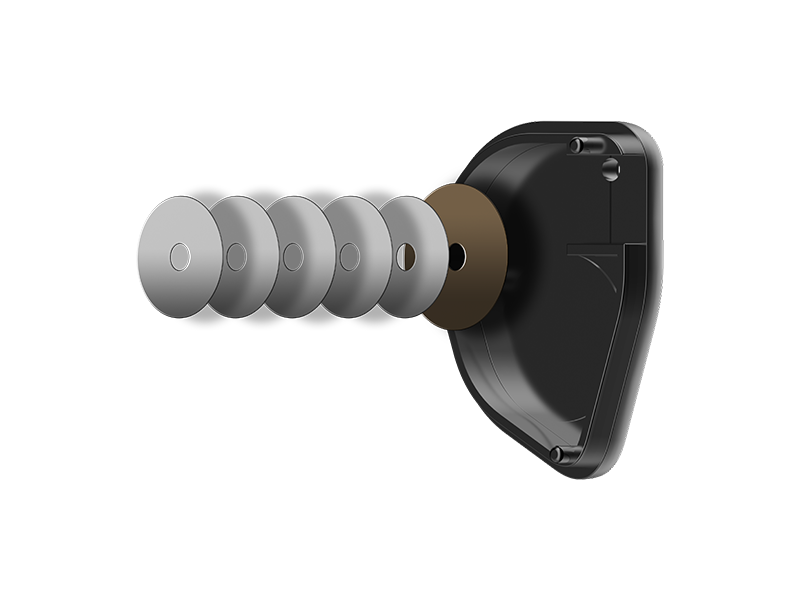
Image: Different ear tip sizes for in-ear monitors.
3.3 Changing Tuning Nozzles
The EW300 HBB features interchangeable nozzles to adjust the sound signature.
- Gently unscrew the currently installed nozzle from the IEM earpiece.
- Select your desired tuning nozzle:
- Silver Steel Tube & Red Silicone Rings: Based on SIMGOT-Golden2023 target curve, offering a balanced sound.
- Golden Copper Tube & Purple Silicone Rings: Based on H-2019 target curve, tailored for gaming with enhanced sound reproduction for crucial in-game audio.
- Carefully screw the new nozzle onto the IEM earpiece until it is finger-tight. Do not overtighten.

Image: Close-up of a SIMGOT EW300 HBB in-ear monitor with a detachable nozzle and a separate golden copper tuning nozzle, illustrating the interchangeable design.
4. Operating Instructions
4.1 Wearing the IEMs
For optimal sound and comfort, wear the IEMs with the cable routed over your ear.
- Insert the earpiece into your ear canal, ensuring a snug fit.
- Loop the cable over the top of your ear, allowing it to rest comfortably behind your ear.
- Adjust the cable slider (if present) to secure the cable under your chin.
4.2 Connecting to an Audio Source
Connect the 3.5mm jack of the IEM cable to your audio device (e.g., smartphone, digital audio player, computer, gaming console controller). Ensure the connection is firm.
4.3 Audio Playback
Once connected, begin audio playback on your device. Adjust the volume on your audio source to a comfortable listening level. The EW300 HBB features passive noise cancellation, which helps reduce external noise for an immersive listening experience.
4.4 Understanding Tuning Nozzles
The two sets of tuning nozzles allow you to customize the sound profile:
- Silver Steel Tube & Red Silicone Rings: Provides a balanced sound signature, suitable for general music listening across various genres.
- Golden Copper Tube & Purple Silicone Rings: Offers a sound profile optimized for gaming, enhancing the clarity of in-game sounds like footsteps and gunfire, based on the H-2019 target curve.

Image: Frequency response graph illustrating the tuning differences between the nozzles.
Video: Detailed overview and demonstration of the SIMGOT EW300 IEMs, including features and sound characteristics.
5. Maintenance
5.1 Cleaning the Earpieces and Eartips
Regular cleaning helps maintain hygiene and sound quality.
- Gently remove the eartips from the earpieces.
- Wipe the earpieces with a soft, dry, lint-free cloth.
- Clean the eartips with mild soap and water. Rinse thoroughly and allow them to air dry completely before reattaching.
- Use a small brush or cleaning tool to carefully remove any earwax or debris from the nozzle filters.
5.2 Cable Care
To prolong the life of your cable:
- Avoid sharp bends or excessive pulling on the cable.
- When disconnecting, always grasp the connector housing, not the cable itself.
- Store the cable neatly coiled, preferably in the provided protective case.
5.3 Storage
When not in use, store your SIMGOT EW300 HBB IEMs in the protective carrying case to prevent damage from dust, moisture, and physical impact.
6. Troubleshooting
| Problem | Possible Cause | Solution |
|---|---|---|
| No sound or intermittent sound | Loose cable connection, incorrect audio source selection, low volume on device, dirty nozzle filter. | Ensure cable is securely connected to both IEMs and audio source. Check audio output settings on your device. Increase device volume. Clean nozzle filters. |
| Poor sound quality (e.g., lack of bass, muffled sound) | Improper eartip seal, incorrect nozzle installed, dirty nozzle filter. | Try different eartip sizes to achieve a proper seal. Ensure the chosen tuning nozzle is fully screwed in. Clean nozzle filters. |
| IEMs fall out of ears easily | Incorrect eartip size, improper wearing technique. | Experiment with different eartip sizes for a more secure fit. Ensure the cable is looped over your ear correctly. |
| Cable detaches easily | Connectors not fully seated, excessive force on cable. | Ensure 2-pin connectors are pushed in firmly. Avoid pulling on the cable. |
7. Specifications
| Feature | Detail |
|---|---|
| Model Name | SIMGOT EW300 HBB |
| Driver Configuration | 1 Dynamic Driver + 1 Planar Driver + 1 Piezoelectric Ceramic Driver (per side) |
| Dynamic Driver Size | 10 mm ceramic composite diaphragm dual-chamber dynamic driver |
| Planar Magnetic Driver | 6 mm annular magnetic driver |
| Impedance | 28 Ohms (±15% @1kHz) |
| Sensitivity | 121 dB/Vrms (@1kHz, Silver Steel Tube & Red Silicone Rings) 119 dB/Vrms (@1kHz, Golden Copper Tube & Purple Silicone Rings) |
| Frequency Response Range | 8 Hz - 40 kHz |
| Effective Frequency Response | 20 Hz - 20 kHz |
| Cable Material | High-purity silver-plated OFC |
| Cable Feature | Detachable 0.78mm 2-pin |
| Headphones Jack | 3.5 mm Jack |
| Connectivity Technology | Wired |
| Noise Control | Passive Noise Cancellation |
| Material | Metal |
| Item Weight | 8.8 ounces |
| Product Dimensions | 0.04 x 0.04 x 0.04 inches |

Image: Technical specifications table for SIMGOT EW300.
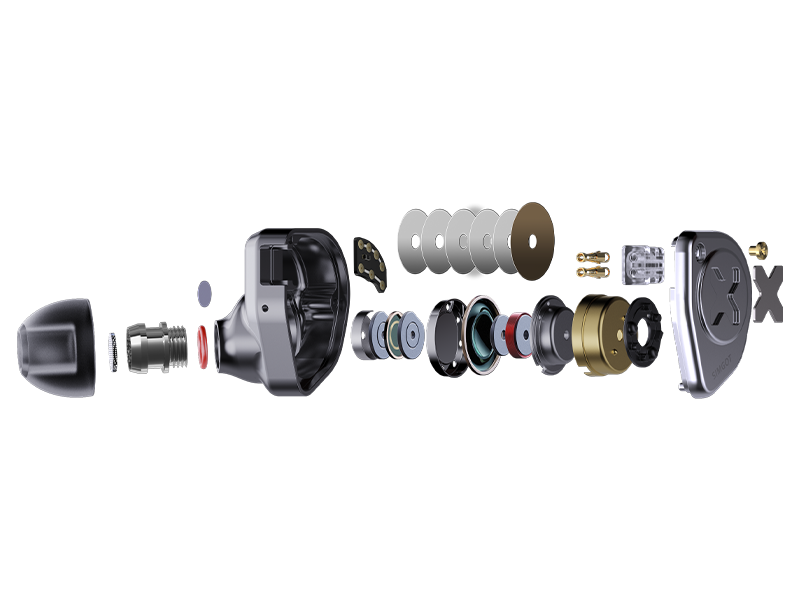
Image: Exploded view of the SIMGOT EW300 IEM components.
8. Warranty and Support
Linsoul products are typically covered by a manufacturer's warranty. For specific warranty details, including duration and terms, please refer to the warranty card included with your product or visit the official Linsoul website. For technical support, troubleshooting assistance beyond this manual, or warranty claims, please contact Linsoul customer service directly through their official channels.
Manufacturer: Linsoul
Website: Linsoul Official Store on Amazon

