
1. Introduction
Thank you for choosing the Blindsmart Motorized Curtain Rods. This system provides an intelligent and convenient way to control your curtains, integrating with various smart home platforms. This manual will guide you through the installation, operation, and maintenance of your new motorized curtain system.
The Blindsmart Motorized Curtain Rods are Matter-certified, offering compatibility with Apple Home, Alexa, Google Assistant, and SmartThings for seamless voice and app control. The system is designed for quiet and smooth operation, enhancing your living space with modern convenience.
2. Safety Information
- Read all instructions carefully before installation and use.
- Keep the product away from water and high humidity environments.
- Do not attempt to disassemble or repair the motor or track system yourself. Contact qualified personnel for service.
- Ensure the power supply voltage matches the product specifications (AC100-240V).
- Keep children and pets away from moving curtains to prevent injury.
- Do not obstruct the curtain's movement path.
3. Package Contents
Please verify that all components are present before beginning installation:

Image: Detailed diagram of all included components for the motorized curtain system.
- Curtain Motor (1 PC)
- Master Driver (1 PC)
- Sub Driver (1 PC)
- Track Sections (various lengths, quantity depends on total length purchased)
- Extended Hook (2 PCS for bidirectional opening, 1 PC for one-side opening)
- Wheel Runner (10 PCS per meter of track)
- Carrier (2 PCS for bidirectional opening, 1 PC for one-side opening)
- Ceiling Bracket (0.5 meter/PC)
- Side Bracket (0.5 meter/PC, optional)
- Connector (100mm, 200mm, 500mm, 1000mm sizes available)
- End Hook (2 PCS for bidirectional opening, 1 PC for one-side opening)
- Belt (1m track with 2m belt)
- Belt Gauge (1 Set)
- Remote Control (1 PC)
4. Setup and Installation
This section outlines the steps for assembling and installing your motorized curtain rod system. Ensure you have all components listed in Section 3 before proceeding.
4.1. Track Assembly
- Connect the track sections using the provided connectors. Ensure they are securely fastened to form the desired length.
- Insert the belt into the track, ensuring it runs smoothly through all sections.
- Attach the wheel runners, carriers, and end hooks to the belt and track as per your curtain opening preference (center open or side open).
4.2. Motor Installation
- Mount the motor securely to one end of the assembled track. Ensure the motor's antenna is not obstructed.
- Connect the power cable to the motor.
4.3. Mounting the Track
Choose between ceiling-mounted or wall-mounted installation based on your preference and room structure.
- Ceiling Mounted: Use the ceiling brackets to secure the track to the ceiling. Ensure proper spacing and alignment.
- Wall Mounted: Use the optional side brackets to attach the track to the wall.

Image: Overview of the assembled motorized curtain rod system.
4.4. Curtain Attachment
Hang your curtains onto the wheel runners and carriers. Ensure the curtains move freely along the track.

Image: Illustration of center-open and side-open curtain configurations.
4.5. Matter Hub Requirement
A Matter-enabled hub is required for smart home integration. This allows the device to work with various Matter-certified ecosystems simultaneously without needing a single controller, platform, or app.

Image: Visual representation of a Matter-enabled hub connecting the curtain system to smart home ecosystems.
5. Operating Instructions
Your Blindsmart Motorized Curtain Rods can be controlled via remote, smartphone app, or voice commands.
5.1. Remote Control
The included RF remote control allows for direct operation of your curtains. It supports multi-channel control, enabling you to operate several motors with a single remote.
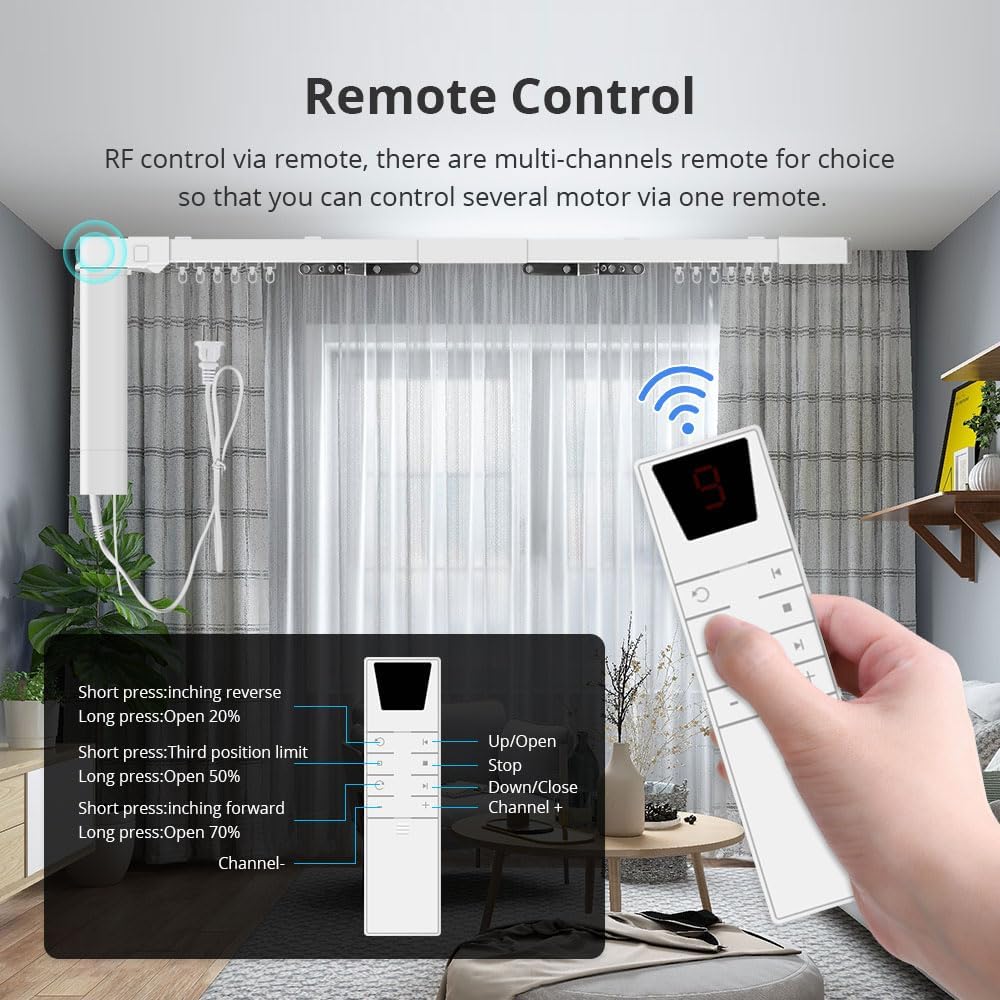
Image: Remote control with button functions for opening, closing, and adjusting curtain positions.
- Up/Open Button: Short press to inch reverse, long press to open 20%.
- Down/Close Button: Short press to set third position limit, long press to open 50%.
- Channel +/-: Select different channels to control multiple curtain systems.
- Other Buttons: Short press to inch forward, long press to open 70%.
5.2. App Control
Add and control your motorized curtain system using a Matter-certified app such as Apple Home, Amazon Alexa, Google Home, or SmartThings. Follow the app's instructions to pair your device.

Image: Examples of app interfaces for controlling the smart curtains.
5.3. Voice Control
Once integrated with your smart home platform, you can use voice commands through compatible speakers (Siri, Alexa, Google Home, Bixby) to control your curtains.

Image: Voice control functionality with various smart speakers.
5.4. Manual Operation (Power Off)
In the event of a power outage, the curtains can still be opened and closed manually by gently pulling them along the track.

Image: Manual operation of curtains during a power outage.
6. Maintenance
- Cleaning: Wipe the track and motor housing with a soft, dry cloth. Do not use abrasive cleaners or solvents.
- Track Inspection: Periodically check the track for any obstructions or debris that might hinder smooth operation.
- Belt Tension: Ensure the belt maintains appropriate tension for optimal performance. Adjust if necessary according to installation guidelines.
- Motor Care: The motor is designed for long-term use and generally requires no special maintenance. Keep it free from dust and moisture.
7. Troubleshooting
| Problem | Possible Cause | Solution |
|---|---|---|
| Curtains do not move. | No power; Remote battery low; Motor not paired; Obstruction in track. | Check power connection; Replace remote battery; Re-pair motor with remote/app; Clear track. |
| Curtains move unevenly or slowly. | Track obstruction; Belt tension incorrect; Motor issue. | Clear track; Adjust belt tension; Contact support if motor issue persists. |
| Remote control not working. | Battery low/dead; Out of range; Not paired. | Replace battery; Move closer to receiver; Re-pair remote. |
| App/Voice control not working. | No Matter hub; Wi-Fi connectivity issue; Device not paired in app. | Ensure Matter hub is active; Check Wi-Fi connection; Re-pair device in smart home app. |
8. Specifications

Image: Detailed product parameter diagram.
| Parameter | Value |
|---|---|
| Product Name | Smart Electric Curtain |
| Model Number | ZM02-02 |
| Rated Voltage | AC100~240V |
| Rated Frequency | 50/60Hz |
| Max Current | 0.25A |
| Max Power | 55W |
| Torsion | 1.5Nm |
| RPM | 100RPM |
| Running Speed | 128mm/s |
| Receive Frequency | 433.92MHz |
| Operating Temperature | -10~65°C |
| Relative Humidity | <80% |
| Receive Sensitivity | -110DBM |
| IP Class | IP20 |
| Power Cable Length | 800mm |
| Material | Metal |
| Mounting Type | Wall Mounted |
9. Warranty and Support
For warranty information and technical support, please refer to the documentation provided with your purchase or visit the official Blindsmart website. You can also contact Blindsmart customer service directly for assistance with product issues or inquiries.
Manufacturer: Blindsmart
ASIN: B0DCZJ8FVG