
1. Introduction
Thank you for choosing the Fansbe Direct A29 Digital Dual Alarm Clock. This device combines a digital alarm clock with a sound machine and customizable night light, offering versatile features for your bedroom. This manual provides detailed instructions for setup, operation, and maintenance to ensure optimal use of your device.
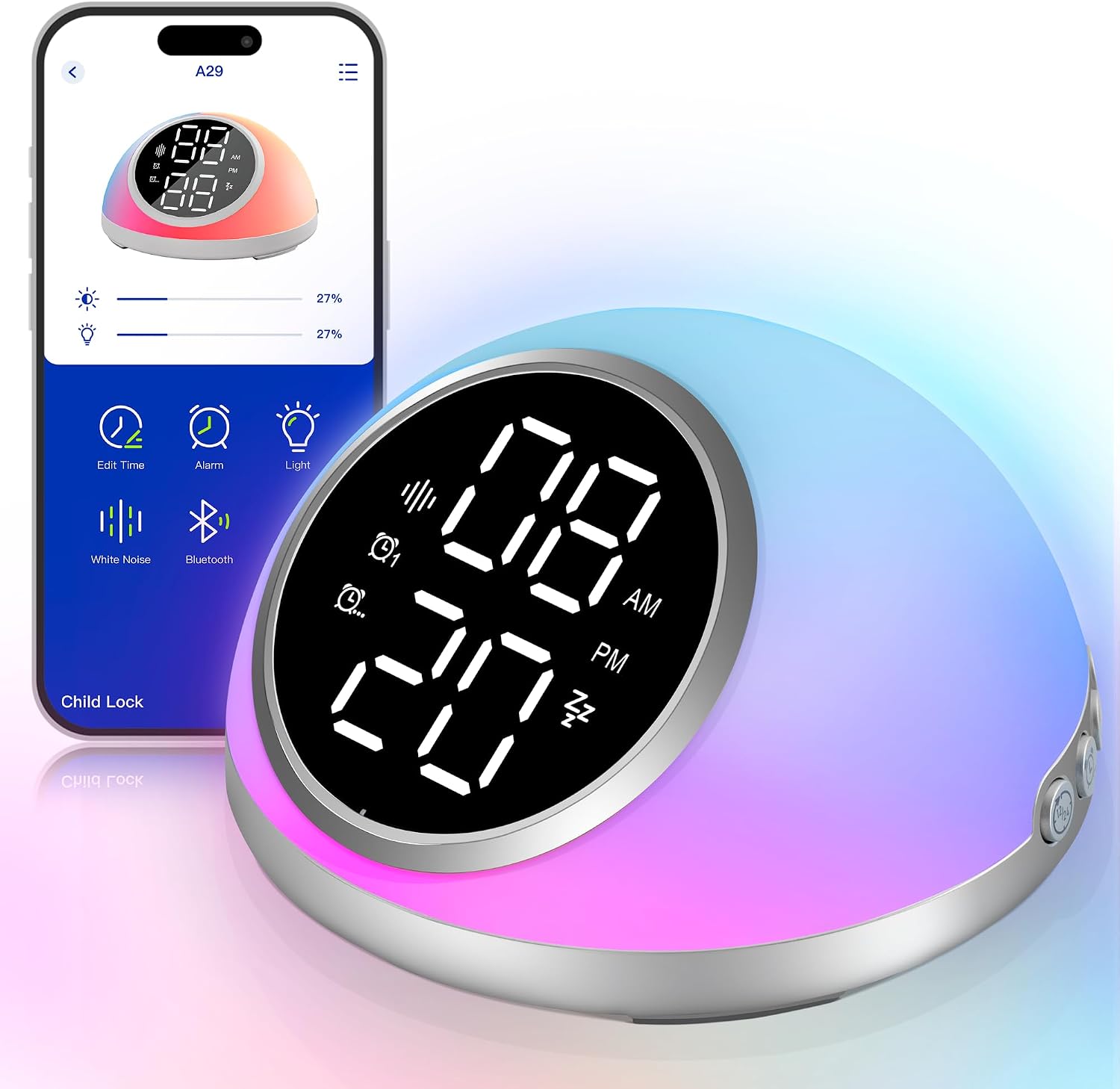
Image 1.1: The Fansbe Direct A29 Digital Dual Alarm Clock displaying time and its accompanying smartphone application interface.
2. Package Contents
Please check the package for the following items:
- Fansbe Direct A29 Digital Dual Alarm Clock
- Type-C Charging Cable
- User Manual
3. Product Overview
Familiarize yourself with the buttons and ports on your alarm clock:
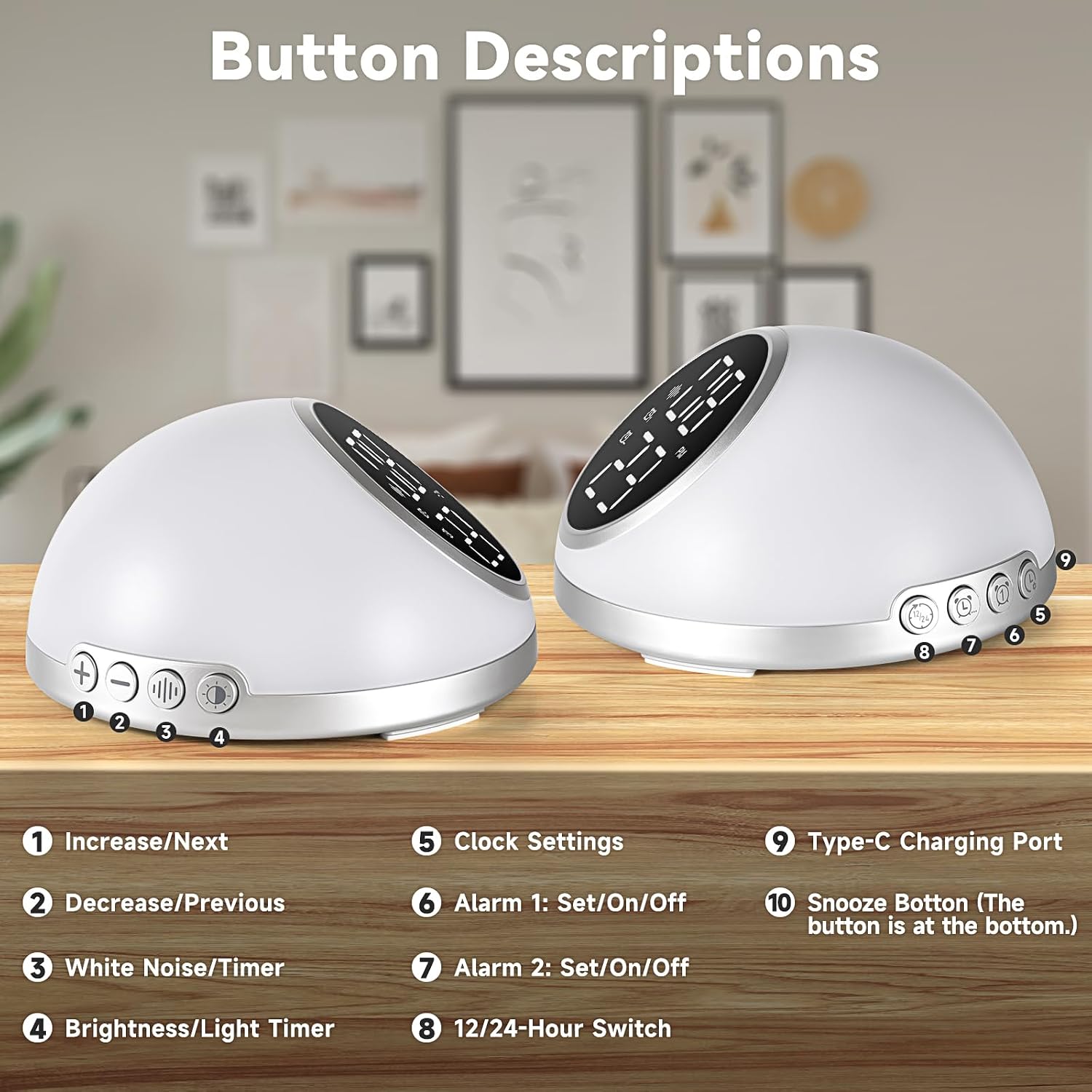
Image 3.1: Front and rear view of the alarm clock with numbered button descriptions.
- Increase/Next: Adjusts values up or navigates to the next option.
- Decrease/Previous: Adjusts values down or navigates to the previous option.
- White Noise/Timer: Activates white noise function or sets its auto-off timer.
- Brightness/Light Timer: Adjusts display brightness or sets light auto-off timer.
- Clock Settings: Enters time and date setting mode.
- Alarm 1: Set/On/Off: Configures or toggles Alarm 1.
- Alarm 2: Set/On/Off: Configures or toggles Alarm 2.
- 12/24-Hour Switch: Toggles between 12-hour and 24-hour time formats.
- Type-C Charging Port: Power input for the device.
- Snooze Button (Bottom): Located at the bottom of the device, press to activate snooze.
4. Setup
4.1 Power Connection
Connect the provided Type-C charging cable to the charging port (9) on the back of the alarm clock and plug the other end into a suitable USB power adapter (not included).
4.2 Backup Battery Installation
For backup memory function during power outages, install 2 AAA batteries (not included) into the battery compartment. This preserves alarm settings and timekeeping.
4.3 Initial Time Setting
Upon first power-on, the clock may display a default time. You can set the time manually using the 'Clock Settings' button (5) or sync it via the app.
4.4 App Download and Connection
Download the official Fansbe Direct app from your smartphone's app store. Follow the in-app instructions to connect your device via Bluetooth. This enables advanced control and customization.
5. Operating Instructions
5.1 Setting Alarms
The device supports two built-in alarms directly on the unit and up to 10 alarms via the smartphone app.
- On-Device Alarms: Press 'Alarm 1 Set/On/Off' (6) or 'Alarm 2 Set/On/Off' (7) to enter alarm setting mode. Use the 'Increase/Next' (1) and 'Decrease/Previous' (2) buttons to adjust the time and confirm settings.
- Alarm Tones: Choose from 9 different alarm tones. The alarm volume gradually increases. The initial alarm volume is customizable.
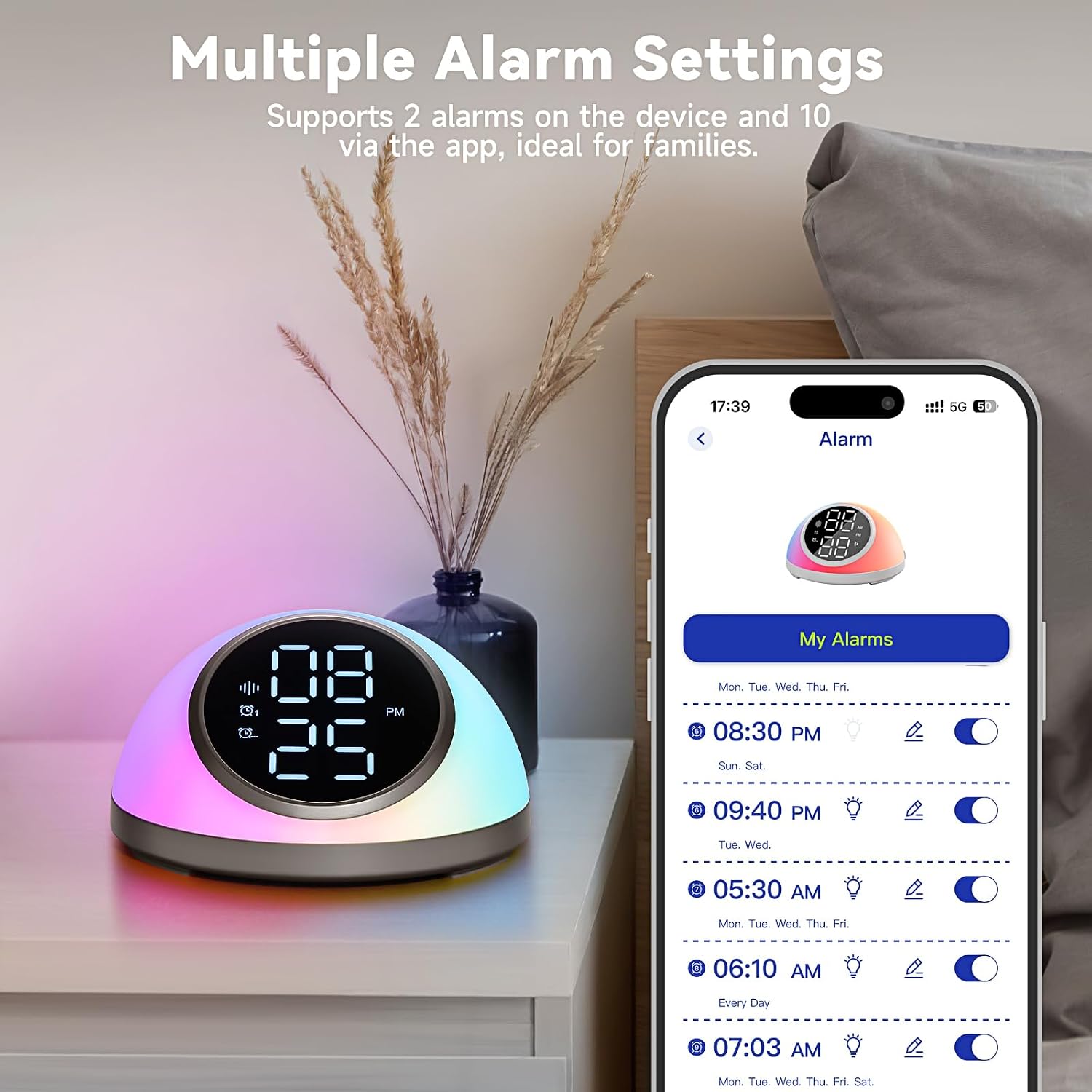
Image 5.1: The smartphone app interface showing multiple alarm settings for the A29 alarm clock.
5.2 Snooze Function
When an alarm sounds, press the 'Snooze Button' (10) located at the bottom of the device for an additional 9 minutes of rest.

Image 5.2: A user activating the one-click snooze function on the alarm clock.
5.3 Time Display and Brightness Control
- 12/24-Hour Format: Use the '12/24-Hour Switch' button (8) to toggle between 12-hour and 24-hour time displays.
- Brightness Adjustment: Press the 'Brightness/Light Timer' button (4) to cycle through 5 brightness levels for the time display. You can also turn off the display completely for a dark room.

Image 5.3: Examples of adjustable time display brightness from 100% to 10% on the A29 alarm clock.
5.4 White Noise & Sound Machine
The alarm clock includes a white noise machine with 23 soothing sounds.
- Activate Sounds: Press the 'White Noise/Timer' button (3) to cycle through available sounds.
- Volume Adjustment: Use the 'Increase/Next' (1) and 'Decrease/Previous' (2) buttons to adjust the volume across 16 levels.
- Auto-off Timer: Set the sound machine to automatically turn off after 15, 30, 60, 90, or 120 minutes.

Image 5.4: Visual representation of the 23 soothing sounds available on the A29 alarm clock, including white noise, pink noise, brown noise, fan sounds, wind sound, campfire sound, forest sounds, rain sounds, wave sounds, and river sounds.
5.5 Customizable Lighting
The alarm clock features a vibrant night light with various lighting effects.
- Lighting Effects: Choose from 6 vibrant lighting effects and personalize colors via the app.
- Brightness Levels: The light offers 5 brightness levels.
- Auto-off Timer: Set the light to automatically turn off after 15, 30, 60, 90, or 120 minutes.

Image 5.5: The A29 alarm clock displaying custom lighting effects, with an illustration of the app interface for color customization.
6. App Control & Customization
The Fansbe Direct app provides extended control and customization options:
- Set up to 10 alarms.
- Sync Bluetooth device time.
- Choose from 6 vibrant lighting effects.
- Customize light colors.
7. Maintenance
To ensure the longevity and proper functioning of your alarm clock:
- Wipe the device with a soft, dry cloth. Do not use abrasive cleaners or solvents.
- Keep the device away from water and excessive moisture.
- Avoid dropping the device or subjecting it to strong impacts.
8. Troubleshooting
If you encounter issues with your Fansbe Direct A29 alarm clock, refer to the following common problems and solutions:
| Problem | Possible Cause | Solution |
|---|---|---|
| Alarm does not sound or is too quiet. | Alarm is not activated, volume is too low, or incorrect time set. | Ensure alarm is enabled via device buttons or app. Check alarm volume settings. Verify alarm time is correct. |
| Time display is off or incorrect. | Power interruption, incorrect manual setting, or app sync issue. | Check power connection and backup batteries. Manually set time using 'Clock Settings' button (5) or re-sync via the app. |
| App disconnects from the device. | Bluetooth interference, app error, or device out of range. | Ensure Bluetooth is enabled on your phone. Restart the app and the alarm clock. Move your phone closer to the device. Check for app updates. |
| Unexpected sounds or announcements (e.g., "Clock Mode!"). | Software glitch or unintended mode activation. | Restart the device by unplugging and re-plugging the power cable. If persistent, check for firmware updates via the app or contact support. |
| Ringing or buzzing noise from the device. | Internal component issue or electrical interference. | Try moving the device to a different power outlet or location to rule out electrical interference. If the noise persists, contact customer support. |
9. Specifications
| Feature | Detail |
|---|---|
| Brand | Fansbe Direct |
| Model Number | A29 |
| Color | Silver |
| Product Dimensions | 11.51 x 3.81 x 4.06 cm |
| Item Weight | 249 g |
| Display Type | Digital |
| Power Source | Corded Electric (Type-C) |
| Backup Battery | 2 AAA batteries (not included) |
| Special Features | Adjustable Brightness, Adjustable Volume, Noise Machine (23 sounds), Snooze, Timer, App Control |
10. Warranty and Support
Fansbe Direct offers a 30-day money-back guarantee for this product. For further assistance, troubleshooting, or warranty claims, please contact Fansbe Direct customer support through the retailer's platform or the contact information provided with your purchase.