
1. Introduction
Thank you for choosing the FLEXISPOT Mobile Standing Desk with Wheels (Model: 32x18 Maple). This pneumatic laptop desk is designed to provide a versatile and ergonomic workstation for various environments, including home offices, bedrooms, and living areas. Its height-adjustable feature and mobile design offer flexibility for both sitting and standing use. This manual provides essential information for assembly, operation, maintenance, and safety to ensure optimal performance and longevity of your desk.

Image: The FLEXISPOT Mobile Standing Desk in a home environment, showcasing its compact and versatile design.
2. Important Safety Information
Please read and understand all safety instructions before assembling or using this product. Failure to follow these instructions may result in injury or damage to the product.
- Always follow the assembly instructions carefully.
- Ensure the desk is placed on a stable, level surface.
- Do not exceed the maximum weight limit of the desk. (Refer to specifications for details).
- Keep fingers and other body parts clear of moving parts during height adjustment.
- Use caution when moving the desk, especially on uneven surfaces or around obstacles, to prevent tipping.
- Do not allow children to play on or around the desk, especially during height adjustments.
- Ensure all screws and fasteners are securely tightened before use and periodically check for looseness.
3. Part List
Before beginning assembly, please verify that all parts listed below are present and undamaged. If any parts are missing or damaged, please contact customer support.
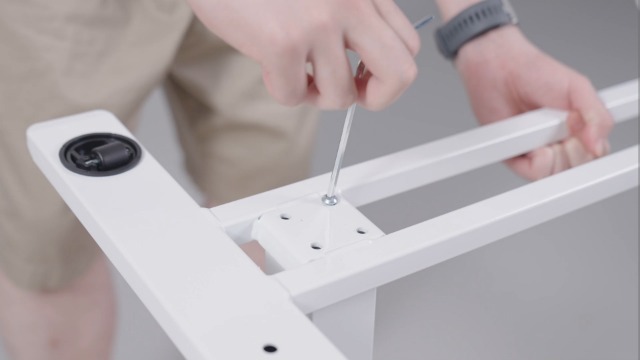
Image: Exploded view of the FLEXISPOT Mobile Standing Desk components. This image shows the base, tabletop, lifting column, crossbeam, wrench spring, Phillips screwdriver, and cup holder, all labeled for easy identification.
- Tabletop (1)
- Lifting Column (1)
- Crossbeam (1)
- Base (1)
- Cup Holder (1)
- Wrench Spring (1)
- Phillips Screwdriver (1)
- Assembly Screws/Hardware (various, typically labeled A, B, C)
4. Setup & Assembly
Assembly is designed to be straightforward and typically takes about 10 minutes. All necessary tools are included.
- Install the Lifting Column Spring: Insert the wrench spring into the top of the lifting column. Ensure proper alignment of the spring and handle protrusion with the handle notch.
- Install the Crossbeam: Attach the crossbeam to the lifting column using the provided screws. Note that the notch on the crossbeam needs to be installed facing up. Secure tightly with the Phillips screwdriver.
- Install the Tabletop: Carefully align the tabletop with the assembled lifting column and crossbeam. Secure the tabletop to the crossbeam using the appropriate screws.
- Install the Base: Attach the base to the bottom of the lifting column. Ensure all screws are tightened for stability.
- Install the Cup Holder: Assemble the cup holder components and attach it to the side of the tabletop using the provided screws and Phillips screwdriver.
- Turn Over the Desk: With assistance if needed, carefully turn the desk upright.
Video: FLEXISPOT H7 Overbed Bedside Table Installation Guide. This video provides a step-by-step visual guide for assembling the desk, demonstrating how to install each component and adjust the height.
5. Operating Instructions
Height Adjustment
The desk features a gas spring pneumatic lift system for smooth and easy height adjustments.
- To Raise: Gently pull the lever located under the tabletop and apply slight upward pressure to the tabletop. The desk will smoothly rise. Release the lever at the desired height.
- To Lower: Gently pull the lever located under the tabletop and apply slight downward pressure to the tabletop. The desk will smoothly lower. Release the lever at the desired height.
- The height can be adjusted from 26 inches to 41.7 inches.

Image: Easy Height Adjustment. This image illustrates the simple one-hand operation for adjusting the desk's height using the pneumatic lift system.
Mobility
The desk is equipped with hidden casters for easy movement.
- To move the desk, simply push or pull it to your desired location. The hidden casters allow for smooth 360-degree rotation.
- The low-profile base (1.2 inches high) is designed to easily tuck beneath furniture like beds and sofas, saving space.

Image: C-Shape & Hidden Casters. This image highlights the desk's design, which allows it to fit under low furniture, and shows the hidden wheels for easy movement.
Versatile Use
This desk is designed for multi-functional use:
- Use as a standing desk for improved posture and energy.
- Position over a bed or sofa for comfortable laptop use, reading, or dining.
- Ideal for small craft projects or as a portable workstation in any room.

Image: Multi-functional Use. This collage demonstrates various applications of the desk, including as a yoga side table, pet grooming station, small craft desk, and solo dining table.
6. Maintenance
Regular maintenance will help prolong the life and appearance of your FLEXISPOT Mobile Standing Desk.
- Cleaning: Wipe the tabletop and frame with a soft, damp cloth. Avoid harsh chemicals or abrasive cleaners that could damage the finish.
- Hardware Check: Periodically check all screws and fasteners to ensure they remain tight. Re-tighten if necessary.
- Moving Parts: Ensure the gas spring mechanism operates smoothly. Do not apply lubricants unless specifically recommended by the manufacturer.
- Storage: When not in use, store the desk in a dry, temperate environment away from direct sunlight or extreme temperatures.
7. Troubleshooting
If you encounter any issues with your desk, please refer to the following common troubleshooting tips:
| Problem | Possible Cause | Solution |
|---|---|---|
| Desk does not adjust height smoothly. | Lever not fully engaged or gas spring issue. | Ensure the lever is fully pulled. If the issue persists, contact customer support. |
| Desk wobbles or is unstable. | Loose fasteners or uneven surface. | Check and tighten all assembly screws. Ensure the desk is on a flat, stable surface. |
| Casters do not roll freely. | Obstruction or debris in casters. | Inspect casters for any obstructions and remove them. Clean casters if necessary. |
If these solutions do not resolve the issue, please contact FLEXISPOT customer support for further assistance.
8. Product Specifications
| Feature | Detail |
|---|---|
| Brand | FLEXISPOT |
| Model | 32x18 |
| Shape | Rectangular |
| Desk Design | Standing Desk |
| Product Dimensions | 18"D x 32"W x 37"H |
| Color | Maple |
| Style | Modern |
| Base Material | Metal and Wood |
| Top Material Type | Wood (FSC-Certified) |
| Finish Type | Painted |
| Special Feature | Portable, Wheel |
| Minimum Height | 26 Inches |
| Maximum Height | 41.7 Inches |
| Required Assembly | Yes |
| Includes All Assembly Tools | Yes |
9. Warranty & Support
This FLEXISPOT product comes with a Limited Warranty. For specific details regarding warranty coverage, terms, and conditions, please refer to the documentation included with your purchase or visit the official FLEXISPOT website.
Customer Support: If you have any questions, require assistance with assembly, or need troubleshooting support, please contact FLEXISPOT customer service. Our team is available to help you within 24 hours.
- Online Support: Visit the FLEXISPOT Store on Amazon for FAQs and additional resources.
- Email/Phone: Refer to your product packaging or the official FLEXISPOT website for direct contact information.

