
1. Introduction
The Elitech Loget260-TH is a 4G real-time temperature and humidity data logger designed for continuous monitoring in various applications, including cold chain logistics, food storage, and life sciences. It features built-in sensors for temperature, humidity, light, shock, and location (LBS), with data uploaded to a cloud platform via a built-in 4G SIM card. This manual provides essential information for the proper setup, operation, and maintenance of your device.
2. Safety Information
- Read all instructions carefully before using the device.
- Do not disassemble or modify the device.
- Keep the device away from water and extreme temperatures outside its operating range.
- Use only the specified charging accessories.
- Dispose of batteries according to local regulations.
3. Device Overview
The Loget260-TH features a clear digital display, control buttons, and various indicators. Understanding these components is crucial for operation.

Figure 3.1: Elitech Loget260-TH device and accompanying mobile application interface. The device shows a humidity reading of 64.0% and status indicators. The smartphone displays temperature and humidity graphs over time, with options for viewing data from today, last 7 days, or last 30 days.

Figure 3.2: Detailed view of the Loget260-TH display. Icons indicate logging status, maximum/minimum values, external probe connection, 4G signal strength, and battery level. The display shows '00:00.0%' and 'F' for Fahrenheit, along with 'OK' and 'Alarm' indicators, and 'START/STOP' and 'Flight Mode' buttons.
4. Setup and Initial Configuration
4.1 Charging the Device
Before first use, fully charge the Loget260-TH using the provided USB cable and a compatible power adapter. The battery indicator on the display will show charging status.
4.2 Powering On/Off
- Power On: Press and hold the 'START/STOP' button for 3 seconds.
- Power Off: Press and hold the 'START/STOP' button for 3 seconds until the device powers down.
4.3 Cloud Platform Registration
To utilize the 4G real-time monitoring features, register your device on the Elitech iCold cloud platform. Visit http://new.i-elitech.com or download the Elitech iCold APP. You will need the device's serial number (e.g., EFL20C000001) located on the back label.

Figure 4.1: Back of the Loget260-TH device showing the serial number and website address for cloud platform access.
4.4 Initial Settings
Configure logging intervals, alarm thresholds, and other parameters via the Elitech iCold platform or APP. The device will synchronize settings upon connection.
5. Operating Instructions
5.1 Starting and Stopping Recording
- Start Recording: Press the 'START/STOP' button briefly. The logging indicator will illuminate.
- Stop Recording: Press and hold the 'START/STOP' button until the logging indicator turns off.
The device supports 'Shadow Data' functionality, which passively records data even if recording is accidentally stopped or not initiated, ensuring data integrity. This data will be uploaded once the network connection is restored.
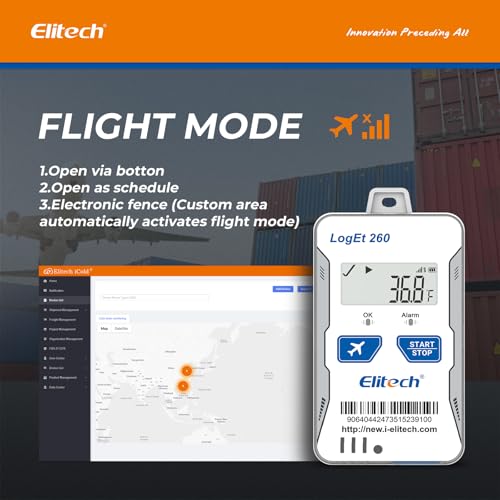
Figure 5.1: Illustration of the 'Shadow Data' feature, highlighting the device's ability to passively record data to ensure integrity, even if active logging is interrupted.
5.2 Flight Mode
The Loget260-TH complies with Do160 for aviation safety and features an 'Airplane Mode'. This mode can be activated in several ways:
- Manual Activation: Press the dedicated 'Flight Mode' button on the device.
- Scheduled Activation: Configure a schedule via the iCold platform.
- Electronic Fence: Set up a custom geographical area in the iCold platform; the device will automatically activate flight mode upon entering this area.
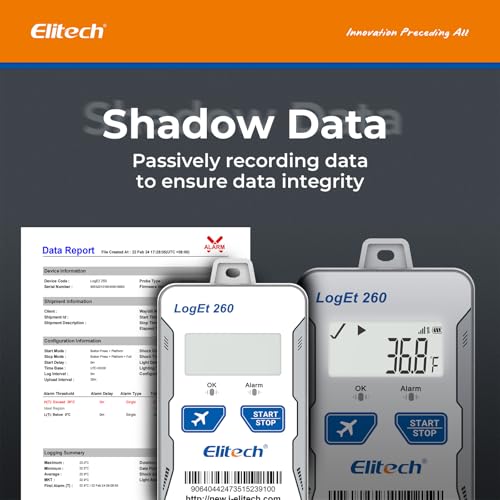
Figure 5.2: The Loget260-TH demonstrating 'Flight Mode' activation methods: via button, schedule, or electronic fence. The image also shows a map interface from the iCold platform, indicating location tracking.
5.3 Real-time Monitoring and Alarms
Data is uploaded to the Elitech iCold cloud platform via the built-in 4G SIM card at user-defined intervals (1 minute to 24 hours). You can monitor data in real-time through the iCold APP, SMS, Email, or the web platform. The device also provides local alarms via sound, screen display, and indicator lights for offline situations.

Figure 5.3: The Loget260-TH device illustrating its cloud data upload capability and the option to export data reports in PDF and CSV formats from the Elitech iCold platform.
5.4 Data Export and Reporting
The Elitech iCold platform allows for comprehensive data analysis and management. You can export data reports in PDF and CSV formats directly from the platform. This platform is FDA CFR 21 Part 11 compliant.
5.5 Typical Applications
The Loget260-TH is suitable for a wide range of applications requiring real-time temperature and humidity monitoring, especially in environments where goods are transported or stored. Common uses include:
- Food Cold Chain
- Harvest Management
- Cold Chain Logistics (Air, Sea, Road)
- Insulation Box Matching
- Life Science Market

Figure 5.4: Visual representation of the diverse applications for the Loget260-TH, including air freight, sea freight, refrigerated trucks, and containers, highlighting its utility in various cold chain scenarios.
6. Maintenance
6.1 Cleaning
Wipe the device with a soft, dry cloth. Do not use abrasive cleaners or solvents.
6.2 Battery Care
The device uses 2 Lithium Ion batteries. Ensure regular charging to maintain battery health. If the device will not be used for an extended period, charge it periodically to prevent deep discharge.
7. Troubleshooting
| Problem | Possible Cause | Solution |
|---|---|---|
| Device not powering on | Low battery; Device malfunction | Charge the device; Contact support if issue persists. |
| No data upload to cloud | No 4G signal; Incorrect settings; SIM card issue | Check 4G signal strength; Verify settings on iCold platform; Contact support. |
| Inaccurate readings | Sensor obstruction; Device placed in unsuitable environment; Sensor malfunction | Ensure sensors are clear; Relocate device; Contact support. |
| Alarms not received | Incorrect alarm settings; Network issues; Notification settings on phone/email | Verify alarm settings on iCold platform; Check network connectivity; Check spam folders/app notification settings. |
8. Specifications
- Model: Loget260-TH
- Connectivity: 4G
- Standard Sensors: Internal Temperature (-30~60℃), Humidity (0~100%RH), Light (0~52000Lux), Shock (0g~16g), Location (LBS)
- Optional Sensors: Humidity, PH value, CO2 Sensor (external, not included with this model)
- Recording Points: 100,000 (offline)
- Upload Interval: 1 minute to 24 hours (settable)
- Display Type: Digital
- Power Source: Battery Powered (2 Lithium Ion batteries included)
- Reusability: Rechargeable
- Outer Material: Plastic
- Dimensions: Approximately 9 cm (Length)
- Compliance: Do160 (for Flight Mode), FDA CFR 21 Part 11 (iCold platform)
9. Warranty and Support
Elitech provides a standard warranty for the Loget260-TH data logger. For detailed warranty terms, technical support, or service inquiries, please visit the official Elitech website or contact Elitech customer service directly. Ensure you have your device's model number and serial number ready when contacting support.
Elitech Official Website: www.elitechlog.com


