
Toshiba 43UF3F63DAZ
Toshiba 43UF3F63DAZ Fire TV User Manual
Model: 43UF3F63DAZ | Brand: Toshiba
Introduction
Welcome to the user manual for your new Toshiba 43UF3F63DAZ Fire TV. This 43-inch 4K Ultra HD Smart TV combines stunning visuals with intelligent features, including HDR Dolby Vision, a triple tuner, Alexa Built-In, and premium sound by Onkyo. This manual provides essential information for setting up, operating, maintaining, and troubleshooting your television to ensure optimal performance and enjoyment.

The Toshiba 43UF3F63DAZ Fire TV, showcasing its smart interface with various streaming applications.
Setup Guide
1. Unboxing and Initial Placement
Carefully remove the TV and all accessories from the packaging. Place the TV on a stable, flat surface or mount it on a wall using a compatible VESA 100x100 mount (not included). Ensure adequate ventilation around the TV.

Dimensions of the Toshiba 43UF3F63DAZ TV, including height with and without stand, depth, width, and VESA mounting points.
2. Connecting Peripherals
Your Toshiba Fire TV offers a variety of connection ports for external devices.
- HDMI Ports (x3): Connect Blu-ray players, gaming consoles, soundbars, or other HDMI-enabled devices. One port supports ARC/CEC for simplified control.
- USB Ports (x2): For connecting USB storage devices to play media or for service updates.
- Digital Audio Output: For connecting to external audio systems.
- Antenna Input: For connecting a terrestrial or cable antenna.
- LAN Port: For a wired internet connection.
- Headphone Jack: For private listening.
- CI Slot: For Conditional Access Modules (CAMs) to decrypt pay-TV channels.

Overview of all connection ports on the Toshiba 43UF3F63DAZ TV, including HDMI, USB, Digital Audio Out, Antenna, Headphones, LAN, and CI Slot.
For wireless connectivity, the TV supports Wi-Fi and Bluetooth. Ensure your Wi-Fi network is available during initial setup.
3. Powering On and Initial Configuration
- Connect the power cord to the TV and then to a power outlet.
- Press the power button on the TV or the remote control to turn on the TV.
- Follow the on-screen instructions to complete the initial setup, which includes:
- Language selection.
- Network connection (Wi-Fi or wired).
- Amazon account login (required for Fire TV features).
- Channel scanning for the integrated triple tuner (DVB-T2, DVB-C, DVB-S2).
Operating Your Fire TV
1. Remote Control Functions
The included remote control provides intuitive navigation and quick access to your favorite apps and features.

The remote control for the Toshiba Fire TV, featuring dedicated buttons for popular streaming services like Prime Video and Netflix.
- Power Button: Turns the TV on/off.
- Navigation Pad: For menu navigation.
- Select Button: Confirms selections.
- Back Button: Returns to the previous screen.
- Home Button: Returns to the Fire TV home screen.
- Volume Buttons: Adjusts volume.
- Channel Buttons: Changes channels (for live TV).
- App Shortcut Buttons: Direct access to Prime Video, Netflix, and other apps.
- Microphone Button: Activates Alexa voice control.
2. Navigating Fire OS
The Fire TV interface provides a personalized home screen with easy access to streaming apps, live TV, and connected devices. Browse content recommendations, search for titles, and manage your apps.

The Fire TV home screen, displaying various streaming applications and content recommendations.
3. Using Alexa Built-In
Your TV features Alexa Built-In, allowing you to control the TV and access information using voice commands. Simply press the microphone button on your remote and speak your command.
- "Alexa, open Netflix."
- "Alexa, switch to HDMI 1."
- "Alexa, turn up the volume."
- "Alexa, what's the weather?"

A user interacting with the Toshiba Fire TV using Alexa voice commands.
4. Entertainment Features
- Streaming Services: Access a wide range of applications like Prime Video, Netflix, DAZN, Disney+, YouTube, and more.
- Triple Tuner: Watch live TV via antenna (DVB-T2), cable (DVB-C), or satellite (DVB-S2) without an additional receiver.
- Sound by Onkyo: Experience enhanced audio quality with integrated Onkyo speakers, providing a cinematic sound experience.
- Gaming Experience: Enjoy realistic gaming with detailed, crystal-clear game worlds and smooth animations, supported by TRU Flow, TRU Resolution, and TRU Micro Dimming technologies.
The Toshiba Fire TV features integrated Onkyo speakers for superior audio performance.

A user enjoying a realistic gaming experience on the Toshiba Fire TV, highlighting TRU technologies.
Maintenance
1. Cleaning Your TV
- Always unplug the TV before cleaning.
- Use a soft, dry, lint-free cloth to wipe the screen and cabinet.
- For stubborn marks on the screen, lightly dampen the cloth with water or a specialized screen cleaner (do not spray directly onto the screen).
- Avoid using abrasive cleaners, waxes, or solvents.
2. Software Updates
Your Fire TV will periodically receive software updates to improve performance and add new features. Ensure your TV is connected to the internet to receive these updates automatically. You can also manually check for updates in the TV's settings menu.
Troubleshooting
If you encounter issues with your Toshiba Fire TV, refer to the following common solutions:
- No Power:
- Check if the power cord is securely connected to the TV and the power outlet.
- Ensure the power outlet is working by plugging in another device.
- No Picture/Sound:
- Verify the correct input source is selected (e.g., HDMI 1, TV).
- Check all cable connections (HDMI, antenna).
- Ensure the volume is not muted or set too low.
- Remote Control Not Working:
- Replace the batteries in the remote control.
- Ensure there are no obstructions between the remote and the TV.
- Try re-pairing the remote if it's a Bluetooth remote (refer to Fire TV settings).
- Internet Connection Issues:
- Restart your Wi-Fi router and modem.
- Check Wi-Fi settings on the TV to ensure it's connected to the correct network.
- If using a wired connection, ensure the Ethernet cable is securely connected.
- Picture Quality Issues (Blurry, Pixelated):
- Check the resolution settings of the connected device or streaming content.
- Ensure your internet speed is sufficient for streaming 4K content.
- For live TV, check antenna signal strength.
For more detailed troubleshooting, consult the online support resources or contact Toshiba customer service.
Specifications
Below are the key technical specifications for the Toshiba 43UF3F63DAZ Fire TV:
- Screen Size: 43 Inches (108 cm diagonal)
- Brand: Toshiba
- Display Technology: LED
- Resolution: 4K Ultra HD (3840 x 2160 pixels)
- Refresh Rate: 50 Hz
- Special Features: Alexa Built-in, Fire TV, HDR Dolby Vision, Sound by Onkyo, TRU Resolution, TRU Flow, Micro Dimming
- Connectivity: 3x HDMI (CEC + ARC), 2x USB, Digital Audio Output, Antenna Input, LAN, Headphone Jack, CI Slot, Wi-Fi, Bluetooth
- Aspect Ratio: 16:9
- Product Dimensions (with stand): 96.5 cm (W) x 60.2 cm (H) x 24.9 cm (D)
- Components Included: User Manual, TV with stand, Remote control with 2 AAA batteries
Energy Efficiency
The Toshiba 43UF3F63DAZ Fire TV has an energy efficiency rating of E. Detailed information can be found on the energy label and the EPREL database.

The energy efficiency label for the Toshiba 43UF3F63DAZ TV, showing its 'E' rating and power consumption.
For more details, visit the EPREL Database (Product ID: 1956462).
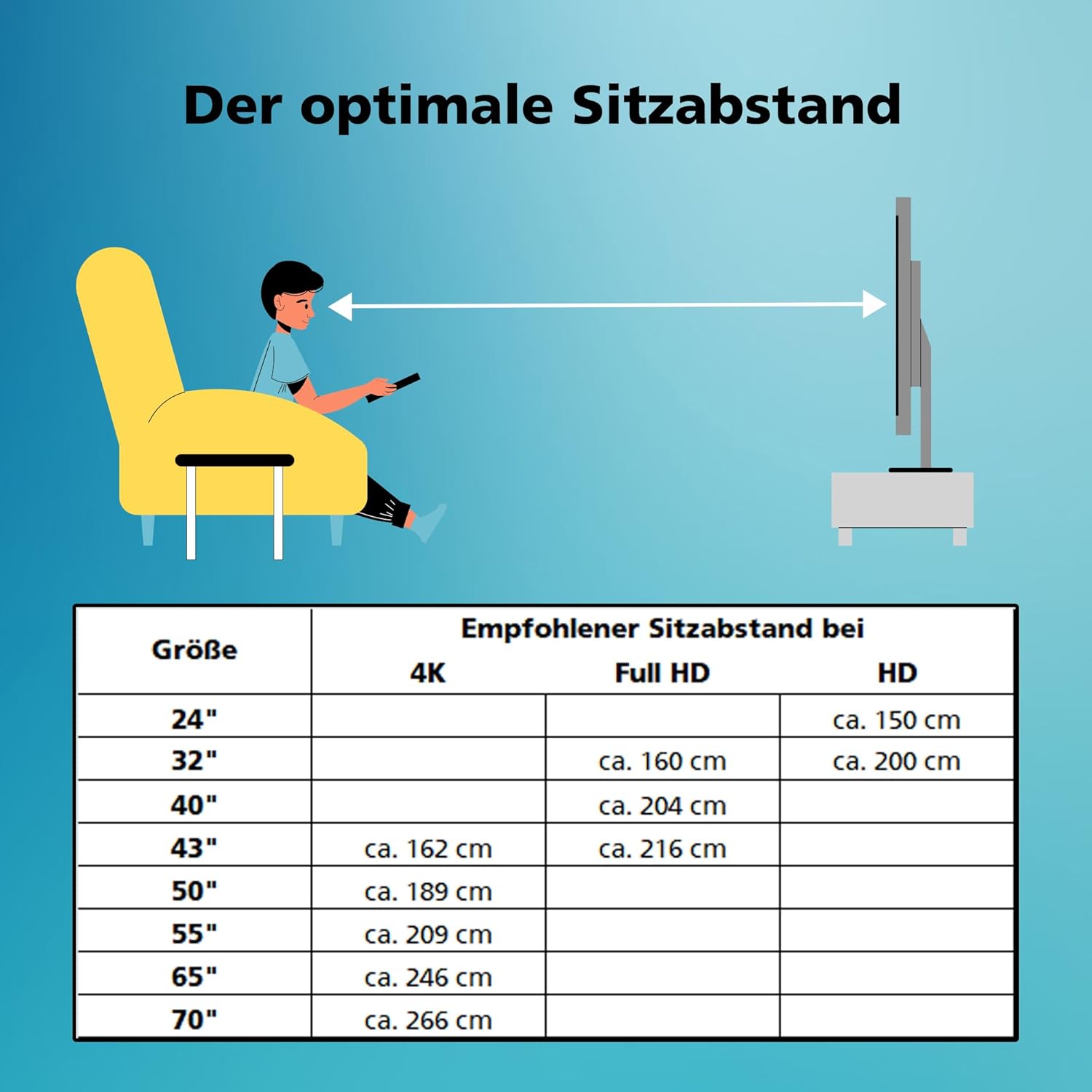
Optimal Viewing Distance
For the best viewing experience, consider the recommended seating distance based on the TV's resolution and size.

Recommended optimal viewing distances for various TV sizes and resolutions, including 4K and Full HD.
Warranty and Support
Your Toshiba Fire TV comes with a manufacturer's warranty. Please refer to the warranty card included in your product packaging for specific terms and conditions. Generally, the product has a minimum guaranteed availability of software and firmware updates for 8 years and spare parts for 7 years from the date of placing on the market.
For technical support, troubleshooting assistance, or warranty claims, please contact Toshiba customer service. You can find contact information on the Toshiba official website or in your product documentation.
Related documents43UF3F63DAZ


Ask a question about this manual
Ask about setup, troubleshooting, compatibility, parts, safety, or missing instructions. Manuals+ will review the question and use this page’s manual context to help answer it.