
1. Introduction
The Haute42 S16-C is a high-performance leverless arcade controller designed for precision gaming across multiple platforms. It features Kailh Crystal Low-Profile Switches, offering responsive and tactile feedback. This manual provides comprehensive instructions for setting up, operating, customizing, and maintaining your controller to ensure optimal performance.

2. Key Features
- Ultra-Low Latency: Equipped with a Raspberry Pi RP2040 controller chip and GP2040-CE firmware, achieving less than 1ms latency.
- Hot-Swappable Switches: Allows for easy replacement of mechanical keys without soldering.
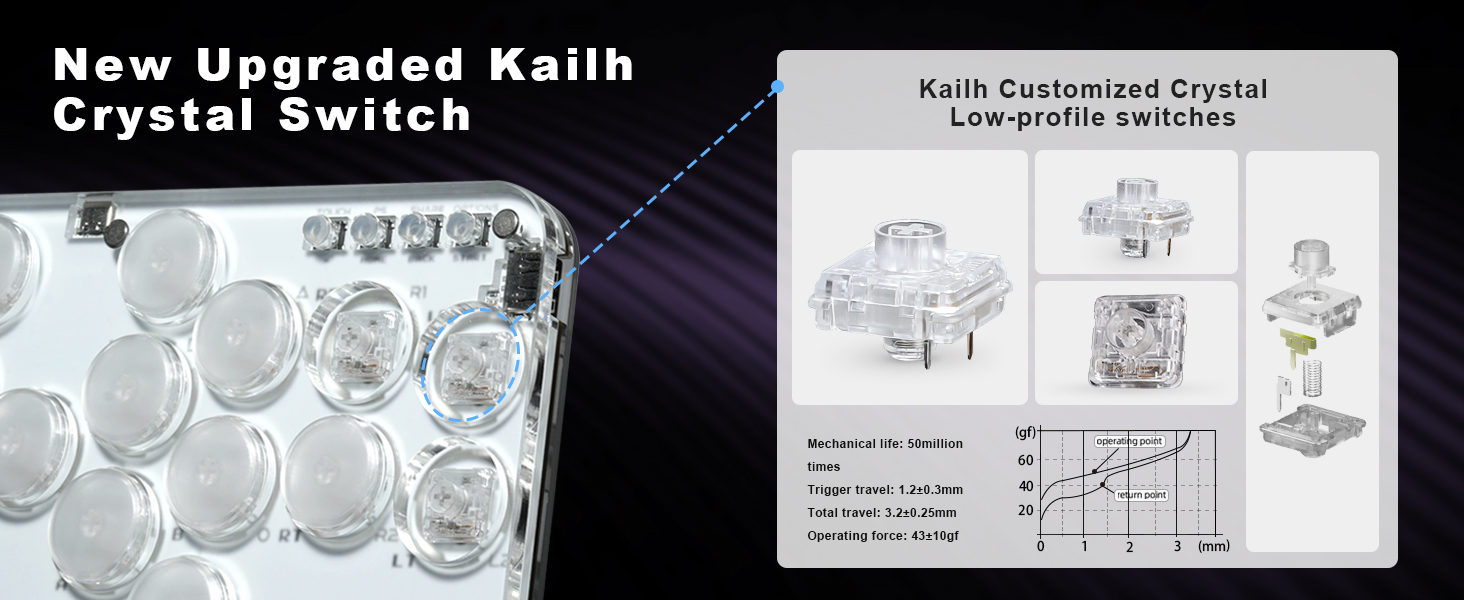
- Kailh Crystal Low-Profile Switches: Provides a light-transmissive design and responsive input.
- Customizable RGB Lighting: Personalize button illumination to enhance your gaming experience.
- OLED Screen: Provides real-time information and settings display.
- SOCD Modes: Supports various Simultaneous Opposing Cardinal Directions (SOCD) cleaning modes.
- Web Configuration: Advanced settings and firmware updates via a web interface.
- Premium Acrylic Panels: Durable and transparent panels suitable for DIY artwork customization.

3. System Compatibility
The Haute42 S16-C controller is compatible with a wide range of gaming systems:
- Windows 10 or above (PC)
- Steam Deck
- PlayStation 3 (PS3)
- PlayStation 4 (PS4)
- Nintendo Switch
- Android devices
- Arcade systems
Note: For PS4/PS5 connectivity, an adapter may be required and is not included with the controller. For detailed instructions on connecting to PS4/PS5, please visit the official support website: cosmoxgaming.com/support/.

4. Package Contents
Upon opening your Haute42 S16-C package, you should find the following items:
- 1x S16-C Leverless Controller
- 1x USB Type-C Cable (1.5m)
- 1x Instruction Manual
- 1x Kailh Low-Profile Switch (spare)
- 1x Switch Puller
- 2x 6mm Button Caps (spare)
- 8x Anti-Slip Pads

5. Setup
To begin using your Haute42 S16-C controller, follow these steps:
- Connect the USB Cable: Plug the included USB Type-C cable into the controller's main Type-C port and the other end into your gaming system (PC, console, etc.).
- System Recognition: The controller should be automatically recognized by most compatible systems. For specific consoles like PS4/PS5, you may need to hold a specific button combination while plugging in to initialize the correct mode. Refer to the official support website for detailed console-specific connection guides.
- Anti-Slip Pads: Apply the included anti-slip pads to the bottom of the controller for stability during gameplay, if desired.

6. Operating Instructions
The Haute42 S16-C features a standard leverless button layout for precise input. Familiarize yourself with the button functions and special features below.
6.1. Basic Button Functions
The controller utilizes a 16-button layout. The primary action buttons are typically mapped to standard fighting game inputs (e.g., punches, kicks). Directional inputs are handled by four dedicated buttons on the left side of the controller.
6.2. Controller Modes
The S16-C supports various controller modes to ensure compatibility with different systems. These modes include:
- X-input mode (for PC)
- Switch mode (for Nintendo Switch)
- PS3/D-input mode (for PlayStation 3 and general DirectInput devices)
- PS4 mode (for PlayStation 4)
- Keyboard mode
The controller will typically auto-detect the correct mode. If manual selection is needed, refer to the official support website or the included instruction manual for specific button combinations.

6.3. Special Functions
- Turbo Function: Allows for rapid, repeated input of a button press. Activation and configuration details can be found in the full instruction manual or via web configuration.
- SOCD Modes: The controller supports various SOCD cleaning methods to prevent simultaneous opposing directional inputs. These modes are configurable via the web interface.
- OLED Screen: The small OLED display provides useful information such as current mode, input latency, and other settings.
6.4. Custom RGB Lighting
The buttons on the S16-C feature customizable RGB lighting. You can adjust colors, effects, and brightness to match your preference or gaming setup. Customization is typically performed through the web configuration interface.

7. Customization and DIY
The Haute42 S16-C is designed with customization in mind, allowing users to personalize their controller.
7.1. Hot-Swappable Switches
The controller's hot-swappable design allows you to easily change out the Kailh Crystal Low-Profile Switches for other compatible mechanical switches without the need for soldering. Use the included switch puller to carefully remove and insert switches.
7.2. DIY Artwork
The premium acrylic top panel can be removed to allow for the insertion of custom artwork, enabling you to personalize the aesthetic of your controller. Ensure any artwork is cut to the correct dimensions and does not obstruct button functionality.

8. Maintenance
Proper maintenance ensures the longevity and performance of your Haute42 S16-C controller.
- Cleaning: Use a soft, dry cloth to wipe down the acrylic panels and buttons. For stubborn smudges, a slightly damp cloth with mild soap can be used, followed by immediate drying. Avoid harsh chemicals or abrasive materials.
- Switch Care: While switches are hot-swappable, avoid excessive force when removing or inserting them to prevent damage to the switch pins or the PCB sockets.
- Storage: Store the controller in a clean, dry environment away from direct sunlight and extreme temperatures.
9. Troubleshooting
If you encounter issues with your Haute42 S16-C controller, consider the following troubleshooting steps:
- Controller Not Recognized: Ensure the USB cable is securely connected to both the controller and the system. Try a different USB port or cable. Verify that the correct controller mode is selected for your system (if applicable).
- Input Lag: The S16-C is designed for ultra-low latency. If you experience noticeable lag, ensure you are using a direct USB connection and not through an unpowered USB hub. Check for any background processes on your PC that might be consuming resources.
- Buttons Not Responding: Check if any switches are loose or improperly seated. Use the switch puller to re-seat or replace faulty switches.
- PS4/PS5 Connection Issues: As mentioned in the compatibility section, specific steps or an adapter might be required. Refer to cosmoxgaming.com/support/ for detailed guidance.
- Firmware Updates: Ensure your controller's firmware is up to date. Firmware updates can resolve bugs and improve performance. Instructions for updating firmware are available via the web configuration interface or the official support website.
10. Specifications
| Feature | Detail |
|---|---|
| Model Number | Cosmox-Haute42 S16-C |
| Controller Chip | Raspberry Pi RP2040 with GP2040-CE firmware |
| Latency | <1ms |
| Switches | Kailh Crystal Low-Profile Switches (Hot-swappable) |
| Connectivity | USB Type-C |
| Dimensions (L x W x H) | 196mm x 125mm x 12.5mm (7.71 x 4.92 x 0.49 inches) |
| Weight | Approximately 1.06 pounds (0.48 kg) |
| Compatibility | PC (Windows 10+), Steam Deck, PS3, PS4, Switch, Android, Arcade |
11. Support & Warranty
ONEED provides strong after-sales customer service and technical support for the Haute42 S16-C controller.
- Technical Support: If you have any questions or require technical assistance, please contact ONEED customer service.
- Online Resources: For additional support, FAQs, and the latest firmware updates, please visit the official support website: cosmoxgaming.com/support/.
- Warranty Information: Details regarding product warranty are typically included with your purchase documentation. Please retain your proof of purchase for warranty claims.