
CYKOV CY59H
CYKOV Office Chair User Manual
Model: CY59H
Brand: CYKOV
Introduction
Thank you for choosing the CYKOV Office Chair. This high-back desk chair is designed with adjustable height and ergonomic features to provide optimal comfort and support for your home or office. It features a luxurious leather seat, adjustable recline, flip-up armrests, and a 360-degree swivel for seamless mobility. This manual provides detailed instructions for assembly, operation, maintenance, and troubleshooting to ensure you get the most out of your new chair.

Image: The CYKOV Office Chair in brown, showcasing its ergonomic design and padded features.
Important Safety Information
Please read all instructions carefully before assembly and use. Keep this manual for future reference.
- Ensure the chair is properly assembled according to instructions.
- Do not exceed a weight capacity of 300 pounds for safe use.
- Avoid standing on the chair or using it as a step stool.
- Keep children and pets away from the chair during assembly.
- Regularly check all bolts and screws to ensure they are tightened.
Package Contents
Before beginning assembly, verify that all parts are present and undamaged. If any parts are missing or damaged, please contact customer support.

Image: An exploded diagram showing all individual components of the CYKOV Office Chair, including the seat, backrest, armrests, gas lift, base, and wheels.
Typical package contents include:
- Backrest Assembly
- Seat Cushion Assembly
- Armrests (Left and Right)
- Chair Base
- Gas Lift Cylinder
- Casters (Wheels)
- Mechanism Plate
- Hardware Kit (Screws, Washers, Allen Wrench)
- Assembly Instructions Booklet
- Gloves (for assembly)
Assembly and Setup
The CYKOV Office Chair is designed for quick and easy assembly, typically taking around 30-40 minutes. An instruction booklet with labeled parts and clear pictures is included to guide you through each step. All necessary tools, including an Allen wrench, are provided.
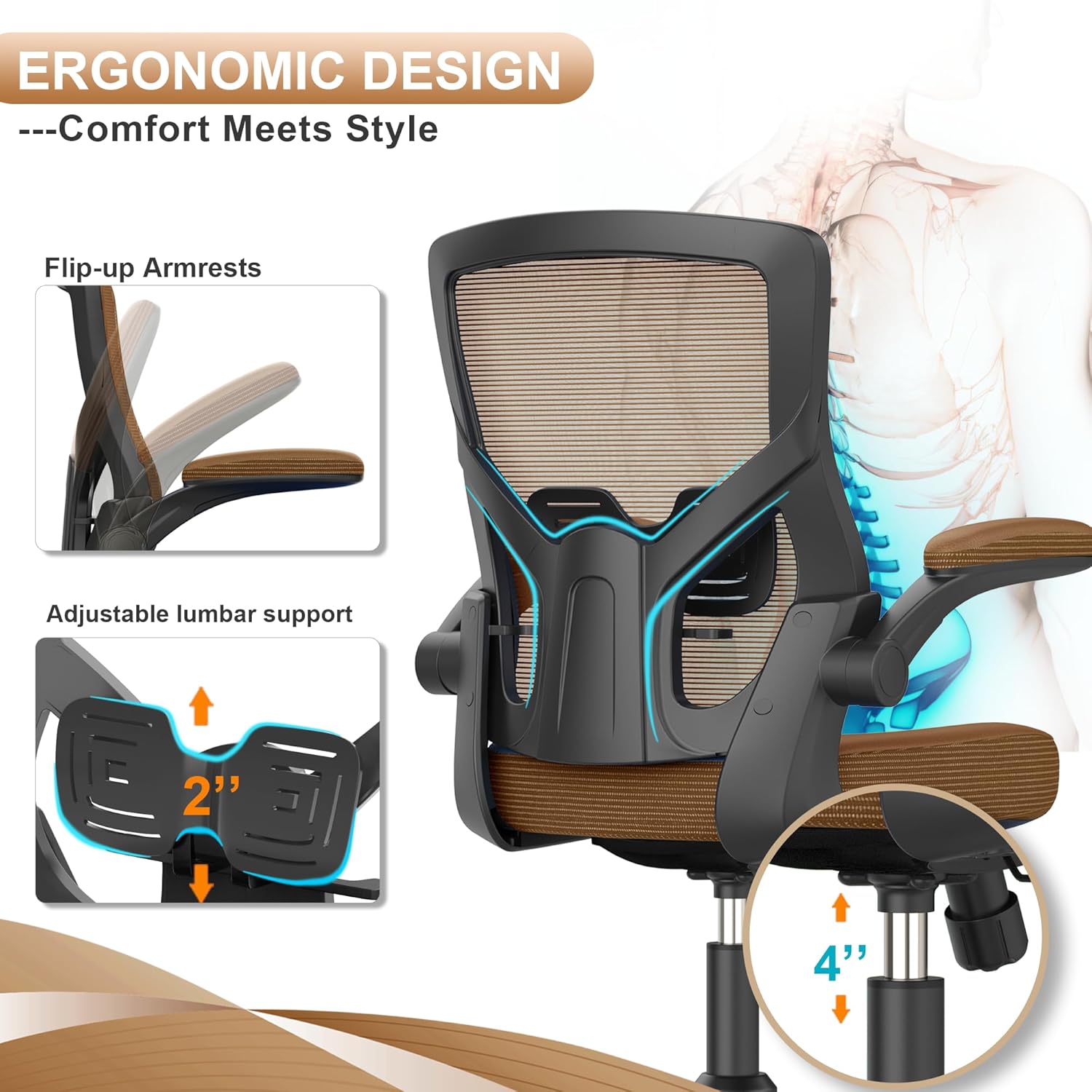
Image: A diagram illustrating the key dimensions of the CYKOV Office Chair, including height, width, and depth, along with its 300 lbs weight capacity.
Assembly Steps (General Overview):
- Insert the casters into the holes at the end of each leg of the chair base.
- Place the gas lift cylinder into the center hole of the chair base.
- Attach the mechanism plate to the underside of the seat cushion using the provided screws. Ensure the front of the mechanism faces the front of the seat.
- Attach the armrests to the seat cushion.
- Attach the backrest to the seat cushion and armrests.
- Carefully place the assembled seat and backrest onto the gas lift cylinder.
- Tighten all screws securely, but do not overtighten.
Refer to the included assembly booklet for detailed, step-by-step instructions and diagrams specific to your chair model.
Operating Instructions and Adjustments
Your CYKOV Office Chair offers several adjustment features to customize your seating experience for maximum comfort and ergonomic support.
1. Height Adjustment
The chair features a 4-inch height adjustment range. To adjust the chair height:
- To raise: While seated, pull the lever located on the right side of the seat upwards and lift your weight off the seat. The chair will rise. Release the lever at the desired height.
- To lower: While seated, pull the lever located on the right side of the seat upwards and apply pressure to the seat. The chair will lower. Release the lever at the desired height.

Image: Close-up view highlighting the ergonomic design of the chair, including adjustable lumbar support and the 4-inch height adjustment mechanism.
2. Recline and Tilt Lock
The chair offers a 90-135 degree tilt lock mechanism, allowing you to recline for relaxation or maintain an upright position for focused work.
- To recline: Pull the lever on the left side of the seat outwards to unlock the tilt mechanism. Lean back to your desired angle.
- To lock tilt: Push the lever on the left side of the seat inwards to lock the chair in your preferred reclined or upright position.
- Tilt Tension: Adjust the tension of the recline by turning the round knob located underneath the seat, towards the front. Turn clockwise to tighten (more resistance) or counter-clockwise to loosen (less resistance).
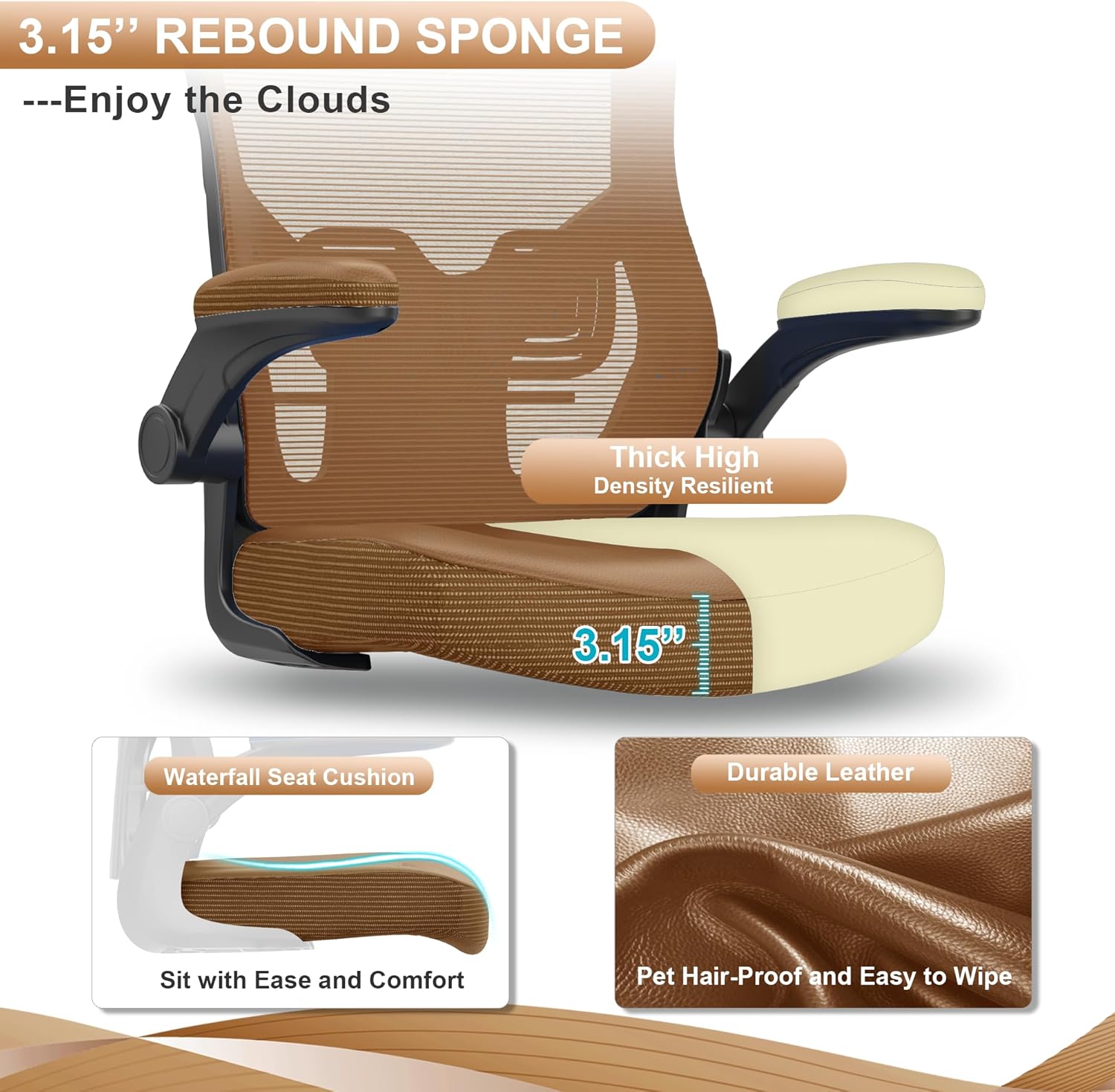
Image: Visual representation of the chair's 90-135 degree recline, 360-degree swivel, and 4-inch height adjustment capabilities.
3. Flip-Up Armrests
The convenient flip-up armrests provide flexibility, allowing you to save space or adjust for comfort.
- To flip up: Grasp the armrest and rotate it upwards until it locks into a vertical position. This allows the chair to be pushed further under a desk.
- To flip down: Gently pull the armrest downwards until it returns to its horizontal position.
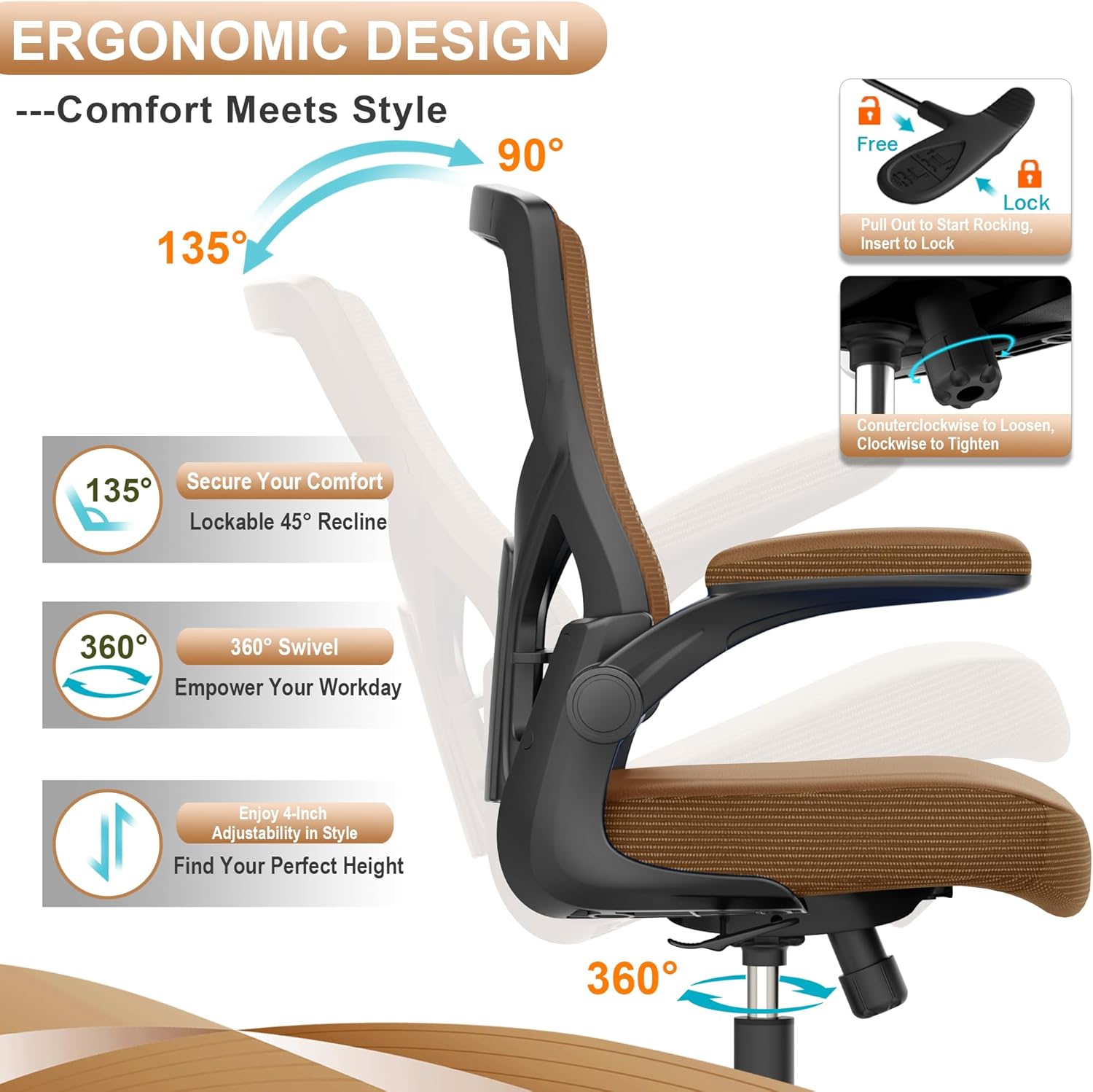
Image: Two views of the CYKOV Office Chair demonstrating the armrests in both the standard down position and flipped-up position for space-saving.
4. 360-Degree Swivel
The chair features a smooth 360-degree swivel, allowing you to effortlessly rotate and pivot in any direction for enhanced mobility and collaboration.
5. Adjustable Lumbar Support
The integrated lumbar support can be adjusted to provide optimal support for your lower back. Gently push or pull the lumbar support pad on the backrest to find your preferred position.
Maintenance and Care
Proper care and maintenance will extend the life and appearance of your CYKOV Office Chair.
- Cleaning the Leather Seat: The premium leather seat is designed for durability and easy maintenance. Wipe clean with a soft, damp cloth. For tougher stains, use a mild leather cleaner and follow the product instructions. Avoid harsh chemicals or abrasive cleaners. The material is also pet hair-proof and easy to wipe.
- Cleaning the Mesh Backrest: Use a soft brush or vacuum cleaner with a brush attachment to remove dust and debris from the mesh. For spills, gently blot with a damp cloth and mild soap, then wipe with a clean, damp cloth and allow to air dry.
- Casters (Wheels): Periodically check the casters for accumulated hair or debris that may hinder smooth movement. Clean as needed. The chair features whisper-quiet wheels suitable for hard floors, carpet, and tile.
- Hardware: Every few months, check all screws and bolts to ensure they are tight. Re-tighten if necessary to maintain stability and prevent squeaking.
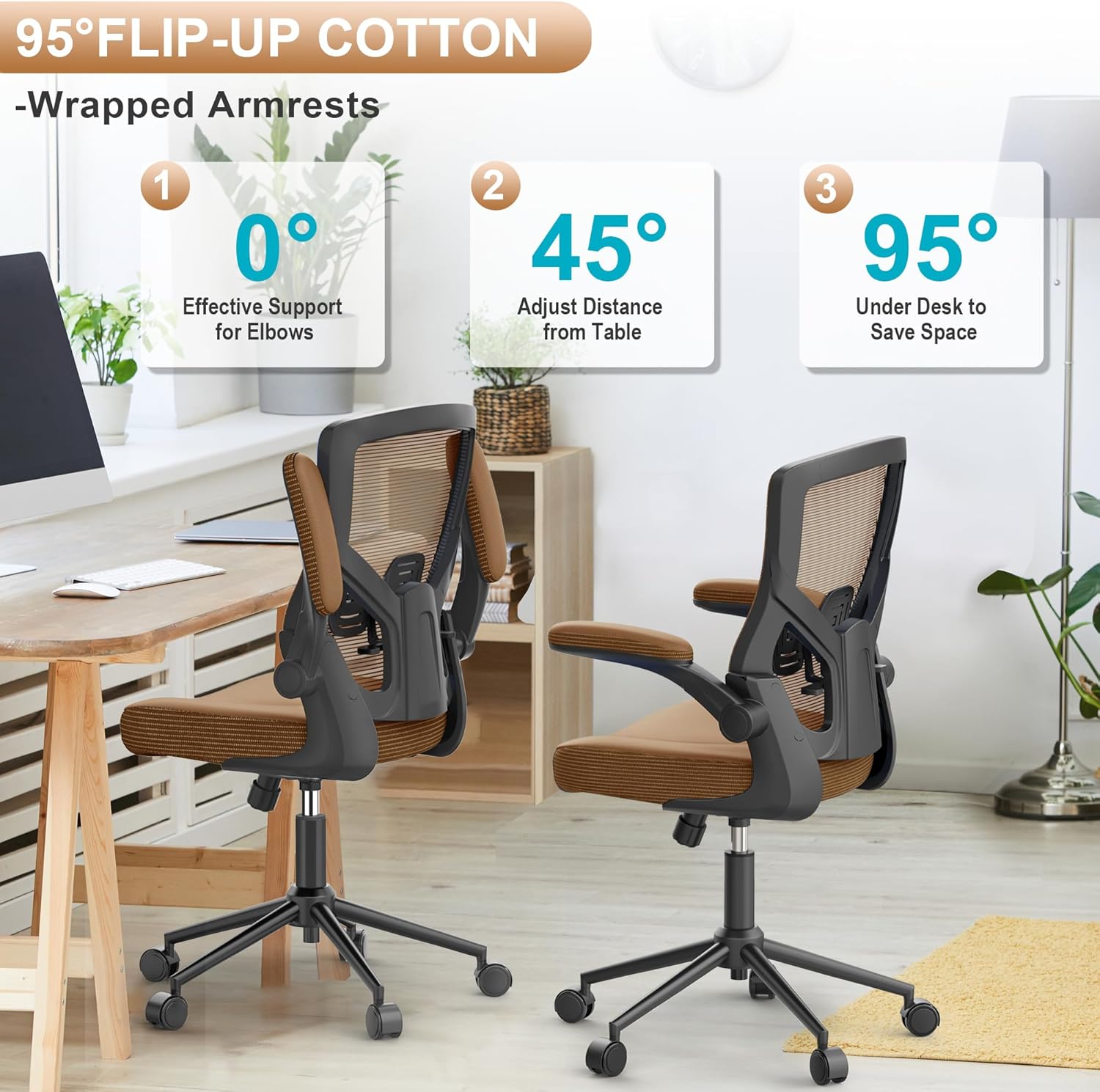
Image: A detailed view of the chair's seat cushion, highlighting its 3.15-inch thick high-density resilient foam, waterfall design, and durable leather material.

Image: Illustration of the chair's sturdy base and whisper-quiet, smooth-rolling casters, suitable for various floor types.
Troubleshooting
This section addresses common issues you might encounter with your office chair.
| Problem | Possible Cause | Solution |
|---|---|---|
| Chair does not adjust height. | Gas lift cylinder malfunction or lever not fully engaged. | Ensure the height adjustment lever is fully pulled up. If the issue persists, the gas lift cylinder may need replacement. Contact customer support for assistance, especially if a taller cylinder is needed. |
| Chair squeaks when moving. | Loose hardware or friction between components. | Check and tighten all assembly screws. Apply a small amount of silicone lubricant to moving parts or joints if necessary. |
| Chair does not roll smoothly. | Debris (hair, lint) caught in casters or damaged casters. | Turn the chair over and remove any debris from the casters. If casters are damaged, they may need to be replaced. |
| Chair feels unstable or wobbly. | Loose connections or uneven assembly. | Re-check all assembly points and tighten screws. Ensure the chair is on a flat, even surface. |
| Backrest does not recline or lock. | Tilt lock lever not engaged/disengaged properly or tilt tension too tight. | Ensure the tilt lock lever is fully pushed in to lock or pulled out to unlock. Adjust the tilt tension knob underneath the seat (counter-clockwise to loosen). Note that the backrest and seat tilt together. |
Specifications
Detailed specifications for the CYKOV Office Chair (Model: CY59H).
| Feature | Detail |
|---|---|
| Brand | CYKOV |
| Model Name | 5189B OFFICE CHAIR (Model Number: CY59H) |
| Color | Brown |
| Product Dimensions | 20"D x 20"W x 45"H |
| Maximum Weight Recommendation | 300 Pounds |
| Back Style | Solid Back (Mesh) |
| Special Feature | Adjustable Height, Ergonomic Design, Lumbar Support, Flip-Up Armrests, Swivel |
| Reclining Position Count | 3 (90-135 degree tilt lock) |
| Fill Material | High Resilience Foam (Seat) |
| Furniture Finish | Leather (Seat) |
| Item Weight | 28.6 pounds |
| Date First Available | August 13, 2024 |
Warranty and Support
CYKOV stands behind the quality and durability of its products.
5-Year Warranty
Your CYKOV Office Chair comes with a comprehensive 5-year warranty. This warranty covers manufacturing defects and significant issues with materials or workmanship under normal use. Please retain your proof of purchase for warranty claims.
Customer Support
CYKOV is committed to providing excellent customer service. If you have any questions, concerns, or require assistance with assembly, parts, or troubleshooting, please do not hesitate to contact our support team. Our team aims to respond to requests within 24 hours and is dedicated to resolving any issues quickly and effectively.
For support, please visit the official CYKOV store on Amazon or refer to the contact information provided in your product packaging.
You can also visit the CYKOV Store on Amazon for more information and support resources.
Ask a question about this manual
Ask about setup, troubleshooting, compatibility, parts, safety, or missing instructions. Manuals+ will review the question and use this page’s manual context to help answer it.