
1. Introduction
This manual provides detailed instructions for the installation, operation, and maintenance of your SIXWIN Android 13 Autoradio. This device is specifically designed for Renault Megane 3 models manufactured between 2008 and 2014. It features a 9-inch capacitive touchscreen, 2GB RAM, 64GB ROM, and supports various connectivity options including Wireless CarPlay, Wired Android Auto, Mirrorlink, WiFi, GPS, FM radio, and Bluetooth.
2. Setup and Installation
2.1 Vehicle Compatibility
Before installation, ensure your vehicle's central control panel matches Option A as shown in the image below. This product is compatible only with Option A configurations. If your vehicle has Option B, please contact customer service for alternative recommendations.

Image: Car Models Attention - Option A (compatible) and Option B (incompatible) dashboard configurations.
2.2 Package Contents
Verify that all components are present in the package:
- Main Unit (9-inch display)
- Power Cable
- USB Cables (2 ports)
- RCA Input/Output Cables
- Reversing Camera Input Cable
- GPS Antenna
- Radio Antenna
- User Manual
- Microphone
- Canbus Decoder
- Installation Tool
- Accessories (frame, circuit board)

Image: Packing List & Size - Overview of the main unit dimensions and all included components.
2.3 Installation Overview
The image below illustrates the appearance of the dashboard before and after the installation of the SIXWIN Autoradio. Professional installation is recommended.

Image: Installation Display - Visual comparison of the car interior before and after the autoradio installation.
3. Operating Instructions
3.1 Wireless CarPlay and Wired Android Auto
The unit supports both Wireless CarPlay for iPhone and Wired Android Auto for Android phones. Connect your iPhone via Bluetooth/WiFi/USB for CarPlay. For Android Auto, use the original data cable for a wired connection. This allows access to navigation, calls, messages, and music through voice commands or the touchscreen.

Image: Wireless CarPlay and Wired Android Auto - User interfaces and connection methods.
3.2 Mirror Link Function
Synchronize your smartphone screen with the car's display. Android phones can connect via USB or WiFi, while iOS devices connect via WiFi only.

Image: Mirror Link - Demonstrates screen mirroring for both iOS and Android devices.
3.3 GPS Navigation and WiFi Connectivity
The unit features a built-in GPS receiver supporting both online and offline maps for convenient navigation. Connect the device to WiFi or a mobile hotspot to access internet-dependent applications such as GPS Maps, YouTube, TikTok, and Spotify.

Image: WiFi Connection and GPS Navigation - Illustrates internet access and mapping capabilities.
3.4 Bluetooth 4.0 and FM/RDS Radio
Utilize the integrated Bluetooth 4.0 for hands-free calling, phonebook synchronization, and Bluetooth music playback. The high-quality digital stereo FM radio allows you to preset up to 18 stations and receive traffic information.
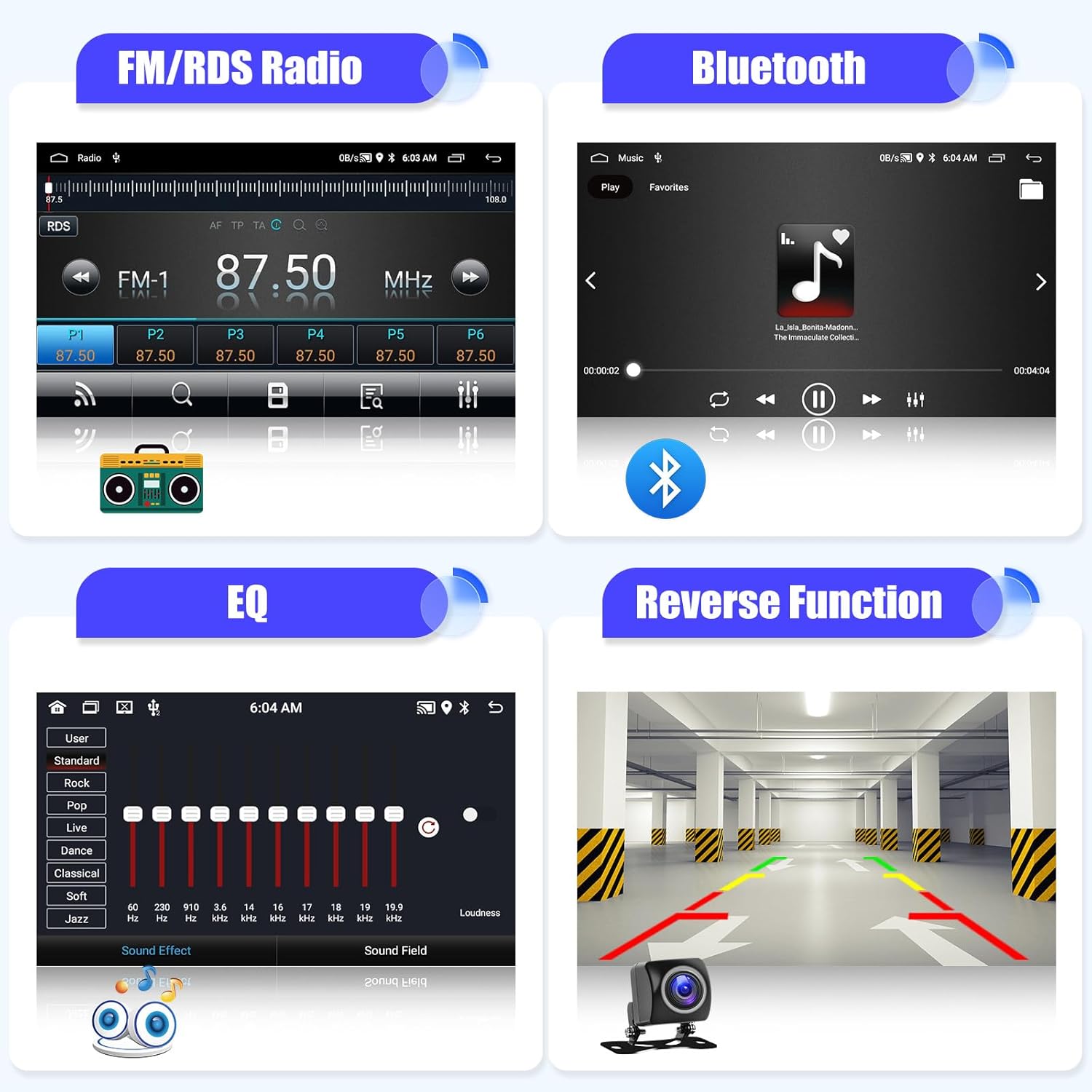
Image: FM/RDS Radio, Bluetooth, EQ, and Reverse Function - Displays various audio and utility features.
3.5 Steering Wheel Control (SWC)
The unit supports original steering wheel controls, allowing for safe operation without needing an additional remote controller. This enables control over volume, track changes, and call management directly from your steering wheel.
Refer to the 'Mirror Link and Steering Wheel Control' image in section 3.2 for a visual representation of SWC functionality.
3.6 Equalizer (EQ)
Customize your audio experience with the built-in equalizer, offering various sound effects and adjustments to suit your preferences.
Refer to the 'FM/RDS Radio, Bluetooth, EQ, and Reverse Function' image in section 3.4 for a visual representation of the EQ interface.
3.7 Reverse Function
The unit supports a reversing camera input, providing a clear view of the area behind your vehicle when reversing, enhancing safety.
Refer to the 'FM/RDS Radio, Bluetooth, EQ, and Reverse Function' image in section 3.4 for a visual representation of the reverse camera display.
4. Maintenance
To ensure the longevity and optimal performance of your SIXWIN Autoradio, follow these general maintenance guidelines:
- Screen Cleaning: Use a soft, lint-free cloth to gently wipe the touchscreen. Avoid abrasive cleaners or solvents that may damage the screen.
- Temperature: Avoid exposing the device to extreme temperatures, both hot and cold, as this can affect its electronic components.
- Connections: Periodically check all cable connections to ensure they are secure and free from damage.
- Software Updates: Check the manufacturer's website or contact support for available software updates to improve performance and add new features.
5. Troubleshooting
If you encounter issues with your SIXWIN Autoradio, refer to the following common problems and solutions:
| Problem | Possible Cause / Solution |
|---|---|
| Device does not power on | Check power cable connections. Ensure vehicle ignition is on. Verify fuse. |
| No sound | Check speaker wiring. Ensure volume is not muted or set to zero. Verify audio output settings. |
| CarPlay/Android Auto not connecting | Ensure Bluetooth/WiFi is enabled on your phone and the head unit. Use original USB cable for wired connections. Restart both phone and head unit. |
| Steering Wheel Controls not working | Verify CANbus decoder connection and configuration. Ensure the steering wheel control wires are correctly connected to the head unit. Some vehicles may require specific programming. |
| GPS signal weak or inaccurate | Ensure GPS antenna is properly installed and has a clear view of the sky. Check antenna connection. |
| Touchscreen unresponsive | Restart the device. If the problem persists, contact customer support. |
If the issue is not resolved by the above steps, please contact customer support for further assistance.
6. Specifications
| Feature | Detail |
|---|---|
| Brand | SIXWIN |
| Model Number | 1 |
| Operating System | Android 13 |
| RAM | 2 GB |
| ROM (Internal Storage) | 64 GB |
| Screen Size | 9 inches LCD |
| Screen Resolution | 1024 x 600 |
| Connectivity Technology | USB, Bluetooth, WiFi |
| Special Features | Wireless CarPlay for iPhone, Wired Android Auto, Mirror Link, GPS Navigation, FM/RDS Radio, Bluetooth 4.0, Steering Wheel Control, EQ, Reverse Camera Input |
| Vehicle Service Type | Car |
| Mounting Type | Dashboard Mount |
| Product Dimensions (L x W x H) | 1 x 1 x 1 cm |
| Item Weight | 1.91 kilograms |
7. Warranty and Support
For warranty information, please refer to the documentation included with your purchase or contact the seller directly. For technical assistance or any questions regarding your SIXWIN Autoradio, please contact our customer support team.
Customer Support Email: SIXWINVIP@126.com

Image: Customer Support - Contact information for assistance.

