
AOFAR HX1600
AOFAR HX1600 Hunting Rangefinder User Manual
Model: HX1600
Introduction
The AOFAR HX1600 Hunting Rangefinder is a high-performance optical device designed for precise distance measurement in various outdoor environments, particularly for hunting and shooting. Featuring a dual-color OLED display and advanced scan technology, it provides accurate readings including angle and horizontal distance. Its rugged, waterproof design ensures durability and reliability in challenging conditions.
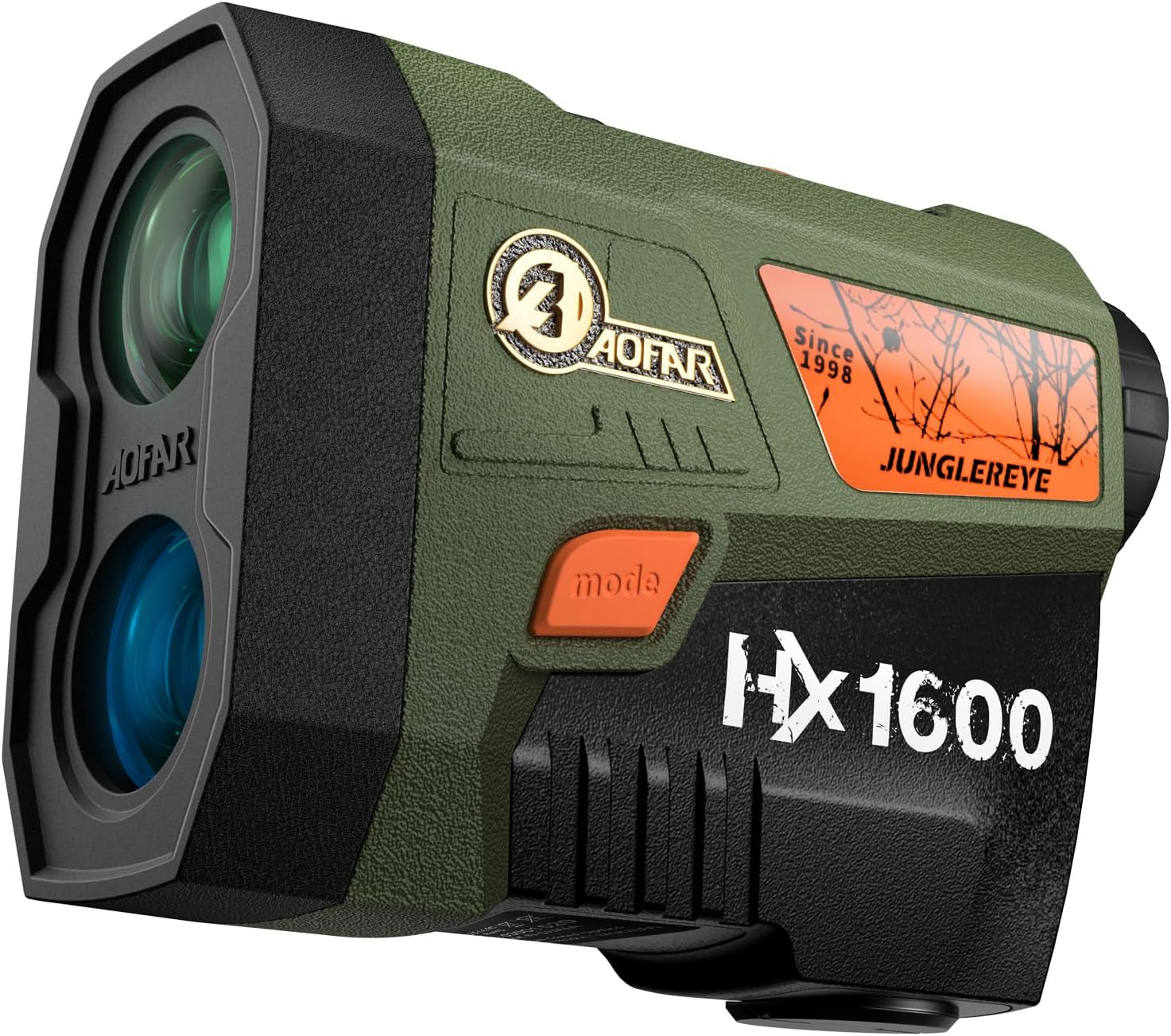
Image: The AOFAR HX1600 Hunting Rangefinder, a compact and durable device.
What's in the Box
Upon opening your AOFAR HX1600 package, please verify that all the following components are included:
- AOFAR HX1600 Hunting Rangefinder
- Cleaning cloth
- User manual
- CR2 battery
- Carabiner
- Carrying pouch
- High-grade portable rope

Image: All components included in the AOFAR HX1600 package, neatly arranged.
Product Features
The AOFAR HX1600 is equipped with several advanced features to enhance your outdoor experience:
- Dual-Color OLED Display: Provides an ultra-clear display with over 95% light transmittance, ensuring excellent visibility in various lighting conditions. The display is adjustable for different environments.
- Latest Cutting-Edge Technology: Incorporates the latest version 3.0 scan technology, allowing for rapid data acquisition, with speed measurements in as little as 1 second.
- Angle and Horizontal Distance: Accurately displays both the line-of-sight distance and the compensated horizontal distance, crucial for precise targeting regardless of terrain inclination.
- Rugged Rangefinder Body: Constructed with an aluminum alloy body and high-density rubber, providing enhanced texture, comfort, and durability. It is designed to be waterproof (IPX4 rated).

Image: Close-up view of the AOFAR HX1600's dual-color OLED display, showing clear readings against a natural background.

Image: Diagram illustrating how the AOFAR HX1600 measures line of sight, angle, and horizontal distance to a target.

Image: The AOFAR HX1600 rangefinder shown in a wet, muddy environment, highlighting its waterproof and durable construction.
Setup
Follow these steps to set up your AOFAR HX1600 Rangefinder for first use:
- Battery Installation: Locate the battery compartment on the device. Insert the included CR2 battery, ensuring the positive (+) end is facing outwards as indicated by the diagram inside the compartment. Close the battery cover securely.
- Power On: Press the Power button (usually located on the top of the device) to turn on the rangefinder. The OLED display should illuminate.
- Eyepiece Adjustment: Rotate the eyepiece diopter to adjust the focus until the reticle and display appear sharp and clear for your vision.
Operating Modes
The AOFAR HX1600 features multiple operating modes to suit different measurement needs. Use the 'Mode' button to cycle through these options and the 'Power' button to activate measurements or confirm selections.
Range Mode
This mode measures the straight-line distance to a target, and also provides angle and horizontal distance compensation. It is ideal for static targets and precise distance determination.
- To enter Range Mode: Press the 'Mode' button until the display shows the Range indicator (typically 'R' or a similar icon).
- To measure: Aim the crosshairs at your target and press the 'Power' button. The distance, angle, and horizontal distance will be displayed.

Image: Overview of the AOFAR HX1600's full range of functions, including range, scan, speed, angle, and waterproof features.
Speed Mode
This mode allows you to measure the speed of moving objects. The device can measure speeds up to 180 m/s.
- To enter Speed Mode: Press the 'Mode' button until the display shows the Speed indicator (typically 'M/S Spd' or similar).
- To measure: Aim at the moving target and press the 'Power' button. The speed will be displayed.

Image: The AOFAR HX1600 displaying its Speed Mode, indicating its ability to measure the velocity of moving targets.
Scan Mode (New Upgrade 3.0 Version)
Scan Mode provides continuous measurement of different targets as you pan the rangefinder across an area. This is useful for quickly ranging multiple objects or tracking a moving target.
- To enter Scan Mode: Press the 'Mode' button until the display shows the Scan indicator.
- To measure: Press and hold the 'Power' button while sweeping the rangefinder across the targets. The display will continuously update with distances to objects within the field of view.

Image: The AOFAR HX1600 demonstrating its Scan Mode, showing continuous distance updates as it pans across a landscape with deer.
Official Product Video: Features and Operation
Video: This official product video provides a visual demonstration of the AOFAR HX1600 rangefinder's key features, including its various operating modes (Range, Speed, Scan) and how to adjust settings like OLED brightness and units. It highlights the practical application of the rangefinder in hunting scenarios.
OLED Brightness and Unit Switching
The HX1600 allows you to adjust the OLED display brightness and switch between measurement units (Meters and Yards).
- Adjusting OLED Brightness:
- Press and hold the 'Mode' button for 2 seconds, then release it. The display will enter the OLED brightness switching screen, showing options like 'A', 'M1', 'M2', 'M3'.
- Click the 'Power' button to cycle through the brightness settings: 'A' (Auto brightness adjustment), 'M1' (Manual brightness level 1), 'M2' (Manual brightness level 2), 'M3' (Manual brightness level 3).
- Switching Measurement Units:
- After selecting your desired OLED brightness, click the 'Mode' button again. The display will show the current unit (M for Meters or Y for Yards).
- Click the 'Power' button to toggle between 'M' (Meters) and 'Y' (Yards).
- Once the desired unit is selected, click the 'Mode' button one more time to return to the measurement screen.
Specifications
| Attribute | Detail |
|---|---|
| Brand | AOFAR |
| Model Name | HX1600 |
| Measuring Range | 1600 yards |
| Color | Green |
| Material | Aluminum, Rubber |
| Item Weight | 9.44 ounces |
| Product Dimensions (LxWxH) | 3.88" x 1.83" x 3.17" |
| Battery Type | CR2 (Disposable) |
| Waterproof Rating | IPX4 |
Maintenance
Proper maintenance will ensure the longevity and optimal performance of your AOFAR HX1600 Rangefinder:
- Cleaning the Lenses: Use the provided cleaning cloth or a soft, lint-free cloth to gently wipe the lenses. Avoid using abrasive materials or excessive force, which can scratch the optical surfaces. For stubborn smudges, a small amount of lens cleaning solution designed for optics can be applied to the cloth, not directly to the lens.
- Cleaning the Body: Wipe the body of the rangefinder with a soft, damp cloth. Do not use harsh chemicals or solvents.
- Storage: When not in use, store the rangefinder in its carrying pouch in a cool, dry place, away from direct sunlight and extreme temperatures. If storing for extended periods, remove the battery to prevent leakage.
- Battery Care: Replace the CR2 battery when the low battery indicator appears on the display. Always dispose of used batteries responsibly.
Troubleshooting
If you encounter issues with your AOFAR HX1600, refer to the following common problems and solutions:
- No Display/Device Not Turning On:
- Check if the battery is inserted correctly with the positive (+) end facing outwards.
- Replace the battery with a new CR2 battery.
- Ensure the Power button is pressed firmly.
- Inaccurate Readings:
- Ensure the target is within the specified measuring range (5-1600 yards).
- Verify that the lenses are clean and free from smudges or debris.
- Make sure the target is reflective enough for the laser to register. Very dark or non-reflective surfaces can be difficult to range.
- Environmental factors like heavy rain, fog, or dense foliage can affect accuracy.
- Display is Dim or Hard to Read:
- Adjust the OLED brightness settings as described in the 'OLED Brightness and Unit Switching' section.
- Ensure the battery has sufficient charge.
- Cannot Switch Modes or Units:
- Ensure you are pressing and holding the 'Mode' button for the correct duration (2 seconds for brightness/unit screen).
- Make sure the device is not in an active measurement cycle.
If the issue persists after attempting these solutions, please contact AOFAR customer support.
Warranty and Support
AOFAR is committed to providing high-quality products and excellent customer service.
- Warranty: The AOFAR HX1600 Rangefinder typically comes with a 24-month warranty. Please refer to your purchase documentation for specific warranty terms and conditions.
- Return Policy: A 30-day return policy is generally offered.
- Technical Support: For any technical assistance or inquiries, AOFAR provides 24-hour technical support.
For customer support, please contact: service@aofar.com

Image: AOFAR's commitment to customer support, highlighting 24-month warranty, 30-day return policy, and 24-hour technical support.
Related documentsHX1600


Ask a question about this manual
Ask about setup, troubleshooting, compatibility, parts, safety, or missing instructions. Manuals+ will review the question and use this page’s manual context to help answer it.