Product Overview
The Defender AI Powered Guard Pro 3K Plus is an advanced security camera designed for comprehensive surveillance of your home or business. Featuring a unique dual-lens system, AI-powered tracking, and robust weather resistance, this camera provides superior monitoring capabilities day and night.
Key features include:
- Dual Lens 3K Plus Technology: Offers two distinct views simultaneously with enhanced clarity, maximizing surveillance coverage.
- Pan, Tilt & Zoom (PTZ): Remotely control the camera's viewing angle for flexible monitoring.
- Smart AI Tracking: Intelligently detects and follows human or vehicle movement, reducing false alarms.
- WiFi 6 & Bluetooth Connectivity: Ensures fast, stable, and seamless live viewing and playback.
- Vibrant Color Night Vision: Provides clear, full-color footage even in low-light conditions up to 100 feet.
- Two-Way Audio: Communicate directly with visitors or deter intruders using the built-in microphone and speaker.
- IP66 Weather-Rated: Designed to withstand various outdoor weather conditions.

The Defender AI Powered Guard Pro 3K Plus camera, showcasing its dual lenses and robust design.
What's Included
Your Defender AI Powered Guard Pro 3K Plus package includes the following components:
- Defender 3K+ Guard Pro PTZ Dual Lens Camera
- Camera Power Supply (10ft)
- Camera Power Extension Cable (25ft)
- Ethernet Waterproof Cable Shield
- Camera Mounting Hardware (screws, wall anchors)
- Drilling Template
- Window Warning Sticker (5x3in)
- Warranty Registration Insert
- Quick Start Guide

All components included in the Defender AI Powered Guard Pro 3K Plus package.
Setup & Installation
1. Before You Begin
Ensure you have a stable Wi-Fi 6 (802.11b/g/n/ax) network and a compatible smartphone or tablet for controlling the camera via the Defender Guard app. The camera requires a corded electric power source (12 Volts, 12 Watts).
2. Physical Installation
The camera is designed for wall or ceiling mount installation. Use the provided drilling template and mounting hardware to securely attach the camera. Ensure the installation location allows for optimal viewing and access to a power outlet. The Ethernet waterproof cable shield should be used for outdoor installations to protect the connection.

Properly mounting the camera to ensure stable and secure placement.
3. App Setup & Pairing
Download the Defender Guard app from your device's app store. Follow the in-app instructions for Bluetooth pairing and connecting to your Wi-Fi network. The app will guide you through the process of adding your new camera.

The Defender Guard app facilitates quick and easy pairing via Bluetooth and Wi-Fi 6.
This video demonstrates the quick setup process and key features of the Defender Guard Pro 3K Plus Dual Lens PTZ camera, including AI tracking and dual lens functionality.
Operating Your Camera
1. Live View & Playback
Access your camera's live feed and recorded footage directly through the Defender Guard app. The dual-lens system allows you to view both a fixed wide-angle perspective and a pan-tilt-zoom (PTZ) view simultaneously. Use the app's controls to pan, tilt, and digitally zoom the PTZ lens to focus on specific areas.

The dual-lens feature provides both a fixed and a PTZ view on your mobile device.
2. AI Features: Smart Tracking & Detection
The camera's advanced AI technology enables precise human and vehicle detection. When motion is detected, the PTZ lens can automatically track the subject, ensuring continuous surveillance. You will receive instant motion detection notifications on your mobile device.
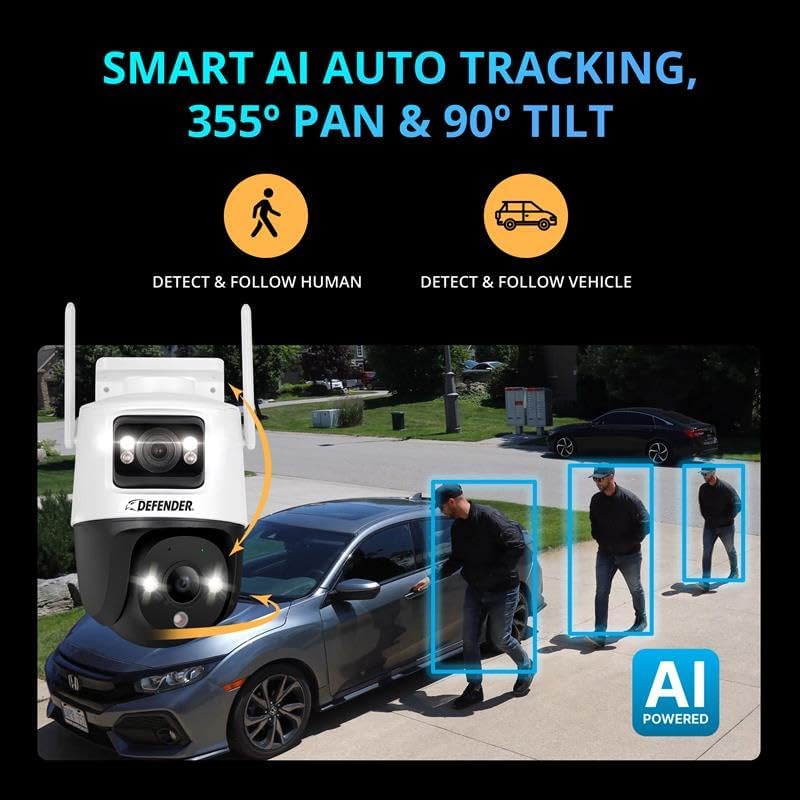
AI-powered auto-tracking intelligently follows detected human and vehicle movement.
This video highlights the AI-powered features of the Defender Guard Pro 3K Plus, including human and vehicle detection, auto-tracking, and the benefits of its dual-lens system.
3. Night Vision Capabilities
Experience clear surveillance even in complete darkness with the camera's vibrant color night vision. Equipped with two spotlights and IR LEDs, the camera illuminates the scene to deliver crisp, detailed visuals up to 100 feet.

Vibrant Color Night Vision provides clear, illuminated footage in dark conditions.
4. Two-Way Audio & Deterrence
The integrated microphone and speaker allow for two-way communication, enabling you to speak with individuals near the camera. For deterrence, the camera features a built-in strobe light and siren that can be activated manually or automatically upon detection of suspicious activity.

Engage in two-way conversations through the camera using the mobile app.
Maintenance
To ensure optimal performance and longevity of your Defender security camera, regular maintenance is recommended:
- Cleaning: Periodically wipe the camera lens and body with a soft, damp cloth to remove dust and debris. Avoid abrasive cleaners.
- Firmware Updates: Check the Defender Guard app regularly for available firmware updates. Keeping your camera's firmware up-to-date ensures you have the latest features and security enhancements.
- Storage Management: If using a Micro SD card for local storage (up to 256GB supported), periodically review and manage your recordings to ensure sufficient space. You can format the SD card via the app if needed.
- Weather Protection: While the camera is IP66 weather-rated, ensuring proper installation and protection from direct, prolonged exposure to extreme weather conditions (e.g., heavy snow accumulation on antennas) can extend its lifespan.

The IP66 rating ensures the camera's durability against various weather conditions.
Troubleshooting
If you encounter issues with your Defender AI Powered Guard Pro 3K Plus camera, consider the following common solutions:
- No Power: Ensure the power adapter is securely connected to both the camera and a working electrical outlet. Check if the outlet is receiving power.
- Connectivity Issues: Verify your Wi-Fi network is active and the camera is within range of your router. Restarting your router and the camera can often resolve connection problems. Ensure your phone and camera are close during initial setup.
- Poor Image Quality: Check the camera lens for dirt or obstructions and clean if necessary. Ensure the camera's resolution setting in the app is set to 3K Plus for optimal clarity.
- False Alarms: Adjust the motion detection sensitivity settings within the Defender Guard app. Utilize the AI detection features to filter for human and vehicle movement only.
- PTZ Control Unresponsive: Ensure the camera has a stable network connection. If the issue persists, try recalibrating the PTZ function through the app's settings.
- Audio Problems: Check the microphone and speaker settings in the app. Ensure volume levels are adequate and there are no physical obstructions to the microphone or speaker.
For more detailed troubleshooting or persistent issues, refer to the comprehensive help section within the Defender Guard app or contact customer support.
Specifications
| Model Name | 3K Guard Pro Dual Lens PLUS PTZ |
| Item Model Number | IP10MDCB1 |
| Indoor/Outdoor Usage | Outdoor |
| Video Capture Resolution | 3K (2880 x 1620) |
| Effective Still Resolution | 10 MP |
| Connectivity Technology | Wireless (WiFi 6, Bluetooth) |
| Power Source | Corded Electric (12 Volts, 12 Watts) |
| Night Vision Range | 100 Feet |
| Viewing Angle | 360 Degrees (PTZ capability) |
| Field Of View | 94 Degrees (Fixed Lens) |
| Water Resistance Level | IP66 |
| Flash Memory Type | Micro SD (up to 256 GB supported) |
| Item Dimensions (L x W x H) | 5.22 x 5.07 x 4.33 inches |
| Item Weight | 13.1 ounces |
Warranty & Support
Defender offers a warranty for its products. For detailed information regarding your product's warranty, including terms, conditions, and registration, please visit the official Defender website:
defendercameras.com/pages/warranty
Additionally, Defender provides free lifetime customer support to assist you with any questions or issues you may encounter with your AI Powered Guard Pro 3K Plus camera.


