
1. Introduction
Thank you for choosing the Genérico Damix M47 XPROT 2-in-1 Bluetooth Speaker and Earbuds. This device combines a powerful portable Bluetooth speaker with integrated wireless earbuds, offering a versatile audio solution for various activities. Designed for portability and high-quality sound, the M47 XPROT features Bluetooth 5.3 for stable connectivity, a 50mm speaker with bass enhancement, and a long-lasting 2000mAh battery.
This manual provides essential information for setting up, operating, and maintaining your device. Please read it carefully before use to ensure optimal performance and longevity.
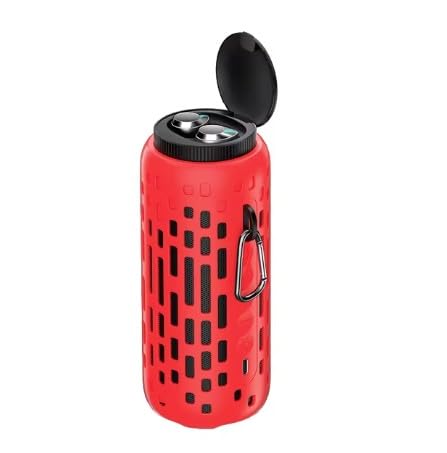
Image 1.1: The Genérico Damix M47 XPROT 2-in-1 Bluetooth Speaker in orange.
2. Package Contents
Please check the package for the following items:
- Genérico Damix M47 XPROT 2-in-1 Bluetooth Speaker with Integrated Earbuds
- USB Charging Cable
- User Manual
3. Product Features
- 2-in-1 Design: Combines a portable Bluetooth speaker and wireless earbuds in one compact unit.
- High-Fidelity Audio: Full stereo sound with a 50mm speaker, built-in high-performance amplifier, and bass enhancement technology.
- Extended Battery Life: 2000mAh battery provides 5-6 hours of continuous music playback on a single charge (1-2 hours charging time).
- Earbud Charging: Integrated earbuds recharge up to 10 times within the speaker casing without requiring the speaker itself to be charged.
- Bluetooth 5.3: Ensures stable signal transmission with a wireless range of up to 10 meters.
- Durable Design: Cylindrical design with RGB lighting, sporty and compact, featuring a non-slip and shock-resistant casing.
- Portability: Compact size and lightweight (450 grams) make it convenient for travel and outdoor use.

Image 3.1: The speaker with its integrated earbuds removed from their charging slots.
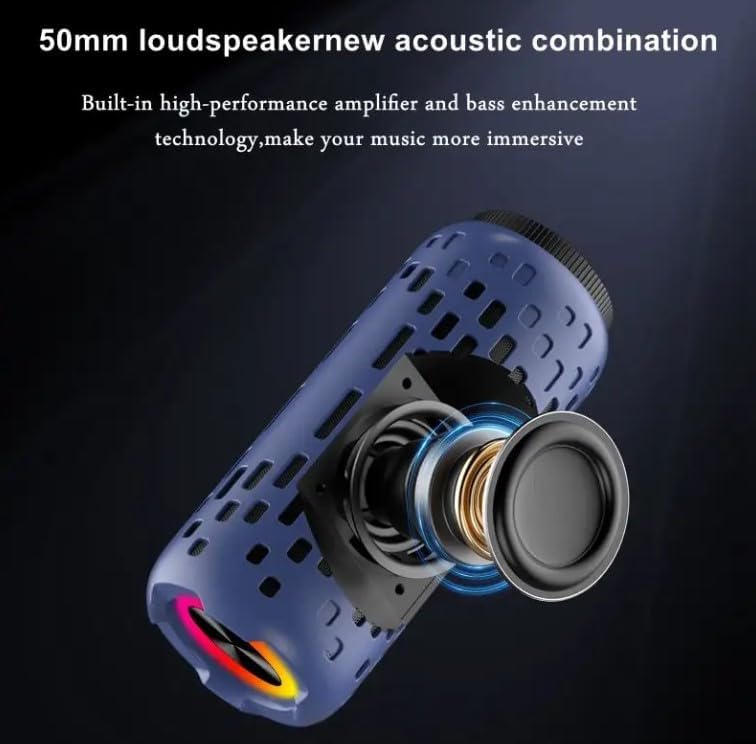
Image 3.2: An internal view highlighting the 50mm loudspeaker and acoustic components.
4. Setup
4.1 Initial Charging
Before first use, fully charge the speaker and earbuds. Connect the provided USB charging cable to the speaker's charging port and a compatible USB power adapter (not included). The charging indicator will show the charging status. A full charge typically takes 1-2 hours for the speaker.
4.2 Speaker Bluetooth Pairing
- Power On: Long press the power button on the speaker to turn it on. The speaker will enter Bluetooth pairing mode, indicated by a flashing LED light.
- Activate Bluetooth: On your smartphone or other Bluetooth-enabled device, go to the Bluetooth settings and enable Bluetooth.
- Select Device: Look for "Damix M47 XPROT" (or similar) in the list of available devices and select it to pair.
- Confirmation: Once paired, the speaker will emit an audible confirmation, and the LED indicator will stop flashing and remain solid.
4.3 Earbuds Bluetooth Pairing
- Remove Earbuds: Take both earbuds out of their charging slots in the speaker. They will automatically power on and attempt to pair with each other.
- Activate Bluetooth: On your smartphone or other Bluetooth-enabled device, go to the Bluetooth settings and enable Bluetooth.
- Select Device: Look for the earbuds' Bluetooth name (e.g., "M47 Earbuds" or similar) in the list of available devices and select it to pair.
- Confirmation: Once paired, the earbuds will emit an audible confirmation.
5. Operating Instructions
5.1 Speaker Controls

Image 5.1: Diagram of speaker buttons and their functions.
- Power Button (⏻):
- Long Press: Power On / Power Off
- Short Press: Play / Pause music
- Mode Button (M):
- Long Press: Switch between Chinese and English voice prompts
- Short Press: Switch between FM Radio mode and Bluetooth mode
- Volume Up / Next Track Button (+):
- Short Press: Next Song
- Long Press: Increase Volume
- Volume Down / Previous Track Button (-):
- Short Press: Previous Song
- Long Press: Decrease Volume
- Light Button (☀):
- Short Press: Cycle through Red, Green, Blue flashing lights
- Double-Click: Red light always on / Turn off the light
5.2 Earbuds Controls
The integrated earbuds typically feature touch controls for basic functions:
- Tap (Left/Right): Play / Pause music, Answer / End call.
- Double Tap (Right): Next track.
- Double Tap (Left): Previous track.
- Triple Tap (Left/Right): Activate voice assistant.
- Long Press (Left/Right): Reject call.
Refer to the specific earbud instructions for detailed touch control functions, as they may vary slightly.
6. Charging
6.1 Charging the Speaker
Connect the USB charging cable to the speaker's charging port and a 5V USB power source. The LED indicator will show charging status. A full charge takes approximately 1-2 hours and provides 5-6 hours of speaker playback.
6.2 Charging the Earbuds
Place the earbuds back into their designated slots within the speaker. The speaker acts as a charging case for the earbuds. The earbuds will automatically begin charging. The speaker's internal battery can recharge the earbuds up to 10 times without needing to be recharged itself.
7. Maintenance
- Cleaning: Use a soft, dry cloth to clean the speaker and earbuds. Do not use abrasive cleaners or solvents.
- Storage: Store the device in a cool, dry place away from direct sunlight and extreme temperatures.
- Water Resistance: While designed for outdoor use, avoid submerging the device in water.
- Battery Care: To prolong battery life, avoid fully discharging the battery frequently. Charge the device regularly, even if not in use for extended periods.
8. Troubleshooting
| Problem | Possible Cause | Solution |
|---|---|---|
| Speaker/Earbuds do not power on. | Low battery. | Charge the device fully. |
| Cannot pair with Bluetooth device. | Bluetooth not enabled, device out of range, or already paired. | Ensure Bluetooth is on, device is within 10m, and not connected to another device. Try restarting both devices. |
| No sound or low volume. | Volume too low, device paused, or connection issue. | Increase volume on both speaker/earbuds and source device. Check play/pause status. Re-pair the device. |
| Earbuds not charging in speaker. | Earbuds not seated correctly, or speaker battery is low. | Ensure earbuds are properly placed in slots. Charge the speaker. |
9. Specifications
| Feature | Specification |
|---|---|
| Model Name | Damix M47 XPROT |
| Item Model Number | M47 |
| Brand | Genérico |
| Connectivity Technology | Bluetooth 5.3 |
| Speaker Output Power | 10 Watts |
| Audio Output Mode | Stereo |
| Speaker Type | Outdoor |
| Input Voltage | 5 Volts |
| Battery Capacity | 2000 mAh |
| Playback Time | 5-6 hours (speaker) |
| Charging Time | 1-2 hours (speaker) |
| Wireless Range | Up to 10 meters |
| Product Dimensions (L x W x H) | 7 x 7 x 17 cm |
| Item Weight | 450 Grams |
| Color | Red (as per product listing, though images show orange) |
| Manufacturer | China |
10. Safety Information
- Do not disassemble, repair, or modify the device.
- Keep away from extreme temperatures, direct sunlight, and open flames.
- Avoid exposure to water or high humidity.
- Do not use damaged cables or chargers.
- Keep out of reach of children.
- Dispose of the device responsibly according to local regulations.
11. Warranty and Support
For warranty information or technical support, please refer to the documentation provided at the time of purchase or contact your retailer. Keep your proof of purchase for any warranty claims.