
1. Introduction
This manual provides detailed instructions for the setup, operation, and maintenance of your CrossBeats Blaze B30 Bluetooth Soundbar. Please read this manual thoroughly before using the product to ensure proper function and to maximize your audio experience.

Image: The CrossBeats Blaze B30 Bluetooth Soundbar, showcasing its sleek design and RGB lighting.
2. Product Overview and Features
The CrossBeats Blaze B30 is a 30W Bluetooth soundbar designed to deliver an immersive audio experience with versatile connectivity options and dynamic RGB lighting.
Key Features:
- Powerful Audio: Equipped with two premium speakers, four passive radiators, and a quad diaphragm setup for 30W bass-boosted sound.
- Dynamic RGB Lighting: Customizable RGB lights enhance the visual experience for music and gaming.
- TWS Pairing: Supports True Wireless Stereo (TWS) pairing to connect two soundbars for a wider stereo soundstage.
- Multi-Connectivity: Offers Bluetooth, AUX, USB, SD Card, and FM radio support.
- Portable Design: Lightweight at 700 grams with an integrated 2400 mAh battery providing up to 8 hours of playtime.

Image: The CrossBeats Blaze B30 soundbar highlighting its quad diaphragm setup for enhanced audio.

Image: A visual representation of the soundbar's 4X powerful bass feature.

Image: The soundbar emphasizing its 8-hour playtime and 2400mAh battery.
3. Setup Guide
3.1 Initial Charging
- Connect the provided Power Cable to the soundbar's charging port (Type-C input).
- Plug the other end of the Power Cable into a suitable USB power adapter (not included) or a powered USB port.
- Allow the soundbar to fully charge before first use. The LED indicator will show charging status.
3.2 Powering On/Off
- To Power On: Press and hold the Power button on the soundbar until the display lights up.
- To Power Off: Press and hold the Power button until the display turns off.
4. Operating Instructions
4.1 Mode Selection
Press the 'M' (Mode) button on the soundbar to cycle through available input modes: Bluetooth (BT), AUX, USB, SD Card, and FM Radio.
4.2 Volume Control
- Increase Volume: Press the '+' button.
- Decrease Volume: Press the '-' button.
4.3 RGB Light Control
The soundbar features a dedicated control button to turn the LED lights on or off, allowing customization of the visual ambiance.
4.4 TWS Pairing (True Wireless Stereo)
To pair two Blaze B30 soundbars for a stereo experience:
- Ensure both soundbars are powered on and in Bluetooth mode.
- On one soundbar (this will be the primary unit), press and hold the TWS pairing button (refer to the soundbar's physical controls for exact button).
- The soundbars will attempt to connect to each other. A confirmation tone or indicator will signal successful pairing.
- Connect your device to the primary soundbar via Bluetooth. Audio will now play through both units in stereo.
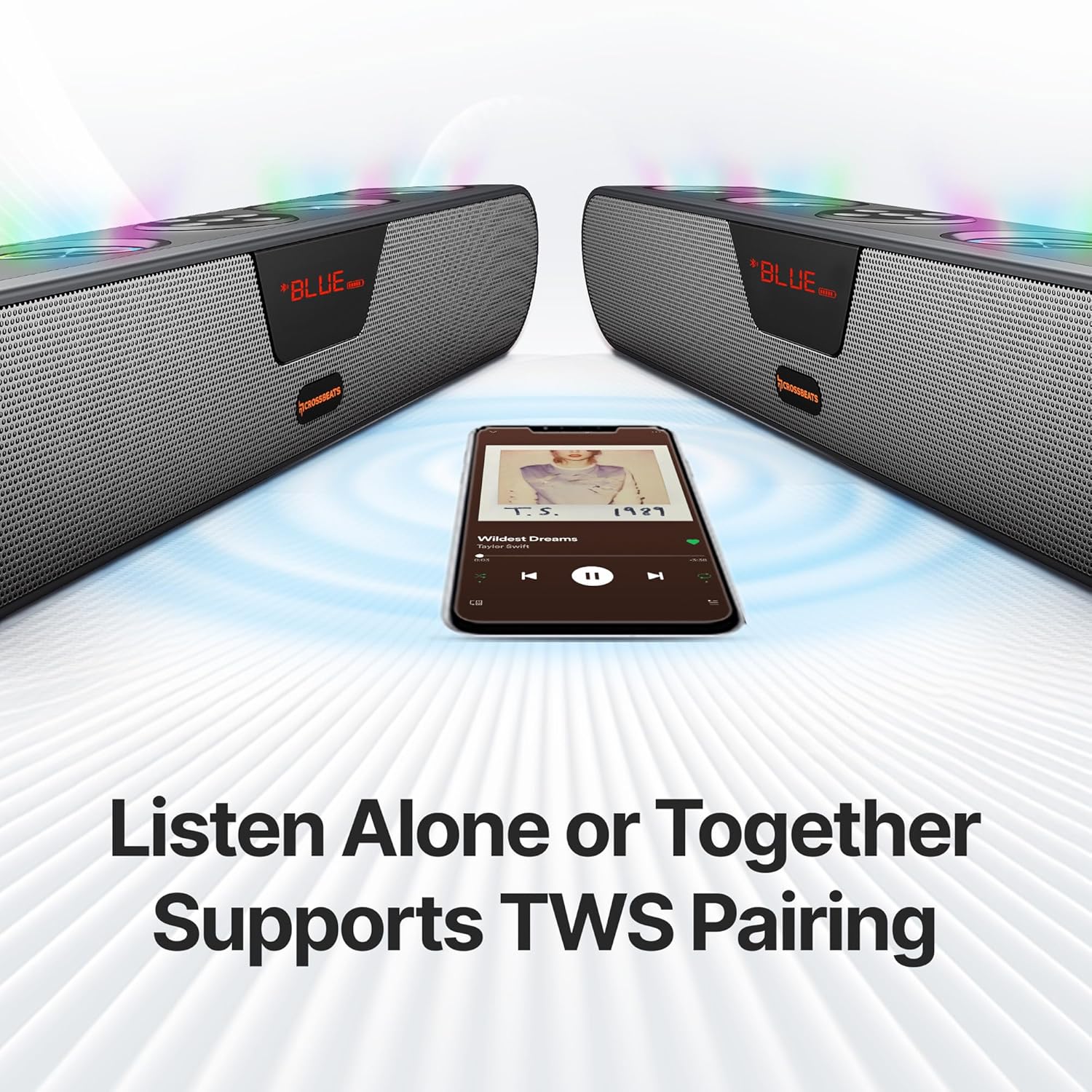
Image: Two CrossBeats Blaze B30 soundbars paired together for a TWS experience.
4.5 FM Radio Operation
In FM mode, the soundbar can scan and play local radio stations.
- Press the 'M' button to select FM mode.
- Press and hold the Play/Pause button to initiate an automatic station scan. The soundbar will save available stations.
- Use the Next/Previous track buttons to navigate between saved stations.

Image: The soundbar displaying FM radio frequency.
5. Connectivity
The Blaze B30 offers multiple ways to connect your audio sources:
- Bluetooth: Wirelessly connect to smartphones, tablets, PCs, and other Bluetooth-enabled devices.
- AUX Input: Use the provided Aux cable to connect to devices with a 3.5mm audio output.
- USB Playback: Insert a USB drive with audio files for direct playback.
- SD Card Playback: Insert an SD card with audio files for direct playback.
- FM Radio: Tune into local FM radio stations.

Image: Close-up of the soundbar's rear panel showing USB, AUX, SD card, and Type-C ports.
6. Maintenance
- Cleaning: Use a soft, dry cloth to clean the surface of the soundbar. Do not use abrasive cleaners or solvents.
- Storage: Store the soundbar in a cool, dry place away from direct sunlight and extreme temperatures.
- Water Resistance: The soundbar is water-resistant, but it is not waterproof. Avoid submerging it in water or exposing it to heavy rain.
7. Troubleshooting
Common Issues and Solutions:
- No Power: Ensure the soundbar is charged or connected to a power source. Check the power cable connection.
- No Sound: Verify the volume is not muted or too low. Check the input mode and ensure the audio source is playing. For Bluetooth, ensure the device is properly paired.
- Bluetooth Disconnection: Ensure the soundbar and your device are within the 15-meter range. Disconnect and re-pair the device.
- Poor FM Reception: Adjust the soundbar's position. In some areas, FM reception may be limited.
- TWS Pairing Failure: Ensure both soundbars are in Bluetooth mode and within close proximity. Repeat the TWS pairing steps.
8. Specifications
| Feature | Specification |
|---|---|
| Model Name | Blaze B30 |
| Speaker Type | Soundbar |
| RMS Power Output | 30 Watts |
| Surround Sound Channel Configuration | 2.0 |
| Connectivity Technology | Bluetooth |
| Wireless Communication Technology | Bluetooth |
| Maximum Bluetooth Range | 15 metres |
| Power Source | Battery Powered |
| Battery Type | 1 Lithium Ion battery (included) |
| Playtime | Up to 8 hours |
| Input Voltage | 5 Volts (DC) |
| Material | ABS + PC |
| Item Weight | 700 Grams |
| Product Dimensions | 5.5D x 20.1W x 6.5H Centimeters |
| Control Method | Touch |
| Special Features | Bass Boost, Display, Multi Room Audio, Portable, USB Port, RGB Lights |
| Water Resistance | Water-Resistant |
| Frequency Response | 20000 Hz |
| Signal-to-Noise Ratio (db) | 85 dB |
| Total Harmonic Distortion | 10% |
9. What's in the Box
The CrossBeats Blaze B30 Soundbar package includes:
- CrossBeats Blaze B30 Soundbar
- Power Cable (for charging)
- Quick Start Guide
- Warranty Card
Video: An overview of the CrossBeats Blaze B30 Soundbar and its included accessories, demonstrating the unboxing experience and key features.
10. Warranty and Support
The CrossBeats Blaze B30 Soundbar comes with a 1-Year Brand Warranty. Please refer to the included Warranty Card for detailed terms and conditions. For technical support or service inquiries, please contact CrossBeats customer service.