
Kircuit Lydsto P1 Mini Series AC/DC Adapter
User Manual: Kircuit 12.6V AC/DC Adapter
Compatible with Lydsto P1 Mini Series Robotic Pool Cleaners
Product Overview
This Kircuit AC/DC adapter is designed to provide reliable power for various Lydsto robotic pool cleaner models. It converts standard AC power from electrical outlets into the DC power required by your device, enabling operation and battery charging.
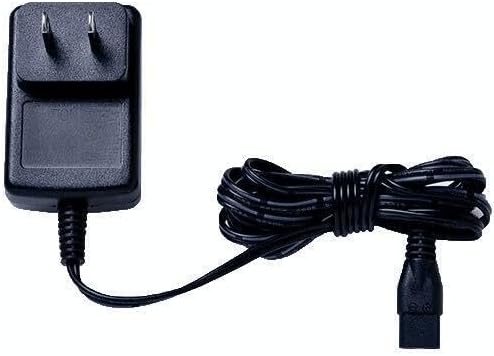
Figure 1: Kircuit 2-Prong 12.6V AC/DC Adapter. This image shows the black power adapter with two flat prongs for wall outlets, connected to a black power cord that is coiled and secured, ending in a connector plug.
Compatible Models
This adapter is compatible with the following Lydsto robotic pool cleaner models and their variants:
- Lydsto P1 Mini
- Lydsto P1 MINI-FH02
- Lydsto YM-P1Mini-01
- Lydsto YM-P1Mini-03
- Lydsto P1 Mini Plus (P1-JZB, P1JZ-B)
- Lydsto P1 Mini Pro (P1-JZ-B)
- Lydsto YM-S2-01
- Lydsto YM-S2-03
- Devices requiring 12.6V DC input with compatible connector.
Note: The charger plug end for this replacement charger is straight, not right-angle. You may need to adjust the position of your vacuum cleaner for optimal recharging.
Setup
- Unpack the Adapter: Carefully remove the Kircuit AC/DC adapter from its packaging. Inspect it for any visible damage.
- Identify the Charging Port: Locate the charging port on your Lydsto robotic pool cleaner. Ensure it matches the connector type of the adapter.
- Connect to Device: Insert the adapter's connector plug firmly into the charging port of your robotic pool cleaner.
- Connect to Power Outlet: Plug the 2-prong end of the adapter into a standard 100-240VAC 50/60Hz electrical wall outlet.
- Verify Connection: Ensure both connections are secure. The device should indicate that it is receiving power or charging (e.g., via an indicator light on the device).
Operating Instructions
This adapter is designed for continuous operation to power your device or charge its battery.
- Charging: Once connected, the adapter will begin charging the device's battery. Refer to your robotic pool cleaner's specific manual for charging indicators and estimated charging times.
- Direct Power: If your device supports direct operation while connected to power, the adapter will supply the necessary power.
- Safety Precautions:
- Do not expose the adapter to water or excessive moisture.
- Do not use the adapter if the cord or plug is damaged.
- Ensure proper ventilation around the adapter during use.
- Unplug the adapter from the wall outlet when not in use for extended periods.
Maintenance
Proper maintenance ensures the longevity and safe operation of your Kircuit AC/DC adapter.
- Cleaning: Disconnect the adapter from both the power outlet and the device before cleaning. Wipe the adapter and cord with a soft, dry cloth. Do not use liquid cleaners or abrasive materials.
- Storage: When not in use, store the adapter in a cool, dry place, away from direct sunlight and extreme temperatures. Avoid tightly coiling the cord to prevent damage.
- Cord Inspection: Periodically inspect the power cord and connector for any signs of fraying, cuts, or bent prongs. If damage is observed, discontinue use and replace the adapter.
Troubleshooting
| Problem | Possible Cause | Solution |
|---|---|---|
| Device not charging/powering on. |
|
|
| Adapter feels warm during use. | Normal operation. | A slight warmth is normal during operation. If the adapter becomes excessively hot or emits a burning smell, disconnect immediately and discontinue use. Ensure adequate ventilation. |
Important Note: If you are unsure whether the battery or charger is faulty, a voltmeter can be used to check the charger's output voltage. The adapter should output 12.6V DC.
Specifications
| Feature | Detail |
|---|---|
| Brand | Kircuit |
| Input Voltage | 100-240VAC, 50/60Hz |
| Output Voltage | 12.6V DC |
| Output Current | 1A (1000mA) |
| Power Output | Approximately 12.6W (based on 12.6V * 1A) |
| Connector Type | 2-Prong (US Standard) |
| Color | Black |
| Protection Features | OVP (Over Voltage Protection), OCP (Over Current Protection), SCP (Short Circuit Protection) |
Warranty and Support
Specific warranty information for this Kircuit product is not provided in this manual. Please refer to the product packaging or contact the seller/manufacturer directly for warranty details and customer support.
For technical assistance or inquiries, please reach out to the Kircuit customer service or the retailer from whom the product was purchased.
Ask a question about this manual
Ask about setup, troubleshooting, compatibility, parts, safety, or missing instructions. Manuals+ will review the question and use this page’s manual context to help answer it.