
1. Introduction
Thank you for choosing the Kircuit AC/DC Adapter. This adapter is designed to provide reliable power conversion from AC to DC, suitable for a wide range of compatible electronic devices. It ensures stable and efficient power delivery, whether you are at home, in the office, or on the go. Please read this manual carefully to ensure proper use and to maximize the lifespan of your adapter.
2. Product Overview and Features
The Kircuit AC/DC Adapter is a high-quality power supply unit built for durability and performance. Its compact design makes it convenient for travel and everyday use.
- Universal Input Voltage: Supports worldwide input voltage from 100-240VAC, 50/60Hz, making it suitable for international use.
- Advanced Protection: Equipped with Over Voltage Protection (OVP), Over Current Protection (OCP), and Short Circuit Protection (SCP) to safeguard your devices.
- High Compatibility: Specifically designed to be compatible with various Sagemcom models, including Fast 5866T, Fast5866T Modem 5G Wireless Broadband Gateway Router, and devices requiring P/N 253918511, 253918508, ADS-36FKJ-12N, 12036EPSA-H, and 191643564-XX.
- Stable Output: Provides a stable 12V DC output at 3A (36W) for consistent power delivery.
- Durable Design: Constructed with high-quality materials for long-lasting performance.

Figure 2.1: The Kircuit AC/DC Adapter, showing the main unit with input specifications and the attached power cord terminating in a barrel connector.

Figure 2.2: A view of two Kircuit AC/DC Adapters, highlighting their compact form factor and design from different angles.
3. Package Contents
Please check the package for the following items:
- 1 x Kircuit AC/DC Adapter
4. Setup Instructions
Follow these steps to properly set up your Kircuit AC/DC Adapter:
- Verify Compatibility: Ensure that your device requires a 12V DC input and that its power port is compatible with the adapter's barrel connector. Refer to your device's manual for power requirements.
- Connect to Device: Insert the barrel connector of the Kircuit AC/DC Adapter firmly into the DC input port of your electronic device.
- Plug into Power Outlet: Plug the AC prongs of the adapter into a standard 100-240VAC wall outlet or power strip. Ensure the outlet is easily accessible.
- Power On Device: Once connected, power on your device. The adapter will automatically begin supplying power.
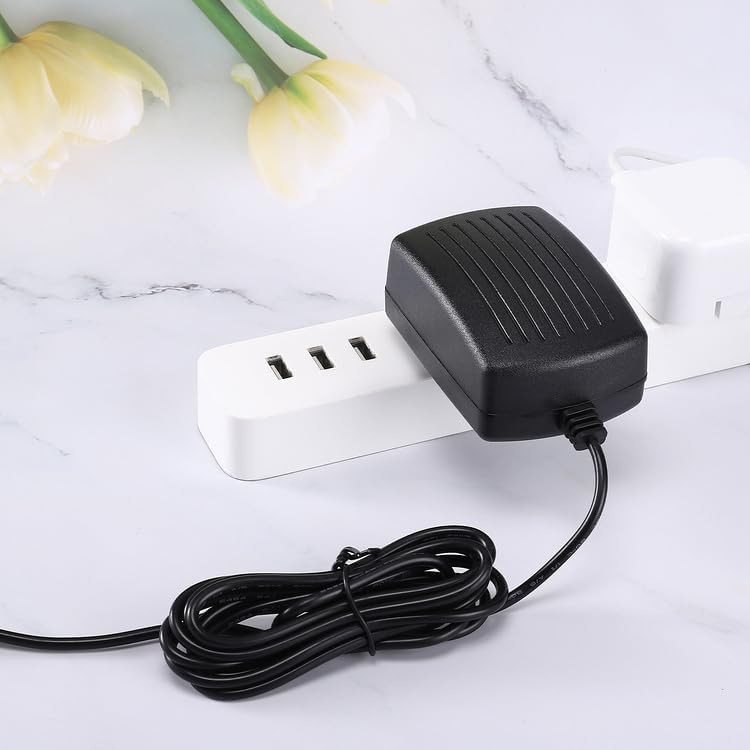
Figure 4.1: The Kircuit AC/DC Adapter plugged into a power strip, demonstrating its compact design that minimizes obstruction of adjacent outlets.

Figure 4.2: The Kircuit AC/DC Adapter with its power cord, illustrating the approximate 6.5 feet (2 meters) cord length for flexible placement.
5. Operating Instructions
The Kircuit AC/DC Adapter operates automatically once connected to a power source and a compatible device. It provides continuous power to your device or charges its battery, depending on the device's functionality. No user intervention is required during operation.
Important: Always ensure the adapter's specifications (voltage and amperage) match or exceed your device's requirements to prevent damage.
6. Safety Information
- For indoor use only. Do not expose the adapter to rain, moisture, or extreme temperatures.
- Do not disassemble or modify the adapter. This may cause electric shock, fire, or damage to the unit.
- Keep the adapter away from heat sources, direct sunlight, and flammable materials.
- Ensure proper ventilation around the adapter during use to prevent overheating.
- Do not use the adapter if the cord or plug is damaged.
- Unplug the adapter from the power outlet when not in use for extended periods.
- Keep out of reach of children.
7. Troubleshooting
If you encounter issues with your Kircuit AC/DC Adapter, please refer to the following table:
| Problem | Possible Cause | Solution |
|---|---|---|
| Adapter not supplying power. | No power from outlet; loose connection; incompatible device. | Check wall outlet with another device. Ensure all connections are secure. Verify device's power requirements match adapter's output. |
| Device not charging/powering on. | Device issue; adapter output mismatch. | Test the device with its original adapter if available. Confirm the device's voltage and amperage requirements are met by this adapter. |
| Adapter feels hot. | Normal operation (slight warmth); poor ventilation; overloaded. | Ensure adequate airflow around the adapter. If excessively hot, unplug immediately and discontinue use. Verify device's power draw is within adapter's limits. |
8. Specifications
| Feature | Detail |
|---|---|
| Model | AC/DC Adapter |
| Brand | Kircuit |
| Input Voltage | 100-240VAC, 50/60Hz |
| Output Voltage | 12V DC |
| Output Amperage | 3A |
| Power Output | 36W |
| Connector Type | Barrel Connector |
| Compatible Devices | Sagemcom Fast 5866T, Fast5866T Modem 5G Wireless Broadband Gateway Router, P/N 253918511, 253918508, ADS-36FKJ-12N, 12036EPSA-H, 191643564-XX |
| Color | Black |
| Included Components | 1 x AC Adapter |
| Manufacturer | Shenzhen Waweis Technology Co., Ltd |
9. Warranty and Support
Kircuit products are manufactured to high-quality standards. For information regarding warranty coverage, returns, or technical support, please refer to the seller's policy on the platform where the product was purchased or contact Kircuit customer service directly through their official channels. Please retain your proof of purchase for any warranty claims.