
Karbeen KM-85
Karbeen 7.0 Cu ft Digital Keypad Large Safe Box (Model KM-85) Instruction Manual
This manual provides detailed instructions for the setup, operation, and maintenance of your Karbeen 7.0 Cu ft Digital Keypad Large Safe Box, Model KM-85. Please read this manual thoroughly before using the safe to ensure proper function and security.
1. Important Safety Information
- Keep emergency keys in a secure location away from the safe and out of reach of unauthorized individuals.
- Do not store emergency keys inside the safe.
- This safe is NOT WATER RESISTANT. Protect it from water exposure.
- While constructed from reinforced low carbon alloy steel for enhanced security against physical attacks, specific fire resistance ratings are not provided.
- Ensure the safe is securely mounted to prevent unauthorized removal.
- Regularly check battery levels to ensure continuous operation of the digital keypad.
2. Product Overview
The Karbeen 7.0 Cu ft Digital Keypad Large Safe Box is designed to secure your valuables with advanced features and robust construction.

This image displays the Karbeen 7.0 Cu ft Digital Keypad Large Safe Box, highlighting its dual-compartment design and various items it can secure, such as jewelry, cash, and documents. The image also visually represents the safe's resistance to physical impact and its robust construction.
Key Features:
- Dual-Compartment Design: Two separate compartments with independent access.
- Digital Keypad: 3D glowing buttons for quick and error-free access.
- Dual Alarm System: Activates upon three consecutive incorrect password entries or violent vibrations.
- Mute Function: Allows for silent operation of the keypad.
- Internal LED Lights: Illuminates the interior for visibility in low light.
- Deposit Slot: Convenient front slot for depositing items without opening the main door.
- Robust Construction: Made from reinforced low carbon alloy steel with a pry-resistant thickened door and five solid live bolts. Features micro-slit laser cutting for enhanced anti-prying.
- Soft Interior Lining: Protects valuables from scratches and damage.
- Emergency Power Jack: Universal USB Type-C port for external power in case of battery depletion.

This image provides a detailed view of the safe's internal components, including the soft lining that protects contents, the convenient drop slot, the internal metal storage box, the double door mechanism, the integrated LED lights, and the robust locking bolts.
3. Setup Instructions
3.1 Unpacking and Initial Inspection
- Carefully remove the safe from its packaging.
- Inspect the safe for any signs of damage during transit. Contact customer service immediately if damage is found.
- Locate all included accessories: 4 emergency keys, 6 expansion screws, 1 USB Type-C cable, 4 non-slip pads, and this user manual.
3.2 Battery Installation
The digital keypad requires batteries for operation (batteries not included). Use 4 AA alkaline batteries.
- Locate the battery compartment on the back of the keypad.
- Open the compartment cover.
- Insert 4 AA alkaline batteries, ensuring correct polarity (+/-).
- Close the battery compartment cover securely.
3.3 Mounting the Safe
For optimal security, it is recommended to mount the safe using the pre-drilled holes and included expansion screws.

This illustration shows the pre-drilled holes located on the back of the safe, indicating where expansion screws should be used for secure wall mounting.
- Choose a suitable location for the safe, such as a wall or floor, ensuring it is a stable surface.
- Mark the drilling points through the pre-drilled holes on the back or bottom of the safe onto the chosen surface.
- Drill pilot holes at the marked points using an appropriate drill bit.
- Align the safe with the drilled holes and insert the expansion screws.
- Tighten the screws firmly to secure the safe in place.
- Attach the non-slip pads to the bottom of the safe if not mounting.
4. Operating Instructions
4.1 Opening the Safe

This image illustrates the three primary methods for opening the safe: using the digital password and knob, using an emergency key and knob, or using an external USB Type-C power source with the digital password and knob.
The Karbeen safe offers multiple ways to access your valuables:
- Using Digital Password:
a. Enter your programmed 4-8 digit password on the keypad.
b. Turn the knob clockwise to open the door. - Using Emergency Key:
a. Insert the emergency key into the keyhole located behind the keypad cover.
b. Turn the key and simultaneously turn the knob clockwise to open the door. - Using External Power (if batteries are depleted):
a. Connect the provided USB Type-C cable to the emergency power jack on the keypad and to an external power source (e.g., power bank).
b. Enter your programmed digital password.
c. Turn the knob clockwise to open the door.
4.2 Setting/Changing Passcode
- With the safe door open, press the internal reset button (usually located on the inside of the door or near the battery compartment).
- The keypad will beep, and an indicator light will flash.
- Enter your new 4-8 digit password on the keypad.
- Press the '#' key to confirm. The keypad will beep again, indicating successful programming.
- Test the new password with the door open before closing it.
4.3 Dual Alarm System
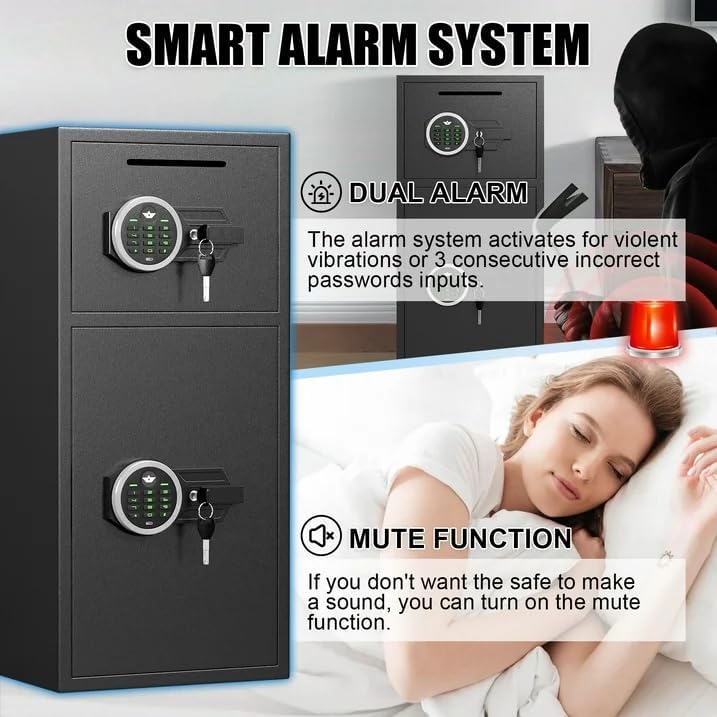
This diagram visually explains the safe's dual alarm system, which activates upon violent vibrations or three consecutive incorrect password entries. It also shows the mute function for silent operation.
The safe is equipped with a dual alarm system that provides an audible alert (up to 70 decibels) under the following conditions:
- Incorrect Password Attempts: If three consecutive incorrect passwords are entered, the alarm will activate.
- Violent Vibrations: If the safe detects violent movement or impact, the alarm will activate.
To silence the alarm, enter the correct password or use an emergency key.
4.4 Mute Function
The mute function allows for silent operation of the keypad, which can be useful in certain situations.
- To activate/deactivate the mute function, refer to the specific instructions in your physical user manual, as the exact button sequence may vary. Typically, this involves pressing a specific key combination on the keypad.
4.5 Using the Deposit Slot
The front deposit slot allows for quick and easy insertion of money or small documents without needing to open the main safe door.
- Simply insert items into the slot at the top of the safe.
- Ensure items are small enough to pass through the slot without obstruction.
5. Maintenance
5.1 Battery Replacement
- When the keypad battery is low, an indicator light may appear, or the keypad may become unresponsive.
- Replace all 4 AA alkaline batteries simultaneously to ensure optimal performance.
- Follow the battery installation steps in Section 3.2.
5.2 Cleaning
- Clean the exterior of the safe with a soft, damp cloth.
- Avoid using abrasive cleaners or solvents, as these can damage the finish.
- Do not spray cleaning liquids directly onto the keypad or electronic components.
6. Troubleshooting
6.1 Keypad Not Responding
- Check the batteries. Replace them if they are low or depleted.
- If batteries are new, ensure they are installed with correct polarity.
- Use the emergency power jack with a USB Type-C cable and external power source to operate the keypad.
6.2 Safe Will Not Open
- Ensure the correct password is being entered.
- If the keypad is unresponsive, refer to "Keypad Not Responding" above.
- Use the emergency key as an alternative opening method.
6.3 Alarm Activates Unexpectedly
- The alarm may activate after three incorrect password attempts. Enter the correct password to disarm.
- The alarm may activate due to violent vibrations. Ensure the safe is on a stable surface and not subject to accidental impacts.
7. Specifications

This image provides a visual representation of the safe's external and internal dimensions, along with icons indicating common items that can be stored, such as medicine, pistols, documents, money, cameras, and jewelry.
| Feature | Detail |
|---|---|
| Brand | Karbeen |
| Model Number | KM-85 |
| Product Dimensions (External) | 14.18"D x 15.75"W x 33.47"H |
| Capacity | 7 Cubic Feet |
| Lock Type | Electronic Combination Lock |
| Material | Reinforced Low Carbon Alloy Steel |
| Item Weight | 52.6 Pounds |
| Alarm System | Dual Alarm (Vibration, Password Attempts) |
| Water Resistance Level | Not Water Resistant |
| Mounting Type | Under Counter Mount (also suitable for wall/floor mounting) |
| Included Components | 4 Emergency Keys, 6 Expansion Screws, 1 USB Type-C Cable, 4 Non-slip Pads, 1 User Manual |
8. Warranty and Support
Karbeen is committed to providing high-quality products and customer satisfaction.
- Lifetime Warranty: The product is covered by a lifetime warranty.
- 90-Day Unconditional Returns: Enjoy a 90-day period for unconditional returns.
- Lifetime Key Matching Service: Karbeen offers a lifetime service for key matching.
- Customer Service: For any issues or inquiries, please contact Karbeen customer service. 24-hour online support is available.
Ask a question about this manual
Ask about setup, troubleshooting, compatibility, parts, safety, or missing instructions. Manuals+ will review the question and use this page’s manual context to help answer it.