
T-SUN TS-F4250
T-SUN Portable LED Work Light Instruction Manual
Model: TS-F4250
Introduction
This manual provides detailed instructions for the safe and effective operation, maintenance, and troubleshooting of your T-SUN Portable LED Work Light. Please read this manual thoroughly before using the product and retain it for future reference.
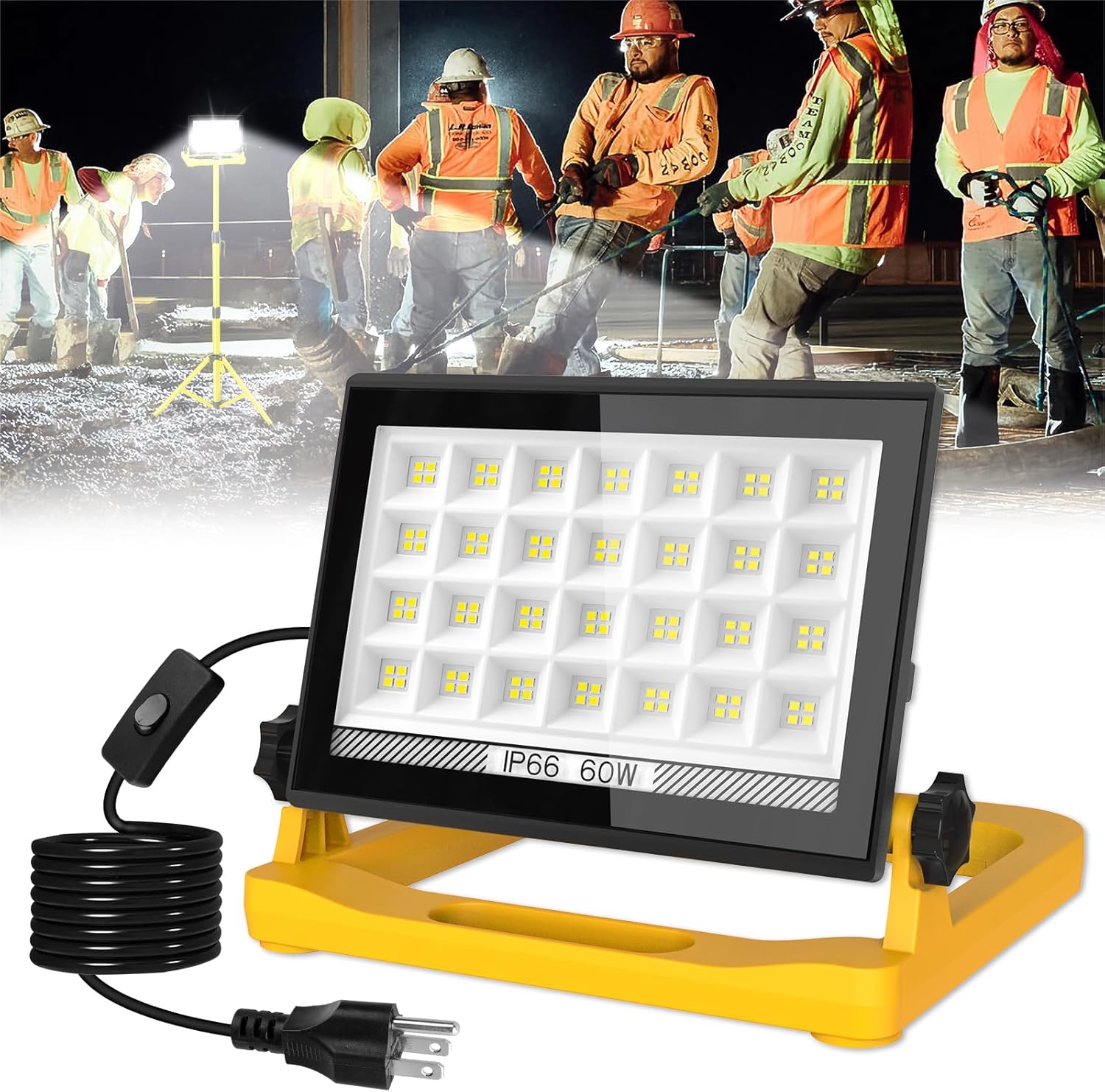
Image: The T-SUN Portable LED Work Light, showing its main unit, 13ft power cord with an inline switch, and a yellow stand. The background depicts construction workers using similar lights at a job site.
Product Features
- High Efficiency LED Beads: Equipped with 112 high-efficiency LED units, providing a brightness of 4500 lumens.
- Extended Power Cord: Features a 13ft (approximately 4 meters) power cord with a plug for convenient power access.
- Versatile Mounting Options: Includes a hidden hook for hanging and a tripod hole for compatibility with tripod stands (tripod stand not included).
- Fold-Flat Design: Allows for easy portability and compact storage.
- 180° Rotating Head: The light head can rotate 180 degrees, enabling flexible light positioning.
- Strong Magnetic Base: A powerful magnetic base allows secure attachment to metal surfaces.
- Three Lighting Modes: Offers High, Medium, and Low brightness settings to suit various lighting needs.
- Memory Function: The light remembers the last used brightness mode if turned off and on again within 8 seconds, or for subsequent uses.
- Durable and Weatherproof: Constructed from sturdy ABS material with an IP66 waterproof rating, protecting it from rain, snow, and rust.
Package Contents
Upon opening the package, please verify that all components are present and undamaged.
- 1 x T-SUN Portable LED Work Light (Model: TS-F4250)
Setup
Unpacking
Carefully remove the work light from its packaging. Inspect the unit for any signs of damage during transit. If any damage is found, do not proceed with setup and contact customer support.
Positioning the Work Light
The T-SUN Portable LED Work Light offers multiple positioning options:
- Freestanding: Place the light on a flat, stable surface using its integrated yellow stand.
- Magnetic Attachment: Utilize the strong magnetic base to attach the light securely to any suitable metal surface. This is ideal for car repair or workshop environments where metal surfaces are available.
- Hanging: Use the hidden hook located on the stand to hang the light from a suitable fixture or support.
- Tripod Mounting: For elevated lighting, the light can be mounted onto a compatible tripod stand using the integrated tripod hole. (Tripod stand sold separately).

Image: A mechanic working on a car engine, with the T-SUN Portable LED Work Light magnetically attached to the underside of the car's hood, illuminating the work area. This demonstrates the strong magnetic base feature.

Image: The T-SUN Portable LED Work Light shown mounted on a yellow tripod stand, with an inset showing a close-up of the tripod mounting mechanism. This illustrates how the light adapts to a tripod.
Ensure the light is positioned securely to prevent accidental falls or damage.
Operating Instructions
Power Connection
Plug the 13ft power cord into a standard electrical outlet. The light is designed for direct power connection and does not require batteries.
Adjusting Brightness Modes
The T-SUN Portable LED Work Light features an inline switch on the power cord to cycle through three brightness modes:
- Press once for High Brightness (100% output).
- Press a second time for Medium Brightness (75% output).
- Press a third time for Low Brightness (25% output).
- Press a fourth time to turn the light Off.

Image: A visual representation of the three brightness modes (100%, 75%, 25%) of the T-SUN Portable LED Work Light, with an illustration of pressing the switch to cycle through them.
Memory Function
The light is equipped with a memory function. If the light is turned off and then turned back on within 8 seconds, it will resume the last used brightness mode. This function also applies to subsequent uses after a longer period.
Adjusting Light Angle
The light head can be rotated up to 180 degrees. Loosen the adjustable knobs on either side of the light head, position the light to the desired angle, and then tighten the knobs to secure it.
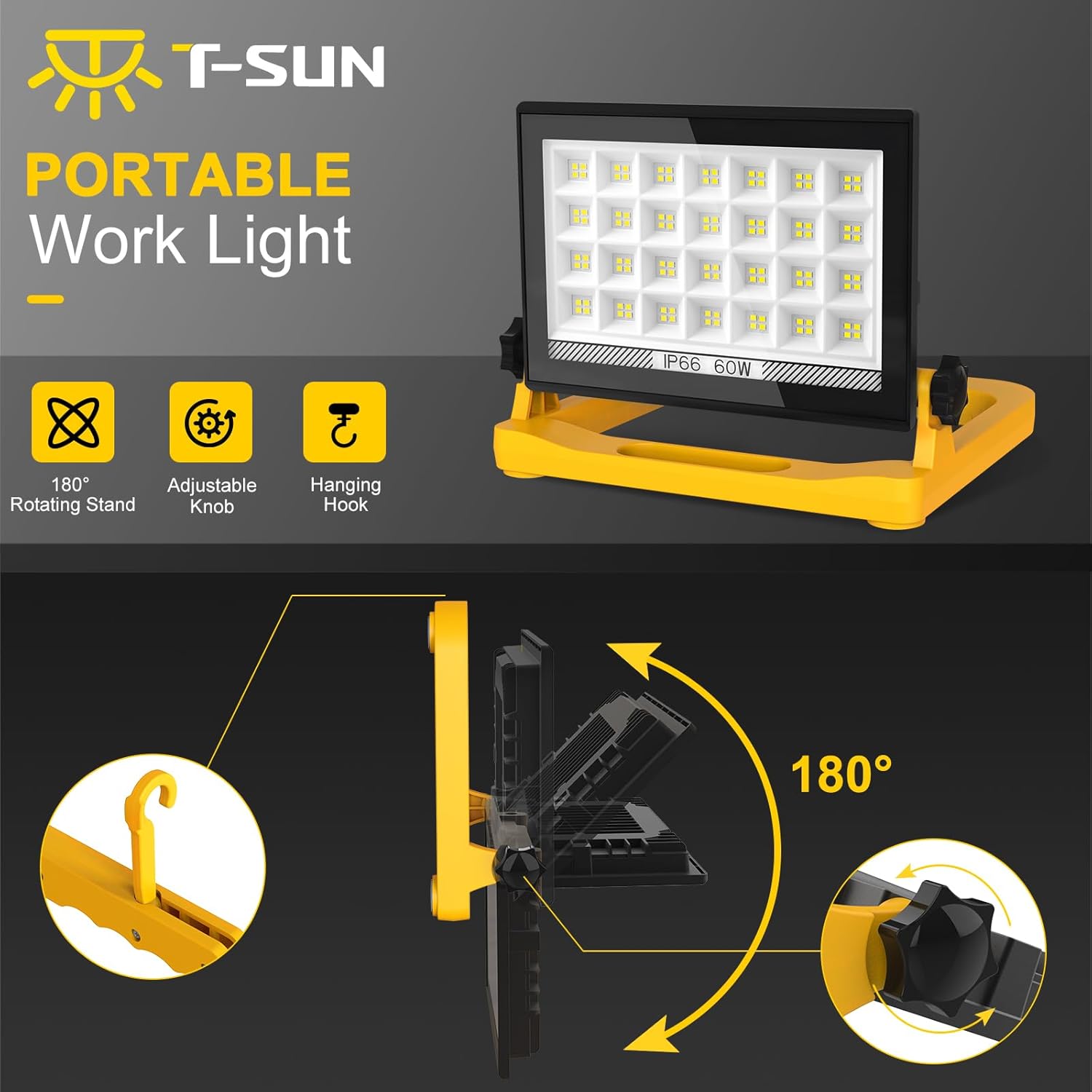
Image: A diagram illustrating the 180-degree rotation capability of the T-SUN Portable LED Work Light's head, along with close-ups of the adjustable knob and the hidden hanging hook.
Maintenance
- Cleaning: Disconnect the power before cleaning. Wipe the light with a soft, damp cloth. Do not use abrasive cleaners or solvents, as they may damage the surface.
- Storage: When not in use, store the work light in a cool, dry place, away from direct sunlight and extreme temperatures. The fold-flat design allows for compact storage.
- Cord Inspection: Regularly inspect the power cord and plug for any signs of damage, fraying, or exposed wires. If damage is found, discontinue use immediately and seek professional repair or replacement.
- Weather Protection: While the light is IP66 weatherproof, prolonged exposure to harsh conditions (e.g., submersion in water) should be avoided to ensure longevity.
Troubleshooting
| Problem | Possible Cause | Solution |
|---|---|---|
| Light does not turn on. | No power supply. Faulty power outlet. Damaged power cord/plug. | Ensure the power cord is securely plugged into a working outlet. Test the outlet with another device. Inspect the cord and plug for damage. Do not use if damaged. |
| Light flickers or dims unexpectedly. | Unstable power supply. Loose connection. Overheating (unlikely for LED, but possible in extreme conditions). | Ensure a stable power source. Check all connections. If issues persist, discontinue use and contact support. |
| Brightness modes are not cycling correctly. | Switch malfunction. | Ensure you are pressing the switch firmly. If the issue persists, contact customer support. |
| Magnetic base is not holding securely. | Surface is not ferromagnetic. Surface is too thin or uneven. Excessive weight/vibration. | Ensure the surface is made of a magnetic material (e.g., steel, iron). Attach to a flat, clean, and sufficiently thick metal surface. Re-position the light or use an alternative mounting method. |
If you encounter problems not listed here or if the suggested solutions do not resolve the issue, please contact T-SUN customer support.
Specifications
| Attribute | Value |
|---|---|
| Brand | T-SUN |
| Model Number | TS-F4250 |
| Model Name | LED Work Light |
| Power | 60W |
| Light Source | 112 LED Beads |
| Brightness | 4500 Lumens |
| Color Temperature | 6000K |
| Material | Acrylonitrile Butadiene Styrene (ABS) |
| Waterproof Rating | IP66 |
| Cord Length | 13 feet |
| Product Dimensions | 8.1 x 5.5 x 1 inches (Length x Width x Height) |
| Item Weight | 2.55 pounds |
| Assembly Required | No |
| Batteries Required | No |
Warranty and Support
T-SUN products are designed for durability and performance. For information regarding warranty coverage, product support, or to purchase replacement parts, please visit the official T-SUN website or contact their customer service department.
T-SUN Customer Support:
- Website: Visit the T-SUN Store on Amazon (for general product information and brand store)
- Refer to your product packaging or the T-SUN official website for the most current contact information.
Please have your model number (TS-F4250) and purchase date available when contacting support.
Ask a question about this manual
Ask about setup, troubleshooting, compatibility, parts, safety, or missing instructions. Manuals+ will review the question and use this page’s manual context to help answer it.