
1. Introduction
Thank you for choosing the Safeliveo Interconnected WiFi Smoke Detector System. This system is designed to provide enhanced fire safety for your home by combining reliable smoke detection with smart home connectivity. This manual provides essential information for the proper installation, operation, and maintenance of your smoke detectors and base station.
2. Product Overview
2.1 Components
- Base Station (GW01)
- Smoke Detectors (SL-S15R)
- USB Adapter and 1.5m Cable
- Screw Kits for installation
- User Manual (this document)
2.2 Key Features
- WiFi Connectivity: Connects to your 2.4GHz WiFi network for app control and notifications. (5GHz WiFi is not supported).
- Interconnected System: Up to 20 smoke detectors can be wirelessly interconnected. If one alarm detects smoke, all connected detectors and the base station will sound.
- 10-Year Battery Life: Each smoke detector is equipped with a high-quality photoelectric sensor and a 10-year lithium battery, eliminating the need for frequent battery changes.
- App Control: Test, silence, and check the status of your smoke detectors remotely via the dedicated smartphone application.
- Real-time Notifications: Receive instant alerts on your smartphone when an alarm is triggered, regardless of your location.
- Family Sharing: Share access to the alarm system with family members through the app, allowing multiple users to receive notifications and manage detectors.
- Loud Alarm: Produces an alarm sound of 85 dB.
- No Flashing LED in Standby: Designed to avoid disruptive flashing lights during sleep.

Image: Internal view of the smoke detector, highlighting the 10-year battery and photoelectric sensor.
2.3 Base Station Overview

Image: Detailed diagram of the Base Station components and their functions.
- 'Interlinked Test' Button: Initiates a test of the interconnected system.
- 'All Mute' Button: Silences all interconnected alarms.
- LED Indicator: Provides visual status of the base station.
- Speaker: Emits alarm sounds and voice prompts.
- Power Interface: Connects to the USB adapter for power.
- QR Code: Used for device pairing with the mobile application.
3. Setup
3.1 App Installation and Account Creation
- Download the Safeliveo app from your smartphone's app store (compatible with Android 10+ and iOS 13+).
- Register for a new account or log in if you already have one.
- Ensure your smartphone's Bluetooth is enabled and the app has necessary permissions.
3.2 Base Station Setup
- Place the base station near your 2.4GHz WiFi router (within 0.5 meters for optimal connection during setup).
- Connect the base station to power using the provided USB adapter and cable.
- Follow the in-app instructions to add the base station to your account. This typically involves scanning a QR code on the base station.

Image: Base station placement near a WiFi router for optimal connectivity.
3.3 Smoke Detector Installation and Pairing
- Choose appropriate locations for your smoke detectors. They should be installed on ceilings or high on walls, away from corners, vents, and areas prone to false alarms (e.g., kitchens, bathrooms).
- Mount the smoke detectors using the provided screw kits.
- Within the app, follow the instructions to pair each smoke detector with the base station. The detectors can be placed up to 100 meters from the base station.
- Assign a name or location to each detector in the app for easy identification.

Image: Example of interconnected smoke detector placement in a multi-story home.
4. Operating Instructions
4.1 Testing the System
Regular testing ensures your system is functioning correctly. It is recommended to test the system monthly.
- Via App: Open the Safeliveo app, navigate to the device list, and select the test function for individual detectors or the entire system.
- Via Base Station: Press the 'Interlinked Test' button on the base station. All interconnected detectors will sound.
- Via Detector: Press the 'TEST/HUSH' button on any smoke detector. That specific detector will sound, and if interconnected, others will follow.

Image: Testing and silencing a smoke detector using the mobile application.
4.2 Silencing Alarms
In case of a false alarm (e.g., from cooking fumes), you can silence the system:
- Via App: When an alarm is active, the app will display an option to 'Silence All'. Tap this button to mute all alarms.
- Via Base Station: Press the 'All Mute' button on the base station.
- Via Detector: Press the 'TEST/HUSH' button on the alarming smoke detector. This will silence it for 10 minutes. If smoke is still detected after 10 minutes, the alarm will reactivate.
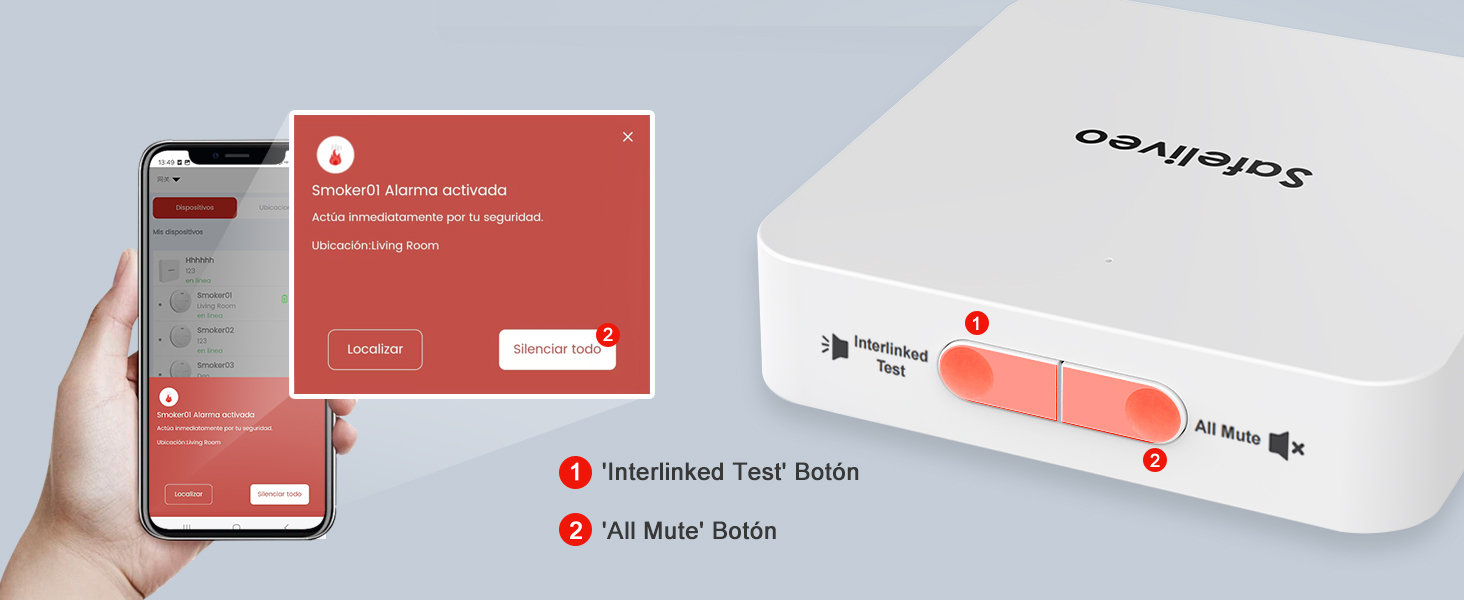
Image: Silencing alarms using the base station buttons or the mobile app.
4.3 Receiving Notifications and Sharing
The system sends real-time notifications to your smartphone when an alarm is triggered. You can also share access to the system with family members.
- Notifications: Ensure your phone has internet access to receive alerts. The app will display the specific detector that triggered the alarm.
- Family Sharing: Within the app settings, you can invite other family members to access and control the system. They will also receive notifications and can manage the detectors.

Image: Multiple users receiving real-time alarm notifications on their smartphones.

Image: Sharing alarm notifications with family members for collective safety.
5. Maintenance
5.1 Battery
The smoke detectors feature a non-replaceable 10-year lithium battery. When the battery reaches the end of its life, the detector will indicate this through a low battery warning. The entire unit should be replaced at this time.
5.2 Cleaning
Clean your smoke detectors regularly to prevent dust buildup from affecting performance. Use a soft, damp cloth to wipe the exterior. Do not use cleaning sprays or solvents.
6. Troubleshooting
- No App Notifications: Ensure your base station is connected to a 2.4GHz WiFi network, your phone has internet access, and app notifications are enabled in your phone settings.
- Detectors Not Interconnecting: Ensure all detectors are within 100 meters of the base station. Re-pair detectors if necessary following the app instructions.
- False Alarms: Relocate detectors away from kitchens, bathrooms, or areas with high humidity/steam. Clean detectors regularly to remove dust.
- Base Station Not Connecting to WiFi: Verify your WiFi is 2.4GHz. Ensure the base station is within 0.5 meters of the router during initial setup. Restart your router and the base station.
- Detector Low Battery Warning: The detector's 10-year battery is depleted. Replace the entire smoke detector unit.
7. Specifications
| Brand | Safeliveo |
| Model Numbers | SL-S15R (Detector), GW01 (Base Station) |
| Power Source (Detector) | 10-Year Lithium Battery (Non-replaceable) |
| Power Source (Base Station) | USB Adapter (Included) |
| Color | White |
| Product Weight | 360 Grams (Total for kit) |
| Alarm Type | Fire |
| Compatible Devices | Android 10 and above, iOS 13 and above |
| Sensor Type | Photoelectric |
| Material | ABS |
| Number of Units | 3 (1 Base Station, 2 Smoke Detectors) |
| WiFi Compatibility | 2.4 GHz (5 GHz not supported) |
| Interconnection Range | Up to 100m between detectors and base station |
8. Warranty and Support
For warranty information and technical support, please refer to the documentation included with your product packaging or contact Safeliveo customer service through the contact details provided on the official Safeliveo website or your purchase platform.


