
Introduction
This manual provides instructions for the ZdalaMit RM-DC355 replacement remote control, designed for use with various Sony Compact Disc Player models. This remote control requires no programming; simply install batteries to begin operation.
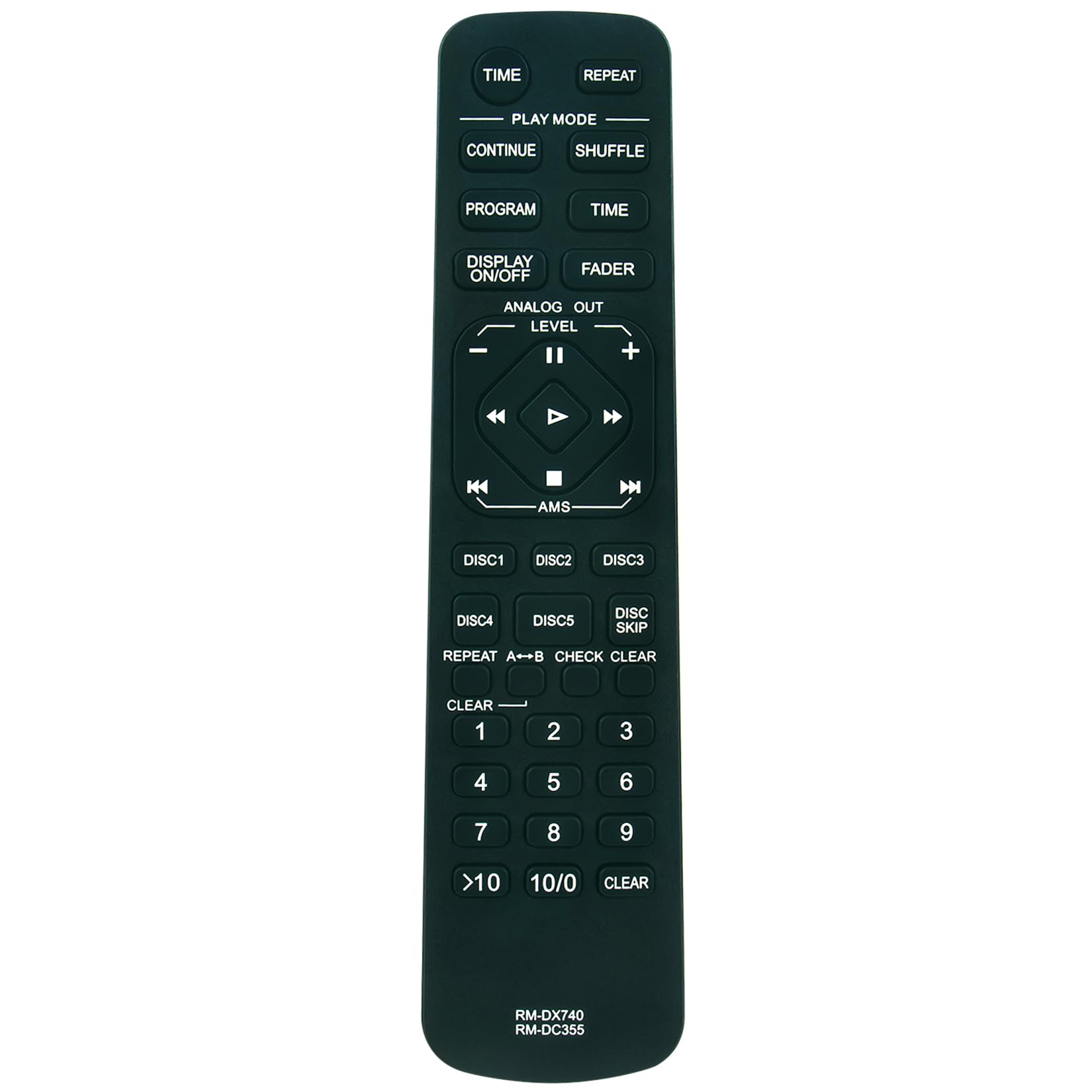
Figure 1: Front view of the ZdalaMit RM-DC355 Replacement Remote Control. This image displays the overall design and button layout of the remote.
Setup
Battery Installation
The RM-DC355 remote control operates on two (2) AAA alkaline batteries. Batteries are not included with the remote control.
- Locate the battery compartment cover on the back of the remote control.
- Slide the cover downwards or press the latch and lift to open the compartment.
- Insert two (2) AAA alkaline batteries, ensuring the positive (+) and negative (-) terminals align correctly with the markings inside the compartment.
- Replace the battery compartment cover by sliding it back into place until it clicks securely.
Once batteries are installed, the remote is ready for use with compatible Sony Compact Disc Players without any additional programming.

Figure 2: Angled view of the remote control, showing the general shape and button layout. The battery compartment is located on the underside of the remote.
Operating Instructions
The RM-DC355 remote control provides full functionality for compatible Sony Compact Disc Players. Point the remote directly at the CD player's infrared receiver for optimal performance.

Figure 3: Close-up view of the remote control's buttons, illustrating the various functions available.
Key Functions:
- DISPLAY ON/OFF: Toggles the display of the CD player on or off.
- TIME: Cycles through different time display modes (e.g., track elapsed, track remaining, disc remaining).
- PLAY MODE: Selects various playback modes such as normal, program, shuffle, or repeat.
- REPEAT: Activates or deactivates repeat playback for a track or the entire disc.
- SHUFFLE: Initiates random playback of tracks on the disc.
- CONTINUE: Resumes playback from where it was paused or stopped.
- PROGRAM: Enters program mode to create a custom playback sequence.
- FADER: Controls audio fade-in/fade-out functions (if supported by the CD player).
- ANALOG OUT LEVEL (+/-): Adjusts the analog audio output level.
- Directional Pad (Up/Down/Left/Right) & Enter: Used for menu navigation and selection.
- PLAY (►): Starts disc playback.
- PAUSE (∥∥): Pauses disc playback.
- STOP (■): Stops disc playback.
- SKIP (◀◀ / ►►): Skips to the previous or next track.
- AMS (Automatic Music Sensor): Fast forwards or rewinds within a track.
- DISC 1-5: Directly selects a disc in multi-disc changers.
- DISC SKIP: Skips to the next available disc in a multi-disc changer.
- REPEAT A↔B: Repeats a specific section of a track.
- CHECK CLEAR: Used in program mode to check or clear programmed tracks.
- Numeric Keypad (0-9, >10, 10/0): Directly selects track numbers.
- CLEAR: Clears entries or selections.
Maintenance
Cleaning the Remote Control
To maintain the remote control's appearance and functionality:
- Wipe the surface with a soft, dry cloth.
- For stubborn dirt, lightly dampen the cloth with water or a mild, non-abrasive cleaner. Ensure no liquid enters the remote.
- Do not use harsh chemicals, solvents, or abrasive cleaning pads, as these can damage the remote's finish or internal components.
Battery Care
- Remove batteries if the remote control will not be used for an extended period to prevent leakage.
- Replace all batteries at the same time with new ones of the same type.
- Dispose of used batteries according to local regulations.
Troubleshooting
If you experience issues with your RM-DC355 remote control, refer to the following common problems and solutions:
- Remote is not responding:
- Check if the batteries are inserted correctly with the correct polarity (+/-).
- Replace old batteries with new AAA alkaline batteries.
- Ensure there are no obstructions between the remote control and the CD player's infrared sensor.
- Confirm that the remote is pointed directly at the CD player.
- Verify that the CD player is powered on.
- Limited range or intermittent response:
- Replace batteries, as low battery power can reduce range.
- Ensure the remote control is within the maximum operating range (approximately 33 feet or 10 meters).
- Avoid strong light sources (e.g., direct sunlight, fluorescent lights) that might interfere with the infrared signal.
- Certain buttons do not work:
- This remote is a replacement and may not support all functions of every original Sony CD player remote. Refer to your CD player's original manual for specific feature compatibility.
- Ensure the button is not stuck or damaged.
Specifications
| Model Name | RM-DC355 |
|---|---|
| Brand | ZdalaMit |
| Compatible Devices | Sony Compact Disc Player (CDP-CE375, CDP-CE345, CDP-CE335, CDP-C591, CDP-CE245, CDP-CE275, CDP-C5CS, CDP-C5CSB) |
| Connectivity Technology | Infrared |
| Power Supply | 2 x 1.5V AAA Alkaline Battery (Not Included) |
| Maximum Range | 33 Feet (approximately 10 meters) |
| Button Quantity | 15 |
| Color | Black |
| Item Weight | 40 Grams |
| Item Dimensions (L x W x H) | 7.62"L x 1.91"W x 0.55"H |

Figure 4: Dimensions of the RM-DC355 remote control, showing its length and width.
Warranty Information
The ZdalaMit RM-DC355 Replacement Remote Control comes with a 1-year warranty from the manufacturer. This warranty covers defects in materials and workmanship under normal use. Please retain your proof of purchase for warranty claims.
For specific warranty terms and conditions, or to initiate a warranty claim, please contact the seller or manufacturer directly.
Support
For further assistance, technical support, or inquiries regarding the ZdalaMit RM-DC355 Replacement Remote Control, please contact your retailer or the manufacturer, ZdalaMit Factory.
When contacting support, please have your product model number (RM-DC355) and details of your issue readily available.