
Topeak TA2052-B
Topeak Uni Super Tourist Fat Bicycle Rear Rack MTX 1.0 Compatible User Manual
1. Introduction
Thank you for choosing the Topeak Uni Super Tourist Fat Bicycle Rear Rack. This rack is engineered for durability and versatility, specifically designed for 24” and 26” wheel fat bikes with disc brakes. It offers a high load capacity and seamless compatibility with Topeak MTX QuickTrack™ bags and accessories, enhancing your cycling experience with reliable cargo transport.
2. Safety Information
- Maximum Load Capacity: Do not exceed the maximum load capacity of 57 lb (26 kg). Overloading can compromise stability and safety.
- Secure Attachment: Ensure all bolts and fasteners are securely tightened before each ride. Regularly check for any loose components.
- Weight Distribution: Distribute weight evenly on the rack to maintain bicycle balance and handling.
- Visibility: Ensure that the rack and any attached cargo do not obstruct your bicycle's lights or reflectors. The rack includes mounts for a RedLite and Tail Light.
- Tire Clearance: Verify adequate clearance between the rack, fenders, and tires to prevent rubbing or interference.
- Professional Installation: If you are unsure about any installation steps, consult a professional bicycle mechanic.
3. Package Contents
Please verify that all components are present before beginning installation:
- Topeak Uni Super Tourist Fat Bicycle Rear Rack Frame
- Mounting Hardware (bolts, nuts, washers)
- Adjustable Legs
- Extra-long Mounting Bracket
- RedLite Mount
- Tail Light Mount
- Side Bars for Pannier Attachment
4. Product Overview & Features
The Topeak Uni Super Tourist Fat Bicycle Rear Rack is constructed from durable aluminum, offering robust support for your gear. Its design accommodates the wider tires of fat bikes while providing a stable platform for various cargo solutions.

Image 1: Topeak Uni Super Tourist Fat Bicycle Rear Rack installed on a fat bike.
Key Features:
- Exclusive Fat Bike Fit: Designed for 24” and 26” wheel fat bikes with disc brakes.
- High Load Capacity: Supports up to 57 lb (26 kg), meeting EN 14872 / ISO 11243 standards.
- Adjustable Design: Features adjustable legs for compatibility with various frame sizes.
- MTX QuickTrack™ Compatible: Seamlessly integrates with MTX TrunkBags, rear baskets, and other rack packs.
- Integrated Mounts: Includes RedLite Mount, Tail Light Mount, and side bars for pannier attachment.
Product Overview Video:
Video 1: Topeak Fat Bike Rack Overview. This video provides a visual overview of the rack's features and design, demonstrating its compatibility and robust construction.
5. Installation Guide
Follow these steps to properly install your Topeak Uni Super Tourist Fat Bicycle Rear Rack:
- Prepare Your Bicycle: Ensure your bicycle is stable, preferably on a stand. Clear any existing accessories from the rear dropout eyelets and seat stay mounts.
- Attach Lower Mounts: Secure the lower ends of the rack to the rear dropout eyelets on your bicycle frame using the provided bolts. For disc brake bikes, ensure proper clearance around the caliper. Do not fully tighten yet.
- Install Upper Mounting Brackets: Attach the adjustable upper mounting brackets to the seat stay mounts on your bicycle frame. These brackets allow for angle adjustment to ensure the rack platform is level. Use the provided bolts and washers.
- Adjust and Align: Adjust the length and angle of the adjustable legs and upper brackets to ensure the rack platform is level and centered over the rear wheel. Ensure sufficient clearance between the rack, tire, and any fenders.
- Tighten All Fasteners: Once the rack is correctly positioned, progressively tighten all bolts and nuts. Start with the lower mounts, then the upper brackets, ensuring even tension. Do not overtighten.
- Install Reflector/Lights: Attach the included RedLite Mount and/or Tail Light Mount to the designated points on the rear of the rack.
Note: Some fat bike frames may require minor adjustments to the mounting brackets for optimal fit.
6. Operating Instructions (MTX QuickTrack™ System)
The Topeak Uni Super Tourist Fat Bicycle Rear Rack features the MTX QuickTrack™ system for quick and secure attachment of compatible Topeak bags.
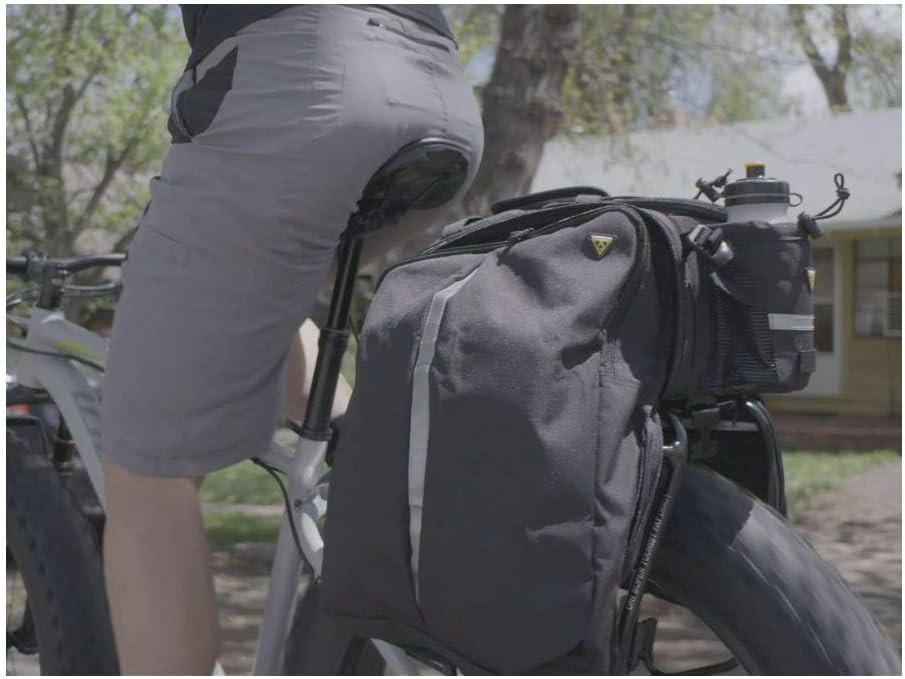
Image 2: Topeak Uni Super Tourist Fat Bicycle Rear Rack with an MTX TrunkBag and panniers attached.
Attaching an MTX QuickTrack™ Bag:
- Align the MTX QuickTrack™ base on your bag with the channel on the top of the rack.
- Slide the bag forward along the channel until you hear a distinct 'click'. This indicates the bag is securely locked into place.
- Gently pull on the bag to ensure it is firmly attached before riding.
Detaching an MTX QuickTrack™ Bag:
- Locate the yellow release button at the rear of the MTX QuickTrack™ bag.
- Press and hold the release button.
- While holding the button, slide the bag backward off the rack.
MTX QuickTrack™ System Video:
Video 2: Topeak QuickTrack MTX. This video demonstrates the simple and secure attachment mechanism of the MTX QuickTrack™ system for Topeak bags.
7. Maintenance
- Cleaning: Clean the rack regularly with a damp cloth and mild soap. Avoid abrasive cleaners that could damage the finish.
- Inspection: Periodically inspect the rack for any signs of wear, damage, or corrosion. Check all welds and connection points.
- Fasteners: Ensure all bolts, nuts, and quick-release mechanisms remain tight. Re-tighten as necessary.
- Lubrication: No specific lubrication is required for the rack itself, but ensure any moving parts of attached accessories are maintained according to their respective manuals.
8. Troubleshooting
- Rack is Loose: Check all mounting bolts and ensure they are tightened to the recommended torque. Verify that the adjustable legs are securely fastened.
- Bag Not Locking: Ensure the MTX QuickTrack™ base on the bag is clean and free of debris. Verify that the rack's channel is clear and the release button mechanism is functioning correctly.
- Insufficient Tire Clearance: Re-adjust the rack's height using the adjustable legs. Ensure the rack is mounted correctly for your fat bike's wheel size.
- Noise/Rattling: Check all connections for tightness. Ensure cargo is securely fastened and not vibrating against the rack or bike frame.
9. Specifications
| Feature | Detail |
|---|---|
| Brand | Topeak |
| Model Number | TA2052-B |
| Material | Aluminum |
| Color | Black |
| Item Weight | 1265 Grams |
| Load Capacity | 57 Pounds (26 kg) |
| Mounting Type | Rear Seat Mount |
| Wheel Size Compatibility | 24" and 26" Fat Bikes |
| Compatibility | MTX QuickTrack™ 1.0 Compatible, Disc Brake Compatible |
10. Warranty & Support
This Topeak product comes with a 1 Year Manufacturer Warranty. For warranty claims, technical support, or further inquiries, please contact Topeak customer service or visit the official Topeak website. Keep your proof of purchase for warranty validation.
Related documentsTA2052-B


Ask a question about this manual
Ask about setup, troubleshooting, compatibility, parts, safety, or missing instructions. Manuals+ will review the question and use this page’s manual context to help answer it.