
KF-Premium V9
KF Premium V9 16-Band 360° Car Trucker Laser Radar Detector User Manual
Model: V9
Introduction
The KF Premium V9 16-Band 360° Car Trucker Laser Radar Detector is designed to provide comprehensive protection against various radar and laser signals encountered on the road. This device helps drivers stay informed of potential speed traps, red-light cameras, and other speed monitoring systems, enhancing road awareness and compliance.
Equipped with advanced detection capabilities and clear voice alerts, the V9 detector offers a user-friendly experience for both professional truckers and everyday drivers.
Package Contents
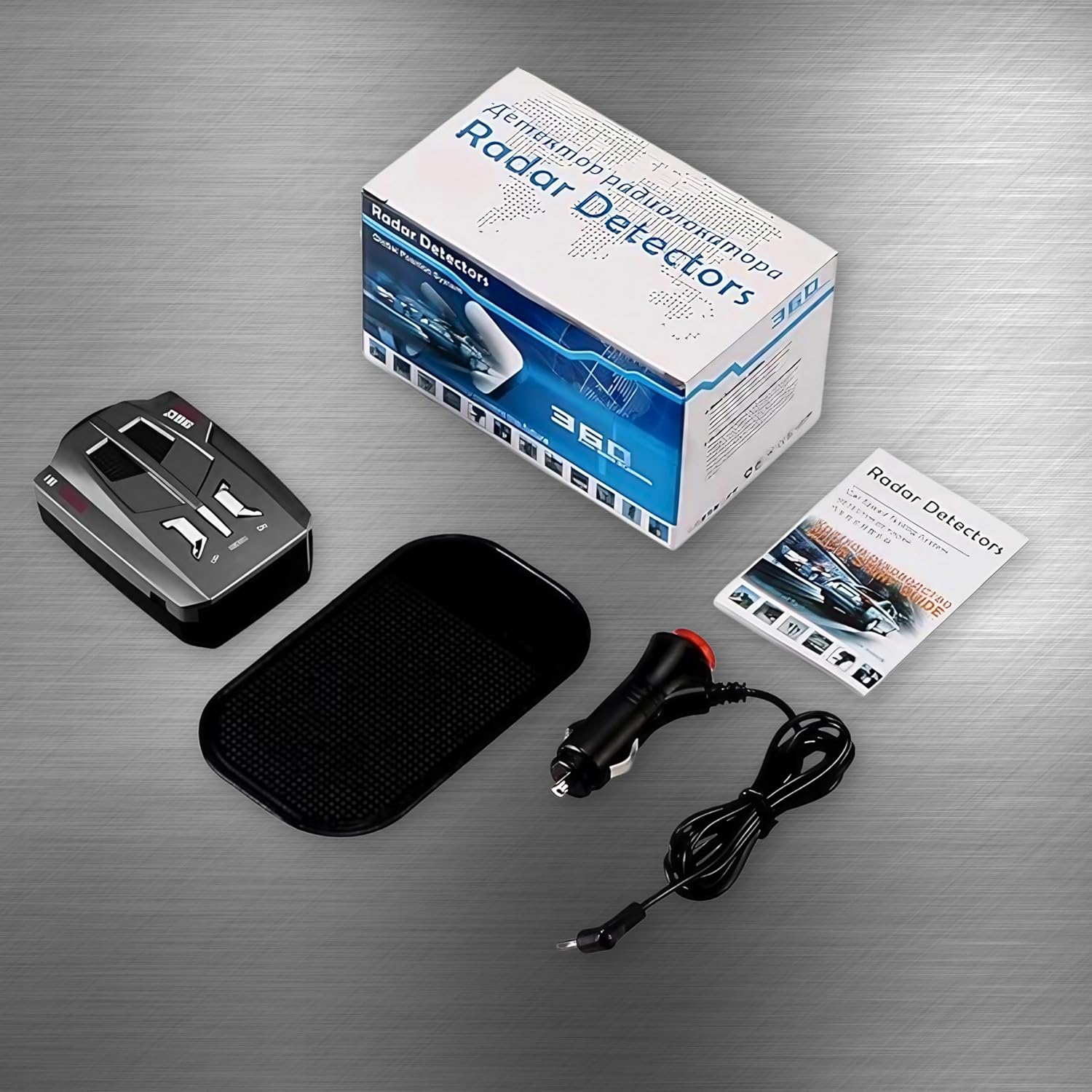
Figure 1: KF Premium V9 Radar Detector and included accessories. The package typically includes the V9 radar detector unit, a power cable with a car charger, a non-slip mat for dashboard mounting, and a user manual.
- KF Premium V9 Radar Detector Unit
- Car Power Cable (12V DC)
- Non-slip Dashboard Mat
- User Manual (this document)
Setup and Installation
Proper installation ensures optimal performance and detection range. Follow these steps for setting up your V9 radar detector:
- Choose a Mounting Location: Select a location on your dashboard or windshield that provides a clear, unobstructed view of the road ahead and behind. The detector should be level and not blocked by wipers, sun visors, or other objects. A common placement is near the center of the dashboard, close to the windshield.
- Secure the Device: Use the provided non-slip dashboard mat to secure the detector firmly in place. Ensure it does not slide during vehicle movement.
- Connect Power: Insert the small end of the car power cable into the DC input port on the V9 detector. Plug the larger end (car charger) into your vehicle's 12V accessory outlet (cigarette lighter socket).
- Power On: The device will typically power on automatically when the vehicle's ignition is turned on, or you may need to press the power button (if available) on the unit.

Figure 2: Example of the radar detector mounted on a car dashboard, providing a clear view of the road. Ensure the device is positioned to receive signals from all directions.
Operating Instructions
The V9 detector is designed for straightforward operation. Familiarize yourself with its controls and alerts.
Controls and Display
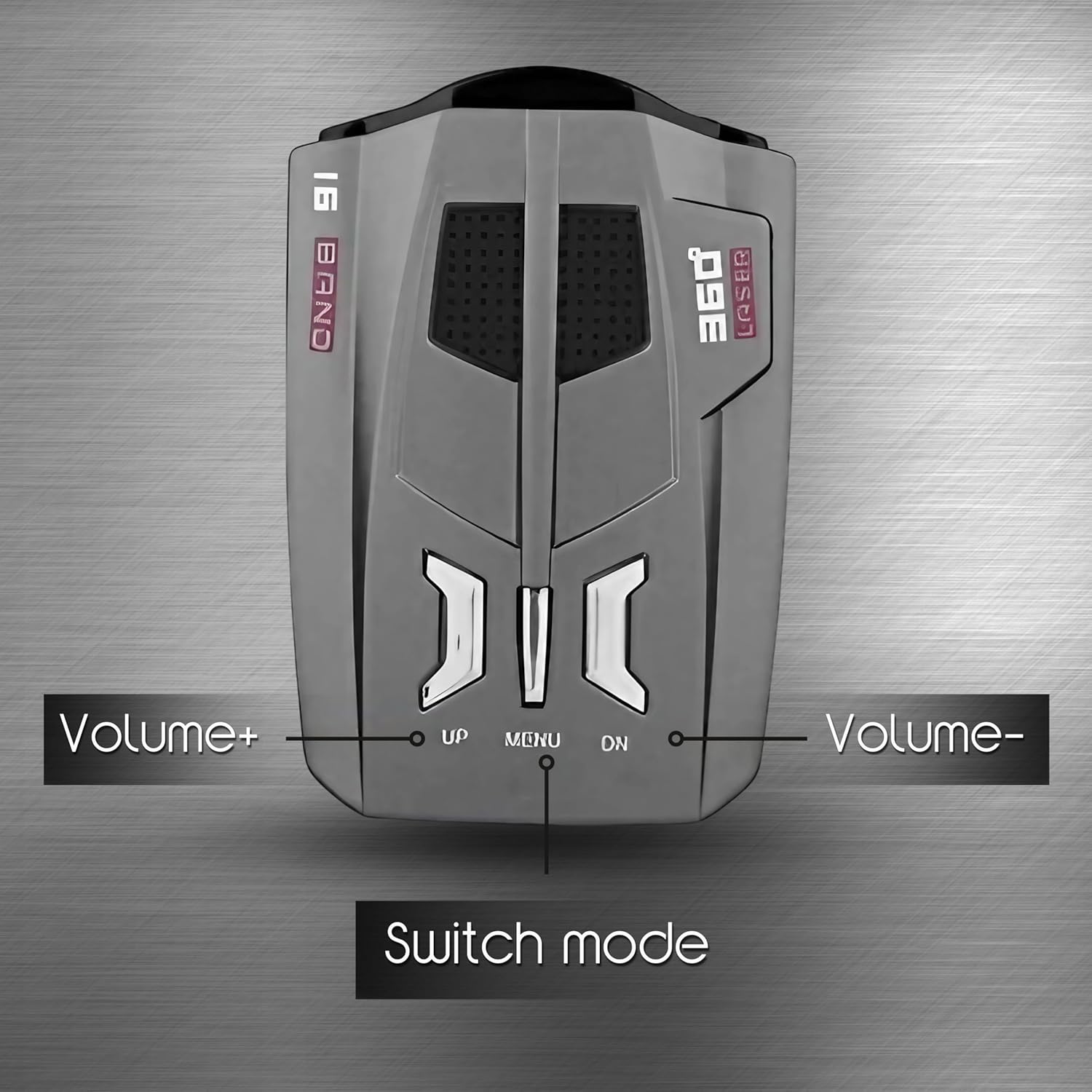
Figure 3: Top view of the V9 detector showing the control buttons: UP (Volume+), MENU (Switch mode), and DN (Volume-).
- UP Button: Increases volume or navigates up in menu options.
- DN Button: Decreases volume or navigates down in menu options.
- MENU Button: Toggles between different operating modes (e.g., City/Highway) or enters menu settings.

Figure 4: The V9 radar detector unit and its separate LCD display. The display shows detected band types (X, K, Ka, Laser), signal strength, and current mode (H for Highway, C for City).
Detection and Alerts
The V9 detector provides 360° detection across 16 bands, including X, K, Ka, and Laser signals. When a signal is detected, the device will provide both visual alerts on the LCD display and clear voice alerts.

Figure 5: Illustration of the 360° detection capability, covering various radar bands such as X, K, Ka, Super Ka, and VG-2.
- Voice Alerts: The device announces the type of radar or laser signal detected (e.g., "Ka band detected"). This allows for hands-free awareness.
- Visual Alerts: The LCD display shows the detected band type and signal strength, allowing you to quickly assess the threat level.
- City/Highway Modes: Use the MENU button to switch between City and Highway modes.
- Highway Mode (H): Provides maximum sensitivity for long-range detection on open roads.
- City Mode (C): Reduces sensitivity to minimize false alerts from automatic door openers and other urban signal sources.
Flow Velocity Measurement
The V9 detector is capable of detecting flow velocity radar bands, which are commonly used on high-speed, straight roads. Upon detection, the device will announce the radar type and emit a warning beep, providing advance notice.
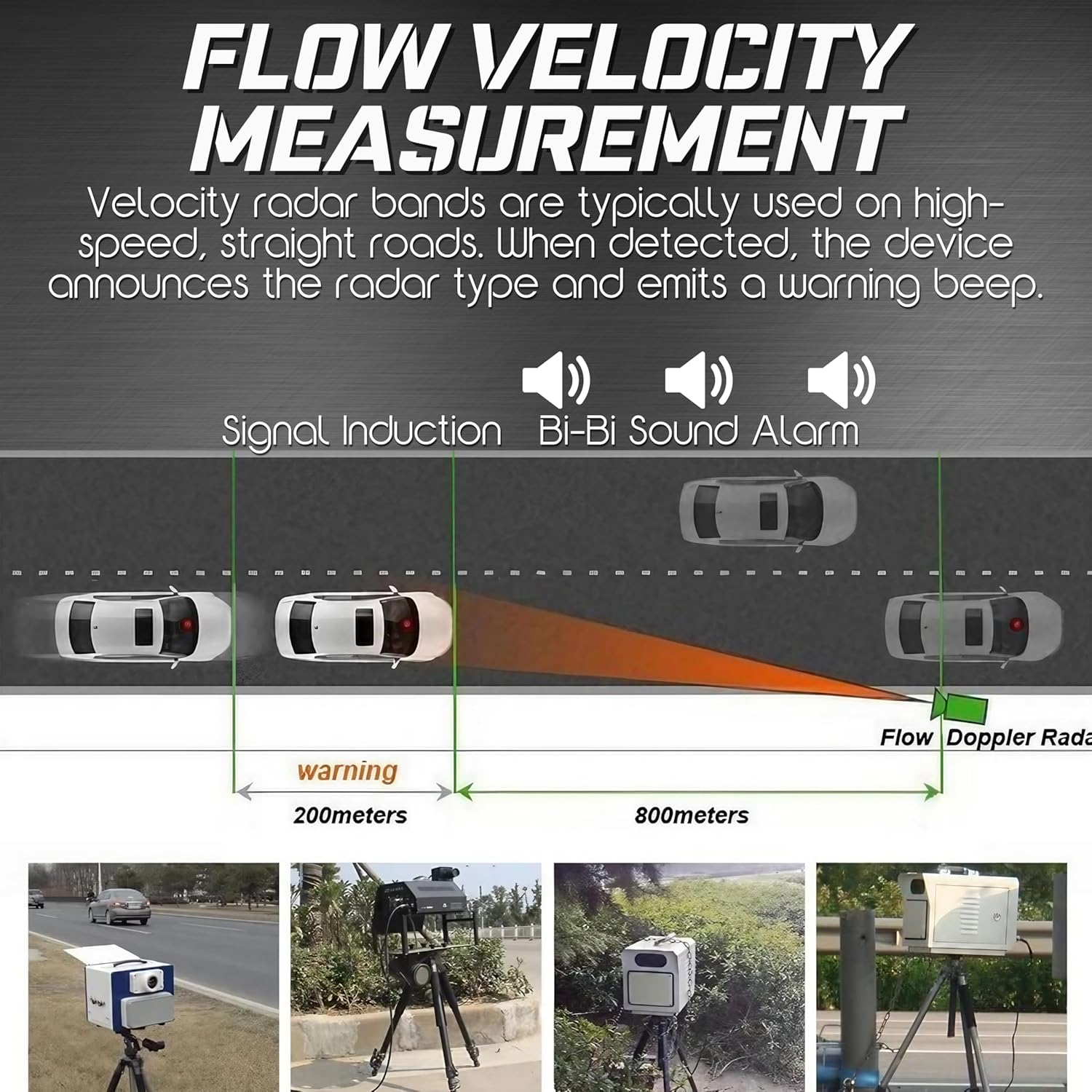
Figure 6: Diagram illustrating flow velocity measurement, showing how the detector provides warnings at distances of 200m and 800m from the radar source.
Maintenance
To ensure the longevity and optimal performance of your KF Premium V9 radar detector, follow these simple maintenance guidelines:
- Cleaning: Use a soft, dry cloth to wipe the exterior of the device. Do not use abrasive cleaners, solvents, or harsh chemicals, as these can damage the casing or internal components.
- Lens Care: Keep the front and rear lenses (if applicable) clean and free of dust or smudges to ensure accurate laser detection. Use a lens cleaning cloth if necessary.
- Storage: When not in use for extended periods, store the detector in a cool, dry place, away from direct sunlight and extreme temperatures.
- Cable Care: Avoid kinking or pinching the power cable. Always unplug the cable by grasping the plug, not the cord.
Troubleshooting
If you encounter issues with your V9 radar detector, refer to the common problems and solutions below:
| Problem | Possible Cause | Solution |
|---|---|---|
| Device does not power on. | No power from vehicle's 12V outlet; loose connection; faulty power cable. | Check if the vehicle's 12V outlet is active (e.g., by plugging in another device). Ensure the power cable is securely connected to both the detector and the outlet. Try a different 12V outlet if available. |
| Frequent false alerts (e.g., near stores). | Interference from automatic door openers, traffic flow sensors, or other non-police radar sources. | Switch the detector to City Mode to reduce sensitivity to common urban interference. Avoid mounting the detector too close to vehicle electronics that might emit signals. |
| Voice alerts are unclear or too quiet. | Volume setting is too low; speaker obstruction. | Press the UP button to increase the volume. Ensure the speaker grille on the detector is not obstructed. |
| No radar/laser detection. | Device is in an incorrect mode; obstructed view; faulty unit. | Ensure the device is in Highway Mode for maximum sensitivity. Verify that the detector has a clear line of sight to the front and rear. If issues persist, contact customer support. |
Specifications
| Model | V9 |
| Brand | KF-Premium |
| Detection Bands | 16-Band (X, K, Ka, Laser, VG-2, etc.) |
| Frequency Bands Supported | Ka-34.700GHZ +/-1300MHZ, Ka-33.400GHZ +/-1300MHZ, Laser beam: 904nm / 33KHz, VG-2: 11.150GHz / 410MHz, Wireless duplex transmission frequency: 2.4GHz / 410MHz, X-10.525GHZ +/-100MHZ, K-24.150GHZ +/-175MHZ, K-24.125GHZ +/-175MHZ, KU-13.450GHZ +/-125MHZ |
| Detection Angle | 360° |
| Display Type | LCD |
| Power Source | Corded Electric (12V DC) |
| Item Weight | 5.3 ounces (approx. 150 grams) |
| Package Dimensions | 3.74 x 2.52 x 1.3 inches (approx. 9.5 x 6.4 x 3.3 cm) |
| UPC | 659048517003 |
Warranty and Support
Warranty: This product comes with a 1-month warranty from the date of purchase. Please retain your proof of purchase for warranty claims. The warranty covers manufacturing defects and malfunctions under normal use conditions.
Customer Support: For technical assistance, troubleshooting beyond this manual, or warranty inquiries, please contact KF-Premium customer support through the retailer where the product was purchased or visit the official KF-Premium website for contact information. Please have your product model (V9) and purchase details ready when contacting support.
Related Documents - V9
 |
ESCORT MAX 3 INTL Radar Laser Detector User Manual This user manual provides comprehensive instructions for the ESCORT MAX 3 INTL Premium Radar Laser Detector, covering installation, features, settings, and troubleshooting. |
 |
General ML-3DG Multi-Line Laser Level Instruction Manual & Specifications Comprehensive instruction manual for the General ML-3DG Multi-Line Laser Level. Includes safety guidelines, item checklist, operating instructions, detector use, mounting options, care, troubleshooting, warranty, and specifications. Model GML3DGPRMKT. |
 |
General ML-3DR Multi-Line Laser Level Instruction Manual Comprehensive instruction manual for the General ML-3DR Multi-Line Laser Level Premium Laser Kit. Includes safety precautions, item checklist, operating instructions, detector usage, multi-purpose mount guide, tripod usage, care and maintenance, troubleshooting, and warranty information. |
 |
Niko Swiss Garde 360 Premium AP Motion Detector Installation Guide Comprehensive installation guide for the Niko Swiss Garde 360 Premium AP motion detector, detailing features, application, safety, wiring, configuration, and technical specifications. |
 |
Extol 8823306 Křížový samonivelační liniový laser - Návod k použití Uživatelský manuál pro samonivelační křížový laser Extol 8823306 se zeleným paprskem. Obsahuje technické údaje, návod k použití, bezpečnostní pokyny a informace o likvidaci. |
 |
New Hampshire Insurance Company: Commercial Inland Marine Wireless Equipment Coverage Certificate This document outlines the terms and conditions of the Commercial Inland Marine Wireless Equipment Coverage Certificate provided by New Hampshire Insurance Company. It details coverage for power surges and theft/loss of equipment, exclusions, premium payments, coverage effective dates, limits of liability, deductibles, conditions in the event of loss, duties of the insured, and eligibility and cancellation provisions. The certificate is issued in conjunction with Apple Inc. |