
1. Introduction
This manual provides detailed instructions for the assembly, operation, and maintenance of your GlasFlength 40 Inch Rustic Computer Desk. Please read this manual thoroughly before assembly and use to ensure proper setup and safe operation. Keep this manual for future reference.
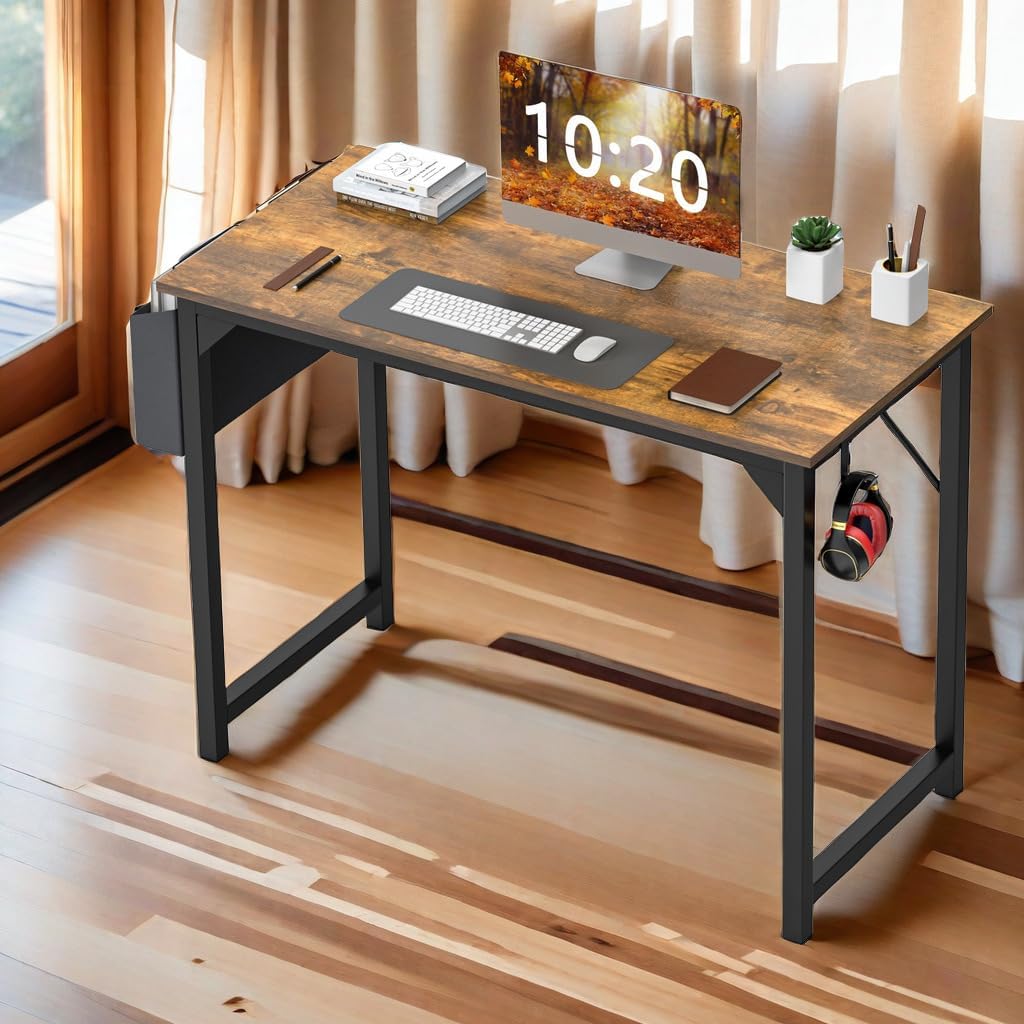
Image 1.1: Fully assembled GlasFlength 40 Inch Rustic Computer Desk.
2. Safety Information
- Ensure all components are present and undamaged before beginning assembly.
- Assemble the desk on a soft, clean surface to prevent scratches.
- Do not overtighten screws during assembly, as this may damage the material.
- Keep small parts and packaging materials away from children.
- Do not stand or sit on the desk.
- Place the desk on a level surface to prevent instability.
- Maximum weight capacity for the desktop is 176 lbs (80 kg). Do not exceed this limit.
3. Package Contents
Verify that all the following components are included in your package:
- Desktop Panel (1)
- Desk Frame Legs (2)
- Diagonal Brace (1)
- Storage Bag (1)
- Headphone Hook (1)
- Assembly Hardware (screws, Allen wrench)
- Adjustable Leg Pads (4)
4. Setup and Assembly Instructions
Follow these steps to assemble your computer desk. It is recommended to have a second person assist with assembly.
- Prepare the Workspace: Clear a spacious area and lay down a blanket or cardboard to protect the desk components and your floor during assembly.
- Attach Leg Frames to Desktop: Carefully align the desk frame legs with the pre-drilled holes on the underside of the desktop panel. Secure them using the provided screws and Allen wrench. Do not fully tighten yet.
- Install Diagonal Brace: Attach the diagonal brace between the two leg frames. This brace enhances the desk's stability. Secure it with the appropriate screws, ensuring it is properly seated.
- Tighten All Screws: Once all components are loosely assembled, go back and fully tighten all screws. Ensure the desk is stable and level.
- Attach Storage Bag: Hook the storage bag onto the designated side of the desk frame. Ensure it is securely attached.
- Attach Headphone Hook: Mount the detachable headphone hook to the opposite side of the desk frame.
- Adjust Leg Pads: Turn the desk upright. Adjust the leg pads at the bottom of each leg to ensure the desk is stable and level on your floor, preventing wobbling and protecting your flooring.

Image 4.1: Illustration of the sturdy frame design with a reinforced X-bar for reliable support.
5. Operating Instructions
Your GlasFlength computer desk is designed for versatile use in various settings.
- Desktop Use: The spacious desktop provides ample room for your computer, monitor, keyboard, mouse, and other office essentials. Its scratch-resistant, anti-collision, and waterproof surface ensures durability for daily use.
- Storage Bag: Utilize the side-mounted storage bag for organizing books, notebooks, files, or other supplies. This keeps your desktop clear and tidy.
- Headphone Hook: The detachable hook provides a convenient spot to hang your headphones, bags, or other accessories, keeping them easily accessible and off the desk surface.

Image 5.1: The desktop surface demonstrating its waterproof and anti-scratch properties.

Image 5.2: The decent storage bag providing additional organization space.

Image 5.3: The sturdy iron hook for hanging headphones or bags.
6. Maintenance
To ensure the longevity and appearance of your GlasFlength computer desk, follow these simple maintenance guidelines:
- Cleaning: Wipe the desktop and frame with a dry, soft cloth. For stubborn marks, a slightly damp cloth can be used, followed immediately by a dry cloth. Avoid harsh chemicals or abrasive cleaners.
- Spills: Although the desktop is waterproof, promptly wipe up any spills to prevent potential damage or staining.
- Inspection: Periodically check all screws and connections to ensure they remain tight. Retighten if necessary to maintain stability.
- Avoid Extreme Conditions: Do not expose the desk to direct sunlight for prolonged periods or extreme temperature changes, as this may affect the material.
7. Troubleshooting
If you encounter any issues with your desk, refer to the following common solutions:
- Desk is Wobbly:
- Ensure all assembly screws are fully tightened.
- Adjust the leg pads at the bottom of each leg to compensate for uneven flooring.
- Missing Parts:
- Carefully check all packaging materials. Small parts may be overlooked.
- If parts are genuinely missing, contact customer support with your purchase details.
- Difficulty Assembling:
- Review the assembly instructions carefully, paying attention to diagrams.
- Ensure components are oriented correctly before tightening screws.
8. Specifications
Detailed specifications for the GlasFlength 40 Inch Rustic Computer Desk:
| Feature | Detail |
|---|---|
| Brand | GlasFlength |
| Model Number | DDP-HX-D-F01V3-40IN-RUST |
| Product Dimensions (D x W x H) | 40"D x 19.7"W x 29.8"H (101.6 cm x 50 cm x 75.7 cm) |
| Item Weight | 23 Pounds (10.4 kg) |
| Color | Rustic |
| Style | Farmhouse |
| Top Material Type | Wood (Particle Board) |
| Base Material | Wood / Metal |
| Finish Type | Powder Coated (Frame) |
| Special Feature | Ergonomic, Storage Bag, Headphone Hook |
| Recommended Uses | Drafting, Gaming, Working, Writing |
| Required Assembly | Yes |
| Product Care Instructions | Wipe with Dry Cloth |

Image 8.1: Product dimension diagram with weight capacity of 176 lbs.
9. Warranty and Support
This GlasFlength computer desk comes with a limited warranty. For specific details regarding warranty coverage, please refer to the documentation included with your purchase or contact customer support.
If you have any questions, require assistance with assembly, or need to report missing/damaged parts, please contact GlasFlength customer service. Our team is available to assist you.
For more products and information, visit the official GlasFlength store: GlasFlength Store on Amazon