
Moondrop BLOCK
Moondrop Block True Wireless Earphones User Manual
Model: BLOCK | Brand: Moondrop
Introduction
The Moondrop Block True Wireless Earphones are designed to provide a high-quality audio experience with the convenience of a flathead earbud design. This manual provides comprehensive instructions for setting up, operating, maintaining, and troubleshooting your Moondrop Block earphones.

Image: Moondrop Block True Wireless Earphones (Black) in their charging case, showcasing the compact and transparent design.
Key Features
- 13mm Bass-Enhanced Dynamic Driver: Equipped with a composite bio-diaphragm, high-efficiency N52 magnet, and CCAW coil for smooth high frequencies and punchy bass.
- B&K5128 Tuning: Tuned using the advanced B&K5128 HATS for realistic acoustic characteristics, providing punchy bass without the need for sponge eartips.
- VDSF Natural Timbre Tuning: Based on HRTF (Head-Related Transfer Function) for a natural and accurate sound reproduction.
- Dual-Microphone Beamforming ENC: Environmental Noise Cancellation significantly reduces ambient noise during voice calls.
- Touch Operation & TWS Mirroring: Supports intuitive touch controls for playback and mode switching, with seamless monaural-binaural switching.
- Bluetooth 5.4: Ensures stable and efficient wireless connectivity.
- Long Battery Life: Up to 6 hours of playback on a single charge, with an additional 15 hours provided by the charging case.
- Low-Latency Game Mode: Optimized for gaming with reduced audio delay.
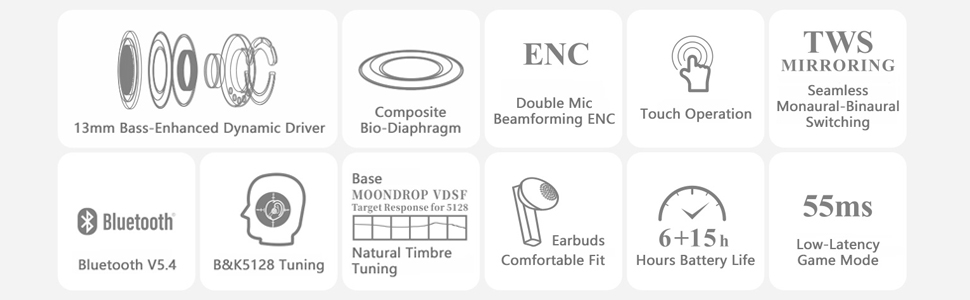
Image: Visual representation of the Moondrop Block's core features, including driver size, noise cancellation, and battery life.
Setup Guide
1. Initial Charging
Before first use, fully charge the Moondrop Block earphones and their charging case. The charging time for the case is approximately 1 hour.
- Place both earphones into the charging case.
- Connect the charging case to a USB power source using a compatible USB-C cable (not included).
- The indicator light on the case will show charging status. Once fully charged, the light will indicate completion (refer to specific light behavior in the operating section if available, otherwise assume standard).
2. Pairing with a Device
The Moondrop Block earphones use Bluetooth 5.4 for wireless connection.
- Ensure the earphones are in the charging case and the case lid is open.
- On your device (smartphone, tablet, computer), navigate to the Bluetooth settings.
- Enable Bluetooth and search for new devices.
- Select "MOONDROP BLOCK" from the list of available devices.
- Once connected, a voice prompt or indicator light will confirm successful pairing.
The earphones will automatically reconnect to the last paired device when taken out of the case, if Bluetooth is enabled on the device.
Operating Instructions
Wearing the Earphones
Gently insert the earphones into your ears. The flathead design is intended for a comfortable fit that allows for some environmental awareness.

Image: Proper placement of the Moondrop Block earbud for comfortable and secure wear.
Touch Controls
The Moondrop Block earphones feature intuitive touch controls on each earbud. The specific functions are as follows:
| Action | Function |
|---|---|
| Single Tap (Left/Right Earbud) | Play/Pause Music, Answer/End Call |
| Double Tap (Right Earbud) | Next Track |
| Double Tap (Left Earbud) | Previous Track |
| Triple Tap (Left/Right Earbud) | Activate Voice Assistant |
| Long Press (Left/Right Earbud) | Reject Call |
| Four Taps (Left/Right Earbud) | Toggle Low-Latency Game Mode (voice confirmation will be heard) |

Image: Demonstration of touch control interaction on the Moondrop Block earbud.
Monaural-Binaural Switching (TWS Mirroring)
The Moondrop Block supports seamless switching between using both earbuds (binaural) and a single earbud (monaural). Simply place one earbud back into the case or take one out, and the system will automatically adjust.
Call Functionality
The dual-microphone beamforming ENC system enhances call clarity by reducing environmental noise.
- Answering/Ending Calls: Single tap either earbud.
- Rejecting Calls: Long press either earbud.

Image: Illustration of the dual-microphone beamforming ENC technology for clear calls.
Maintenance and Care
Proper care will extend the lifespan of your Moondrop Block earphones.
- Cleaning: Use a soft, dry, lint-free cloth to clean the earbuds and charging case. Do not use abrasive cleaners, alcohol, or chemical solvents.
- Storage: When not in use, always store the earphones in their charging case to protect them and keep them charged.
- Avoid Moisture: Keep the earphones and case away from water, humidity, and extreme temperatures. They are not waterproof.
- Charging Contacts: Ensure the charging contacts on both the earbuds and inside the case are clean and free of debris to ensure proper charging.
Troubleshooting
If you encounter issues with your Moondrop Block earphones, try the following solutions:
| Problem | Solution |
|---|---|
| Earbuds not pairing/connecting. |
|
| Only one earbud playing audio. |
|
| Earbuds not charging. |
|
| Poor sound quality or low volume. |
|
| Touch controls not responding. |
|
Specifications
| Feature | Detail |
|---|---|
| Model Name | BLOCK |
| Brand | Moondrop |
| Connectivity Technology | Wireless (Bluetooth) |
| Bluetooth Version | 5.4 |
| Bluetooth Range | Up to 10 meters (33 feet) |
| Audio Driver Type | Dynamic Driver |
| Audio Driver Size | 13 Millimeters |
| Frequency Range | 20 Hz - 20,000 Hz |
| Battery Life (Earbuds) | Up to 6 Hours |
| Battery Life (with Charging Case) | Up to 21 Hours (6 hours + 15 hours from case) |
| Charging Time (Case) | Approximately 1 Hour |
| Control Method | Touch |
| Earpiece Shape | Flathead |
| Included Components | Wireless Charging Case |
| Item Weight | 2.82 ounces |
| Color (Current Variant) | Black |
| Country of Origin | China |
Warranty and Support
Moondrop products typically come with a limited warranty. For specific warranty terms and conditions, please refer to the documentation included with your purchase or visit the official Moondrop website.
For technical support, product inquiries, or warranty claims, please contact Moondrop customer service through their official channels. You may find contact information on the Moondrop website or within your product packaging.
Online Resources:
- Moondrop Official Website: www.moondroplab.com (Example link, actual link might vary)
- Moondrop Store on Amazon: Visit the Moondrop Store
Related documentsBLOCK


Ask a question about this manual
Ask about setup, troubleshooting, compatibility, parts, safety, or missing instructions. Manuals+ will review the question and use this page’s manual context to help answer it.