
1. Introduction
Thank you for choosing the Moondrop Block True Wireless Earbuds. These earbuds are designed to provide a high-quality audio experience with advanced features such as a 13mm bass-enhanced dynamic driver, VDSF natural timbre tuning, dual-microphone beamforming ENC, and seamless monaural-binaural switching. This manual will guide you through the setup, operation, and maintenance of your new earbuds.

Image 1.1: Moondrop Block True Wireless Earbuds (Pink) with charging case.
2. Package Contents
The Moondrop Block package includes the following items:
- Moondrop Block True Wireless Earbuds (Left and Right)
- Wireless Charging Case
- User Manual (this document)
3. Setup
3.1 Charging the Earbuds and Case
Before first use, fully charge the earbuds and the charging case. The charging case provides approximately 15 hours of additional battery life, while the earbuds offer up to 6 hours on a single charge.
- Place the earbuds into the charging case. Ensure they are correctly seated in their respective slots.
- Connect the charging case to a power source using a compatible USB-C cable (not included).
- The indicator light on the charging case will show the charging status. A full charge typically takes about 1 hour.
3.2 Bluetooth Pairing
Follow these steps to pair your Moondrop Block earbuds with your device:
- Open the charging case. The earbuds will automatically enter pairing mode, indicated by a flashing light.
- On your smartphone, tablet, laptop, or smart speaker, navigate to the Bluetooth settings.
- Search for available devices and select "Moondrop Block" from the list.
- Once connected, the indicator light on the earbuds will stop flashing, and your device will confirm the connection.
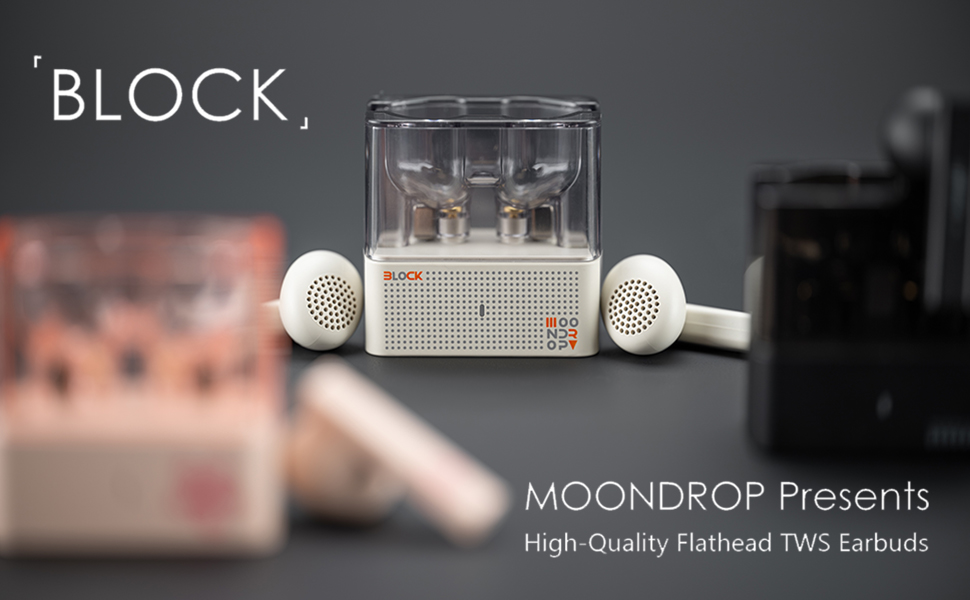
Image 3.1: Moondrop Block earbuds ready for pairing.
4. Operating Instructions
4.1 Wearing the Earbuds
The Moondrop Block features a flathead earbud design for a comfortable fit. Gently insert each earbud into your ear canal until it feels secure and comfortable.

Image 4.1: Proper wearing of the Moondrop Block earbud.
4.2 Touch Controls
The earbuds support touch operations for various functions:
- Play/Pause: Single tap on either earbud.
- Next Track: Double tap on the right earbud.
- Previous Track: Double tap on the left earbud.
- Answer/End Call: Single tap on either earbud.
- Reject Call: Press and hold on either earbud.
- Activate Voice Assistant: Triple tap on either earbud.
- Mode Switching: Specific modes (e.g., gaming mode) can be toggled by pressing and holding for a designated duration (refer to specific mode instructions).

Image 4.2: Demonstrating touch operation on the earbud.
4.3 Monaural-Binaural Switching (TWS Mirroring)
The Moondrop Block supports TWS mirroring, allowing seamless switching between using both earbuds (binaural mode) or just one (monaural mode). Simply place one earbud back into the charging case, and the other will continue to function independently.
4.4 Environmental Noise Cancellation (ENC) for Calls
Equipped with dual-microphone beamforming ENC, the earbuds effectively reduce environmental noise during voice calls, ensuring clear communication.

Image 4.3: Dual-microphone beamforming ENC in action.
4.5 Low-Latency Gaming Mode
For an optimized gaming experience, the Moondrop Block features a low-latency gaming mode (55ms). Activate this mode via touch control (refer to specific mode switching instructions) to minimize audio delay during gameplay.

Image 4.4: Earbuds used for gaming with low latency.
5. Maintenance
Proper maintenance ensures the longevity and optimal performance of your earbuds.
- Cleaning: Regularly clean the earbuds and charging case with a soft, dry, lint-free cloth. Do not use harsh chemicals or abrasive materials.
- Storage: When not in use, store the earbuds in their charging case to protect them from dust and damage.
- Avoid Moisture: Keep the earbuds and case away from water, humidity, and extreme temperatures.
- Charging Contacts: Ensure the charging contacts on both the earbuds and the case are clean and free of debris to maintain a reliable connection.
6. Troubleshooting
If you encounter any issues with your Moondrop Block earbuds, refer to the following common solutions:
| Problem | Solution |
|---|---|
| Earbuds not pairing |
|
| No sound from one earbud |
|
| Charging issue |
|
| Poor call quality |
|
7. Specifications
Detailed technical specifications for the Moondrop Block True Wireless Earbuds:
- Model Name: BLOCK
- Form Factor: True Wireless
- Ear Placement: In Ear (Flathead design)
- Connectivity Technology: Wireless (Bluetooth)
- Bluetooth Version: 5.4
- Bluetooth Range: 10 meters
- Audio Driver Type: Dynamic Driver
- Audio Driver Size: 13 Millimeters
- Diaphragm Material: Composite Biological Diaphragm
- Frequency Range: 20 Hz - 20,000 Hz
- Battery Life (Earbuds): 6 Hours
- Battery Life (with Charging Case): 6 + 15 Hours (Total 21 Hours)
- Charging Time: 1 Hour
- Control Method: Touch
- Special Features: Dual-Microphone Beamforming ENC, VDSF Natural Timbre Tuning, B&K5128 Tuning, Low-Latency Game Mode (55ms), TWS Mirroring
- Compatible Devices: Smartphones, Laptops, Tablets, Smart Speakers
- Included Components: Wireless Charging Case
- Item Weight: 2.89 ounces
- Package Dimensions: 2.92 x 2.48 x 2.05 inches
8. Warranty and Support
Moondrop products are manufactured to high-quality standards. For warranty information, technical support, or service inquiries, please refer to the warranty card included with your purchase or visit the official Moondrop website. Please retain your proof of purchase for warranty claims.


