
Introduction
Thank you for choosing the ANALOI Kids Sleep Training Alarm Clock. This manual provides detailed instructions for setting up, operating, and maintaining your new alarm clock. Please read this manual thoroughly before use to ensure proper function and to maximize your child's sleep training experience.
Setup
Before first use, ensure all components are present and connect the device to a power source.
Package Contents:
- ANALOI Kids Sleep Training Alarm Clock
- 5V1A Charger
- Type-C USB Cable
- Instruction Manual (this document)
Power Connection:
- Connect the Type-C USB cable to the power connector on the back of the alarm clock.
- Plug the 5V1A charger into a standard wall outlet.
- The alarm clock is designed for an input power of 5V/1A or 5V/2A.
- A CR2032 memory battery is included to retain settings during power outages.

Figure 1: Alarm Clock and Accessories
Operating Instructions
The ANALOI Kids Sleep Training Alarm Clock features intuitive controls for various functions. Refer to the button layout below for quick identification.
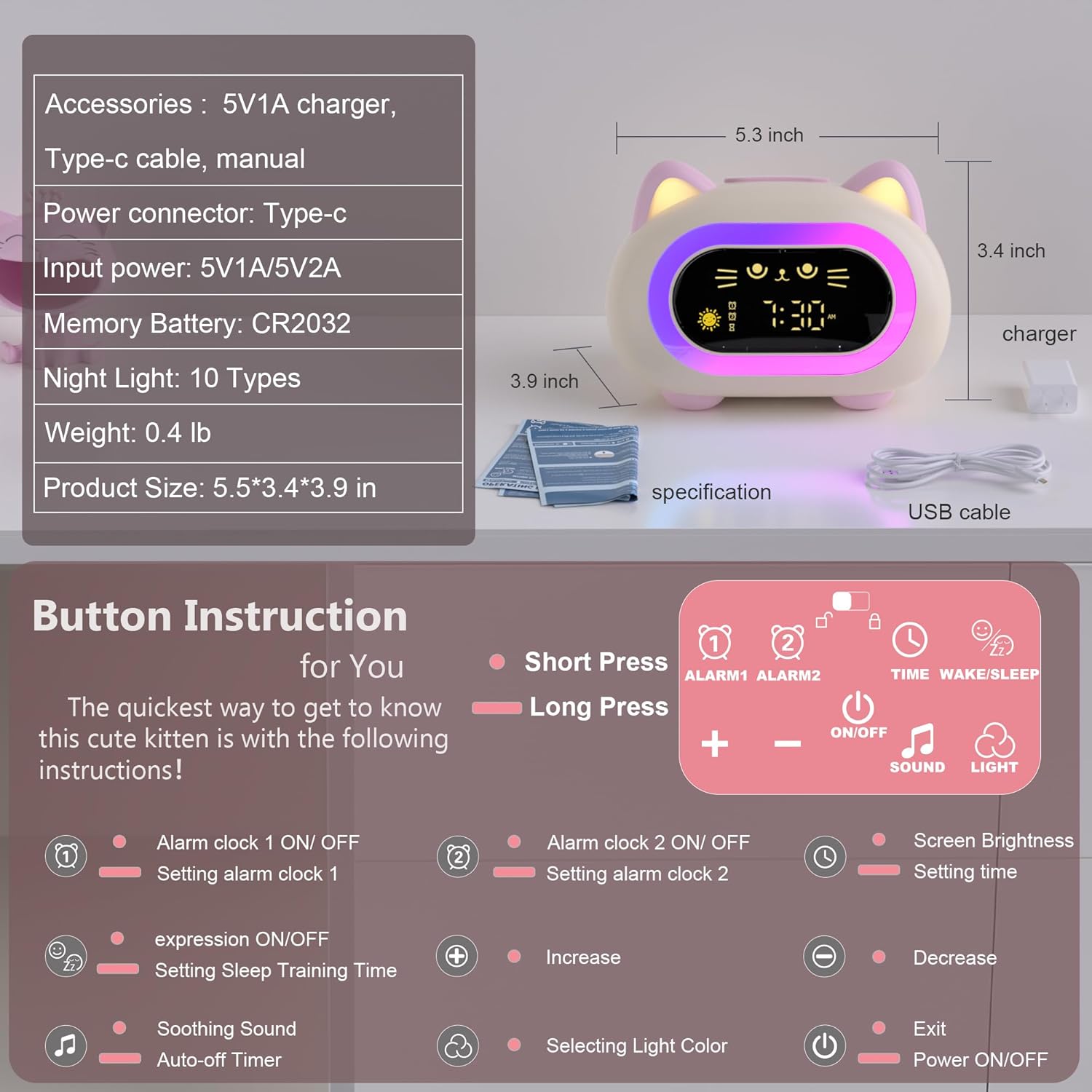
Figure 2: Button Functions and Product Dimensions
Basic Controls:
- Short Press: Activates a function briefly.
- Long Press: Holds down a button for a few seconds to access settings or advanced functions.
Setting Time and Alarms:
- Setting Time: Long press the TIME/WAKE/SLEEP button to enter time setting mode. Use the + and - buttons to adjust hours and minutes. Short press TIME/WAKE/SLEEP to confirm and move to the next setting.
- Setting Alarm 1: Long press the ALARM1 button. Use + and - to set the desired alarm time. Short press ALARM1 to confirm. Short press ALARM1 again to toggle Alarm 1 ON/OFF.
- Setting Alarm 2: Follow the same steps as Alarm 1, using the ALARM2 button.
- Snooze Function: When an alarm sounds, short press any button on the top of the clock to activate snooze for 9 minutes.

Figure 3: Dual Alarm and Snooze Functionality
Sleep Training Feature:
The clock uses visual cues to help children understand when it's time to wake up and go to bed.
- Setting Sleep Training Time: Long press the TIME/WAKE/SLEEP button until the sleep training icon flashes. Use + and - to set the desired wake-up and bedtime.
- Wake-Up Cue: An open-eyed smiley face with a green light indicates it's time to wake up.
- Bedtime Cue: A closed-eye emoji with a red light indicates it's time for bed.

Figure 4: Sleep Training Visual Cues
Night Light and Sounds:
The clock offers various light and sound options to create a calming atmosphere.
- Night Light: Short press the LIGHT button to cycle through 10 different color modes. Long press LIGHT to adjust the brightness (Low, Medium, High).
- Soothing Sounds: Short press the SOUND button to cycle through 7 soothing sounds and 6 ringtones. Long press SOUND to adjust the volume.
- Auto-Off Timer: The night light and soothing sounds can be set with an automatic shutoff timer (15, 30, or 60 minutes). Refer to the button diagram for setting the auto-off timer.

Figure 5: Night Light Colors and Brightness

Figure 6: Available Soothing Sounds and Ringtones
Maintenance
To ensure the longevity and proper functioning of your ANALOI Kids Sleep Training Alarm Clock, follow these simple maintenance guidelines:
- Cleaning: Wipe the surface of the clock with a soft, dry cloth. Do not use abrasive cleaners, solvents, or harsh chemicals, as these can damage the finish.
- Avoid Water: This device is not waterproof. Keep it away from water and high humidity environments to prevent damage to internal components.
- Battery: The CR2032 memory battery is designed for long-term use. If the clock consistently loses time or settings after a power disconnection, the memory battery may need replacement. Consult the support section for assistance.
- Storage: When not in use for extended periods, store the clock in a cool, dry place.
Troubleshooting
If you encounter any issues with your ANALOI Kids Sleep Training Alarm Clock, please refer to the following common problems and solutions:
| Problem | Possible Cause | Solution |
|---|---|---|
| Clock does not power on. | Not connected to power, or power adapter/cable is faulty. | Ensure the Type-C cable is securely connected and the charger is plugged into a working outlet. Try a different USB cable or charger if available. |
| Alarm does not sound. | Alarm is not set or is turned off. Volume is too low. | Verify that Alarm 1 or Alarm 2 is activated (indicated by an icon on the display). Increase the alarm volume using the SOUND button. |
| Sleep training light/icon not changing. | Sleep training feature is not enabled or times are incorrectly set. | Long press the TIME/WAKE/SLEEP button to enter sleep training settings and ensure the feature is active and times are correctly configured. |
| Night light is not working or stuck on one color. | Light function is off or a specific color mode is selected. | Short press the LIGHT button to cycle through colors. Long press LIGHT to adjust brightness. |
| Settings are lost after power disconnection. | Memory battery (CR2032) is depleted or not properly installed. | Ensure the CR2032 battery is correctly installed. If the issue persists, the battery may need to be replaced. Contact support for guidance. |
If the problem persists after attempting these solutions, please contact ANALOI customer support for further assistance.
Specifications
| Feature | Detail |
|---|---|
| Brand | ANALOI |
| Model Number | CAT-NEW |
| Color | Powder Pink |
| Display Type | Digital |
| Special Features | Adjustable Brightness, Dual Alarm, Night Light, Sleep Training, Snooze |
| Product Dimensions (W x H) | 5.51" x 3.93" |
| Item Weight | 0.29 Kilograms |
| Power Source | Electrical (via Type-C USB) |
| Input Voltage | 5 Volts |
| Memory Battery | 1 CR2032 (included) |
| Material Type | Plastic, Silicone |
| Night Light Modes | 10 Color Options |
| Sounds | 7 Soothing Sounds, 6 Ringtones |
| Room Type | Bedroom, Kid's Room, Living Room, Study Room |
| Smart Home Compatibility | Not Smart Home Compatible |
Warranty Information
ANALOI offers a 2-year free replacement warranty for this product. This warranty covers functional defects, quality problems, and missing parts under normal use conditions.
Please retain your proof of purchase for warranty claims.
Customer Support
For any questions, concerns, or assistance with your ANALOI Kids Sleep Training Alarm Clock, please do not hesitate to contact our customer support team. We provide 24-hour after-sales service to ensure your satisfaction.
Contact Information: Please refer to the contact details provided on the product packaging or the official ANALOI website.
