
1. Introduction
The Keychron K5 Max is an advanced ultra-slim wireless mechanical keyboard designed for versatility and performance. It offers triple-mode connectivity, including 2.4 GHz wireless, Bluetooth 5.1, and Type-C wired options, ensuring seamless integration with various devices. Featuring QMK/VIA programmability, hot-swappable low-profile Gateron mechanical switches, and PBT keycaps, the K5 Max provides a customizable and efficient typing experience for macOS, Windows, and Linux users.
2. Setup
2.1 Package Contents
- Keychron K5 Max Mechanical Keyboard
- USB Type-C Cable
- Keycap Puller
- Switch Puller
- User Manual
2.2 Connectivity Modes
The K5 Max supports three connection modes: 2.4 GHz wireless, Bluetooth, and wired USB Type-C. Use the mode switch located on the top edge of the keyboard to select your desired connection type.

The Keychron K5 Max supports 2.4 GHz wireless, Bluetooth, and wired USB-C connections for versatile use.

Detail of the G/Cable/BT and Win/Android Mac/iOS switches on the Keychron K5 Max.
2.2.1 2.4 GHz Wireless Connection
- Flip the mode switch to '2.4G'.
- Plug the 2.4 GHz receiver into your device's USB port.
- The keyboard will automatically connect. The polling rate in this mode is 1000 Hz.
2.2.2 Bluetooth Connection
- Flip the mode switch to 'BT'.
- Press and hold 'Fn + 1' (or 'Fn + 2' / 'Fn + 3') for 4 seconds until the '1' key (or '2' / '3') flashes rapidly, indicating pairing mode.
- On your device, search for 'Keychron K5 Max' in the Bluetooth settings and connect.
- You can connect up to 3 devices and switch between them using 'Fn + 1/2/3'.
2.2.3 Wired Connection
- Flip the mode switch to 'Cable'.
- Connect the keyboard to your device using the provided USB Type-C cable.
- The keyboard will function as a wired device and charge simultaneously. The polling rate in this mode is 1000 Hz.
2.3 System Compatibility
The K5 Max is compatible with macOS, Windows, and Linux operating systems. Use the OS switch located next to the connectivity mode switch to select the correct layout for your system.

The Keychron K5 Max is suitable for both Mac and Windows operating systems, with a dedicated switch for layout adjustment.
3. Operating Instructions
3.1 Keyboard Layout
The K5 Max features a 100% full-size layout with 104 keys, including a dedicated number pad, providing a complete typing experience in an ultra-slim form factor.
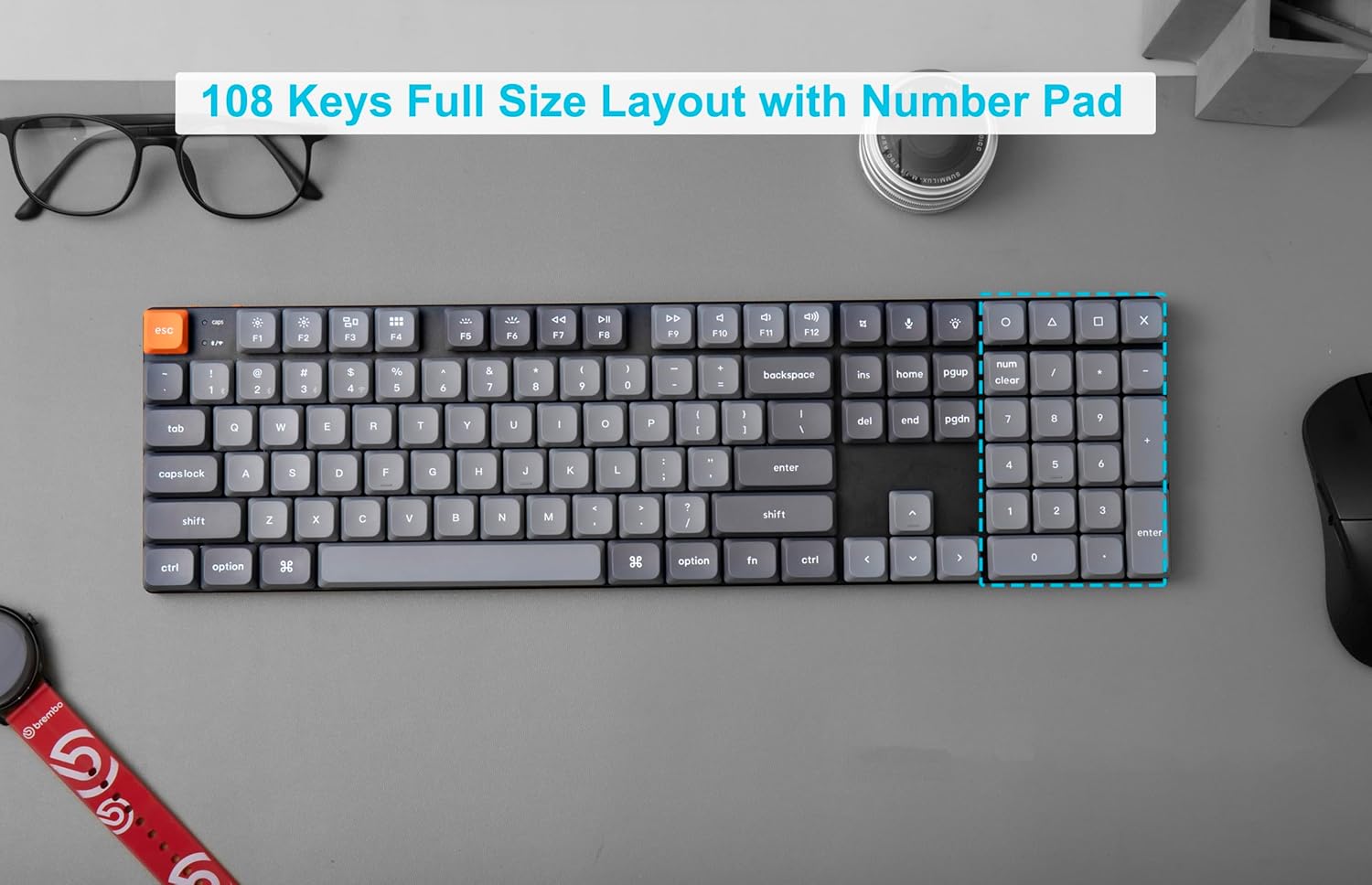
The Keychron K5 Max features a 108-key full-size layout, including a number pad.
3.2 QMK/VIA Programmability
The K5 Max is fully QMK/VIA programmable, allowing you to remap keys, create macros, and customize lighting effects. Connect the keyboard via USB-C to your computer and use the VIA software to access its full customization potential. VIA is compatible with macOS, Windows, and Linux.

Program your Keychron K5 Max with QMK and VIA software for custom key assignments and macros.
3.3 RGB Backlight Control
The keyboard features dynamic RGB backlighting. Use the dedicated backlight key (usually 'Fn + Lightbulb icon' or similar) to cycle through various lighting effects and colors. Brightness can typically be adjusted with 'Fn + F5' (decrease) and 'Fn + F6' (increase).
3.4 Hot-Swappable Switches
The K5 Max is equipped with hot-swappable low-profile Gateron mechanical switches, allowing you to easily change switches without soldering. This enables customization of your typing feel.

The Keychron K5 Max features hot-swappable switches, allowing for easy customization of your typing experience.

The Keychron K5 Max features low-profile Gateron Red switches, designed for a responsive and quiet keystroke.

The ultra-slim body of the Keychron K5 Max is designed with low-profile Gateron switches for a compact and comfortable typing experience.
4. Maintenance
4.1 Cleaning the Keyboard
- Disconnect the keyboard from all power sources.
- Use a can of compressed air to remove dust and debris from between the keycaps.
- For stubborn dirt, gently wipe the keycaps and keyboard surface with a slightly damp, lint-free cloth. Avoid excessive moisture.
- Do not use harsh chemicals or abrasive materials.
4.2 Replacing Switches and Keycaps
Thanks to the hot-swappable design, you can easily replace switches and keycaps. Use the provided keycap puller to remove keycaps and the switch puller to remove switches. Ensure the new switch pins align correctly before pressing them into place.
5. Troubleshooting
5.1 Connectivity Issues
- 2.4 GHz / Bluetooth Not Connecting: Ensure the mode switch is set correctly. For Bluetooth, confirm the keyboard is in pairing mode (key flashing). Try re-pairing. Ensure the 2.4 GHz receiver is securely plugged in.
- Intermittent Connection: Check for interference from other wireless devices. Ensure the keyboard is within range of your device.
- Wired Connection Not Working: Try a different USB port or cable. Ensure the mode switch is set to 'Cable'.
5.2 Keys Not Responding / Incorrect Input
- Specific Key Not Working: If the keyboard is hot-swappable, try removing and re-inserting the switch for that key. Ensure the switch pins are not bent.
- Incorrect Key Output: Verify the OS switch is set to the correct operating system (Mac/Win/Android/iOS). If you have remapped keys using QMK/VIA, check your custom layout in the software.
- Firmware Update: Check the Keychron official website for the latest firmware updates for your K5 Max model. Firmware updates can resolve various performance and functionality issues.
5.3 Backlight Issues
- Backlight Not Turning On: Ensure the keyboard is charged. Adjust brightness levels using the designated function keys.
- Inconsistent Lighting: This might indicate a software issue; try resetting the keyboard or updating firmware.
6. Specifications
| Brand | Keychron |
| Model Number | K5M-H1 |
| Connectivity Technology | 2.4 GHz Wireless, Bluetooth 5.1, USB Type-C Wired |
| Keyboard Description | Mechanical |
| Switch Type | Low Profile Gateron Mechanical (Red Switch variant) |
| Number of Keys | 104 |
| Backlighting | RGB |
| Polling Rate | 1000 Hz (2.4 GHz & Wired modes) |
| Programmability | QMK/VIA |
| Hot-Swappable | Yes |
| Keycap Material | PBT |
| Compatible Devices | Mac, Windows, Linux (via Bluetooth or 2.4 GHz wireless connection) |
| Item Weight | 2.7 pounds |
| Package Dimensions | 17.48 x 6.42 x 1.93 inches |
| Batteries | 1 Lithium Ion battery (included) |
7. Warranty and Support
For detailed warranty information, please refer to the official Keychron website or the warranty card included with your product. Keychron provides customer support for product inquiries, technical assistance, and troubleshooting.
Official Website: www.keychron.com
Please visit the website for the latest drivers, firmware, and support resources.


