
NICE-POWER SPS-C605S
NICE-POWER SPS-C605S DC Power Supply User Manual
Model: SPS-C605S (0-60V 0-5A)
Adjustable Regulated DC Bench Power Supply with Encoder, Output Switch, OCP/OVP, USB-A, and Type-C Quick Charge
1. Introduction
This manual provides essential instructions for the safe and efficient operation of your NICE-POWER SPS-C605S DC Power Supply. Please read this manual thoroughly before use and retain it for future reference. This device is designed for laboratory, electronics repair, DIY, and educational applications, providing a stable and adjustable DC power source.
Safety Precautions:
- Ensure the power supply is connected to a grounded outlet.
- Do not operate in wet or damp conditions.
- Do not open the casing; refer servicing to qualified personnel.
- Verify voltage and current settings before connecting to a load to prevent damage.
- This power supply is designed for 110V input only. Do not connect to 220V.
2. Product Overview
The NICE-POWER SPS-C605S is a variable DC power supply featuring precise voltage and current control, multiple protection functions, and convenient charging ports. Below is a diagram of the front panel and its components.

Figure 2.1: Front Panel Layout of the SPS-C605S DC Power Supply. This image illustrates the main display, control knobs, output terminals, and USB charging ports.
2.1. Front Panel Components
- Voltage Display: Shows the output voltage in Volts (V).
- Current Display: Shows the output current in Amperes (A).
- Power Display: Shows the output power in Watts (W).
- C.V. Indicator: Illuminates when the power supply is operating in Constant Voltage mode.
- C.C. Indicator: Illuminates when the power supply is operating in Constant Current mode.
- V-COARSE Knob: Coarse adjustment for output voltage.
- V-FINE Knob: Fine adjustment for output voltage. Press and hold for 5 seconds to mute/unmute the beeping sound.
- A-COARSE Knob: Coarse adjustment for output current.
- A-FINE Knob: Fine adjustment for output current.
- OCP Button: Activates/deactivates Over Current Protection.
- OVP Button: Activates/deactivates Over Voltage Protection.
- OUTPUT Button: Toggles the power output on or off.
- POWER Button: Main power switch for the unit.
- USB-A Port: 18W Quick Charge output for compatible devices.
- USB-C Port: 18W Quick Charge output for compatible devices.
- Output Terminals: Red (+) for positive, Black (-) for negative, Green (GND) for ground connection.
2.2. Included Accessories
- 1x NICE-POWER SPS-C605S DC Power Supply
- 1x Thickened Power Cable (110V US Standard)
- 1x Thickened Output Cable (with alligator clips)
- 1x User Manual
3. Setup
- Placement: Place the power supply on a stable, level surface with adequate ventilation. Ensure the rear cooling fan is not obstructed.
- Power Connection: Connect the provided power cable to the AC input on the rear of the unit and then to a standard 110V AC grounded wall outlet.
- Output Cable Connection: Connect the red output cable to the red (+) terminal and the black output cable to the black (-) terminal. If grounding is required for your application, connect a separate ground wire to the green (GND) terminal.
- Initial Power On: Press the main POWER button on the front panel. The display will illuminate.
4. Operating Instructions
4.1. Setting Voltage and Current
The SPS-C605S uses high-precision encoder knobs for adjustment. You can set the desired voltage and current before enabling the output.

Figure 4.1: Detailed view of encoder knob operation. Pressing the knob switches digit selection, while rotating adjusts the value.
- Voltage Adjustment:
- Rotate the V-COARSE knob for large voltage changes.
- Rotate the V-FINE knob for precise voltage adjustments.
- To adjust specific digits, press the V-FINE knob to cycle through the digits. Rotate the knob to change the selected digit's value (0-9).
- Current Adjustment:
- Rotate the A-COARSE knob for large current changes.
- Rotate the A-FINE knob for precise current adjustments.
- Similar to voltage, press the A-FINE knob to select a digit and rotate to change its value.
4.2. Output Control
After setting the desired voltage and current, connect your load to the output terminals. Then, press the OUTPUT button to enable the power output. The button will illuminate when output is active. Press it again to disable the output.

Figure 4.2: The OUTPUT button allows for safe connection and disconnection of loads without powering down the unit.
4.3. Over Voltage Protection (OVP) and Over Current Protection (OCP)
The SPS-C605S features enhanced OVP and OCP functions to protect both the power supply and your connected load.
- Activation: Press the OVP or OCP button to activate the respective protection. The button will illuminate.
- Triggering: If the output voltage or current exceeds the preset limit (or a short circuit occurs), the power supply will automatically stop output, sound an alarm, and the display will flash "OVP" or "OCP".
- Reset: To clear the alarm and resume operation, adjust the voltage/current settings or disconnect the load (if a short circuit was detected), then press the flashing OVP or OCP button again.
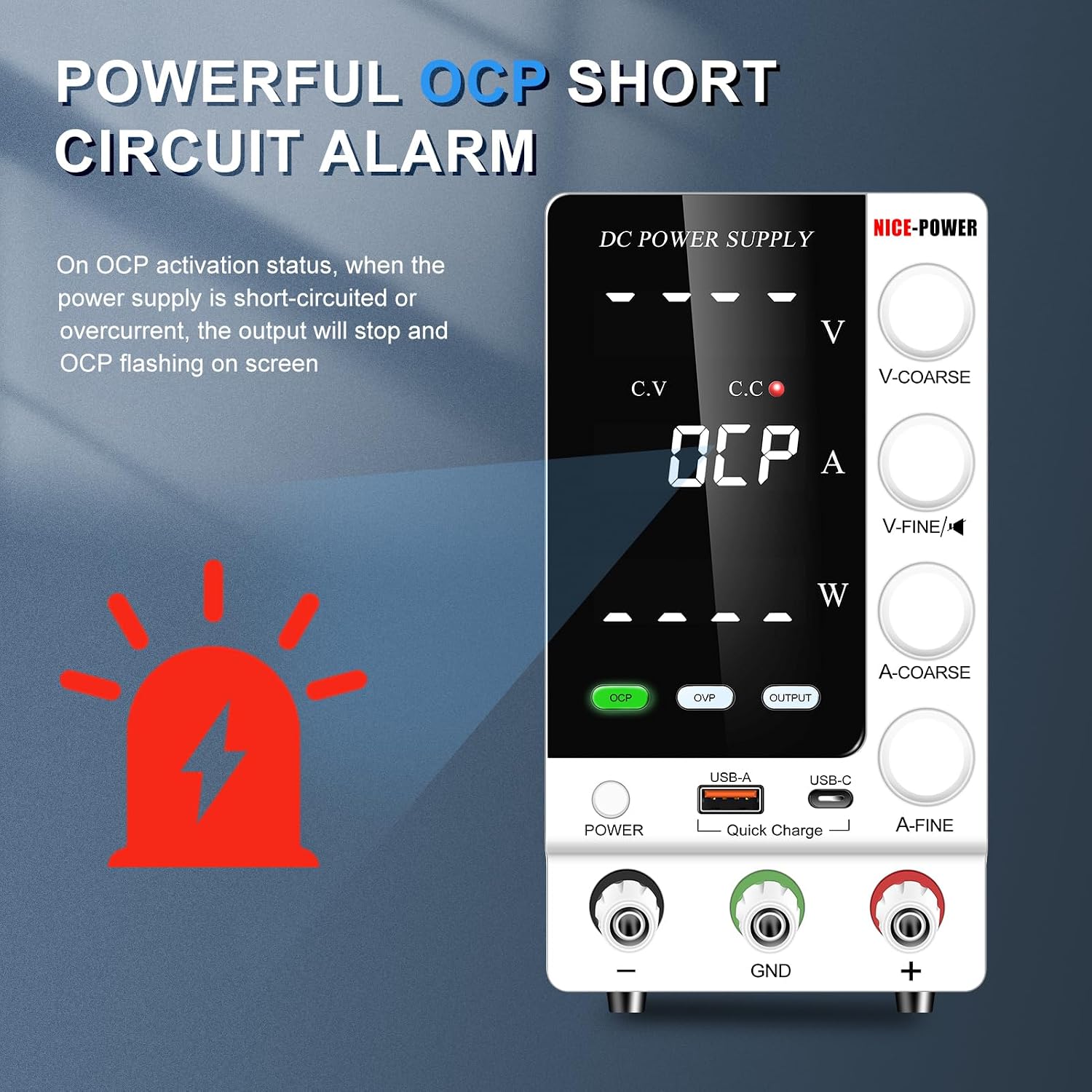
Figure 4.3: Visual representation of the OCP alarm state, indicating a short circuit or overcurrent condition.
4.4. Mute Function
The encoder knobs produce a beeping sound during adjustment by default. To mute or unmute this sound:
- Press and hold the V-FINE encoder knob for 5 seconds. A "bi" sound will confirm the change.
- The mute setting is not saved after power-off. You will need to re-apply it upon restart if desired.
4.5. USB-A and Type-C Quick Charging Ports
The power supply includes 18W USB-A and Type-C ports for quick charging of compatible devices. These ports operate independently of the main DC output.

Figure 4.4: The integrated USB-A and USB-C ports provide convenient fast charging for mobile devices.
4.6. Constant Voltage (C.V.) and Constant Current (C.C.) Modes
The SPS-C605S automatically switches between Constant Voltage (C.V.) and Constant Current (C.C.) modes depending on the load and your settings.
- C.V. Mode: When the load resistance is high, the output voltage remains constant at the preset value, and the output current is determined by the load. The C.V. indicator will be lit.
- C.C. Mode: When the load resistance is low, the output current remains constant at the preset value, and the output voltage is determined by the load. The C.C. indicator will be lit.
5. Maintenance
- Cleaning: Disconnect the power supply from the AC outlet before cleaning. Use a soft, dry cloth to wipe the exterior. Do not use abrasive cleaners or solvents.
- Cooling Fan: The intelligent temperature-controlled fan operates automatically when the internal temperature exceeds 50°C (122°F). Ensure the rear fan vent is clear of obstructions for optimal cooling and extended lifespan.
- Fuse Replacement: The power supply is equipped with a replaceable fuse located near the AC input on the rear panel. If the unit fails to power on, check and replace the fuse with one of the same type and rating (e.g., 250V/5A). Always disconnect the power cable before attempting fuse replacement.

Figure 5.1: The intelligent cooling fan located at the rear of the unit helps maintain optimal operating temperature.
6. Troubleshooting
| Problem | Possible Cause | Solution |
|---|---|---|
| No power when turned on. | Power cable not connected, power outlet fault, blown fuse. | Check power cable connection. Test outlet with another device. Replace fuse if blown (refer to Maintenance section). |
| No output voltage/current. | OUTPUT button not pressed, OVP/OCP activated, output cables disconnected. | Press the OUTPUT button. Check if OVP/OCP is flashing and reset if necessary. Verify output cable connections. |
| OVP/OCP alarm sounds. | Output voltage/current exceeded preset limits, short circuit in load. | Reduce preset voltage/current. Check load for short circuits. Press OVP/OCP button to reset. |
| Beeping sound during adjustment is annoying. | Beeping function is enabled by default. | Press and hold the V-FINE knob for 5 seconds to mute. |
| Unit gets hot during operation. | Normal operation under heavy load, obstructed cooling fan. | Ensure adequate ventilation around the unit. The intelligent fan will activate to cool the unit. |
7. Specifications
| Feature | Value |
|---|---|
| Model Number | SPS-C605S |
| Output Voltage Range | 0-60V |
| Output Current Range | 0-5A |
| Output Wattage | 300 Watts |
| Input Voltage | 110V AC (US Standard) |
| Display | 4-digit LED (Voltage, Current, Power) |
| Voltage Accuracy | 0.01V |
| Current Accuracy | 0.001A |
| Protection Features | OVP, OCP, Over-Load, Over-Temperature, Short-Circuit, Leakage, Grounding |
| USB Charging Ports | 1x USB-A (18W Quick Charge), 1x Type-C (18W Quick Charge) |
| Cooling Method | Intelligent Temperature Control Fan |
| Product Dimensions (L x W x H) | 8.4 x 3.3 x 5.5 inches |
| Item Weight | 2.6 Pounds |
8. Warranty and Support
NICE-POWER is committed to providing high-quality products and excellent customer service. Your SPS-C605S DC Power Supply comes with a standard warranty covering manufacturing defects.
- Quality Assurance: All units undergo inspection before shipment to ensure quality.
- Technical Support: For any questions, technical assistance, or warranty claims, please contact NICE-POWER customer service. Refer to the product packaging or the official NICE-POWER website for current contact information.
- Online Resources: Visit the NICE-POWER Store on Amazon for additional product information and support.
Related documentsSPS-C605S


Ask a question about this manual
Ask about setup, troubleshooting, compatibility, parts, safety, or missing instructions. Manuals+ will review the question and use this page’s manual context to help answer it.