
Important Safety Information
Please read and understand all instructions before assembly and use. Keep this manual for future reference.
- Do not use without a compatible mattress.
- Assemble with care to avoid injury.
- Do not exceed the recommended weight limit of 900 pounds.
- Keep small parts away from young children and pets to prevent choking hazards.
- Ensure all connections are secure before use.
Product Overview
The Hasuit Queen Size Bed Frame combines functionality with a farmhouse aesthetic, offering integrated storage, a charging station, and LED lighting for enhanced convenience and style.

A complete view of the Hasuit Queen Size Bed Frame, showcasing its farmhouse design, integrated LED lighting in the headboard, and the storage ottoman at the foot of the bed.
Key Features
- Farmhouse Storage Headboard: Features a faux wood grain finish and two-tone design with three storage shelves.
- Integrated Charging Station: Includes 2 AC outlets and 2 USB ports for convenient device charging.
- Storage Ottoman: Padded bench at the foot of the bed provides ample hidden storage space.
- Noiseless Design: Silent sponge strips and embedded buckles prevent squeaking.
- LED Light System: Hidden light strip in the headboard with multiple colors and patterns, controllable via APP or button.
- Sturdy Construction: Metal slats provide strong mattress support, eliminating the need for a box spring.
An overview video demonstrating the key features of the Hasuit Queen Size Bed Frame, including the headboard storage, charging station, LED lights, and the footboard storage ottoman.
Specifications
| Feature | Detail |
|---|---|
| Size | Queen |
| Product Dimensions | 94.5"L x 62.2"W x 46"H |
| Weight Capacity | 900 pounds |
| Color | Oak Grey |
| Material | Metal (Slats), Wood (Frame components) |
| Charging Station | 2 AC Outlets (125V/12A), 2 USB Ports (5V/2A) |
| Power Cord Length | 4.92 feet |
| Special Features | No Box Spring Needed, Squeak Resistant, Storage Ottoman, USB Port, LED Lighting |
| Assembly Required | Yes |

Diagram illustrating the overall dimensions of the bed frame, including length, width, height, and specific measurements for the headboard and footboard storage.
Package Contents
Before beginning assembly, ensure all parts and hardware are present. Refer to the included detailed installation instructions for a complete list of numbered accessories.
- Headboard components
- Footboard with storage ottoman components
- Side rails
- Metal bed slats
- Center support legs
- Hardware pack (screws, bolts, washers, Allen wrench)
- LED light strip and controller
- Charging station unit
- Assembly instructions manual
Setup and Assembly
Assembly of the Hasuit bed frame is designed to be straightforward. Follow the detailed installation instructions provided in your package. It is recommended to assemble the bed frame with two people.
General Assembly Steps:
- Unpack and Identify Parts: Lay out all components and hardware. Match them against the parts list in your instruction manual.
- Assemble Headboard: Connect the headboard panels and attach the top shelf. Install the LED light strip and charging station into the designated slots.
- Assemble Footboard: Construct the footboard, ensuring the storage ottoman mechanism is correctly installed.
- Connect Side Rails: Attach the side rails to the assembled headboard and footboard.
- Install Center Support: Secure the center support beam and legs to the bed frame.
- Place Metal Slats: Position the metal slats across the frame. The snap-fit design allows for easy installation. Ensure anti-noise tape is correctly positioned on the slats to prevent squeaking.
- Final Checks: Verify all bolts and screws are tightened. Ensure the bed frame is stable and level.
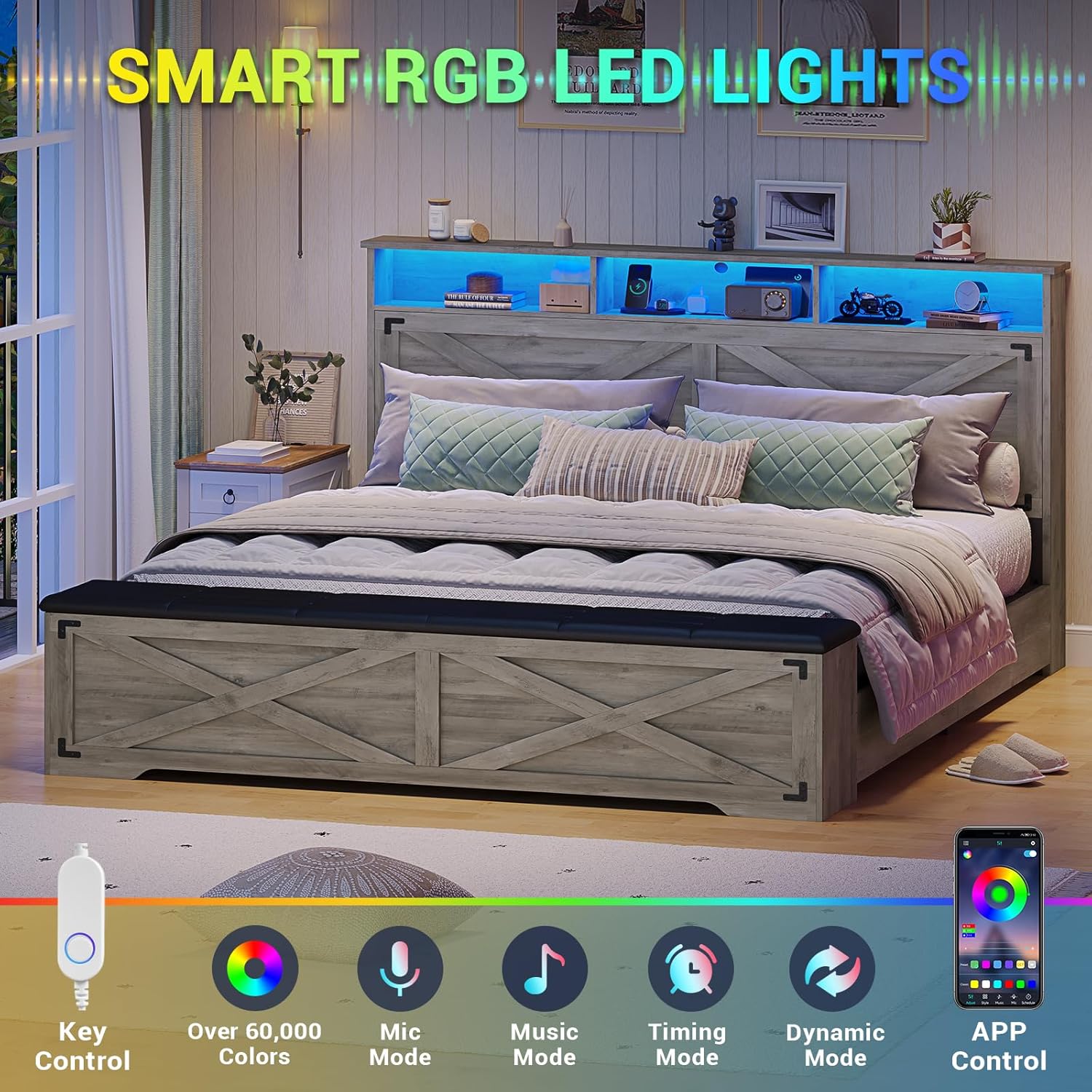
Illustration of the snap-in design for the metal bed slats, indicating easy and secure assembly.

Close-up showing the anti-noise tape applied to the metal slats, designed to prevent squeaking and ensure a quiet sleep environment.
Operating Instructions
Charging Station
The headboard features a built-in charging station for your electronic devices.
- AC Outlets: Two 125V/12A AC outlets are available for powering larger devices.
- USB Ports: Two 5V/2A USB ports are provided for charging smartphones, tablets, and other USB-powered devices.
- Power Connection: Ensure the bed frame's power cord is securely plugged into a wall outlet.

Detailed view of the charging station located on the headboard, showing two AC outlets and two USB ports for electronic devices.
LED Lighting
The integrated LED light strip in the headboard offers customizable ambient lighting.
- Control Methods: The LED lights can be controlled via a physical button on the headboard or through a dedicated mobile application (refer to the specific LED light manual for APP details).
- Color and Pattern Selection: Choose from a variety of colors and lighting patterns to suit your preference.

Close-up of the headboard featuring three storage compartments with integrated LED lighting and a built-in charging station.
Storage Ottoman
The footboard features a padded storage ottoman for convenient hidden storage.
- Accessing Storage: Lift the padded lid of the ottoman to access the internal storage compartments.
- Usage: Ideal for storing seasonal clothes, extra bedding, books, or other personal items.
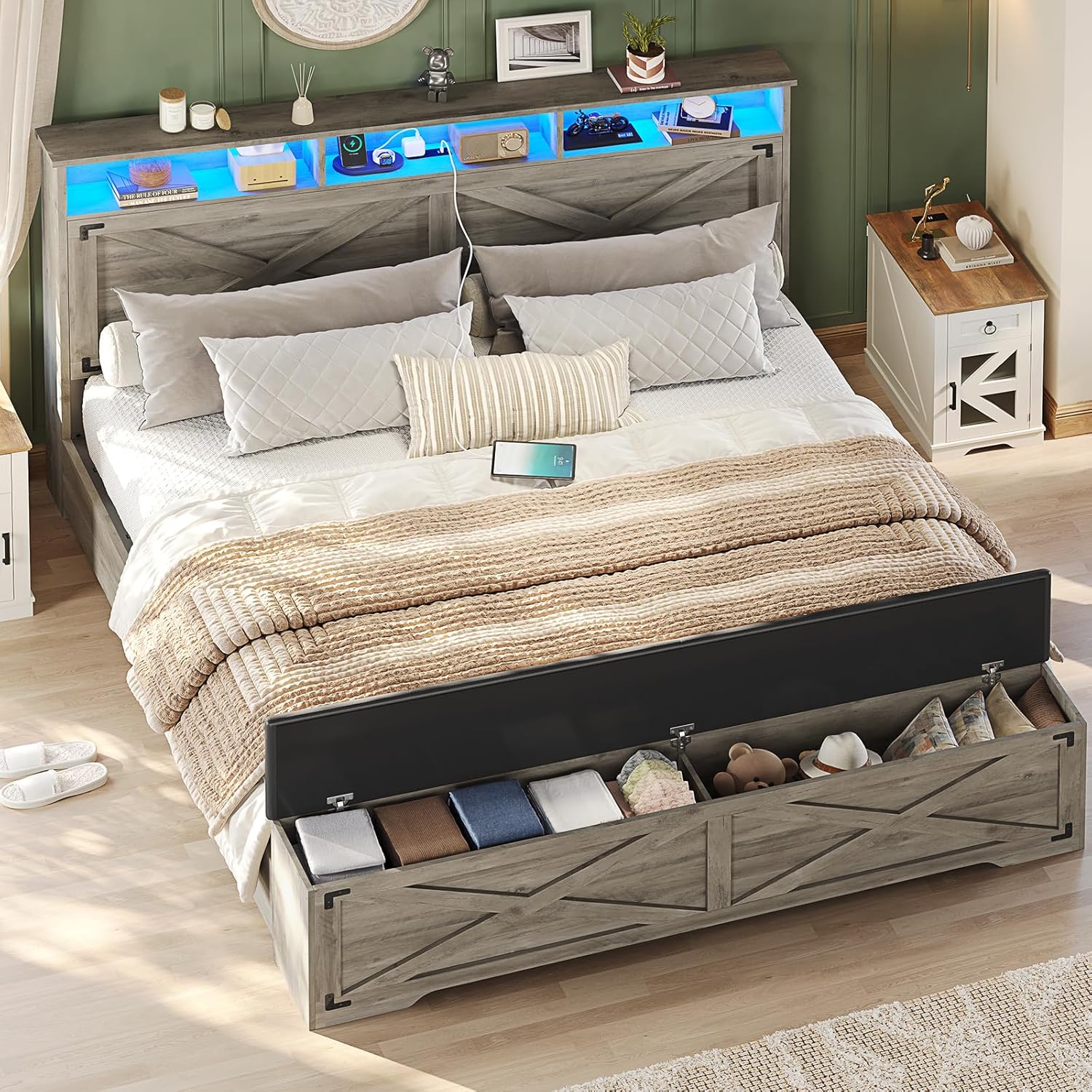
View of the storage ottoman with its lid open, revealing ample space for storing items like clothes or bedding.

A person sitting on the bed frame, demonstrating the use of the storage ottoman for organizing clothes.
Maintenance
Regular maintenance helps prolong the life and appearance of your bed frame.
- Cleaning: Wipe down the wood and metal surfaces with a soft, damp cloth. Avoid harsh chemicals or abrasive cleaners.
- Upholstery Care: For the padded ottoman, spot clean with a mild soap and water solution if necessary.
- Hardware Check: Periodically check all bolts and screws to ensure they remain tight. Retighten as needed to maintain stability and prevent noise.
- Electrical Components: Ensure the charging station and LED light connections are secure. Do not attempt to repair electrical components yourself.
Troubleshooting
If you encounter any issues, refer to the following common troubleshooting steps.
- Bed Frame is Squeaking:
- Ensure all bolts and screws are securely tightened.
- Verify that the anti-noise tape on the metal slats is properly installed and intact.
- Check that the mattress is correctly seated on the slats.
- Charging Station Not Working:
- Confirm the bed frame's main power cord is plugged into a functional wall outlet.
- Check that the charging station unit is properly connected within the headboard.
- Test with different devices and cables to rule out device-specific issues.
- LED Lights Not Functioning:
- Ensure the bed frame's main power cord is plugged in.
- Check the connection of the LED light strip and its controller.
- If using the APP, ensure your device is properly paired and the APP is updated.
- Try controlling with the physical button to isolate the issue.
If these steps do not resolve the issue, please contact customer support.
Warranty and Support
Hasuit is committed to providing quality products and customer satisfaction. While specific warranty details are not provided in this manual, we offer comprehensive after-sales support.
- Damaged or Missing Parts: If your bed frame arrives damaged, scratched, or with missing parts, please contact our customer service team immediately.
- Technical Assistance: For any questions regarding assembly, operation, or troubleshooting, our support team is available to assist you.
For assistance, please visit the official Hasuit website or contact our customer service department through the retailer where you purchased the product. Our after-sales service will respond promptly to address your concerns.