
Introduction
The Motorola Moto Tag is a compact and versatile item finder designed to help you keep track of your valuable belongings. Utilizing Google's Find My Device network, it offers precise location tracking through Bluetooth and Ultra-Wideband (UWB) technology, ensuring you can locate items both nearby and across the globe. This manual provides comprehensive instructions for setting up, operating, maintaining, and troubleshooting your Moto Tag.
What's in the Box
- Motorola Moto Tag device
- CR2032 Battery (pre-installed or included separately)
Setup
Initial Setup and Pairing
To begin using your Moto Tag, follow these steps to pair it with your Android device via the Google Find My Device app:
- Ensure your Android phone is running the latest version of Android and has the Google Find My Device app installed.
- Power on your Moto Tag. If the battery is not pre-installed, insert the CR2032 battery as described in the "Battery Replacement" section.
- Open the Google Find My Device app on your Android phone.
- The app should automatically detect the Moto Tag nearby. Follow the on-screen prompts to complete the pairing process. This typically involves confirming the device and assigning a name to your tag (e.g., "Keys," "Backpack").
- Once paired, the Moto Tag will appear in your Find My Device app, ready for tracking.

Image: Front view of the Motorola Moto Tag. This image displays the circular design of the tag, featuring the Motorola logo prominently in the center. The tag is shown in its blueberry color.
Operating Your Moto Tag
Locating Items
The Moto Tag leverages Google's Find My Device network for precise location tracking:
- Bluetooth Tracking: For items within close proximity (e.g., within your home), use the Find My Device app to make the Moto Tag ring, helping you pinpoint its exact location.
- UWB Precision Finding: If your Android phone supports Ultra-Wideband (UWB) technology, the Find My Device app can provide precise, step-by-step directional guidance to your Moto Tag when it's nearby, similar to a compass.
- Global Network Tracking: For items located further away, the Moto Tag utilizes the vast Google Find My Device network. If another Android device passes within range of your tag, its location will be anonymously updated in your app, allowing you to track it globally.
Privacy and Security
Motorola and Google prioritize your privacy. The Moto Tag incorporates unwanted tracking protections, ensuring that all location data is private and secured with end-to-end encryption on Google's trusted network. You will be notified if an unknown Moto Tag is detected traveling with you over time.
Maintenance
Battery Replacement
The Moto Tag is powered by a standard CR2032 coin cell battery, offering up to one year of battery life. When the battery is low, you will receive a notification in the Find My Device app. To replace the battery:
- Locate the battery compartment on the back of the Moto Tag.
- Twist the back cover counter-clockwise to unlock it.
- Carefully remove the old CR2032 battery.
- Insert a new CR2032 battery with the positive (+) side facing up.
- Align the back cover and twist it clockwise to lock it securely.
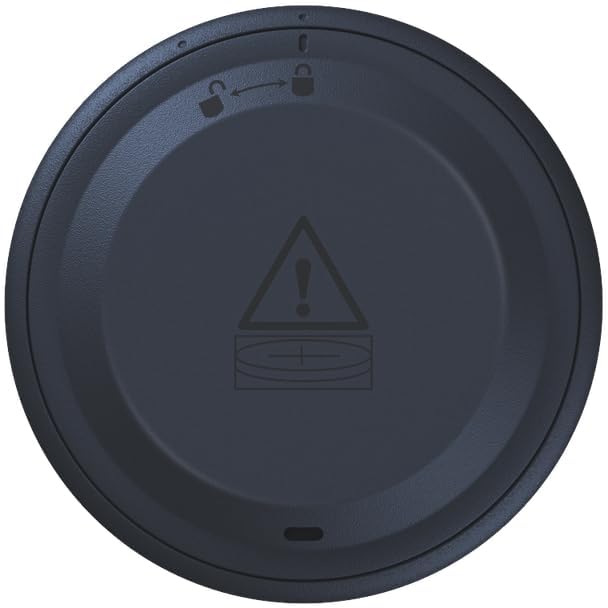
Image: Back view of the Motorola Moto Tag. This image shows the rear of the device, highlighting the battery compartment cover with clear unlock and lock indicators.
Water Protection
The Moto Tag features IP67 underwater protection, meaning it is resistant to dust and can withstand immersion in up to 1 meter of fresh water for up to 30 minutes. While it is designed to be durable against splashes and brief submersion, it is not recommended for prolonged underwater use.
Cleaning
To clean your Moto Tag, gently wipe it with a soft, damp cloth. Avoid using harsh chemicals or abrasive materials, as these may damage the device's finish or internal components.
Troubleshooting
If you encounter issues with your Moto Tag, refer to the following common problems and solutions:
| Problem | Solution |
|---|---|
| Moto Tag not pairing with phone. |
|
| Inaccurate location tracking. |
|
| Short battery life. |
|
Specifications
| Feature | Detail |
|---|---|
| Model Number | PG38C06063 |
| Dimensions | 1.26 x 1.26 x 0.31 inches (32 x 32 x 8 mm) |
| Weight | 0.264 ounces (7.5 grams) |
| Battery Type | 1 x CR2032 (included) |
| Battery Life | Up to 1 year |
| Connectivity | Bluetooth, Ultra-Wideband (UWB) |
| Supported Application | Google's Find My Device |
| Water Protection | IP67 (dust and water resistant) |
| Material | Plastic |
| Color | Blueberry |
Warranty and Support
For detailed warranty information and technical support, please visit the official Motorola support website or contact their customer service. Keep your proof of purchase for warranty claims.
Official Motorola Support: www.motorola.com/us/support